
WordPress’s core updater can let someone with no account run code on a site while an update is being installed. On 3 November the US Cybersecurity and Infrastructure Security Agency (CISA) added that flaw to its Known Exploited Vulnerabilities catalogue, based on evidence of active exploitation.
The bug, tracked as CVE-2026-119977, is present in WordPress 4.7 through 7.1.3. Version 7.1.4, released on 28 October, contains the fix, and WordPress said the same security changes were being backported to older branches as far back as 4.7. WordPress also said only the most recent version is actively supported. Sites that allow automatic background updates may already have received 7.1.4 or the matching branch release; both WordPress and NHS England Digital say owners should confirm the update has finished.
What the flaw does
A core update is the process WordPress uses to replace its own software with a newer release. During an update that uses a complete package, WordPress unpacks a copy of the new version into a temporary folder under wp-content/upgrade. That copy can include the WordPress installer, and on a typical site the web server can reach files in that folder.
CISA and Wordfence describe the weakness as a time-of-check time-of-use (TOCTOU) race: WordPress creates the temporary copy first and only later finishes moving the new files into place. Anyone who can work out the folder’s name and open the installer in that gap may run code on the server. That is remote code execution, or RCE: the visitor’s PHP runs with the same permissions as the web server. CISA files the issue under CWE-367, the label used for this kind of race. Wordfence assigned the CVE and, with the US National Vulnerability Database, rates it 8.1 out of 10, or high, because no login is required. The same score treats the attack as high complexity, since the opening exists only while an update is under way.
Umut Bayram, a researcher at Picus Security, discovered the weakness and reported it. WordPress described it as “a weakness in the WordPress upgrade process which can lead to remote code execution during the upgrade window” and recommended immediate updates. In his write-up, Bayram said the updater behaviour itself dates to WordPress 2.7, released in 2008, and that he worked through the finding with GPT 5.6 Sol as a research partner in about four hours.
The update that installs the fix can still be exposed
Bayram’s distinctive finding, which The Hacker News also reported, is that installing the fix does not immediately close the window. The extraction step still uses the updater already on the site. On WordPress 5.9 and later, that older code names the temporary folder after the downloaded file, so the path can be predicted one last time.
Part of the fix already works during that update: WordPress copies files into place using the new code, which now skips wp-config.php, so an attacker can no longer overwrite the live configuration file that way. Bayram says someone who still wins the window can set up the temporary copy with their own database, log in to it, and run PHP with the web server’s permissions before the folder is deleted. From there they can read or write files on the live site.
Not every update exposes the installer. Bayram says complete packages include the installer files, while a smaller partial package does so only if it happens to contain them. The Hacker News checked WordPress.org’s update service and found that an update within a branch, such as from 7.1.3 to 7.1.4, was offered as a partial package, including for automatic updates, while a move from an older branch, such as from 7.0.7 to 7.1.4, was offered only as a complete package. A site can also fall back to a complete package if its core files do not match official checksums or if the update is a reinstall. The deciding factor, Bayram told The Hacker News, “isn’t partial versus complete. It’s whether the updater already installed on the site has been fixed.”
On WordPress 4.4 through 5.8, the older updater adds random characters to the folder’s name, which hides the path unless the site leaks it another way, such as in an error message.
Exploitation and the federal deadline
CISA added CVE-2026-119977 to its catalogue on 3 November, “based on evidence of active exploitation,” and announced the addition on X.
Under Binding Operational Directive 26-04, US federal civilian agencies had to apply the vendor’s mitigations by 6 November or discontinue use of the product if they could not. The directive does not bind other organisations, although CISA encourages everyone to prioritise catalogue entries. CISA’s listing marks ransomware use as unknown and says forensic triage is required for this bug, meaning federal agencies are expected to check whether the system was compromised before it was patched. CISA did not describe the attacks.
Wordfence said in a 5 November analysis by István Márton that its firewall had blocked more than 240,000 exploit attempts since the flaw became public, with probing starting on 28 October and peaking on 30 October at more than 74,000 blocked attempts in a single day. Wordfence stressed that those blocked requests are not confirmed breaches: most are likely automated attempts to hit a site at the exact moment it updates, and successful exploitation is difficult in practice because the window lasts only as long as the update itself. Wordfence said paid customers received a firewall rule on 28 October, and that sites on the free version would receive the same rule on 27 November.
Affected versions
Wordfence Intelligence lists a fixed release for every maintained branch from 7.1 back to 4.7. WordPress.org’s download archive independently records 7.1.4 and 7.0.8 as published on 28 October. WordPress 4.6 and earlier did not receive a security update for this issue, Bayram noted; those releases sit outside the branches WordPress still patches.
| Branch | Affected versions | Fixed release |
|---|---|---|
| 7.1 | 7.1.0–7.1.3 | 7.1.4 |
| 7.0 | 7.0.0–7.0.7 | 7.0.8 |
| 6.9 | 6.9.0–6.9.10 | 6.9.11 |
| 6.8 | 6.8.0–6.8.11 | 6.8.12 |
| 6.7 | 6.7.0–6.7.10 | 6.7.11 |
| 6.6 | 6.6.0–6.6.10 | 6.6.11 |
| 6.5 | 6.5.0–6.5.13 | 6.5.14 |
| 6.4 | 6.4.0–6.4.13 | 6.4.14 |
| 6.3 | 6.3.0–6.3.13 | 6.3.14 |
| 6.2 | 6.2.0–6.2.14 | 6.2.15 |
| 6.1 | 6.1.0–6.1.15 | 6.1.16 |
| 6.0 | 6.0.0–6.0.17 | 6.0.18 |
| 5.9 | 5.9.0–5.9.19 | 5.9.20 |
| 5.8 | 5.8.0–5.8.18 | 5.8.19 |
| 5.7 | 5.7.0–5.7.20 | 5.7.21 |
| 5.6 | 5.6.0–5.6.22 | 5.6.23 |
| 5.5 | 5.5.0–5.5.23 | 5.5.24 |
| 5.4 | 5.4.0–5.4.24 | 5.4.25 |
| 5.3 | 5.3.0–5.3.26 | 5.3.27 |
| 5.2 | 5.2.0–5.2.29 | 5.2.30 |
| 5.1 | 5.1.0–5.1.27 | 5.1.28 |
| 5.0 | 5.0.0–5.0.30 | 5.0.31 |
| 4.9 | 4.9.0–4.9.34 | 4.9.35 |
| 4.8 | 4.8.0–4.8.33 | 4.8.34 |
| 4.7 | 4.7.0–4.7.38 | 4.7.39 |
What Bayram advises before updating
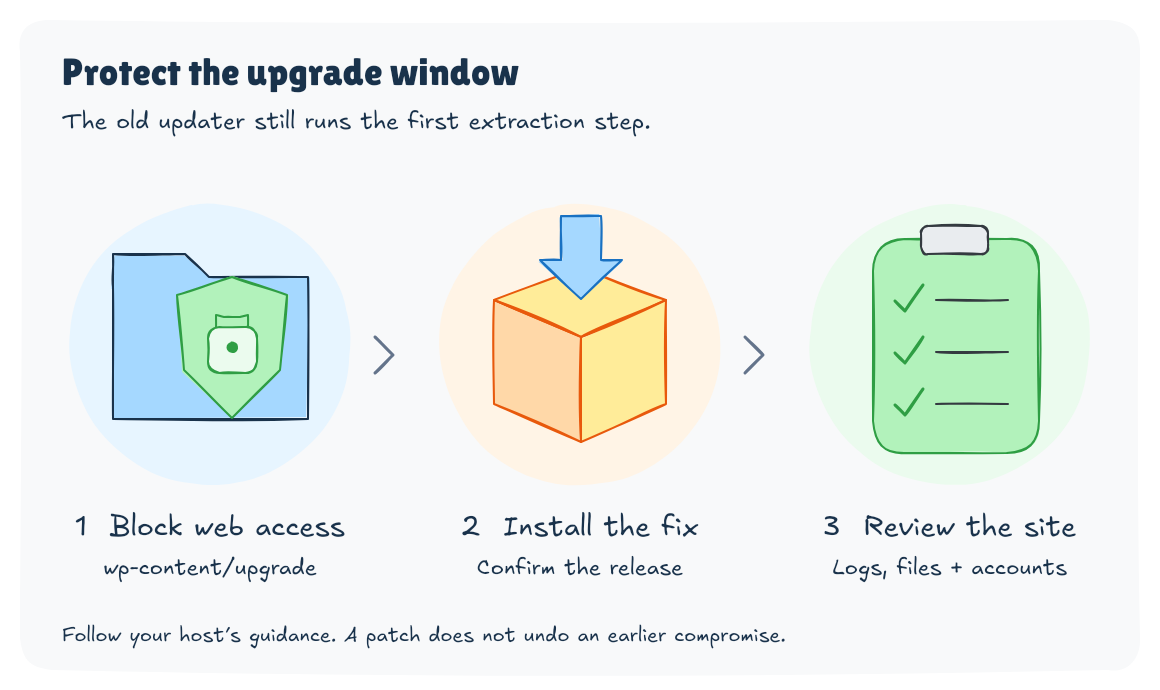
Because the first update from an unpatched release still runs the old extractor, Bayram’s first recommendation is to stop the web server from serving wp-content/upgrade at all. WordPress works with that folder directly on disk, he says, so blocking web access does not break updates.
On Nginx, he published this rule:
location ^~ /wp-content/upgrade/ { deny all; }On Apache, he says to add Require all denied inside a block for that folder in the virtual host configuration.
If only a .htaccess file is available, add the following line to the .htaccess file in the WordPress root, above the WordPress rewrite rules:
RedirectMatch 403 ^/wp-content/upgrade/Do not put a .htaccess file inside wp-content/upgrade itself. The old updater deletes everything there first, so the file would be gone when it is needed.
Confirm that a request to /wp-content/upgrade/ returns a 403 error, then update to 7.1.4 or the fixed release for that branch.
The other route he describes is a manual update outside the web root: back up the site files and database, unpack the new release in a folder the web server does not serve, copy the core files into place without touching wp-config.php or wp-content, then run the WordPress database update. WP-CLI’s wp core update command is not a substitute, he says, because it runs the same updater and unpacks the package into the same folder.
What to check afterwards
Wordfence recommends reviewing web-server logs for requests to PHP files under /wp-content/upgrade/, particularly setup-config.php, which a normal update does not need outsiders to request. It also suggests checking that directory for leftover files and reviewing installed plugins and WordPress user accounts for anything unexpected.
The same WordPress 7.1.4 release also fixed stored cross-site scripting issues, a stored denial-of-service problem in the Interactivity API, and information-disclosure and authorisation bugs, according to WordPress’s own advisory.
Once 7.1.4 or a matching branch update is in place, later core updates use a random folder name, and a configuration file written into the temporary copy is no longer copied over the live one.
Sources
- WordPress 7.1.4 security release
- CISA: CISA adds one known exploited vulnerability to catalog
- CISA Known Exploited Vulnerabilities catalog entry
- NVD record for CVE-2026-119977
- Umut Bayram, Picus Security: CVE-2026-119977 technical write-up
- The Hacker News report on the last-update window
- Wordfence: Attackers actively probing for the upgrade-window RCE
- Wordfence Intelligence vulnerability record
- NHS England Digital alert CC-4884
- WordPress.org release archive
Discover more from Sulat AI & Tech News
Subscribe to get the latest posts sent to your email.