Upstash has published a Hermes Agent plugin, upstash-hermes-memory, that stores an agent’s memories and chat history in Upstash Redis and searches those memories on every turn. The company says it runs on the Upstash Free plan.
The post is by Cahid Arda Oz and dated 6 November. The plugin is listed in the Hermes plugin catalog. Upstash also posted about it on X.
New blog: Give Hermes Agent long-term memory with Upstash Redis
November 11, 2026
What Upstash is
Upstash builds serverless data tools. The one most people meet first is Redis: a managed database you talk to over HTTP or the ordinary Redis protocol, billed per request, with no servers of your own to run. Upstash says reads can land in single-digit milliseconds, and it offers the HTTP path for places like Cloudflare Workers, Vercel and AWS Lambda, where a long-lived TCP connection is a nuisance.
It has grown a cluster of other products around that database. QStash is an HTTP message queue and scheduler. There’s a Vector database, a Search product, and Workflow for durable multi-step functions. Rate Limit is an HTTP library for the same serverless and edge runtimes. Box is a cloud sandbox for agents, and Blob is object storage. Redis is sold with a free tier; after that you pay for the commands you run.
In a February 2024 post, co-founder Enes Akar said Upstash Redis launched in 2021 and that the company had just taken a $10 million investment led by Andreessen Horowitz. TechCrunch had reported a $1.9 million seed in March 2022. The website lists the company as Upstash, Inc., based in California.
How Hermes remembers, before and after
Explain it like I’m 12
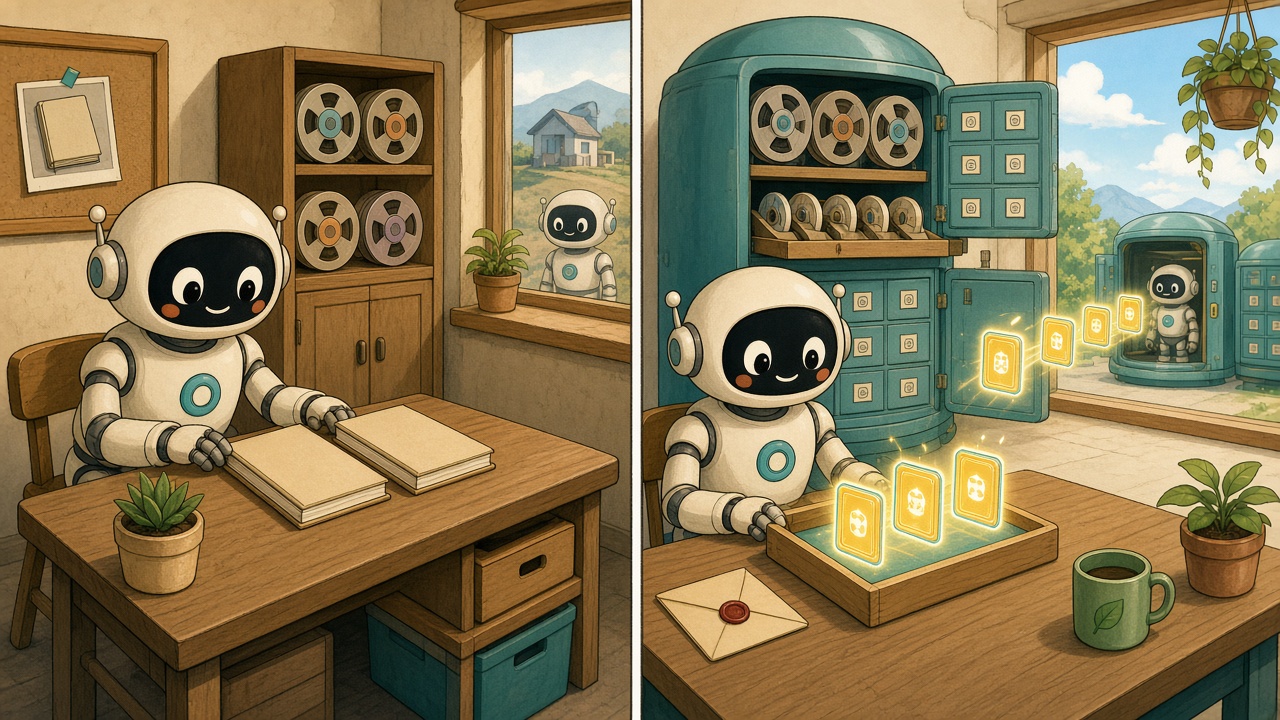
Think of the built-in memory as two small notebooks. At the start of a chat, the agent takes a photo of them and keeps looking at that photo until you start a new chat. That’s plenty for “I like short answers” or where a project lives, but the notebooks fill up, and a new fact written today may not show up until the next chat. Upstash is more like a shared filing room the agent can search every time you send a message. It still keeps the notebooks, and it also files the chat itself, so it can look up last week’s decisions — including from another machine, if you point both at the same room.
Before: two local files, frozen at the start of a session
Hermes Agent’s built-in memory, as the official docs describe it, is two Markdown files in ~/.hermes/memories/: MEMORY.md for the agent’s notes, capped at 2,200 characters, and USER.md for a user profile, capped at 1,375 characters. Together that’s about 3,500 characters, which matches the figure in Oz’s post. A named profile keeps its own copies under ~/.hermes/profiles/<name>/memories/, so a CLI session and a Telegram bot on different profiles don’t share notes.
At the start of a session those files are injected into the system prompt as a frozen snapshot. The snapshot doesn’t change mid-session, on purpose, so the model’s prefix cache can be reused. If the agent adds, patches or removes an entry during the chat, the change is written to disk immediately, but it won’t appear in the prompt until the next session starts. There is no separate “read” action: the agent is expected to see its notes in that snapshot.
When a write would overflow the cap, the memory tool returns an error instead of dropping entries quietly. The agent has to shorten or remove older notes in the same turn, then retry. Oz writes that this is enough for simple preferences, but not for months of projects, people and decisions.
Past conversations are stored separately, in a local SQLite database at ~/.hermes/state.db, with full-text search through the session_search tool. The docs say that search returns the actual messages, with no extra model call, and they put a typical query at about 20 milliseconds. That history stays on the machine that recorded it.
This matters on messaging platforms, where a Telegram or Discord chat is one continuous session that survives restarts and overnight shutdowns. New notebook entries stay invisible to that running chat, and the docs say the loop of forgetting, recalling from memory and searching past sessions almost never gets to fire unless you start a fresh session with /new. On the CLI, each invocation is already a new session, so this mostly takes care of itself. A spoken “I’ll remember that” also does nothing unless the model actually calls the memory tool.
After: the same notebooks, plus a Redis store searched on every message
The Upstash plugin doesn’t replace those files. Hermes’s memory-provider docs say only one external provider can be active, and that it always runs alongside the built-in stores. Oz’s post is specific about what changes in practice.
On each incoming message, Hermes searches the Redis store and adds up to three related memories to the prompt. That search runs even in a long, never-reset messaging session, so a fact saved to Redis can be recalled later in the same chat. The two local notebooks are still frozen until /new. Several profiles, or copies of Hermes on more than one machine, can share the same Redis database and user id, which is how a fact saved on one box can be recalled on another.
The character cap on the two files doesn’t apply to the Redis store in the same way. Recall still injects only the top three hits, and the database itself is still bound by the Redis plan’s storage and command limits. Memories and chats share a single Redis Search index, which is why the integration can run on the Free plan (one index per database).
How a turn works

Before each turn, the plugin searches Upstash Redis with the incoming message and adds up to three memories to the prompt. After the turn, new messages are appended to that session’s transcript as one small write the size of the turn, however long the chat has run.
Memory recall uses hybrid search: keyword matching (phrase, term and fuzzy) merged with a search-by-meaning query, using Redis Search’s reciprocal rank fusion. Redis Search creates the embeddings itself, so you don’t need a separate embeddings model or vector database. The plugin README notes that the semantic side has no relevance cutoff, and that in a small-store test a hybrid query took about 150 to 300 milliseconds, against a few milliseconds for keyword-only recall. If a hybrid query fails, recall falls back to keyword search for that call. Chat search stays keyword-only, because a whole session is stored as one document.
Subagents, cron jobs and context flushes can read memories, but only the main agent writes. When Hermes’s built-in memory tool persists a fact, the integration saves a copy to Redis. If Hermes later corrects or removes it, the Redis copy is updated or deleted too, so the old version doesn’t sneak back in.
The integration also gives the model four tools during a turn: upstash_memory_save, upstash_memory_search, upstash_memory_forget and upstash_chat_search.
Memories are stored under keys such as agentkit:memory:<user>:<id>, and transcripts under agentkit:chat:<user>:<session>, over HTTPS to the Redis database you configure. The catalog’s disclosure adds that memory text and each recall query are embedded by Redis Search’s managed embeddings in that database, chat transcripts are not embedded, and the plugin contacts nothing else. Telemetry is off by default. The plugin does not publish a separate fee; you pay whatever your Upstash Redis plan charges for the commands it runs. The README’s timing figure is from a small-store test, not a published latency guarantee.
Setup, and sharing memory with other apps
The official steps are to create a Redis database in the Upstash console, then install the plugin and pick it as the memory provider:
hermes plugins install upstash
hermes memory setup
hermes memory setup asks for the REST URL and token and writes them to ~/.hermes/.env. You can also install upstash-hermes-memory with pip and set memory.provider: upstash in ~/.hermes/config.yaml. Required variables are UPSTASH_REDIS_REST_URL and UPSTASH_REDIS_REST_TOKEN. Optional ones include a user id (it defaults to the chat-platform user, then the Hermes profile name, then default), a key prefix that defaults to agentkit, and the telemetry flag, which is off unless you set it to 1.
To check it, the post says, tell the agent something about yourself, start a new session with /new, and ask about it. Memories should also show up in the Upstash console Data Browser under agentkit:memory:.
The integration writes the same keys and documents as AgentMemory and ChatHistory in @upstash/agentkit-sdk. A fact a Hermes agent saves can be recalled by a TypeScript agent built with the Vercel AI SDK on the same database, and the other way round. Using both on one database needs a plan with more than one search index, because the TypeScript side creates its own memory index. The Python classes also work outside Hermes. The code is open source in the AgentKit repository.
Upstash also documents a way for agents to request a free Redis database, with no signup, by posting to https://upstash.com/start-redis with a User-Agent that names the agent. Unclaimed databases are deleted after three days, and a GET to the same path returns the full instructions.
A community guide to the built-in side
The official announcement itself did not draw public quote posts. A community tips account, Hermes Agent Tips, had already published a longer guide to the built-in two-file memory — the “before” side of this change — including the frozen snapshot, the overflow error, and why a fact saved in a running Telegram chat can seem to vanish until you type /new.
your hermes long-term memory is two small text files…
November 6, 2026
Discover more from Sulat AI & Tech News
Subscribe to get the latest posts sent to your email.