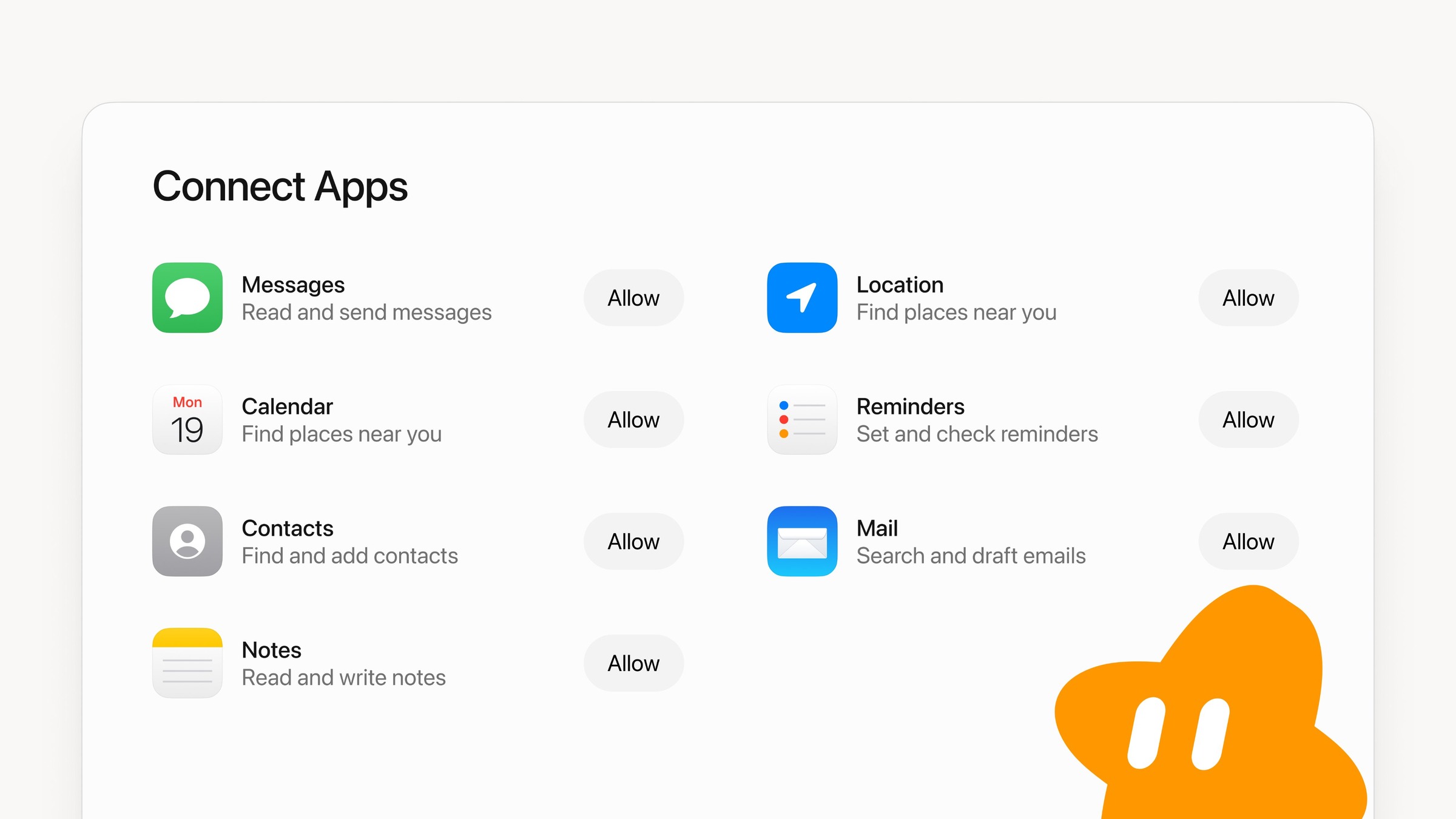
The official Grok Bot account says the Mac app can now use Messages, Mail, Notes, Reminders, Calendar, Location and Contacts. The same post includes a screenshot of Connect Apps, with an Allow button beside each one.
In that graphic, Messages is labelled “Read and send messages.” Mail is “Search and draft emails.” Notes is “Read and write notes,” Contacts is “Find and add contacts,” Reminders is “Set and check reminders,” and Location is “Find places near you.” Calendar carries the same subtitle as Location.
Mail’s label stops at search and draft, while Messages is written as read and send.
| App | Official label |
|---|---|
| Messages | Read and send messages |
| Calendar | Find places near you |
| Contacts | Find and add contacts |
| Notes | Read and write notes |
| Location | Find places near you |
| Reminders | Set and check reminders |
| Search and draft emails |
Grok Bot on Mac can now use Messages, Mail, Notes, Reminders, Calendar, Location, and Contacts.
November 12, 2026
Akshaya, who works in product at Grok Bot, quoted the announcement and wrote that the Bot can now talk to apps on your computer, and that with iMessage support she can clear out and respond to her hundreds of unread texts. In a later reply she said the feature is already live on iOS, “but sadly no iMessage support there.”
grok @bot can now talk to apps on your computer!! finally with iMessage support I can clear out and respond to my hundreds of unread texts… what other apple connectors should we support next?
November 12, 2026
Lauren, who works on Grok Bot at SpaceXSI, pointed to the wider set of connectors and offered two examples: ask a Bot to look at messages from your family and update your calendar for important events, or look at messages from potential clients for a small business and help manage your bookings.
one of the best ways to get the most out of grok bot is with our many connectors. the more context and tools your bot has, the more helpful it can be to your work and life! try asking bot to look at messages from your family and update your calendar for important events or look at messages from potential clients for your small business and help manage your bookings
November 12, 2026
Official mobile docs already let a Bot you own, in your own chat in the Grok Bot app, use Calendar, Contacts, Location and Reminders on iPhone, with a short list of limits: it only reads contacts, it never invites anyone to a calendar event, and it can’t change or delete a repeating one. Messages, Mail and Notes are the additions named for Mac, and iMessage is the one Akshaya says isn’t on iOS.
Bots could already connect Gmail and Google Calendar as cloud apps, with their own sign-in and a longer list of supported actions in the docs. This announcement covers the Mac’s own Apple apps, turned on one at a time from Connect Apps.
The desktop app is available from x.ai/bot. The docs say it runs on macOS on Apple silicon and Intel, as well as on Windows and Linux. Akshaya closed her post by asking which other Apple connectors to support next.
Discover more from Sulat AI & Tech News
Subscribe to get the latest posts sent to your email.