Cloudflare says Kling Image 4.0, Kling AI’s latest image model, is now available through AI Gateway, its proxy for AI model calls. The model page lists output at 2K, up to 10 reference images and up to nine images per request, at $0.063 per image plus $0.003 per input image.
The model is a small addition to a big product. AI Gateway now caches, rate limits, routes, scans, bills and logs your model traffic, and most of that is hard to spot from the product page. This guide goes through all of it, checked against Cloudflare’s docs, changelog and blog.
Calling Kling Image 4.0 through the gateway
The model ID is klingai/kling-v4-image. The only required input is a prompt of up to 50,000 characters. Pass up to 10 reference images as https URLs, data URIs or base64 (JPG or PNG, up to 30 MB each, at least 300 px per side) and refer to them in the prompt as @image_1, @image_2 and so on. Resolution is fixed at 2k, n runs from 1 to 9, and aspect_ratio accepts auto, 16:9, 9:16, 1:1, 4:3, 3:4, 3:2, 2:3 and 21:9. Auto picks a ratio from your input images.
Cloudflare’s example uses the Workers AI binding, with the gateway named in the third argument:
const response = await env.AI.run(
  'klingai/kling-v4-image',
  {
    prompt:
      'A photorealistic portrait of a fox in an autumn forest, golden hour lighting',
    resolution: '2k',
    aspect_ratio: '16:9',
  },
  {
    gateway: { id: 'default' },
  }
)
The same call works over the REST /ai/run endpoint, with the model and input in the body. The response comes back as {"state": "Completed", "result": {"image": ..., "images": [...]}}, with URLs to the generated images.
What AI Gateway is
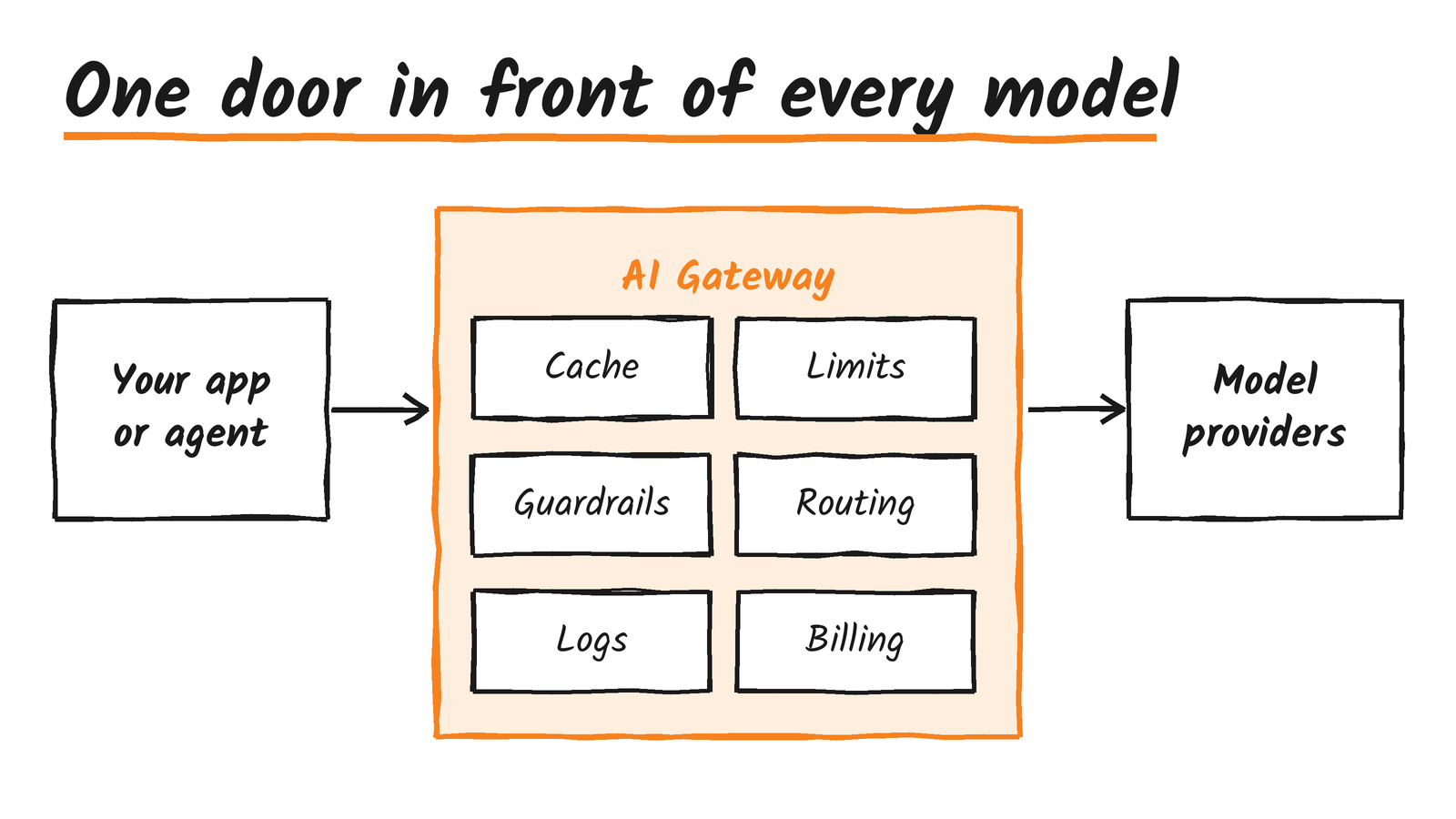
AI Gateway sits between your application and the model providers you call. It’s available on all plans, and its core features, analytics, caching and rate limiting, are free. The getting started guide needs only your account ID and an API token with AI Gateway Read and Edit plus Workers AI Read permissions. A gateway called default is created automatically on your first authenticated request, with authentication and logging on and caching and rate limiting off.
Six ways in
Cloudflare documents several entry points, and they differ in what they can reach:
- REST API. Endpoints under
api.cloudflare.com/client/v4/accounts/{id}/ai/cover/ai/runfor every modality,/ai/v1/chat/completionsin the OpenAI format,/ai/v1/responses, and/ai/v1/messagesin the Anthropic format. The Anthropic endpoint doesn’t serve Workers AI models. These calls need the Workers AI Read permission. A token with only an AI Gateway permission gets a 401 with code 10000. - Workers binding.
env.AI.run()takes a gateway options object withid,skipCache,cacheTtl,cacheKey,collectLogandmetadata. The binding also exposesenv.AI.aiGatewayLogIdand a gateway() helper withpatchLog(),getLog()andgetUrl(). - Provider-native endpoints.
gateway.ai.cloudflare.com/v1/{account}/{gateway}/{provider}keeps each provider’s own request shape, authenticated with thecf-aig-authorizationheader. - OpenAI-compatible endpoint.
/compat/chat/completionsis deprecated for single-model calls but still works for dynamic routes and existing integrations. The Universal endpoint is deprecated too. - WebSockets API. It supports realtime for providers that offer it, and non-realtime for all providers.
- Background requests. Set
options.backgroundon an/ai/runrequest and add awebhookUrl. The webhook must be HTTPS, delivery is best-effort and isn’t retried, andwebhookFormatcan be raw or chat.
Models are named author/model, and Workers AI models use the @cf/ prefix. The docs list Anthropic, Azure OpenAI, Baseten, Bedrock, Cartesia, Cerebras, Cohere, Deepgram, DeepSeek, ElevenLabs, Fal, Google AI Studio, xAI, Groq, HuggingFace, Ideogram, Mistral, OpenAI, OpenRouter, Parallel, Perplexity, Replicate, Vertex AI and Workers AI. The catalogue spans text, image, video, speech, transcription and upscaling models. In April, Cloudflare’s AI platform post put it at more than 70 models from over 12 providers.
Web search comes from the providers, not the gateway
The web search page describes proxying each provider’s own search tool rather than offering one search feature. Anthropic’s web_search_20250305 tool goes through /ai/v1/messages, OpenAI’s web_search_preview through /ai/v1/responses, xAI’s web_search on grok-4.20-multi-agent-0309, and Alibaba’s enable_search flag. Perplexity and Parallel work through proxies. Cloudflare charges no separate web search fee, and Gemini, DeepSeek and MiniMax models aren’t supported through the unified tool.
Paying for models: credits, your own keys, or x402
There are three ways to pay a provider, and they’re checked in a fixed order. A key sent with the request wins, then a stored BYOK key under the default alias, then Unified Billing credits.
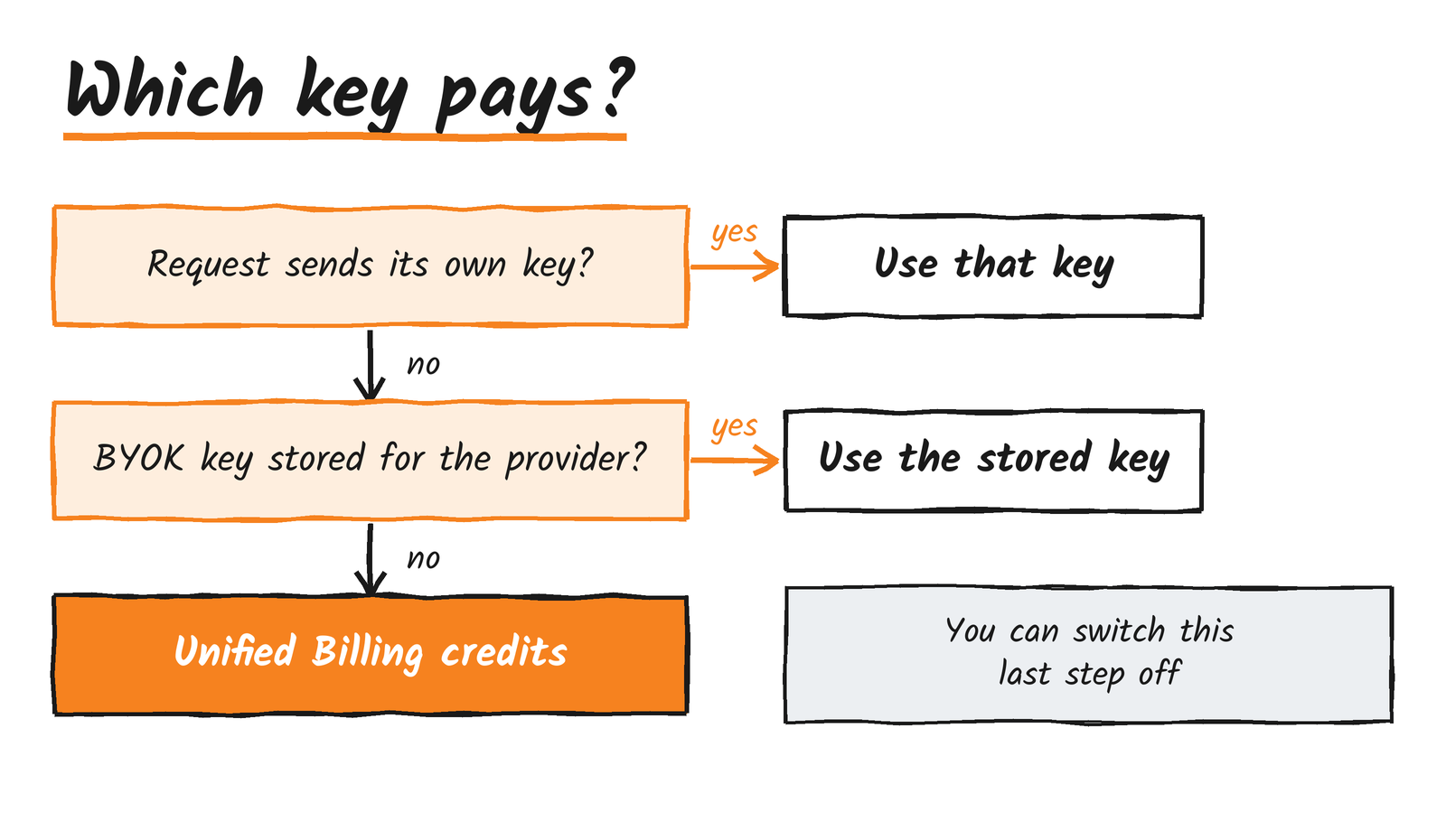
Unified Billing means you buy prepaid credits from Cloudflare and call providers without holding their keys. It adds a 5% fee on the credits you buy, so $100 of credit costs $105, and provider token prices pass through at no markup. Auto top-up is available, but only cards work, not PayPal, Apple Pay or Google Pay. A negative balance is charged monthly. Zero data retention applies to Unified Billing traffic on Cloudflare-managed credentials only. Workers AI can draw on credits too if the gateway’s billing is set to Unified, and frontier models such as kimi-k2.6, kimi-k2.7-code and glm-5.2 get 50 requests a minute per model per account with credits, against 20 on standard billing.
Unified Billing requests are capped at 200 per 60 seconds per gateway. Go over and you get a 429 with error 2018. The cap doesn’t apply to BYOK. If you want a hard stop on the credit fallback, turn on “Require provider credentials” or send cf-aig-no-wholesale. A request with no usable credentials then fails with a 400 and error 2044.
BYOK stores provider keys in Secrets Store. You can keep several per provider under aliases and pick one with cf-aig-byok-alias, but only on provider-passthrough calls. The binding and unified endpoints use the default alias only. Rotating a key takes effect with no code change. Since 6 November, the Provider Keys page shows last-used and last-updated dates and flags keys that have sat idle for more than 90 days, with usage tracking starting this month.
Machine Payments lets an agent pay per request over x402. The client sends Payment-Method: x402, gets a 402 with a PAYMENT-REQUIRED header, then retries with PAYMENT-SIGNATURE. It’s limited to US-based accounts with a card, works on /ai/run only, and covers four models for now: z-ai/glm-4.7-flash, google/gemma-4-26b-a4b-it, openai/gpt-oss-20b and alibaba/qwen3.8-27b.
Caching
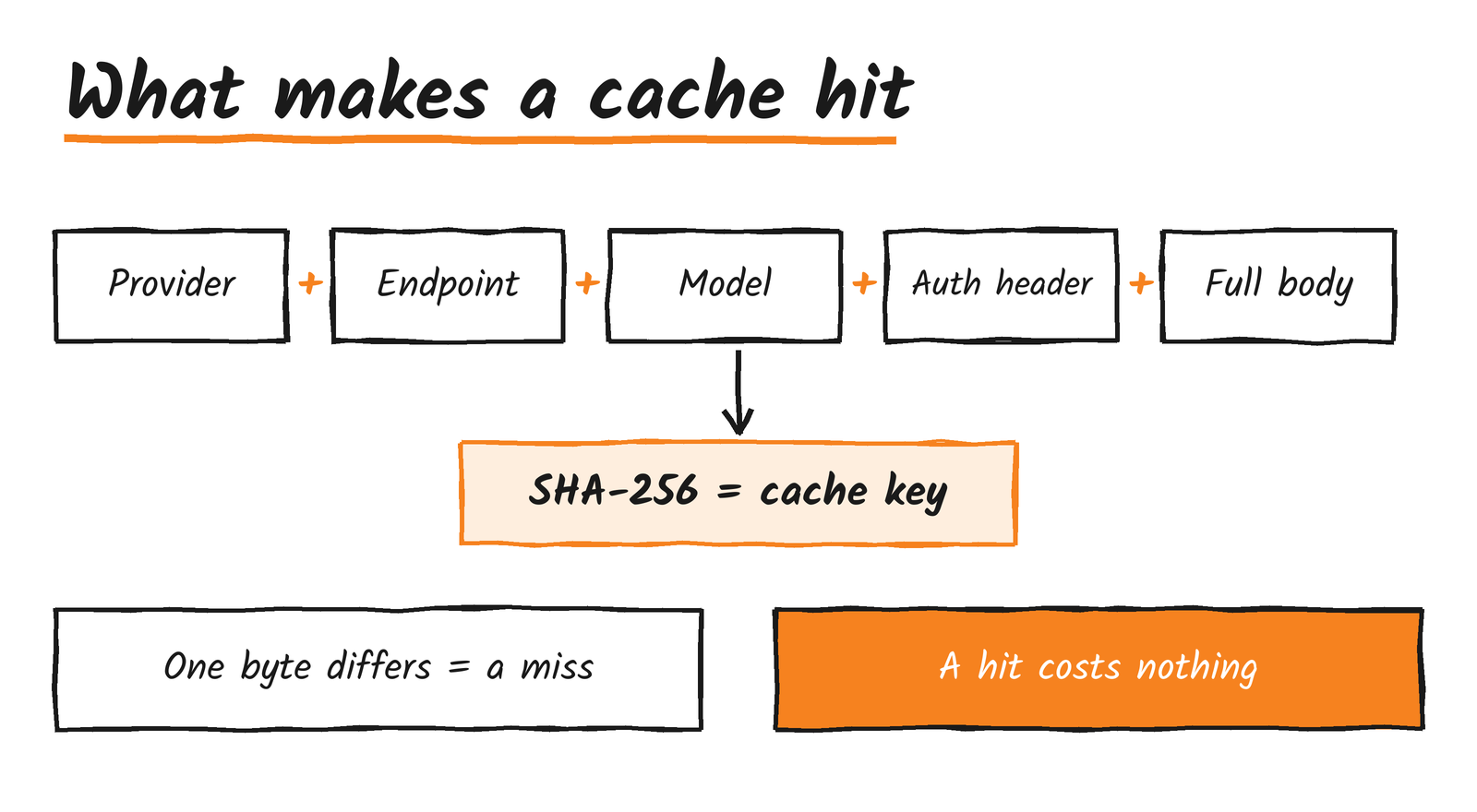
Caching is off by default and covers text and image responses. It only matches identical requests. The cache key is a SHA-256 hash over the provider, endpoint, model, auth header and full body, and a hit is reported in the cf-aig-cache-status response header as HIT or MISS. A cache hit costs nothing.
Control it per request with cf-aig-skip-cache, cf-aig-cache-ttl and cf-aig-cache-key. The older cf-cache-ttl and cf-skip-cache names are deprecated. TTL runs from 60 seconds to one month, and a custom key opts a request into caching with a default TTL of five minutes if you set none. The cache is volatile, so two identical requests sent at the same moment can both miss. Cacheable requests top out at 25 MB.
Rate limits and spend limits
Rate limiting works as a fixed or sliding window and returns a 429 once a gateway goes over. Spend limits are newer, introduced in a June blog post, and work in dollars. Each rule is scoped by provider, model or metadata, applied as split-by-value or filter-by-value, and runs over a rolling or fixed daily, weekly or monthly window. A gateway can hold 20 rules. Go over budget and the request either gets a 429 or falls back to a cheaper model through a dynamic route.
Spend limits work with both Unified Billing and BYOK for models with known pricing. Enforcement is eventually consistent, so a burst can briefly overshoot. For per-user budgets, put a user ID in your own metadata, or use the verified cf.user_id that Cloudflare Access adds on custom domains.
Routing: Auto Router, model aliases and dynamic routes
The Auto Router, launched in a September blog post, is a model name rather than a setting. Call cloudflare/auto and a classifier plus cost and quality scoring picks a model from a Cloudflare-managed pool that spans Workers AI, Anthropic, OpenAI and xAI. It supports Chat Completions and Responses but not WebSockets. Response headers explain the choice: cf-aig-routed-model, cf-aig-routing-reason, cf-aig-routing-decision-id and cf-aig-request-id. Send cf-aig-session-id and cf-aig-turn-id to keep a conversation on one model, opt out with cf-aig-no-session-affinity, and restrict the pool with cf-aig-allowed-models or cf-aig-allowed-providers. There’s an OpenCode setup and an @cloudflare/aig-opencode-plugin package for OpenCode 1.18.29 or later.
Model aliases, added on 4 November, let you name a model list yourself. You call custom/<name> and the gateway uses either a preferred algorithm, which follows your list order, or a smart one. Each gateway holds up to 100 aliases of 1 to 50 models, names run 1 to 64 characters, and an alias can’t point at another alias. A per-request options.routing override is supported, errors come back as 404, 400 or 503, and aliases don’t work with x402.
Dynamic routes are the flexible option. You build a visual or JSON flow from Start, Conditional, Percentage, Model, Rate Limit, Budget Limit and End nodes, with versions, deploy and rollback. Call a route as dynamic/<route>. Two catches: a dynamic route accepts only the OpenAI chat-completions shape, and /ai/run rejects it with a 400 and code 7003. On REST calls you also need the cf-aig-gateway-id header. Cloudflare recommends BYOK and authentication for routes.
Fallbacks, timeouts and retries
The fallbacks and request handling pages cover the failure path. The cf-aig-step response header tells you which step answered, with 0 meaning the primary. cf-aig-request-timeout sets a timeout measured to the first response byte. Retries allow up to five attempts with a delay of up to 60 seconds, and a constant, linear or exponential backoff, set per request with cf-aig-max-attempts, cf-aig-retry-delay and cf-aig-backoff. The same settings can live at gateway level, where the delay ranges from 0.1 to 60 seconds.
Guardrails and DLP
Two features scan traffic, and they work differently. Guardrails uses Llama Guard 3 8B on Workers AI across hazard categories S1 to S14, plus P1 prompt injection through @cf/meta/prompt-guard-2-86m. You choose Flag, Ignore or Block, separately for prompts and responses. A block returns error 2016 for a prompt or 2017 for a response. It adds roughly 500 ms, covers English, French, German, Hindi, Italian, Portuguese, Spanish and Thai, and is billed as Workers AI inference.
Data loss prevention uses Cloudflare One DLP profiles, covering financial data, personal information, government IDs, healthcare data and custom entries, and it’s free on all plans. Accounts without Zero Trust get two predefined profiles, one for financial information and one for social, insurance and national ID numbers. A policy flags or blocks on the request, the response or both. Blocks return HTTP 400 with error 2029 for requests or 2030 for responses, and the cf-aig-dlp response header reports what happened. It needs no Gateway proxy or TLS decryption.
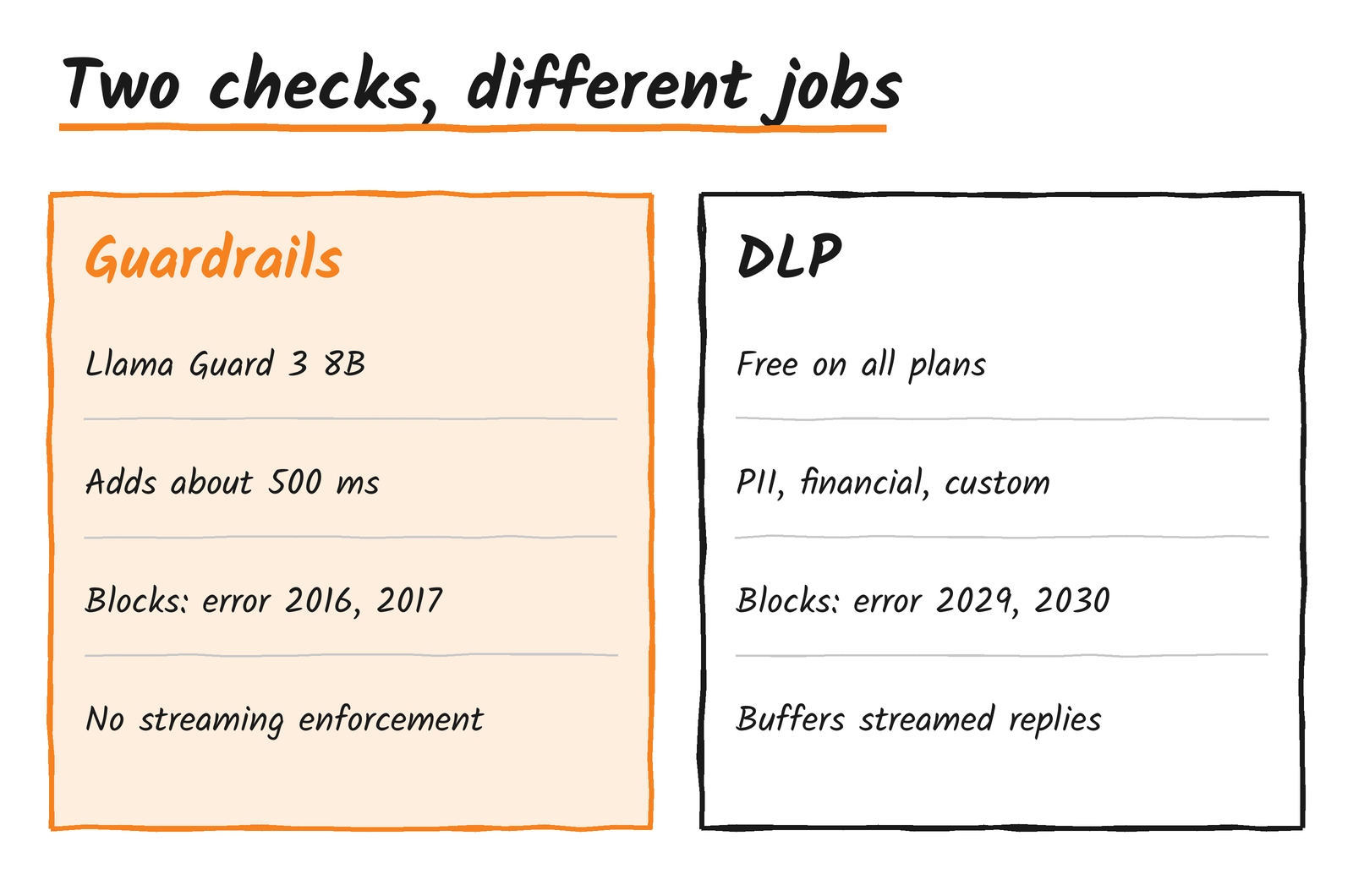
Both have limits that matter in production:
- Guardrails can’t enforce on streams. Through REST it logs but doesn’t enforce, and through the gateway endpoint it buffers the response and returns it non-streamed. Embedding models are checked on the prompt only.
- If Guardrails can’t get a Workers AI response for a category set to Block, the request is blocked. If the category is only set to Flag, it goes through.
- DLP buffers streamed responses when response scanning is on, skips cache hits, doesn’t decode base64 or files, and has no per-request bypass. Cloudflare’s answer is separate gateways.
Authentication, Cloudflare Access and custom domains
Authentication has been required on new gateways since a 3 November changelog, and once it’s on it can’t be turned off. Trying to switch it off returns a 400 with “Authentication cannot be disabled once enabled.” Workers bindings are pre-authenticated. AI Gateway tokens are account-scoped, not per gateway, which is worth knowing before you hand one to a team.
On a custom domain, Cloudflare Access can stand in for the token: the gateway accepts the Access JWT as the credential and adds the verified cf.user_id, taken from the JWT subject, to the request metadata. Service tokens get no cf.user_id, and cf.* metadata keys are reserved. Custom domains cover the gateway.ai.cloudflare.com endpoints only, not the REST API, and a gateway created through the API needs a DNS CNAME.
Gateways also front APIs Cloudflare doesn’t list. A custom provider can be any HTTPS API. Its slug is prefixed custom- and its base_url is the domain root. It works through the compat or provider-specific endpoints, with caching and rate limits applying per provider.
Logs, analytics and cost tracking
Analytics show requests, tokens, cost, errors and cached share, and the same data is available through GraphQL. Costs are estimates, and you can replace them with your own through the cf-aig-custom-cost header, which takes per-token input and output prices and cache read and write prices. Custom metadata holds up to five entries per request as strings, numbers or booleans, sent in cf-aig-metadata.
Logging is controlled per request with cf-aig-collect-log and cf-aig-collect-log-payload, though Unified Billing requests always log their billing details. Gateways created from 24 September 2026 follow Workers Logs pricing and retention. Older gateways keep Legacy Logs, which allow 10 million logs per gateway on a paid plan and 100,000 per account on the free plan, at 500 logs a second per gateway and 10 MB per log.
Log classification is off by default and needs log collection on. It tags requests by task and rates how well each model fit, as Overkill, Appropriate, Underpowered or Could not assess, which gives you a data-backed way to find calls that can move to a cheaper model.
For export, Logpush ships logs from the AI Gateway dataset with hybrid RSA and AES encryption, using a public key you upload in the gateway settings. It’s billed under Logpush pricing, allows four jobs per account and caps logs at 1 MB. OpenTelemetry export sends OTLP in JSON or protobuf with GenAI attributes, and honours cf-aig-otel-trace-id and cf-aig-otel-parent-span-id so gateway spans join your own traces. Cloudflare names Honeycomb, Braintrust, Langfuse, Datadog and New Relic as compatible.
User Insights, announced on 30 September, is free. It shows active users and adoption, counts users to review (cost at least twice the median), and flags anomalies when a session runs above twice that user’s own 95th percentile and above the organisation’s 99th. It doesn’t block requests. The older Evaluations feature is deprecated for new accounts.
Coding agents and SDKs
The coding agents page lists setups for Android Studio, Claude Code, Claude Desktop, Cursor, Gemini CLI, GitHub Copilot CLI, OpenAI Codex, OpenCode, Pi, VS Code and Xcode. The Claude Code route uses the Anthropic-compatible Messages endpoint. For SDKs, createAI from agents/models/ai-sdk and agents/models/pi-ai wires the gateway into the Vercel AI SDK and Pi AI. A 21 October changelog says it replaces workers-ai-provider and ai-gateway-provider, both now deprecated and frozen.
Limits and prices in one place
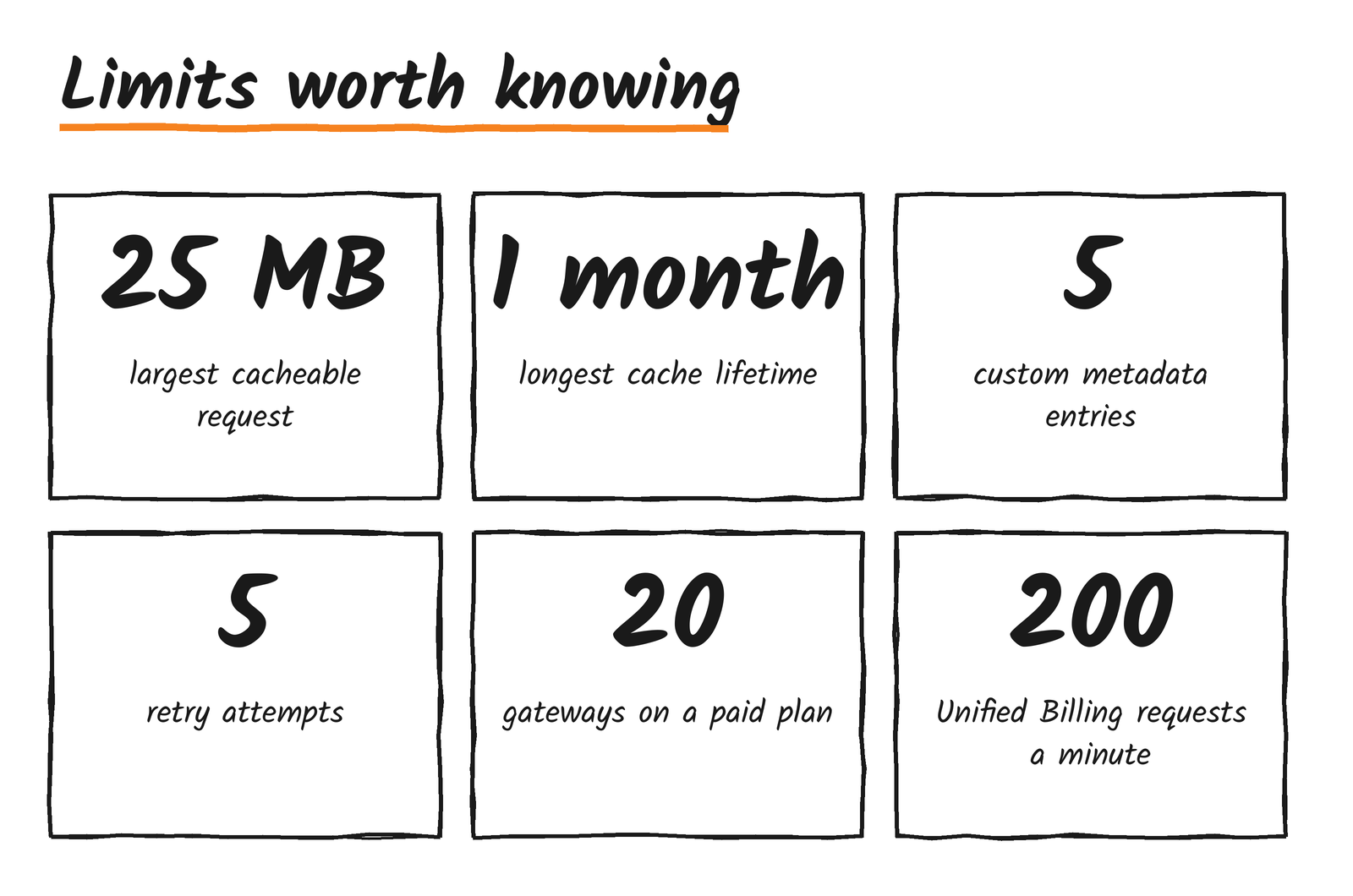
Gateways are capped at 10 on the free plan and 20 on paid plans, with names up to 64 characters. The limits and pricing pages hold the rest. In short, analytics, caching, rate limiting and DLP cost nothing extra, Guardrails is billed as Workers AI inference, Unified Billing adds 5% to credits you buy, logs follow Workers Logs or Legacy Logs pricing depending on when the gateway was made, and Logpush is billed on its own.
Gotchas before you build on it
- A cached response costs nothing, but cache keys include the auth header and full body, so a changed timestamp or request ID in the body means every call misses.
- The
cf-aig-byok-aliasheader works on provider-passthrough calls only. The binding and unified endpoints use thedefaultalias. - REST
/ai/runand dynamic routes don’t mix. Use the OpenAI-compatible path for routes. - Streaming weakens both safety features. Guardrails won’t enforce on a stream, and DLP buffers the response when response scanning is on.
- An AI Gateway token alone can’t call the REST API. It needs Workers AI Read as well.
- Spend limits are eventually consistent, so treat them as a brake, not a hard cap.
Cloudflare’s changelog is the place to watch, since much of this changed between August and November.
Discover more from Sulat AI & Tech News
Subscribe to get the latest posts sent to your email.