
OpenAI’s Agents API now accepts Daybreak Blue and Daybreak Red, the two access tiers in its Trusted Access for Cyber programme. Michael Luo, who works on product at OpenAI, announced it on X on 21 November, and the Agents API docs now have a section called Use Daybreak in a session that shows the request fields.
The Agents API is OpenAI’s hosted service for running agents on the Codex harness. It’s been in public beta since 10 September, with OpenAI handling sessions, context compaction and recovery while the developer supplies the tools and picks the environment. Daybreak is OpenAI’s reviewed access programme for security work, which I’ve covered through the GPT-6 Cyber release on 7 November and the Daybreak Red Team and Defense Factory products on 13 November. The Responses API already picks a tier with the access_programs.cyber field, and sessions in the Agents API use the same field.
🔐 Big news: OpenAI’s Agents API now supports Daybreak access!
— Michael Luo on X
The world of security is rapidly changing. New exploits are being discovered quicker than ever and not only are they being discovered but they are being weaponized too.
That’s where Daybreak and Agents API comes in
What a Daybreak session looks like
The docs say the Agents API supports both tiers, and that you need an API key from a project with access to both your chosen model and its cyber access program. When you create a session, you add the program to the request body. Blue pairs gpt-6-sol with daybreak_blue, and Red pairs gpt-5.6-cyber with daybreak_red. In both examples access_programs sits at the top level, next to agent, rather than inside it.
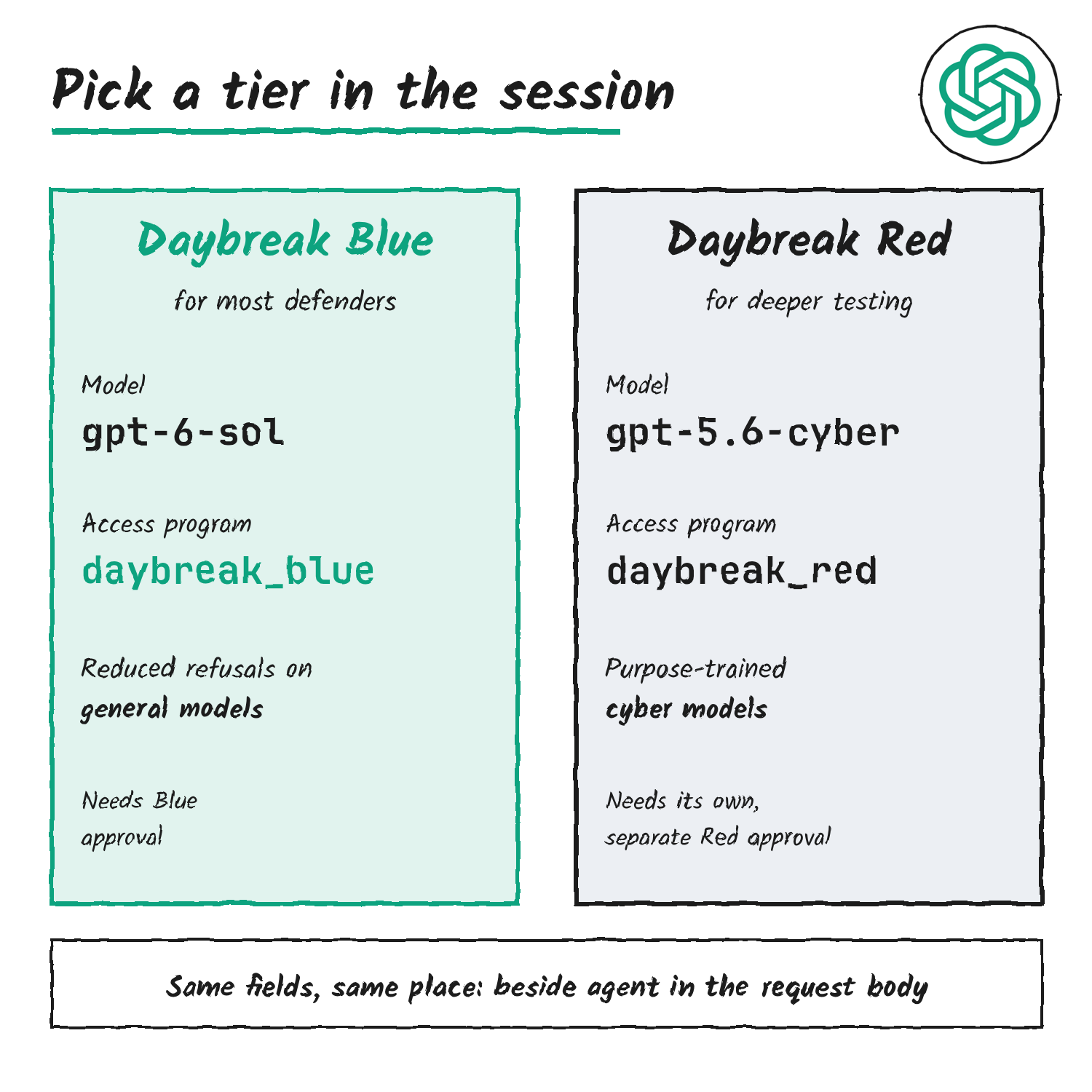
Here’s OpenAI’s quickstart request for creating a session, with the Daybreak field added.
curl --no-buffer --fail-with-body https://api.openai.com/v1/agents/sessions \
  -H "OpenAI-Beta: agents=v1" \
  -H "Authorization: Bearer $OPENAI_API_KEY" \
  -H "Content-Type: application/json" \
  -d '{
    "agent": { "model": "gpt-6-sol" },
    "access_programs": { "cyber": "daybreak_blue" },
    "environment": { "type": "openai_hosted" },
    "input": "Explain how to validate a security patch in a test environment.",
    "stream": true
  }'
Which value you send depends on the model. The Agents API page points to the table in OpenAI’s Responses API guide to Daybreak, which says to use the value listed for the model even when your organisation holds a higher approval.
| Model | Approval needed | Value to send |
|---|---|---|
| GPT-6 Sol, GPT-6 Luna | Blue or Red | daybreak_blue |
| GPT-6.2 Astra, GPT-6.2 Sol, GPT-6.1 Sol, GPT-6.1 Terra, GPT-6 Astra | Red | daybreak_blue |
| GPT-6 Cyber | Red plus separate model approval | daybreak_red |
| GPT-5.6 Cyber | Red | daybreak_red |
That guide gives an example: in the Responses API, gpt-6-sol with daybreak_red returns a 400 invalid_access_program error. It also says that on GPT-6.1 Terra and newer models, including GPT-6.2 Astra and GPT-6.2 Sol, leaving the field out means standard safeguards, not the highest tier your project holds.
What each tier covers
Daybreak Blue gives reduced refusals on supported mainline models for verified defensive work in authorised environments, according to OpenAI’s help centre. The listed work includes vulnerability triage, secure code review, malware analysis, detection engineering, incident response and patch validation, and OpenAI calls Blue the recommended starting point for most security teams.
Daybreak Red adds GPT-5.6 Cyber for every Red organisation and GPT-6 Cyber with a separate model approval, plus reduced refusals on mainline models including Astra. OpenAI lists penetration testing, red teaming, exploit validation and controlled vulnerability research as its uses. On GPT-6.2 Astra, GPT-6.2 Sol and GPT-6.1 Sol, reduced refusals need Red approval, and Blue keeps standard safeguards on those models. I covered the GPT-6.2 release on 18 November.
Getting approved
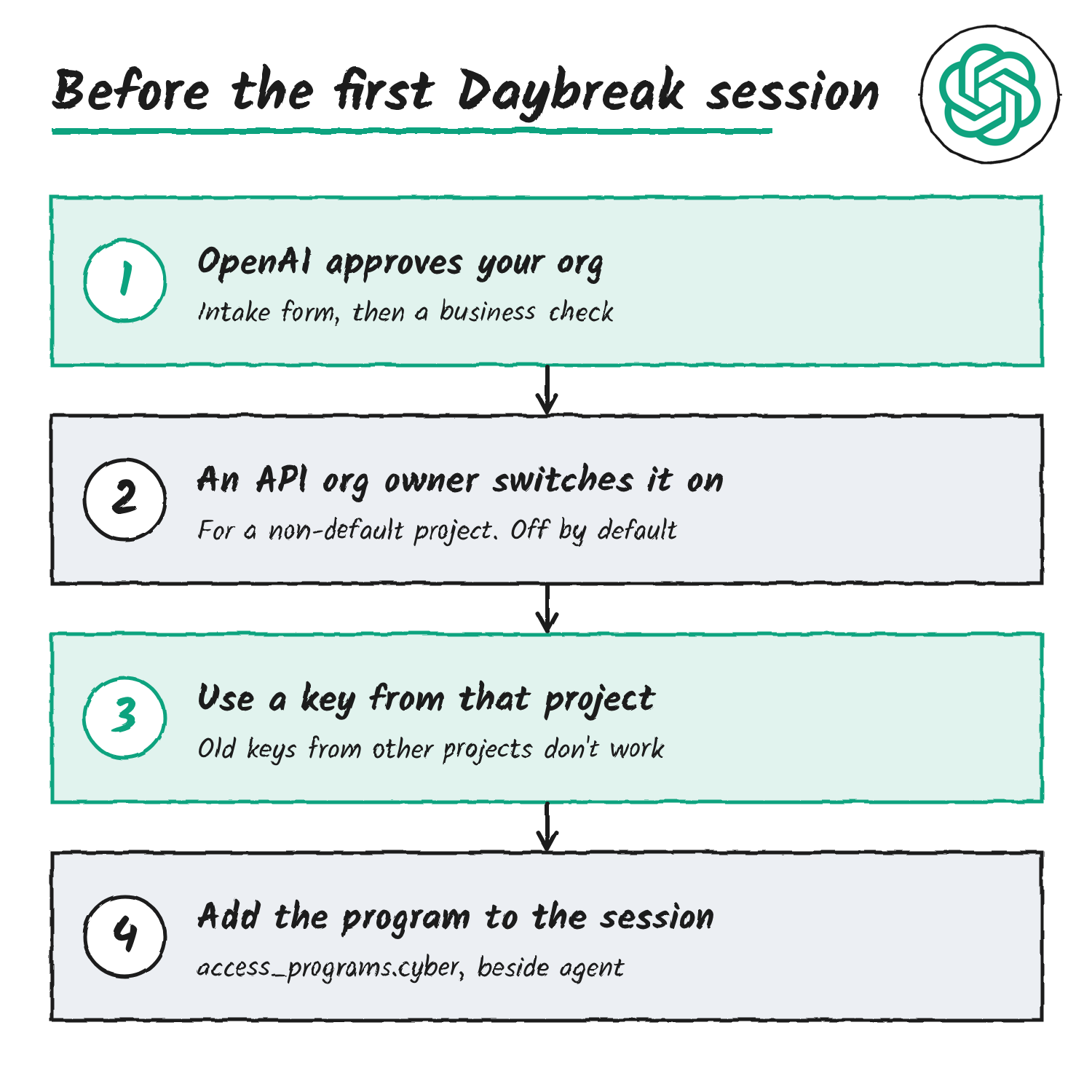
Approval comes before any of this works, and it doesn’t switch anything on by itself, according to OpenAI’s onboarding guide.
- An organisation submits OpenAI’s enterprise Daybreak intake form.
- Persona emails the listed contact for a business verification, and OpenAI then runs its own eligibility checks and confirms whether the organisation can use Blue, Red or both.
- Daybreak controls start off. An API organisation owner turns on the Daybreak toggle for a non-default project under Project Settings, General, Daybreak model access, and the change can take about 15 minutes.
- Requests then use an API key from that project. A key from an old organisation or project doesn’t grant access.
Red adds requirements. OpenAI’s docs say the API organisation holding Red access must require single sign-on and enforce MFA through the identity provider. GPT-6 Cyber API access needs an IP allowlist by default, and projects on Zero Data Retention generally need Private Safety Processing as well. Daybreak is for internal work: OpenAI says not to enable it for customer-facing applications, downstream product traffic or third-party access.
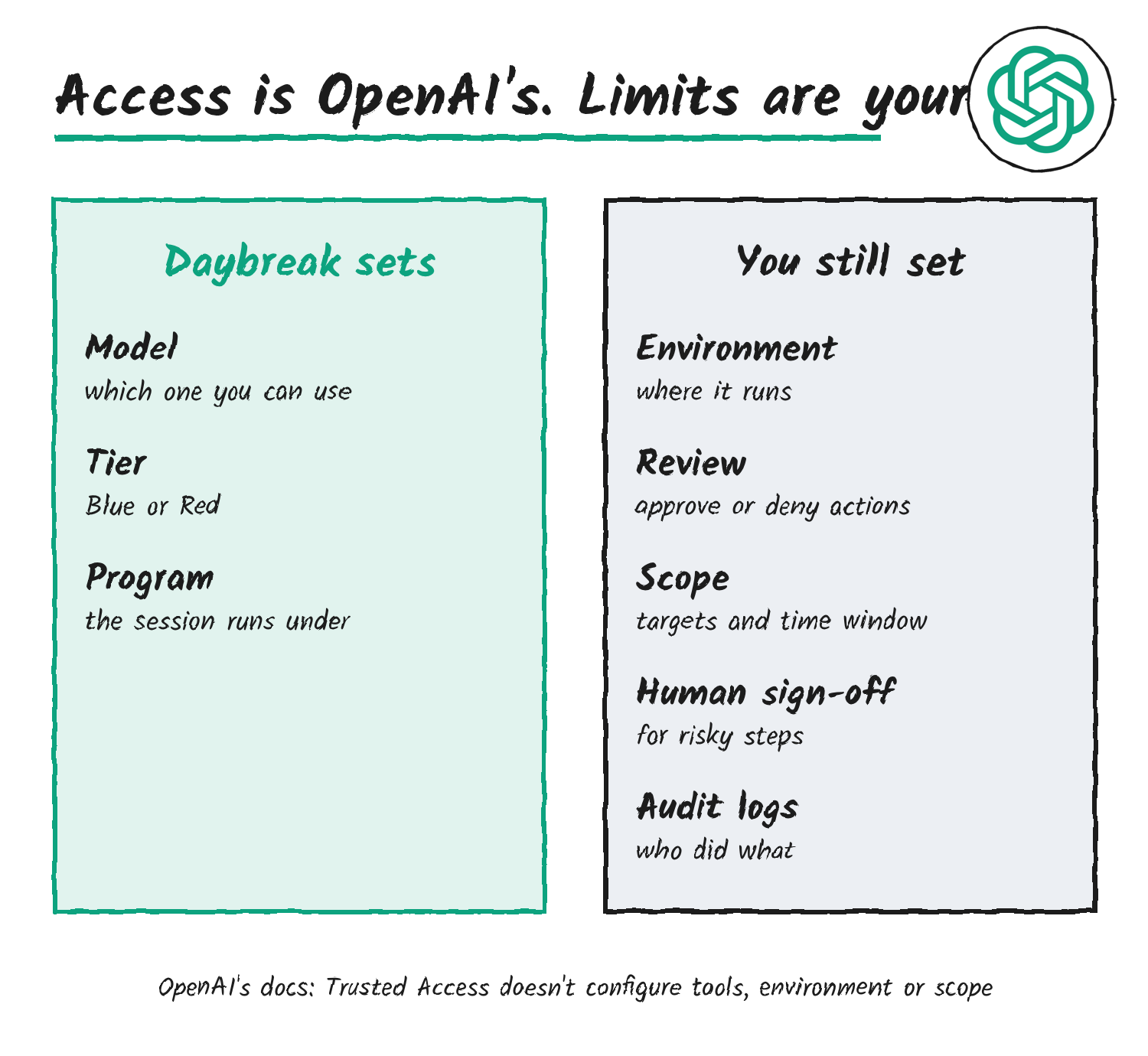
Where the limits come from
OpenAI’s cybersecurity checks page says Trusted Access governs approved model access and doesn’t configure your tools, environment or engagement scope. For a Responses API, Agents API or Agents SDK workflow that can take sensitive actions, OpenAI’s guardrails guide lists what to do before each tool call runs: check the target, action, arguments, calling identity and engagement window against the approved scope, deny out-of-scope hosts, credential theft, persistence, data exfiltration, destructive changes and production access, and pause ambiguous or high-risk actions for human approval. It also says to keep independent filesystem, network and identity boundaries, record decisions and fail closed if review becomes unavailable.
The Agents API session body carries two settings for this. The environment setting decides where the agent runs commands, and OpenAI-hosted environments have network controls. Setting review to auto_review has an OpenAI-managed reviewer model approve or deny supported approval requests, with its tokens billed on top of the agent’s. OpenAI’s approvals page says automatic review doesn’t change the environment’s network restrictions, and it lists environment prerequisites to check before turning it on.
OpenAI’s API safeguards apply on top. If its systems detect suspicious cybersecurity activity above defined thresholds, access can be temporarily revoked and requests return a cyber_policy error. Organisations that send a unique safety_identifier per end user can see the limit land on the affected user rather than the whole organisation.
Applications for Daybreak start at OpenAI’s Daybreak page, and the session fields are in the Agents API configuration guide.
Sources: Michael Luo on X, OpenAI Agents API configuration guide, OpenAI Daybreak in the Responses API, OpenAI Daybreak overview, OpenAI enterprise Daybreak onboarding.
Disclosure: I’m an OpenAI, Firecrawl and Devin ambassador.
Discover more from Sulat AI & Tech News
Subscribe to get the latest posts sent to your email.