
If you run an MCP server and want ChatGPT to react when something changes in your app, ChatGPT can subscribe to your server’s events and receive them as signed webhooks, OpenAI’s developer docs say. This guide covers the ChatGPT side: connecting the server, subscribing from a Work chat, and checking each step. The background on the extension itself is in my report on MCP Events reaching beta.
I checked every step against OpenAI’s MCP Events guide, its plugin connection guide and its help centre article on custom MCP servers on 21 November, New Zealand time. The code samples are OpenAI’s own, trimmed.
What you’ll end up with
| Item | Detail |
|---|---|
| Who it’s for | Developers and teams who run an MCP server with events, or use a vendor’s server that has them |
| What you end up with | Your server connected to ChatGPT as a plugin, a Work chat subscribed to one of its events, and signed webhooks arriving and getting a response |
| Where it works | Work chats on ChatGPT web, Work chats in the desktop app with Cloud selected, and dots, OpenAI’s always-on agents |
| Delivery mode | Webhook |
What you need first
- An MCP server on a public HTTPS endpoint, typically at
/mcp, or a Secure MCP Tunnel to a private one. - Persistent storage for subscriptions, so they survive a restart.
- Outbound HTTPS from your server to callback URLs.
- Permission to create plugins from custom MCP servers in your ChatGPT workspace.
On a Business workspace, only admins and owners can create and publish plugins for custom MCP servers, OpenAI’s help centre says. On Enterprise and Edu, admins and owners can create and test them, admins can use role-based access control to give selected members the Create plugins with MCPs permission, and only admins and owners can publish. OpenAI’s MCP Events page adds that workspace controls for plugins and event-triggered tasks apply.
What ChatGPT supports
ChatGPT reaches your server over Streamable HTTP using initialize, or over MCP 2.0 HTTP with protocol version 2026-07-28. It follows the draft MCP Events specification, which OpenAI links as the original design sketch rather than the final SEP-3415 text. Where the two differ, follow OpenAI’s page.
| Feature | ChatGPT |
|---|---|
Webhook delivery (events/subscribe) | Supported |
| Callback verification | Supported |
Poll (events/poll) | Not supported |
Push stream (events/stream) | Not supported |
gap and terminated control notifications | Not supported |
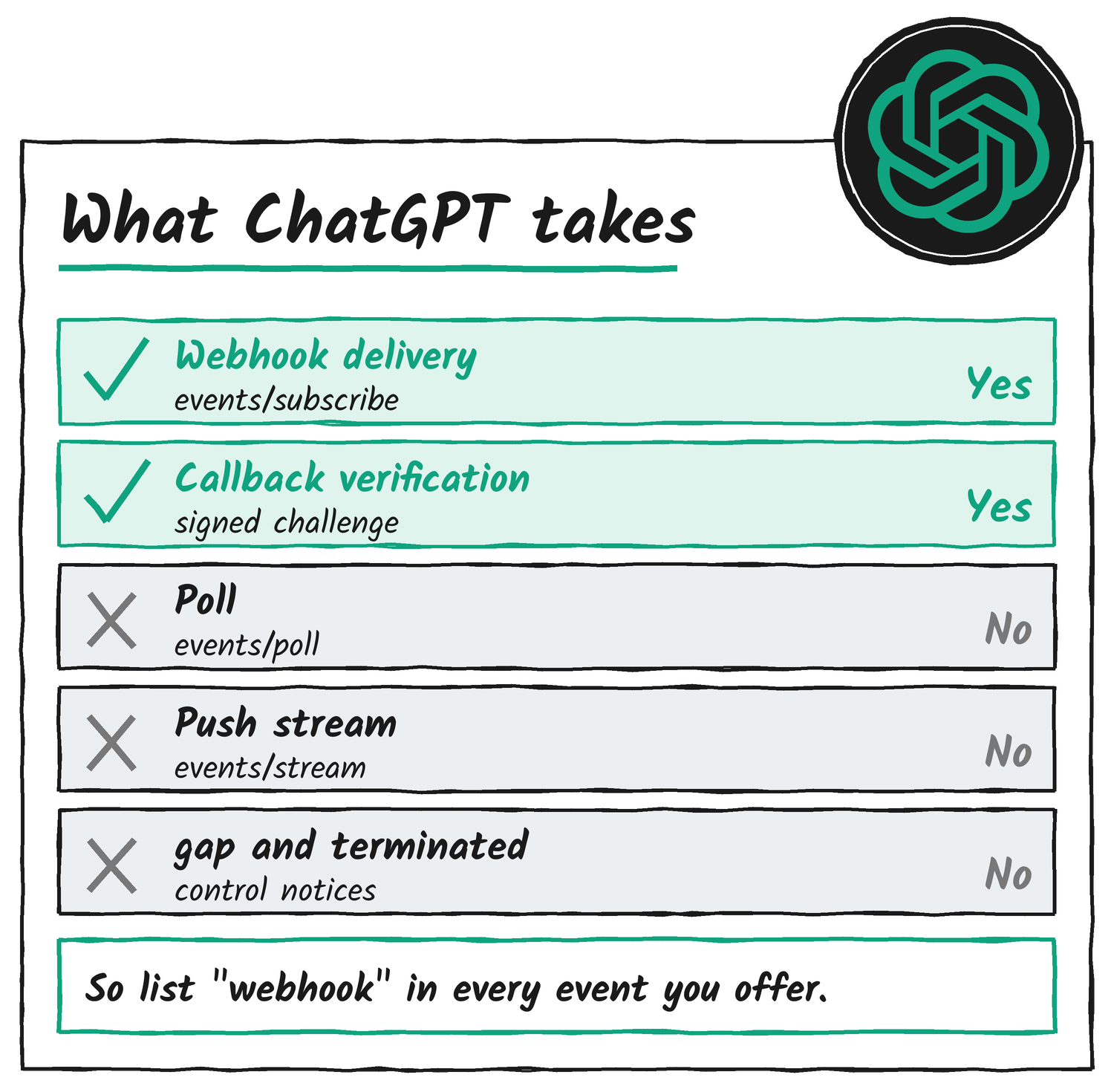
A separate feature shares part of the name. ChatGPT’s built-in event-triggered tasks respond to Gmail, Slack and GitHub activity once you connect those apps under Settings, then Apps, and they’re open to eligible Plus, Pro, Business, Enterprise and Edu accounts, OpenAI’s help centre says. MCP Events is the route for events from your own server.
Step 1: Advertise events from your server
Add an events entry to your server’s capabilities. For servers that use initialisation, put it in the initialize response:
{
  "jsonrpc": "2.0",
  "id": 1,
  "result": {
    "protocolVersion": "2025-03-26",
    "capabilities": {
      "tools": {},
      "events": {}
    },
    "serverInfo": { "name": "example-server", "version": "1.0.0" }
  }
}
For MCP 2.0 with protocol version 2026-07-28, put it in the server/discover response instead:
{
  "jsonrpc": "2.0",
  "id": 1,
  "result": {
    "resultType": "complete",
    "supportedVersions": ["2026-07-28"],
    "capabilities": {
      "tools": {},
      "events": {}
    }
  }
}
The extension’s final text names the capability io.modelcontextprotocol/events under extensions. ChatGPT reads the top-level events entry from the earlier draft, so Expose, a tunnelling service whose server ChatGPT can subscribe to, declares both.
Step 2: Implement the three event methods
Serve events/list, events/subscribe and events/unsubscribe on the same authenticated MCP endpoint as your tools. events/list returns your event definitions, events/subscribe creates or refreshes a subscription, and events/unsubscribe stops one.
A definition tells ChatGPT what users can subscribe to and which filters exist. This one lets a user watch one document for new review comments:
{
  "jsonrpc": "2.0",
  "id": 1,
  "result": {
    "events": [
      {
        "name": "comment.created",
        "description": "A new review comment was added to the specified document.",
        "delivery": ["webhook"],
        "inputSchema": {
          "type": "object",
          "properties": {
            "document_id": {
              "type": "string",
              "description": "ID of the document to monitor for new review comments."
            }
          },
          "required": ["document_id"],
          "additionalProperties": false
        },
        "payloadSchema": {
          "type": "object",
          "properties": {
            "document_id": { "type": "string" },
            "comment_id": { "type": "string" },
            "text": { "type": "string" },
            "url": { "type": "string" }
          },
          "required": ["document_id", "comment_id", "text", "url"],
          "additionalProperties": false
        }
      }
    ]
  }
}
inputSchema describes the arguments ChatGPT passes when it subscribes, and payloadSchema describes the data object in every delivered event. List webhook under delivery, because it’s the only mode ChatGPT uses. Use stable event names and specific descriptions, apply filters on your server before delivery, and return only the events the connected account is allowed to discover. If the catalogue spans several pages, return nextCursor and accept it as cursor on the next request.
Step 3: Make the endpoint reachable and inspect it
ChatGPT needs a public HTTPS endpoint that supports streamable HTTP. OpenAI’s Secure MCP Tunnel connects a private server without exposing it to the internet, and a development tunnel works for local testing, but neither replaces the public endpoint plugin submission needs. Check the endpoint with MCP Inspector before you add it:
npx @modelcontextprotocol/inspector@latestExercise each tool with representative inputs, missing identifiers and empty results, and confirm authentication errors are readable. OpenAI’s guide says to resolve transport, initialisation, schema and authentication errors before you go on.
Step 4: Add the server to ChatGPT
- Go to ChatGPT Plugins, select the plus button, then Add custom MCP server.
- Enter a user-facing name and description.
- Under Connection, enter the MCP server URL including the
/mcppath, or select Tunnel and choose a tunnel or enter itstunnel_id. - Configure authentication, read the risk warning and select I understand and want to continue.
- Select Create as a plugin, then review the tools and metadata ChatGPT discovered.
- Open the plugin page and check that your events appear alongside your tools.
After any change to your tools or events, deploy or restart the server, open the connection under ChatGPT Plugins, select Refresh, confirm the advertised metadata changed and start a new conversation.
Step 5: Subscribe from a Work chat
Start a Work chat on ChatGPT web, or select Work and Cloud in the desktop app. A dot works too. Tell ChatGPT what to monitor and what to do when an update arrives. OpenAI’s own examples show the pattern:
| Use case | What you tell ChatGPT | MCP event |
|---|---|---|
| Turn feedback into pull requests | Monitor #product-feedback for bug reports and open draft pull requests with fixes and tests. | message.created, filtered by channel_id |
| Apply document feedback | Watch this document for review comments and implement any requested edits. | comment.created, filtered by document_id |
ChatGPT then calls events/subscribe on your server with the event name, the filter arguments and a webhook destination:
{
  "jsonrpc": "2.0",
  "id": 2,
  "method": "events/subscribe",
  "params": {
    "name": "comment.created",
    "arguments": { "document_id": "doc_123" },
    "delivery": {
      "mode": "webhook",
      "url": "https://receiver.example.com/mcp-events/callback_123",
      "secret": "whsec_<base64-encoded-signing-key>"
    },
    "cursor": null
  }
}
Before your server accepts it, four things have to happen:
- Check that the user is authorised for the requested event and arguments.
- Validate the event name and arguments against your definition, and require a
whsec_signing secret whose base64 value decodes to 24 to 64 bytes. - Validate and verify the callback URL (step 6).
- Store the subscription with its owner, filters, callback URL, signing secret and expiry.
Then return a subscription ID with the expiry you grant. Derive the ID deterministically from the authenticated principal, callback URL, event name and arguments, so a repeated request updates the existing subscription. Compare arguments as canonical JSON, so key order doesn’t create duplicates.
{
  "jsonrpc": "2.0",
  "id": 2,
  "result": {
    "id": "sub_123",
    "refreshBefore": "2026-10-02T12:00:00Z",
    "cursor": null,
    "truncated": false
  }
}
Return cursor: null for event types that don’t support replay.
Step 6: Verify the callback
Before your server sends any application data, it has to prove the callback URL wants the events. Send a signed request with a fresh, single-use, short-lived challenge:
{
  "type": "verification",
  "challenge": "a-single-use-random-value"
}
Give the request a unique webhook-id such as msg_verification_123, sign the body with the subscription’s secret, and include webhook-timestamp, webhook-signature and X-MCP-Subscription-Id. ChatGPT echoes the challenge in its response:
{
  "challenge": "a-single-use-random-value"
}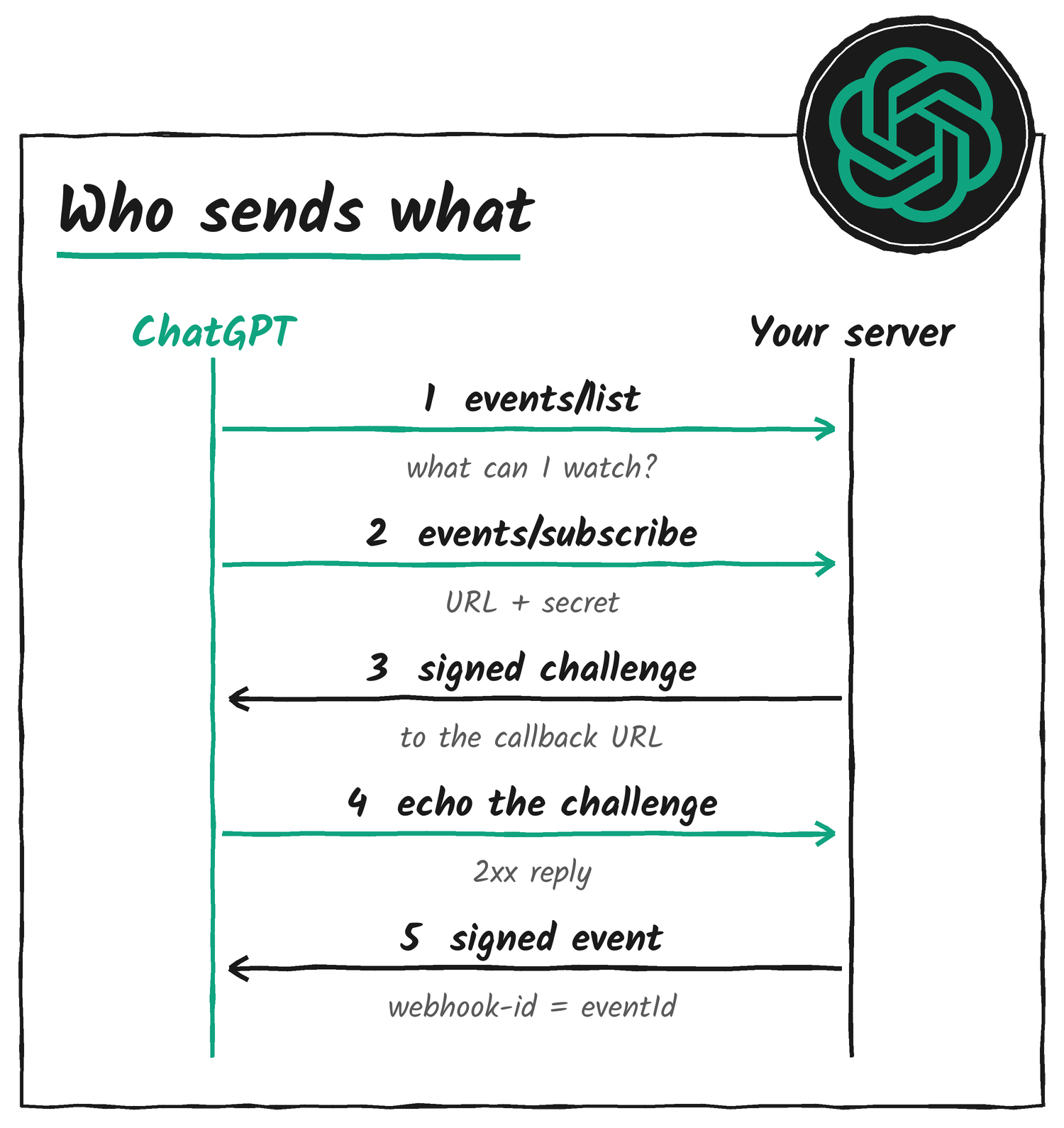
Require a 2xx response, compare the returned challenge in constant time and only then activate delivery. Cache a successful check for a bounded period per authenticated principal and callback URL, so repeated subscriptions don’t trigger repeated challenges. If verification fails, return JSON-RPC error -32015 (CallbackEndpointError) with a categorised data.reason, such as challenge_failed or timeout.
Callbacks must use HTTPS. Resolve and validate the destination address at connection time, connect to the address you validated while keeping the original hostname for TLS verification, block private, local and other non-public addresses, and don’t follow redirects. Apply the same checks to verification requests and to event deliveries.
Step 7: Send a signed event
When something matches an active subscription, POST one event object to its callback URL:
{
  "eventId": "evt_456",
  "name": "comment.created",
  "timestamp": "2026-10-01T12:05:00Z",
  "data": {
    "document_id": "doc_123",
    "comment_id": "comment_456",
    "text": "Can we add the rollout dates to this section?",
    "url": "https://docs.example.com/doc_123#comment_456"
  },
  "cursor": null
}
Use a unique eventId and keep it across retries. Set timestamp to when the event occurred, as an ISO 8601 time with a timezone. The name has to match the subscribed event and data has to match its payloadSchema. Application fields go inside data, because a top-level type marks a protocol control notification.
ChatGPT verifies deliveries with Standard Webhooks, using the subscription’s signing secret. The signature covers the event ID, the signing timestamp and the exact body bytes, so serialise the body once and send those same bytes.
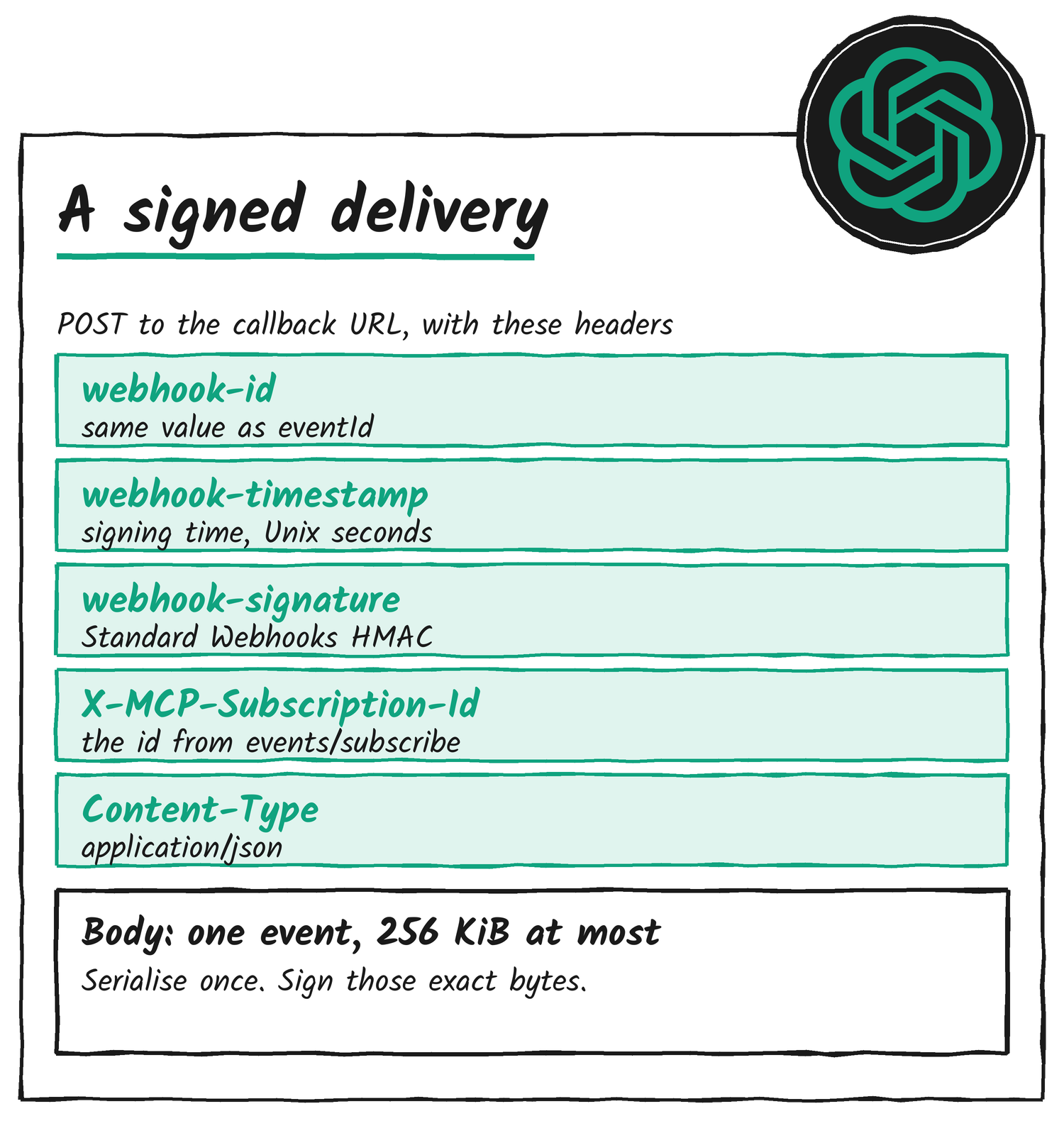
OpenAI’s Node.js example, using the standardwebhooks package, shows the whole delivery. Pass a webhookFetch with the same interface as fetch that validates callback addresses on each connection and blocks redirects:
import { Webhook } from "standardwebhooks";

export async function sendEvent(
  subscription: { id: string; url: string; secret: string },
  event: { eventId: string },
  webhookFetch: typeof fetch
) {
  const body = JSON.stringify(event);
  if (Buffer.byteLength(body, "utf8") > 256 * 1024) {
    throw new Error("Event payload exceeds 256 KiB");
  }

  const signedAt = new Date();
  const signer = new Webhook(subscription.secret);
  const response = await webhookFetch(subscription.url, {
    method: "POST",
    redirect: "error",
    signal: AbortSignal.timeout(10_000),
    headers: {
      "Content-Type": "application/json",
      "webhook-id": event.eventId,
      "webhook-timestamp": String(Math.floor(signedAt.getTime() / 1000)),
      "webhook-signature": signer.sign(event.eventId, signedAt, body),
      "X-MCP-Subscription-Id": subscription.id,
    },
    body,
  });

  return { accepted: response.ok, status: response.status };
}
A 2xx response acknowledges receipt, and ChatGPT processes the event asynchronously. Send one event per request, with a body of 256 KiB (262,144 bytes) at most. ChatGPT can group separately delivered events into one task run, according to the task’s batching settings. Retry transient failures with exponential backoff and bounded attempts, keeping the event ID and signing afresh each time. Don’t retry a 410 or 413. Events can arrive out of order, so make your write tools idempotent.
Step 8: Keep subscriptions alive and stop them
ChatGPT refreshes an expiring subscription by calling events/subscribe again before refreshBefore, with the same identity and the last saved cursor. Update the existing subscription and return the new expiry. If ttlMs is omitted, use your server’s default lifetime. A ttlMs of null asks for no expiry, and you return refreshBefore: null only when you grant that. If a refresh brings a replacement secret, replace the stored one, and sign with both keys for a short rotation window using Standard Webhooks’ space-separated signatures.
Keep subscription state for the lifetime you grant, including across restarts, recheck the user’s access during that time, and stop delivery if it’s revoked. To stop a subscription, ChatGPT calls events/unsubscribe with the original event name, arguments and callback URL:
{
  "jsonrpc": "2.0",
  "id": 3,
  "method": "events/unsubscribe",
  "params": {
    "name": "comment.created",
    "arguments": { "document_id": "doc_123" },
    "delivery": {
      "mode": "webhook",
      "url": "https://receiver.example.com/mcp-events/callback_123"
    }
  }
}
Stop sending events for that subscription and return an empty result, {}. Make unsubscribe idempotent and authorise it against the connected account.
How to check it works
OpenAI’s test list covers the full lifecycle. Run it in this order:
- Confirm your server advertises
eventsthroughinitializeorserver/discover, receivesevents/listand returns the definitions you expect. - Check that your events appear on the plugin page alongside your tools.
- Start a Work chat on ChatGPT web, or select Work and Cloud in the desktop app, and ask ChatGPT to subscribe to one of your events and say what it should do when one arrives. A dot works for this too.
- Confirm your server receives
events/subscribewith the expected event name and arguments. - Check that callback verification succeeds and the subscription is stored.
- Trigger a matching event in your app and confirm the webhook delivery gets a
2xx. - Confirm ChatGPT receives the event data and responds as you instructed.
- For a filtered subscription, trigger an event that doesn’t match the filters and confirm it isn’t delivered.
- Stop monitoring in ChatGPT, then confirm your server processes
events/unsubscribeand stops delivering.
Then run the failure cases OpenAI lists: repeated subscription requests, expiry and refresh across a server restart, account disconnection, revoked access to a subscribed resource, invalid signatures, duplicate deliveries, and bursts with batching on and off. If the action ChatGPT takes changes data in your app, check the resulting events don’t create a feedback loop.
A server to try: Expose
Expose’s write-up says ChatGPT can subscribe to its request.completed event today. Connect the Expose MCP server at https://expose.dev/mcp to ChatGPT, share a site with expose share http://localhost:3000, and ask ChatGPT to tell you when a request to your tunnel fails. Expose says the event carries the method, path, status and duration but no headers or bodies, that it grants a subscription at most 24 hours, and that it limits each subscription to 30 deliveries a minute. It also says ChatGPT expects error -32015 for a failed callback check where the SEP has -32027.
Pitfalls
| Situation | What to do |
|---|---|
The capability sits only under extensions | Declare the top-level events entry too. ChatGPT reads it. |
| An event offers only poll or push | List webhook in delivery. It’s the only mode ChatGPT uses. |
webhook-id doesn’t match eventId | Send the same value in both, and keep it across retries. |
| The body is re-serialised after signing | Serialise once and sign those exact bytes. Sign again with a fresh timestamp on each retry. |
| A callback redirects or resolves to a private address | Require HTTPS, validate the address at connection time and don’t follow redirects. |
| The payload is large | Keep a request to 256 KiB. Send a summary and expose a read tool for the full record. |
| The payload carries instructions | Treat comments and other user-authored text as data. Don’t add text telling the model how to behave. |
| Unsubscribing an unknown subscription | Return an empty result, not a not-found error. Expose says ChatGPT expects that. |
| Subscriptions vanish after a restart | Keep subscription storage persistent for the lifetime you grant. |
| ChatGPT’s action changes your data | Check the resulting events don’t trigger the same subscription again. |
Pages to keep
- OpenAI: MCP Events, the reference this guide follows.
- OpenAI: Connect and test your plugin, for adding and refreshing a custom MCP server.
- OpenAI Help Centre: Connecting custom MCP servers in ChatGPT, for plans and permissions.
- OpenAI Help Centre: Scheduled tasks in ChatGPT, for the built-in Gmail, Slack and GitHub triggers.
- MCP Events extension reaches beta, for how the extension works.
- Expose: How we built MCP Events, a worked server.
- Standard Webhooks, for signing and verifying.
Disclosure: I’m an OpenAI, Firecrawl and Devin ambassador.
Discover more from Sulat AI & Tech News
Subscribe to get the latest posts sent to your email.