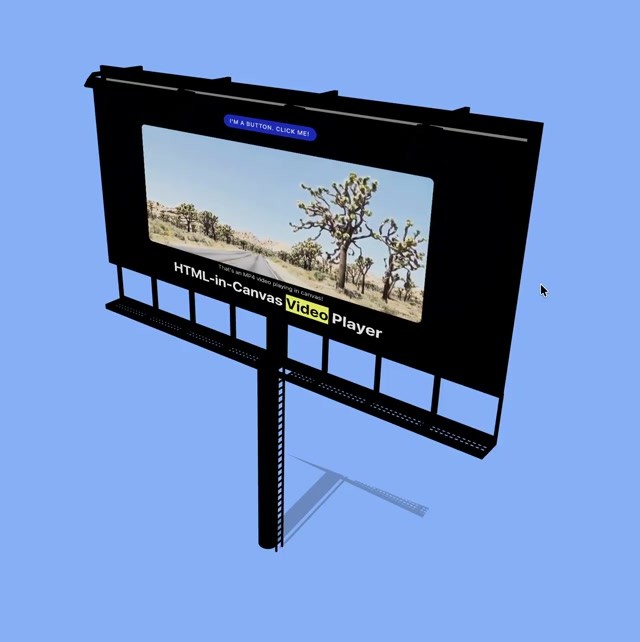
Chrome for Developers says HTML-in-Canvas has landed in Chrome 157. According to Chrome’s documentation, pages can paint live DOM into 2D, WebGL and WebGPU canvases. Chrome also says selection, Find-in-Page, translation and accessibility trees continue to apply to that painted content.
The 9 November ChromiumDev post links Natalia Markoborodova’s Chrome Developers blog of 26 October 2026. That post says Chrome 157 is the official stable release after an origin trial. Separately, Google’s Chrome Releases blog promoted Chrome 157 to the stable channel for Windows, Mac and Linux on 3 November 2026.
Sulat hasn’t retested the API in Chrome, Firefox or Safari, and hasn’t audited the third-party libraries Chrome names.
How the API is supposed to work
Chrome’s guides tell developers to set content="drawable" on the canvas and drawable on the elements they want painted. In 2D, the quickstart uses CanvasRenderingContext2D.drawElementImage(). In WebGL and WebGPU, Chrome says the DOM is uploaded as a texture, then canvas.updateElementGeometry() takes a transform so hit-testing and accessibility geometry follow the painted pixels.
HTML-in-Canvas launches in Chrome 157 to let you create UIs never before possible on the web
ChromiumDev’s post calls out interactivity inside 3D textures, screen-reader access, translation and Find-in-Page. Markoborodova’s blog also lists text selection, copy and paste, context menus, autofill, extension rewrites of mesh text, DevTools CSS inspection, crawler and AI-agent indexing, and export through toDataURL(), toBlob() and captureStream().
What Chrome says was broken before
In the blog, Markoborodova walks through two older patterns. Imperative drawing with fillText() and similar calls, she writes, leaves screen readers, Find-in-Page, translation and natural copy-paste out unless a hidden fallback DOM is maintained by hand. Floating HTML overlays synced with JavaScript transforms, she writes, can tear under camera motion, sit above the whole canvas instead of inside a 3D scene, and force per-frame style work as overlay count rises.
Chrome’s pitch, in short: keep canvas-level pixel and GPU control, and keep the painted HTML as real DOM that stays selectable, searchable, translatable and exposed to assistive technology.
Feature detection and support limits
Chrome documents a short support check: create a canvas, set content="drawable", then test whether canvas.content === "drawable". Those pages say the API arrived in Chrome 157 and “might not be supported in all browsers.” Suggested fallbacks include alternative UIs, floating overlays, or libraries such as html2canvas, dom-to-image and three-html-render. Those libraries, Chrome notes, are third-party projects outside Google’s maintenance.
On 4 November, This Week in React author Sébastien Lorber wrote that Chrome 157 was out, HTML-in-Canvas was stable, and no flag was needed. That lines up with Chrome’s stable-release wording. Sulat hasn’t checked flag state across every Chrome channel.
Lorber’s note is a developer report about Chrome 157 defaults.
Libraries Chrome names, and Shopify Editions
Chrome’s overview names several graphics libraries with HTML-in-Canvas hooks and leaves current status to each project. The list includes experimental THREE.HTMLTexture in Three.js, PlayCanvas texture setSource(), BABYLON.HtmlTexture, PixiJS HTMLSource from v8.19.0, and the open-source CanvasUI set. Chrome repeats that these are community libraries, not Google-supported products.
On 28 October, ChromiumDev said Shopify used HTML-in-Canvas in its latest Shopify Editions experience so interactive HTML sits inside canvas scenes, and told visitors to tap “~” on the Editions site. That is Chrome’s claim about a partner demo. Sulat hasn’t verified the Editions code.
Where Chrome sends developers next
Chrome’s overview links 2D, WebGL and WebGPU guides, Modern Web Guidance for coding agents, a WICG GitHub feedback repo and a community demo collection. The company presents HTML-in-Canvas as a Chrome 157 platform API after the origin trial. Its docs tell developers to feature-detect, because other browsers may lack support.
Discover more from Sulat AI & Tech News
Subscribe to get the latest posts sent to your email.