Grok Bot can now connect to MCP servers on a private Tailscale network without those servers being opened to the public internet, Tailscale said. The feature behind the connection, Tailscale OAuth apps, is now generally available, and the company says other developers can use it to build their own agent integrations.
@bot can now connect to private MCP servers on your tailnet without exposing them to the public internet.
— Tailscale on X
Powered by Tailscale OAuth apps, now GA, so you can build secure agent integrations, too.
Grok Bot, the AI agent app from SpaceXSI and Cursor, does its work on a computer of its own in the cloud, away from the user’s machines. The tools people most want an agent to use, such as an internal database or wiki, often sit on private networks. Tailscale’s announcement puts the problem this way: “You shouldn’t have to expose your internal infrastructure to the public internet just to make it accessible to an AI agent.”
The three terms
MCP, the Model Context Protocol, is an open standard for connecting AI applications to outside tools and data, such as files, databases and search engines. An MCP server is the program that offers those tools to an agent. Sulat’s MCP explainer goes into more detail.
A tailnet is a private network run on Tailscale. Laptops, phones, servers and small computers such as a Raspberry Pi join it and can reach one another over encrypted connections wherever they are. A policy file controlled by the tailnet’s admins decides which devices can talk to which.
OAuth is the standard behind the familiar “Sign in with…” approval screen. A Tailscale OAuth app lets a tool ask a person for permission on a Tailscale consent screen, then add a device to their tailnet that belongs to that person.
How Grok Bot joins a tailnet
Users connect through the Tailscale plugin in the Grok Bot desktop app, which needs Grok Bot 0.49 or newer, according to the plugin’s README. Choosing Authenticate opens Tailscale’s consent screen. Once the user approves, Grok Bot joins the tailnet as a device tied to their identity. Tailscale says the tailnet’s access policies, audit logs and device quotas then apply to it “just like for any other device you own”, and that “you’re not pasting keys or secrets anywhere.”
Tailscale’s developer guide describes what happens underneath. The approval produces an access token that also works as the key for adding one device to the tailnet. It can be used once, it expires after an hour, and no refresh token comes with it, so each new device means another trip through the consent screen. Tailscale’s changelog lists the API for creating these apps as generally available from 27 October, ahead of the 9 November announcement that named Grok Bot as a production user.
What Grok Bot can reach
After connecting, users add MCP servers on the tailnet to Grok Bot by their http:// or https:// address. The connection reaches further than MCP. Grok Bot’s setup guide says commands on the bot’s own computer can reach tailnet machines by name or by their Tailscale 100.x address, over HTTP, HTTPS or TCP, with nothing extra to install. Disconnecting a tailnet cuts open connections “within seconds”, the guide says.
The guide limits who can use the connection. On a personal tailnet, that’s the bot’s owner, teammates they’ve linked and routines the owner schedules. On a company tailnet, it’s the member’s own chats, Slack direct messages and scheduled routines, and Slack Connect channels never use a tailnet. Grok Bot asks for approval before it removes a device, adds a tailnet or changes the default one.
Some users were already running servers like this. One replied to Tailscale that they’d connected a “context server” on a Raspberry Pi, which their agents use as shared memory between sessions.
Implemented this yesterday.
— Ebsolas on X
I have a context server on a ras pi that I have on my tailnet. It’s acting as a durable brain to keep working knowledge shareable between agents and sessions.
So things like knowledge about my network or design philosophy doesn’t get lost in a single long session.
Personal and company tailnets work differently
The plugin offers two setups, and they differ most in how much of the network the bot’s device can reach.
| Detail | Personal tailnet | Company tailnet |
|---|---|---|
| Who sets it up | The member, who must own or administer the tailnet | A team admin enables it at cursor.com, then each member authenticates their own device |
| Tailscale plan | No plan requirement listed | Premium or Enterprise |
| The bot device’s access | Joins untagged, with the member’s own access | The member’s own access, plus a custom:grokbot attribute |
| How to narrow it | No tag or posture option in Grok Bot’s current docs | Device postures that check the custom:grokbot attribute |
| Status | Available | Beta |
That matters because of how Tailscale starts out. A new tailnet’s default policy lets every device reach every other device. If a personal tailnet still uses that default, a Grok Bot device that joins with its owner’s access can reach anything else on the network, not just the MCP servers, until the owner writes narrower rules.
Tailscale’s tag workaround doesn’t match Grok Bot’s plugin
Custom posture attributes are a Premium and Enterprise feature. For other plans, Tailscale’s blog suggests a different route. Tags are Tailscale’s labels for machines, and a policy can give a tagged device narrower access than its owner has.
“On other plans, you can achieve similar control by assigning a tag to Grok Bot’s device after authentication and using tag-based access rules instead of combining user identity with device posture.”
— Tailscale blog
Grok Bot’s plugin has dropped that route. Its changelog for version 1.0.5 says personal tailnets now connect only through one-click Connect and “the tag:grokbot sign-in path is gone.” A GitHub issue filed on 4 November says tagging the device “immediately drops its session”, and that reconnecting creates a new device that’s untagged again. In Tailscale, tagging a device changes its owner from a person to the tag. The error the plugin shows says Grok Bot signs a device out when that happens.
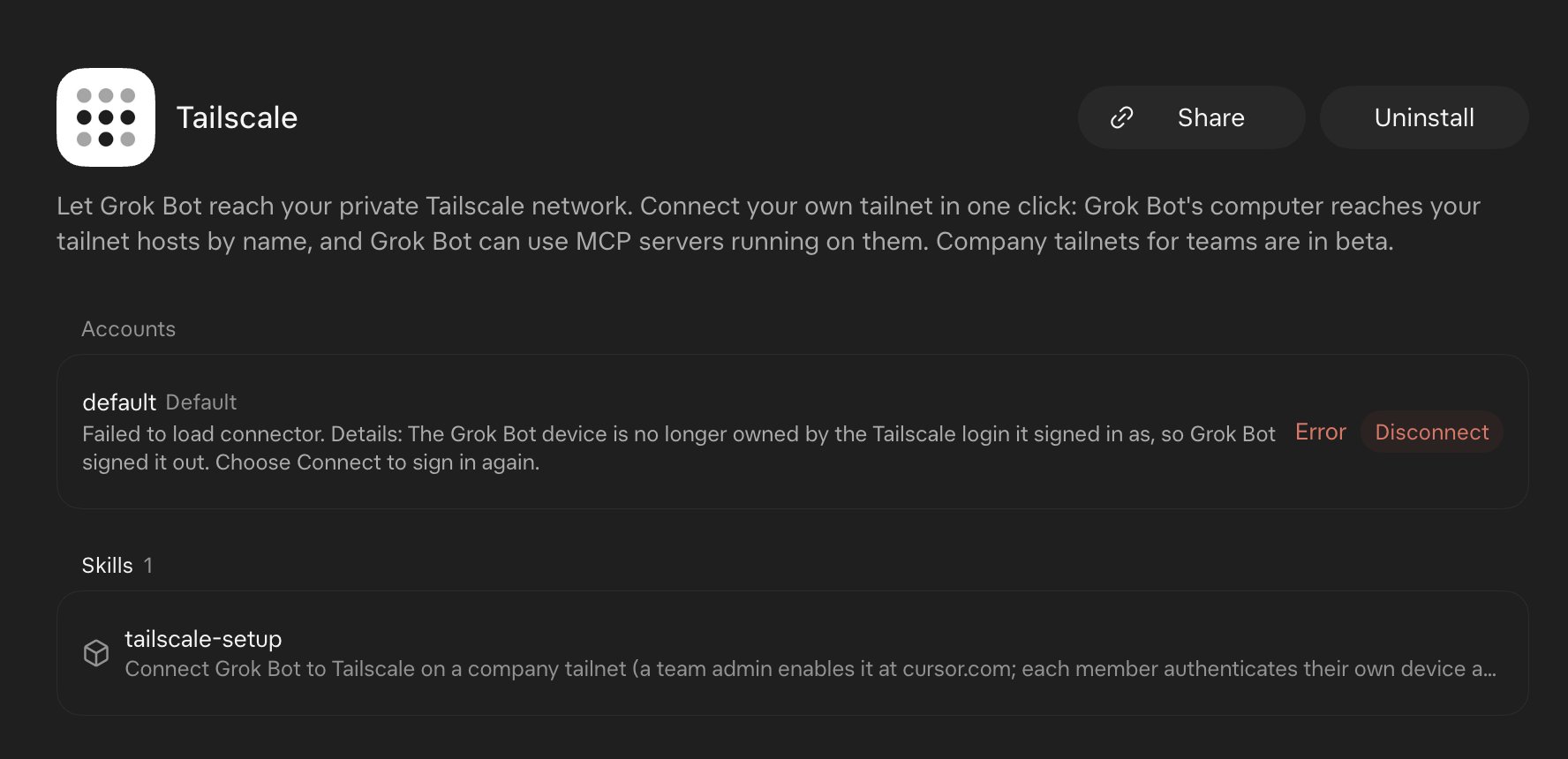
Several people raised the mismatch in replies to Tailscale’s post, including Dom, a staff software engineer whose screenshot is above, and another user who said the plugin showed its authorisation as expired once a tag was applied. Jack Spiering, who calls himself a Tailscale Insider, asked for the device to join with a predefined tag instead.
@Tailscale @spacexai feedback: please let the Grok Bot device join a tailnet with a predefined ACL tag. Right now it joins as my user and gets all my access, and adding a tag after approval makes it expire directly. A tag would let me limit it to only the services it needs on a more granular way.
— Jack Spiering on X
My way of managing a tailnet is that everything has a tag, only then you can connect to other devices. A standard join won’t let you do anything. In this case I need to create an exception to let a not tagged device reach tagged devices.
On the GitHub issue, Dean Rie, whose GitHub profile lists SpaceXSI, replied that the plugin no longer offers a tag-based way to limit the device on personal tailnets. Supporting one would be “a product request rather than a docs fix,” he wrote, adding that host and port grants on the member’s own identity are “the closest option on a personal tailnet for now.”
Company tailnets use a posture
On Premium or Enterprise, which Tailscale’s pricing page lists from US$18 per user a month, a team admin enables Grok Bot at cursor.com and allows members’ Grok Bot devices to join. Each member’s device then carries the custom:grokbot attribute. Device postures are Tailscale rules that check a device’s attributes before allowing a connection. In Tailscale’s example policy, existing rules apply only to devices without the attribute, and one extra rule lets Grok Bot devices reach designated MCP servers.
{
  "postures": {
    "posture:grokbot": ["custom:grokbot == true"],
    "posture:human": ["custom:grokbot NOT SET"]
  },

  // All access rules require posture:human unless otherwise specified
  "defaultSrcPosture": ["posture:human"],

  "grants": [
    {
      // Engineers can access production databases. The defaultSrcPosture applies here.
      "src": ["group:engineering"],
      "dst": ["tag:production-db"],
      "ip": ["tcp:5432"]
    },
    {
	// Grok Bots owned by engineers can access MCP servers.
      "src": ["group:engineering"],
      "srcPosture": ["posture:grokbot"],
      "dst": ["tag:mcp-servers"],
      "ip": ["tcp:443"]
    }
  ]
}
Tailscale’s example policy: engineers keep their database access, while their Grok Bot devices can reach only servers tagged as MCP servers, on port 443. Source: Tailscale blog.
Grok Bot’s setup guide warns that without the posture, a company device has the member’s own access. If a tailnet requires device approval, an admin approves the new device on the Machines page. The guide also says split DNS, subnet routes and internal certificate authorities need Cursor to switch them on, and that a public domain name that points at a Tailscale address won’t be followed.
Building your own integration
Tailscale is pitching OAuth apps to other agent builders. Its documentation describes them as a way to build internal tools. A tailnet Owner or Admin creates the app through the Tailscale API, the app and everyone who approves it must belong to the same tailnet, and the consent screen can’t be customised.
The public docs don’t explain how a service used by many organisations, as Grok Bot is, gets onto each customer’s tailnet. Grok Bot’s troubleshooting notes mention an error saying a tailnet “hasn’t allowed Grok Bot’s Tailscale app”, which a tailnet admin has to fix. Tailscale’s developer guide doesn’t describe that approval step.
OAuth apps sit beside Tailscale’s older OAuth clients, which create devices owned by a tag, a shared service identity. Cursor’s own Tailscale integration for its Rollouts feature uses that model, joining as a tagged device with a key that expires in 10 minutes. OAuth apps tie each device to the person who approved it, and Tailscale recommends them when devices need to be traceable to individual users for security, compliance or accountability.
What users are weighing
Some replies described the workaround the plugin replaces: installing Tailscale directly on Grok Bot’s cloud computer. Matthew Lopez, a co-founder of ApertureChat, said that connection “keeps going out due to the constant VM updates.” Grok Bot’s setup guide now says not to install a Tailscale client there, because the computer is wiped when it’s replaced. Tym Rabchuk said they’d been using public MCP servers behind Cloudflare tunnels to limit what the bots could reach, and might revisit that.
Others were more cautious about what it means at work.
Like, this is cool and all from a home labber perspective.
— christian_taillon on X
But things are getting really complex for organizational cyber security.
The company-tailnet setup, which uses the posture approach Tailscale recommends, is still in beta. For personal tailnets, the GitHub issue asking for a narrower option remains open.
Discover more from Sulat AI & Tech News
Subscribe to get the latest posts sent to your email.