Dax Raad, who builds the open-source coding agent OpenCode at Anomaly, said on X on 16 November that all of OpenCode Browse’s browser tools are now available in “codemode”. The post replied to OpenCode’s launch of Browse 0.1.0. Raad wrote that it means “your agent can compose all your mcp tools along with browser actions”, and he called that very powerful. It also leans on a term most people haven’t met. Code mode lets an AI agent use its tools by writing a short program, instead of asking for them one by one.
The short version
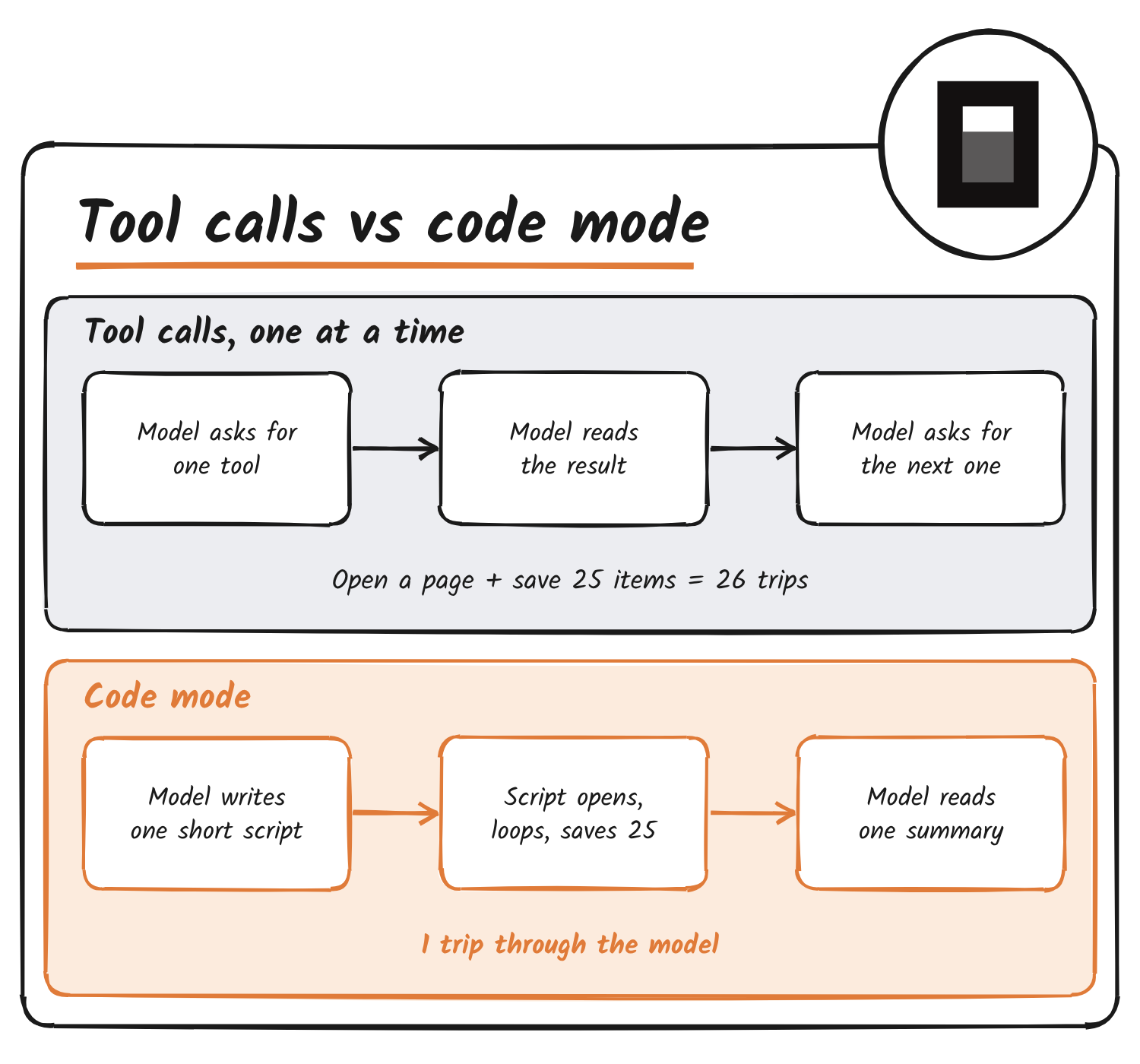
An AI agent does its work by calling tools. A tool is any action it can take, such as opening a web page, searching a repository or saving a record in another app. Normally the agent calls one tool, waits, reads the result, then decides what to call next.
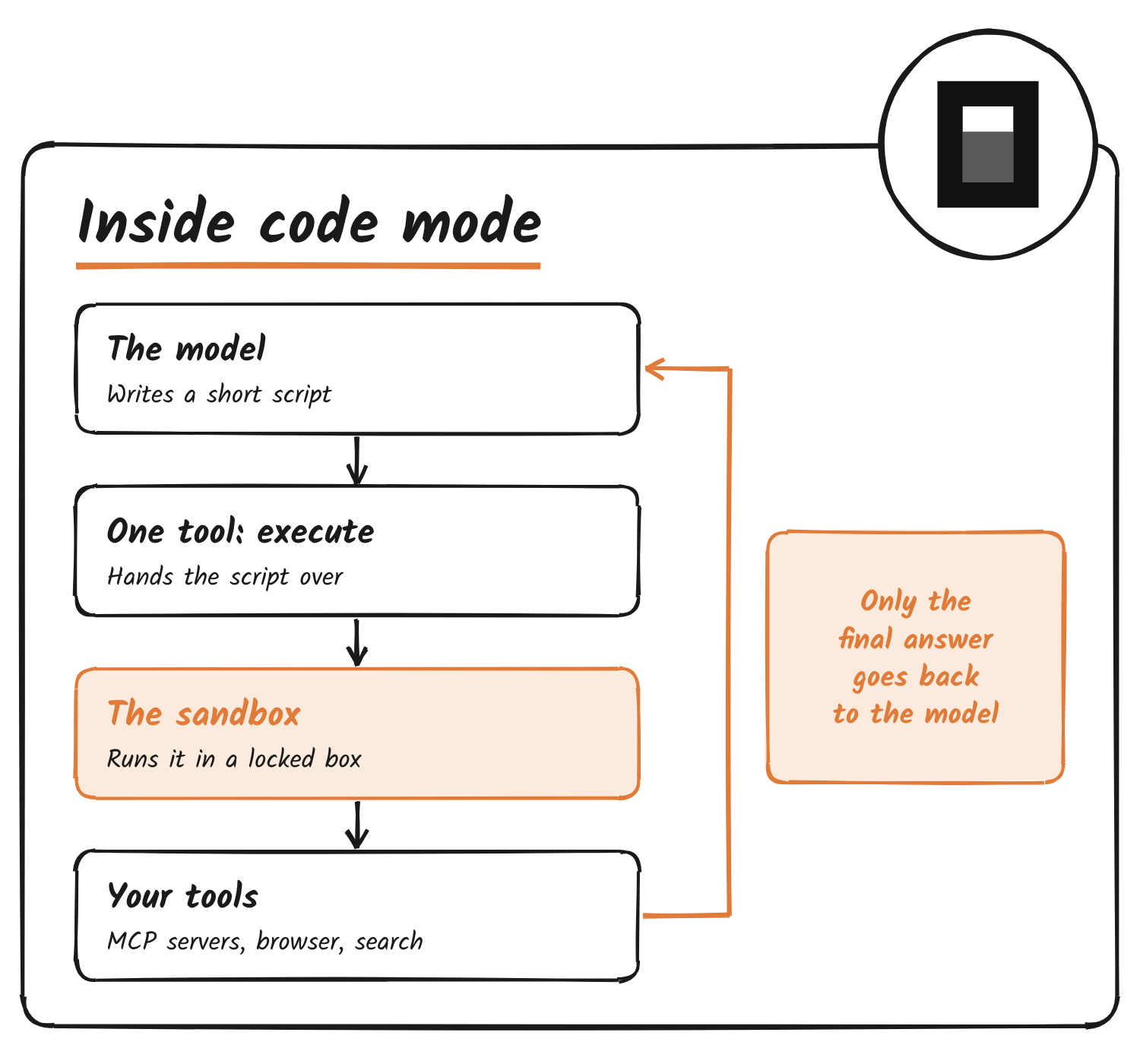
In code mode, the agent writes a small script instead. The script calls the tools, loops over lists and passes one result into the next call. A locked-down runner executes it, and only the final answer goes back to the agent. Think of the difference between texting an assistant one errand at a time and handing over a written checklist.
How agents normally use tools
Three terms do most of the work in this story.
- Tool call: the agent’s request to run one action, such as “open this URL”.
- Round trip: one full loop of the agent asking, the tool running and the result coming back for the agent to read.
- MCP (Model Context Protocol): a common standard for plugging tools into agents, so the same tool works in many products.
Every round trip has a cost. The model has to read the result before it can choose the next step, and all of it piles up in its context window, the limited amount of text it can keep in view at once. A big catalogue of tools also eats that space before any work starts, because each tool’s description has to be shown to the model.
Say you ask an agent to open a page, pull 25 items from it and save each one in a tracking app. With plain tool calls that’s one call to open the page and 25 more to save, and the model reads a result after each. That’s 26 trips.
What changes in code mode
In code mode the model writes one script for the whole job. Dax Raad’s own example describes the same shape: open a URL, fetch a list of things, loop over them and call an MCP tool for each one, then carry on. The sketch below is an illustration of that idea. The tool names are made up and aren’t OpenCode’s real interface.
// Illustration only: invented tool names
const page = await browser.open("https://example.com/jobs");
const jobs = await browser.extractList(page, "job titles");

for (const job of jobs) {
  await tracker.save({ title: job });
}

return { saved: jobs.length };
The agent never sees the 25 individual results. It sees one line back, such as “saved 25”. The loop, the waiting and the passing of data from step to step all happen inside the runner.
Why it helps
There are three separate gains, and the first two are the ones OpenCode’s own design notes lead with.
- Fewer round trips. OpenCode’s code mode documentation says it avoids an agent round trip between every dependent tool call. Independent calls can run together.
- A cleaner context window. Big intermediate results stay inside the program instead of flowing through the model. The model can also look tools up on demand rather than reading a huge catalogue up front.
- Models are good at code. Cloudflare, which introduced the idea, argued that models have seen far more real code than tool-call examples, so writing a script plays to their strengths.
The saving can be large. Anthropic, in its write-up on running code with MCP, reports an example workflow dropping from 150,000 tokens to 2,000, a cut of 98.7%. Cloudflare reports that exposing its whole API as one tool per endpoint would take about 1.17 million tokens, against roughly 1,000 with its code mode setup. A token is a small chunk of text, and the amount of text a model reads is a big part of what an agent run costs.
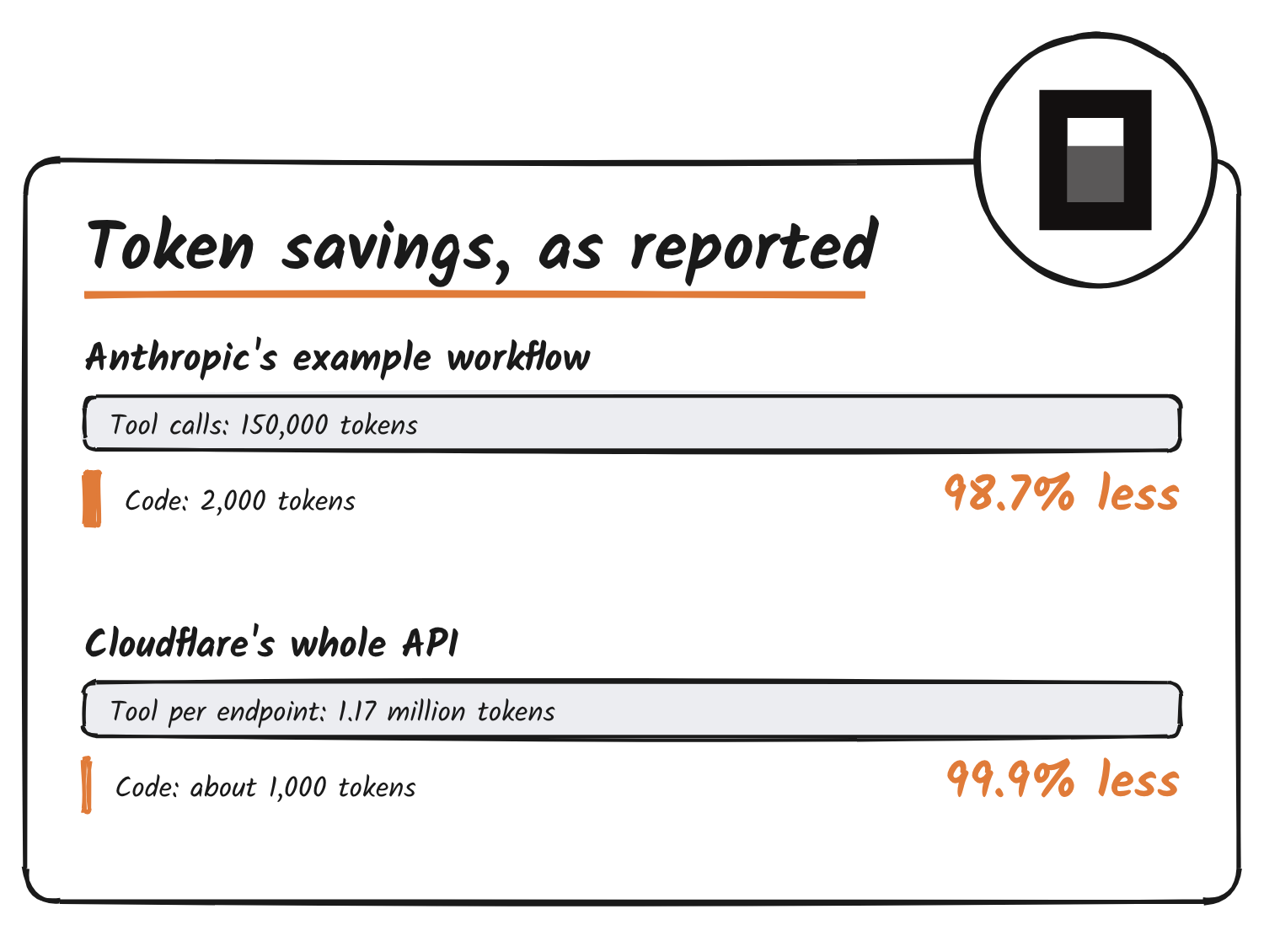
Treat those as the vendors’ own examples. They show what’s possible on a workflow built to suit code mode, not what you’ll see on every task.
Where the idea came from
OpenCode’s own README says Cloudflare originally introduced code mode. Anthropic then published its own take, and Claude Code has an experimental version, covered in our report on Claude Code’s Code Mode. Same idea, three places to run the code.
| Who | How tools are shown to the model | Where the script runs |
|---|---|---|
| Cloudflare | MCP tools turned into a TypeScript API. Its own API server exposes two tools, search and execute | A V8 isolate, a small sealed-off JavaScript sandbox. API keys sit in bindings the script can’t read |
| Anthropic | Tools laid out as files the model opens only when it needs them | A code execution environment, with results filtered before they reach the model |
| OpenCode | One execute tool, plus a search tool to look up the rest | Its own small interpreter, written to run only the JavaScript features it supports |
What OpenCode built
OpenCode 2.0 shipped on 12 October with a package called @opencode/codemode. Anomaly’s launch note says it’s a minimal JavaScript interpreter that turns MCP servers and OpenAPI endpoints into functions the agent calls from a script. The note says it runs scripts natively, without Node.js virtual machines or an embedded engine such as QuickJS.
Three details matter for everyday use.
- It’s on by default. Every MCP server in OpenCode 2.0 is opted into code mode. A server can opt out with
"codemode": falsein its config. - The model sees one tool. The model gets a single
executetool, and a built-in$codemode.searchlets it look up exact tool signatures instead of carrying them all in its context. - It isn’t real Node.js. The README says the interpreter only runs the language features OpenCode has implemented. Timers,
processand filesystem access aren’t available.
The browser is the new part. OpenCode announced Browse 0.1.0 on 16 November, and says it’s rewritten in Rust, uses 25 times less memory, is 23 times smaller and no longer depends on Playwright, a common browser-automation library. Raad’s reply says the browser actions are now part of code mode, so one script can mix them with every other MCP tool the agent has. Browse also works with other MCP clients, where an execute tool lets a script combine several page actions in one go.
Is it safe to run code an AI wrote?
Running code an AI wrote sounds like asking for trouble. The design’s answer is to shrink what the script can touch. OpenCode’s README says programs can’t directly reach the network, the filesystem, processes or application APIs. They can only call the tools the host hands them. Cloudflare’s version uses a sealed sandbox and keeps credentials out of the script’s reach for the same reason.
The README also lists limits a host can set: total run time, the number of tool calls and the size of the output. It ships no defaults for them, so a product built on the package has to choose its own. A sandbox stops a script reaching things it shouldn’t. It doesn’t stop a script doing the wrong thing with the tools it’s allowed to use.
What it doesn’t fix
- Mistakes get repeated. A wrong instruction inside a loop runs on every item. With one tool call at a time, a human or the model might spot the problem after the first.
- Less to review. You see a summary, not each step. Check what a given product shows you before trusting a long script.
- Numbers are examples. The big savings come from vendors’ chosen workflows. OpenCode’s 2.0 launch note publishes no benchmarks.
- It’s still young. OpenCode’s changelog shows steady Code Mode fixes since launch, including one for asynchronous steps that interleaved mid-statement and lost writes.
Plain-English glossary
| Term | What it means here |
|---|---|
| Agent | An AI that takes actions on your behalf, not just answers questions |
| Tool | One action an agent can take, such as opening a page or saving a record |
| MCP | A shared standard for plugging tools into agents |
| Context window | The amount of text a model can hold in view at once |
| Token | A small chunk of text; models read and are billed by tokens |
| Sandbox | A sealed area where code runs with only the access it’s given |
| Interpreter | A program that reads code and carries it out step by step |
Discover more from Sulat AI & Tech News
Subscribe to get the latest posts sent to your email.