
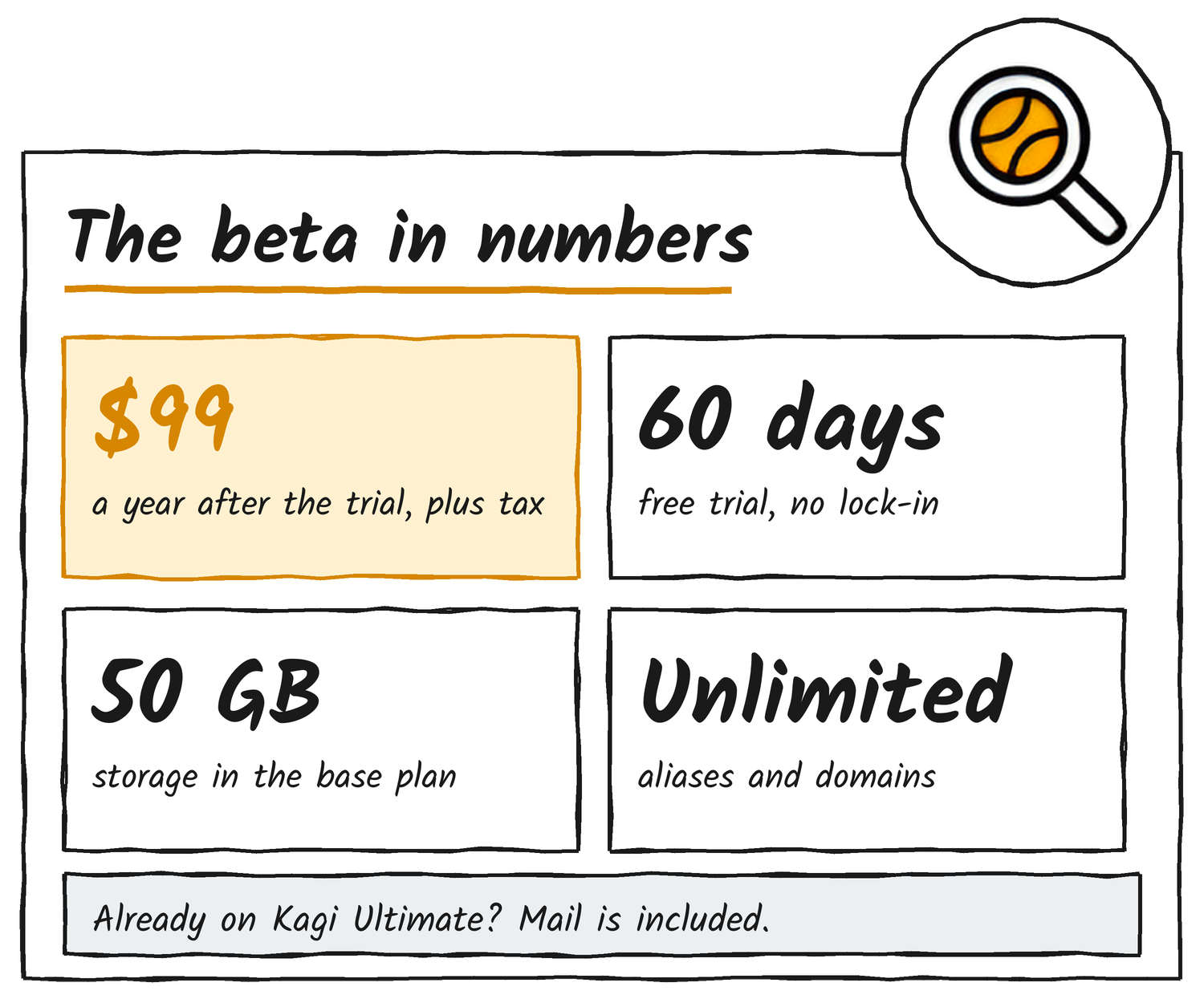
Kagi opened the public beta of Kagi Mail on 23 November, giving anyone a 60-day free trial of a private email and calendar service that runs on the open-source Stalwart server and works with Apple Mail, Thunderbird and any other IMAP, JMAP or CalDAV client. After the trial it costs US$99 a year plus sales tax, and it’s included in Kagi Ultimate, the company’s top subscription tier.
The service is the third leg of a plan Kagi’s chief executive set out in 2025: a search engine, a browser and an email service, all paid for by subscribers rather than advertisers. Its AI layer sorts, highlights and answers questions about your mail, and one switch turns all of it off. Kagi’s own FAQ says the service isn’t end-to-end encrypted, because it has to read the mail to do that work.
What the beta includes
Every account gets a @kagimail.com address, unlimited aliases, unlimited custom domains, a built-in calendar and 50 GB of storage, according to Kagi’s launch post. Kagi built the hosting and both apps itself, a web mail client and a calendar, on top of Stalwart, with the web client written in-house on JMAP.
| Area | What Kagi lists |
|---|---|
| Addresses | A @kagimail.com address, unlimited aliases, and unlimited custom domains with an optional catch-all for each domain |
| Storage | 50 GB |
| Calendar | Single and repeating events, invitations, email reminders, several colour-coded calendars, CalDAV sync and public calendar subscriptions; tasks aren’t supported yet |
| Protocols | IMAP4, SMTP, JMAP, Sieve and CalDAV; POP3 isn’t supported |
| Teams and families | Shared addresses on your own domain with access you choose, and sign-in through a social login or an organisation’s own OIDC provider; shared mailboxes are coming |
| Power users | A keyboard-first interface with a command palette and search operators, Sieve rules that run without AI, and a read-only MCP server |
| Writing | Kagi Translate built in, plus proofreading and translation while you compose |
| Moving in | MBOX import and live IMAP import |
The interface owes a lot to the terminal. Kagi’s FAQ says the UI was originally inspired by text interfaces, so not every feature is reachable with a mouse alone, and pressing ? lists the commands. HTML mail opens as plain text by default, and pressing v shows the full version. Sending can be undone for 15 seconds by default.
How to connect Apple Mail, Thunderbird or another client
Open External Clients in the Kagi Mail settings, create an app-specific password with a short description such as “Thunderbird on laptop”, then add the account in your mail app. Thunderbird, K-9 Mail and FairEmail detect the settings automatically. For manual setup, Kagi lists IMAP on mail.kagimail.com port 993, SMTP on mail.kagimail.com port 465 and JMAP on mail.kagimail.com port 443, all over TLS. Aliases don’t appear in IMAP clients on their own, so they have to be added by hand.
The AI layer, and the line Kagi says it won’t cross
Kagi describes the intelligence features as an executive assistant for the inbox. Rules are written in plain language, such as labelling anything where beta users send product feedback, and each rule only gets the permissions you grant, whether that’s reading the message body or skipping the inbox. Inbox Highlights lists what needs action today and learns from what you dismiss, a newsletter view reads subscriptions like a feed, and an Ask feature answers questions with a link to the source email, including text inside scanned PDFs and photos. Writing to [email protected], or copying it into a thread, gets answers about that conversation, and actions are listed as coming soon.
What Kagi says the AI won’t do is write for you. Its product page puts it this way:
There is no AI inside Kagi Mail pretending it’s you, drafting replies the way it thinks you’d write them.
Kagi Mail product page
Proofreading and translation while you write are included, which fits what chief executive Vladimir Prelovac wrote in June 2025: “please do not send AI generated emails, others will be able to easily tell and it will be embarrassing – spelling and grammar check is OK.”
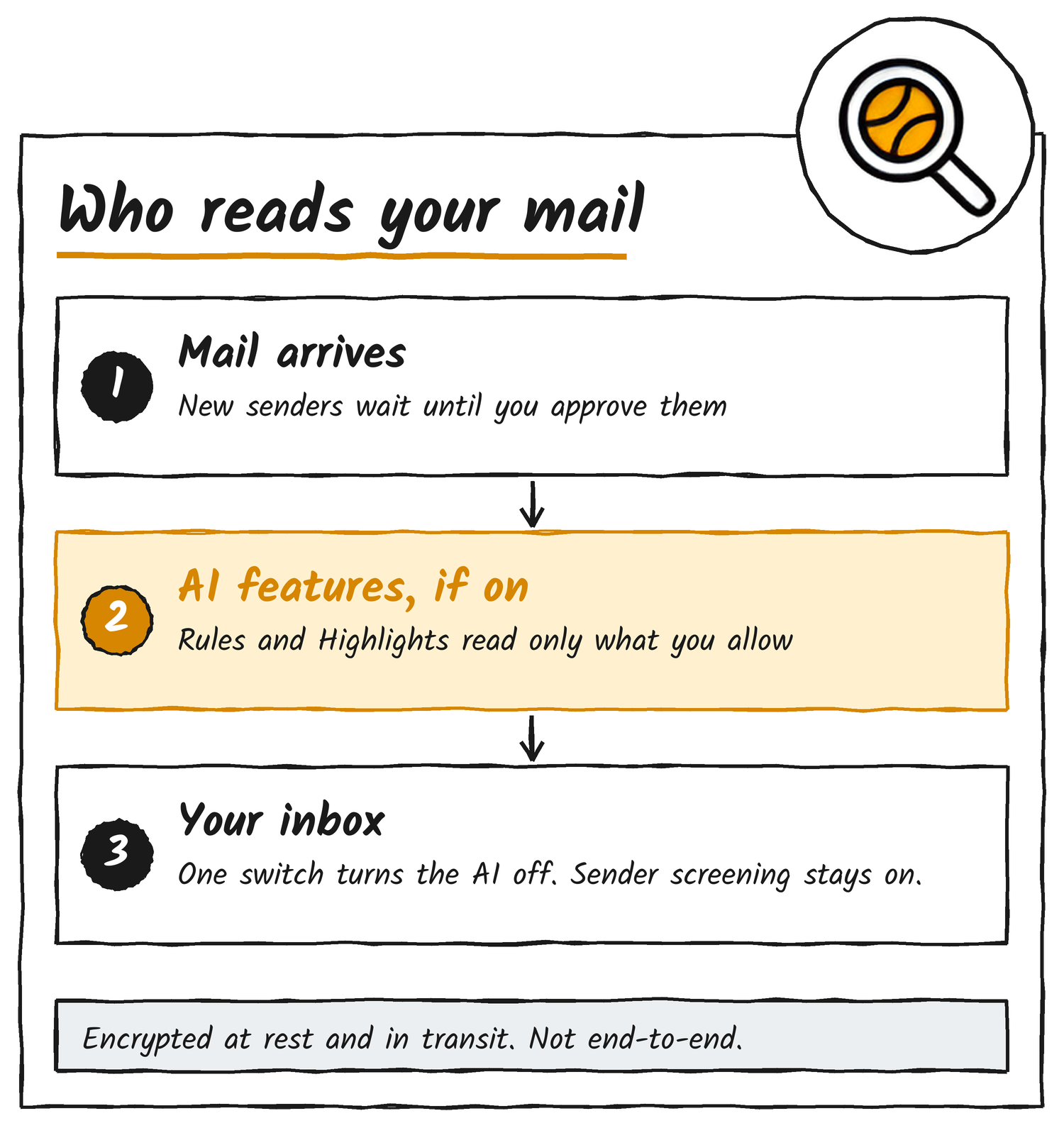
The FAQ lists what the AI switch pauses: Inbox Highlights, Preview, AI rules, natural language search, translation, proofreading and the email assistant. Triage, which holds mail from new senders until you approve them, keeps sorting, and Sieve filters run without any AI. On Kagi Ultimate the AI features draw on the plan’s existing AI allowance.
Privacy: what Kagi promises and what it doesn’t
The promises are specific. Tracking pixels and remote images are blocked or proxied through Kagi’s image proxy, so senders can’t tell when or where a message was opened, and that holds for any client you use to read the mailbox. Suspicious senders trigger a phishing warning, verified senders show their brand logo, and the launch post says: “No ads, ever. No profiling, no selling, no sharing your data.”
The limit is encryption. The FAQ answers “Is Kagi Mail End-to-End Encrypted (E2EE)?” with “No”, and the product page adds that mail is encrypted at rest and in transit but that Kagi Mail “doesn’t offer end-to-end encryption or PGP, because it has to read your mail to flag what needs you and answer your questions.” Users can add end-to-end encryption through a third-party client such as Thunderbird. Proton and Tuta sell the opposite trade: Proton says its always-on end-to-end and zero-access encryption means “even we do not have access to your data”, and Tuta’s plans are listed as fully encrypted.
Jurisdiction is the other question. Kagi Inc. is based in Palo Alto, California, and when a Bluesky user objected to a US-run mail service during the pre-launch teasers, Kagi’s account replied that it plans to offer EU data residency, with no date yet. On retention, Kagi says you can export everything before you leave, after which your data is deleted from its systems on a set schedule and isn’t kept for product improvement.
Price, the trial and the way out
Kagi’s launch post and product page both give a 60-day free trial, after which Kagi Mail is US$99 a year plus sales tax, and the FAQ adds a monthly price of US$9 plus tax. Ultimate members don’t pay extra: Ultimate is US$25 a month, or US$270 a year, on Kagi’s pricing page. The Kagi Mail sign-up page describes the free period another way, saying “Free during Beta” with “No payment information required” and promising notice before anything changes.
The exit promise is the most concrete part of the pitch. After you leave, the mailbox stays reachable for six months, with sending and receiving for the first 60 days and read-and-export access for the remaining four. Export is one click, or any IMAP, JMAP or CalDAV app. Coming in has one catch: a live IMAP import means Kagi encrypts and stores your old account’s password, OAuth sign-in isn’t supported, and Kagi recommends app-specific passwords for Gmail, Outlook and Zoho.
What isn’t here yet
| Feature | Status | Target |
|---|---|---|
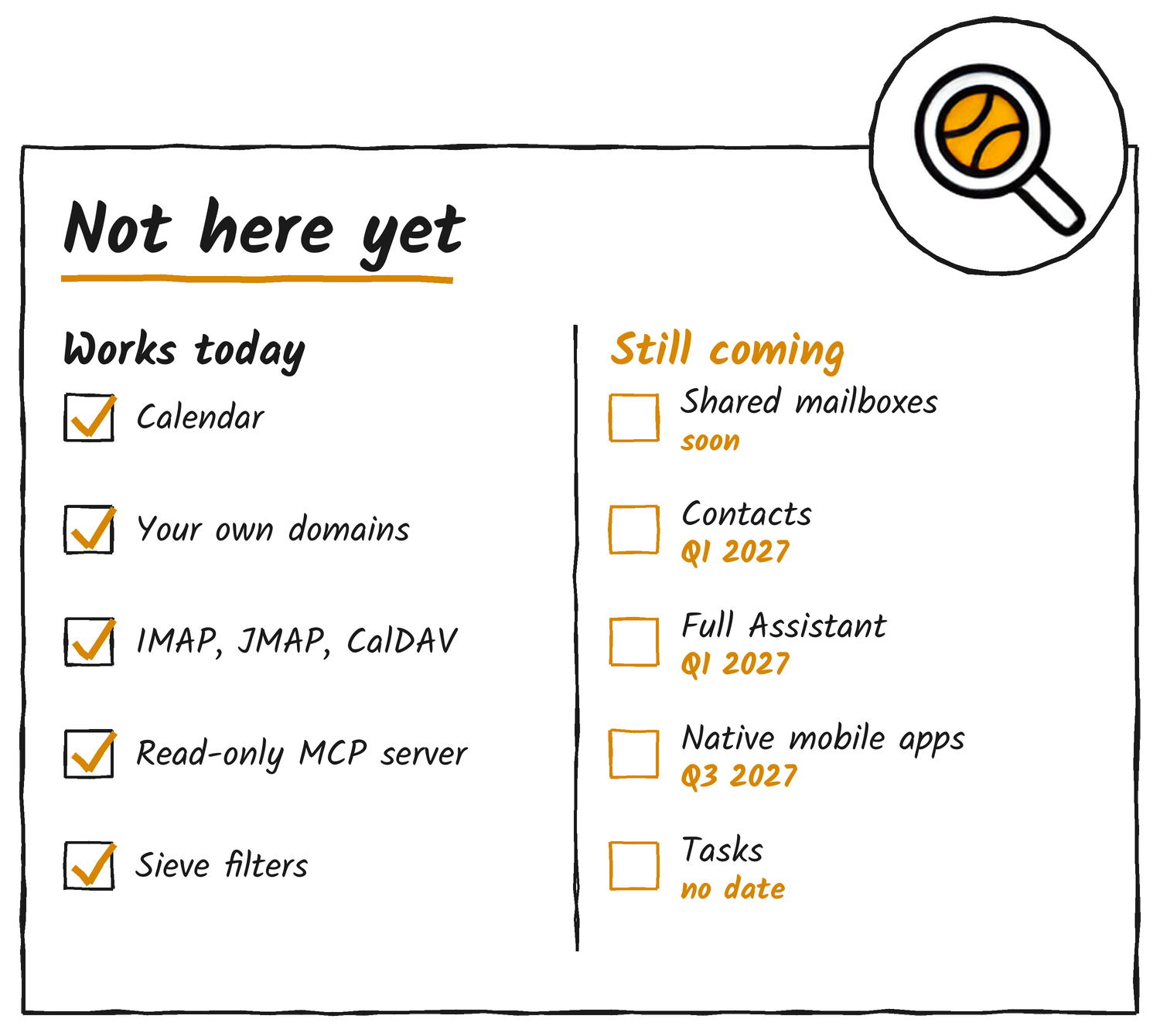
| Contacts and address book | Not available | Q1 2027 |
| Full Kagi Assistant integration | Not available | Q1 2027 |
| Native mobile apps | Mobile web app, or any IMAP or JMAP app | Q3 2027 |
| Shared mailboxes | Not available | “Coming soon”, no date |
| Assistant actions | Not available | “Coming soon”, no date |
| Tasks | Not supported | No date |
| EU data residency | Not available | Planned, no date |
| End-to-end encryption | Not offered | Not planned |
Anyone who needs contacts synced to a phone, or a native iPhone or Android app, waits until 2027 or works through Apple Mail, Thunderbird or another IMAP or JMAP client, which Kagi says set up automatically.
Why Kagi built an email service
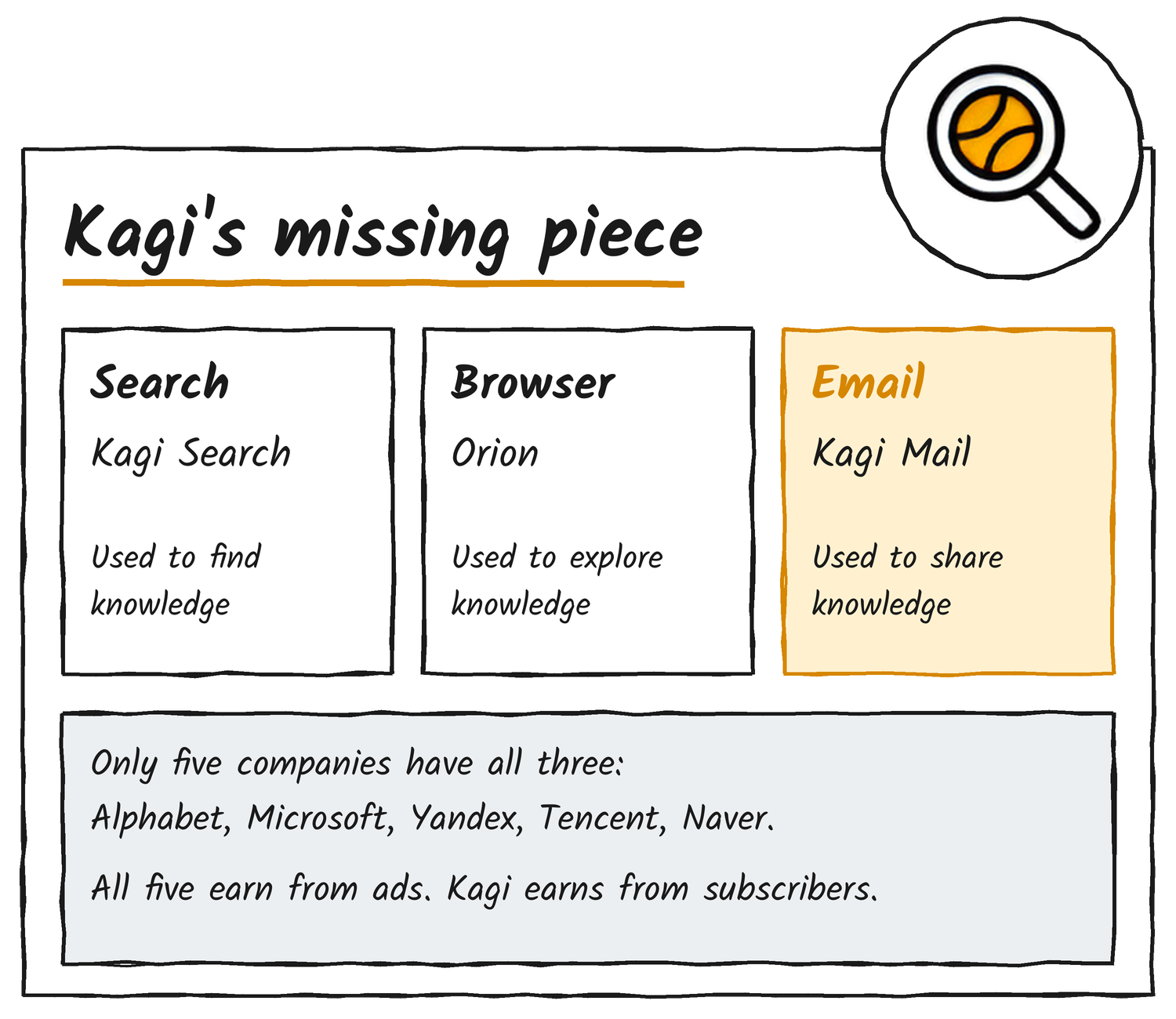
Prelovac laid out the reasoning in a June 2025 status update. Search, a browser and email, he wrote, cover “probably 90%+” of typical consumer use of the web, and only five companies offer all three: Alphabet, Microsoft, Yandex, Tencent and Naver, each of which he lists as earning from ads. He argued that a search company without its own browser and inbox leaves a gap its rival can use:
if you just have search, and your customers use Chrome and Gmail, then your main competitor has important friction points they can use to win your customer back.
Vladimir Prelovac, Kagi status update, June 2025
Prelovac said he’d had product design documents for an email service going back to 2012, that Kagi Mail was about 15% done in June 2025, and that the first very early preview had gone to Kagi’s distinguished community members the week before. The public beta arrives about 18 months after that preview. Kagi’s product page now sells it as protection for attention: Kagi Mail “keeps things like newsletters and cold pitches out of the way and warns you about phishing emails, so the people waiting on a reply come first.”
The launch post names two rivals by choice: “There are great ones out there, and we’re fans of what Fastmail and Tuta are doing.” Kagi teased the beta on 13 November, and the first replies to its post on X asked whether it was built on Stalwart and JMAP.
Who’s behind it
Vladimir Prelovac founded Kagi in Palo Alto in May 2018 and bootstrapped it alone for its first four years, according to the company’s history page. It raised US$670,000 from its own users in June 2023, became a public benefit corporation in January 2024, and says its team reached 50 people in 2026. In June 2025 it said it had been break-even profitable for a year. Kagi doesn’t publish revenue, and Prelovac’s stated ambition is 5 million customers, which he says would mean US$1 billion in revenue.
75,993
members on Kagi’s stats page
10,254
family plans
401
teams
The mail launch follows a decision to narrow Kagi’s browser work. On 2 October the company said it was ending development of Orion for Linux and Windows and open-sourcing both, so its small team could concentrate on Orion for macOS and iOS.
The market Kagi Mail enters
The default is still Gmail. Google said in January 2026 that Gmail has 3 billion users, a figure the analytics firm EmailAnalytics traces to Google’s own blog. The paid, privacy-minded end of the market is far smaller, and Kagi’s launch lands in the middle of Black Friday promotions at Proton and Tuta.
| Service | Price listed for one person | What the provider says it offers |
|---|---|---|
| Kagi Mail | US$99 a year or US$9 a month after a 60-day trial; included in Ultimate | 50 GB, unlimited domains and aliases; encrypted at rest and in transit, not end-to-end; IMAP, JMAP and CalDAV |
| Fastmail Individual | US$60 a year (US$5 a month billed yearly), or US$6 month to month | Open standards; dbggr’s October survey lists IMAP, JMAP, CalDAV, CardDAV and an MCP server, with US or EU storage |
| Proton Mail Plus | US$47.88 a year (US$3.99 a month), US$4.99 monthly; US$29.88 for the first year in its Black Friday sale | 15 GB, one custom domain, end-to-end and zero-access encryption; IMAP and SMTP through the Proton Mail Bridge app |
| Tuta Revolutionary | €3 a month paid yearly; Black Friday offers two years for the price of one | 20 GB, three custom domains and 15 extra addresses; fully encrypted, no tracking |
| HEY for You | US$99 a year, billed annually only; HEY for Domains is US$12 a user a month | 100 GB, a @hey.com address, a calendar and spy-pixel blocking; 30-day trial with no card |
| Gmail | Free | Google says 3 billion users, with Gemini inside Gmail on Workspace plans |
The arithmetic is plain. Kagi’s US$99 matches HEY’s yearly price, sits US$39 above Fastmail Individual’s US$60 and US$51.12 above Proton Mail Plus’s list price of US$47.88, though Proton’s first-year sale price is US$29.88. Its 50 GB is more than Proton Mail Plus’s 15 GB and Tuta Revolutionary’s 20 GB and less than HEY’s 100 GB, and its unlimited custom domains compare with one at Proton and three at Tuta. For anyone already on Ultimate, the mail costs nothing extra.
The real split is on encryption and AI. Proton and Tuta market end-to-end encryption and say they can’t read your mail, while Kagi puts an AI layer on a mailbox it can read and lets you turn that layer off. Proton’s AI answer is a separate assistant, Lumo, which its Workspace Premium plan includes, while Google’s is Gemini inside Gmail.
Kagi’s choice of Stalwart matters here. Stalwart is an open-source, Rust-built server that speaks JMAP, IMAP, SMTP, CalDAV, CardDAV and WebDAV, and because Kagi Mail runs on open protocols, a mailbox that outgrows it can move to any host that speaks IMAP, JMAP or CalDAV, or to a Stalwart server you run yourself.
What to watch next
- Whether contacts and full Assistant integration land in Q1 2027, and native mobile apps in Q3 2027, as Kagi’s table promises.
- How Kagi squares the 60-day trial in its launch post with “Free during Beta” on its sign-up page, and when the notice of any change arrives.
- A date for EU data residency, which Kagi has promised without one.
- The read-only MCP server, which Kagi lists as a Labs feature with setup notes for Claude Code, Codex, Claude and ChatGPT, and the write actions the Email Assistant is due to gain.
Sources: Kagi’s launch post, Kagi Mail FAQ, product page, pricing, stats and history pages and its June 2025 status update and Orion update; Stalwart; pricing pages for Fastmail, Proton, Tuta and HEY; dbggr; EmailAnalytics; Drag.
Discover more from Sulat AI & Tech News
Subscribe to get the latest posts sent to your email.