Liferay has put SEO & AEO Studio into beta, a tool that scans a website for search problems, ranks them by impact and fixes a few of them with AI inside Liferay DXP, according to its 2 November announcement and its 11 November release notes. The beta is private, Liferay switches it on account by account, and general availability is planned for Q1 2027.
Julia Molano, Liferay’s Director of Product Management, framed it as closing the gap between the marketers who find site problems and the admins and developers who fix them, often after a wait for a release cycle. AEO stands for answer engine optimisation: work that aims to get a site’s content cited in AI answers, not only listed in search results.
Liferay SEO & AEO Studio brings that entire loop, from detecting an issue to fixing it, into one place, so marketing teams can act on both traditional and AI search visibility without the back-and-forth.
Julia Molano, Director of Product Management, Liferay
The launch release lists more than the beta documentation does. The release says the Studio monitors AI citations and AI crawler activity. The documentation lists 24 site checks, three AI-written fixes and two Google data sources, and none of them is an AI citation or crawler report.
- What the Studio does
- What Autofix changes on a live page
- What the pitch promises that the docs don’t list
- Liferay, and why it’s building this
- The market it’s entering
- What it changes for customers
- Terms used in this piece
What the Studio does
The Studio runs inside Liferay AI Hub as an add-on. An administrator adds a domain and switches on a scan engine, and the Studio then crawls the site’s public pages the way search crawlers and AI models read them, per Liferay’s docs. Each scan produces a list of insights, each showing how many pages it affects. A page drops off the list once it’s fixed, so the team can see what work is left.
24
site checks listed in the beta docs
1
domain per account in the private beta
1,000
pages is the most one scan can read
Q1 2027
is when Liferay plans general availability
The 24 checks fall into four groups. Content structure covers missing or multiple h1 tags, pages under 200 words and skipped heading levels. Images and media covers missing or overlong alt text. Page metadata covers titles outside 30 to 60 characters, meta descriptions outside 70 to 160 and a missing Open Graph image. Links and URLs covers broken internal links, redirect chains and loops, orphan pages, dead-end pages, unfriendly URLs and generic anchor text such as “click here”. Liferay’s On Page and Technical pages give the detection rule for each.
| Setting | Options | Default |
|---|---|---|
| Auto Scan | On or off | Off |
| Frequency | Daily, weekly or monthly | Daily |
| Max pages per scan | 100, 500 or 1,000 | 100 |
| Max crawl depth | 1, 2, 4, 8, 16 or 24 links deep | 2 |
| Max duration | 1, 6, 12, 24 or 48 hours | 24 hours |
A scan needs a public /sitemap.xml and fails without one. With Google PageSpeed Insights connected, the Technical page shows average desktop scores for Performance, Accessibility, Best Practices and SEO. With Google Search Console connected, the Search Performance page shows clicks, impressions, click-through rate and average position, fetched daily.
What Autofix changes on a live page
Autofix is the part that writes. It covers three insights: a missing or empty title tag, a missing or empty meta description, and a meta description that’s too long or too short. For each, an AI Hub agent reads the crawled page and offers one to three suggestions with a reason. The agents aim for titles of 30 to 60 characters and descriptions of 120 to 160.
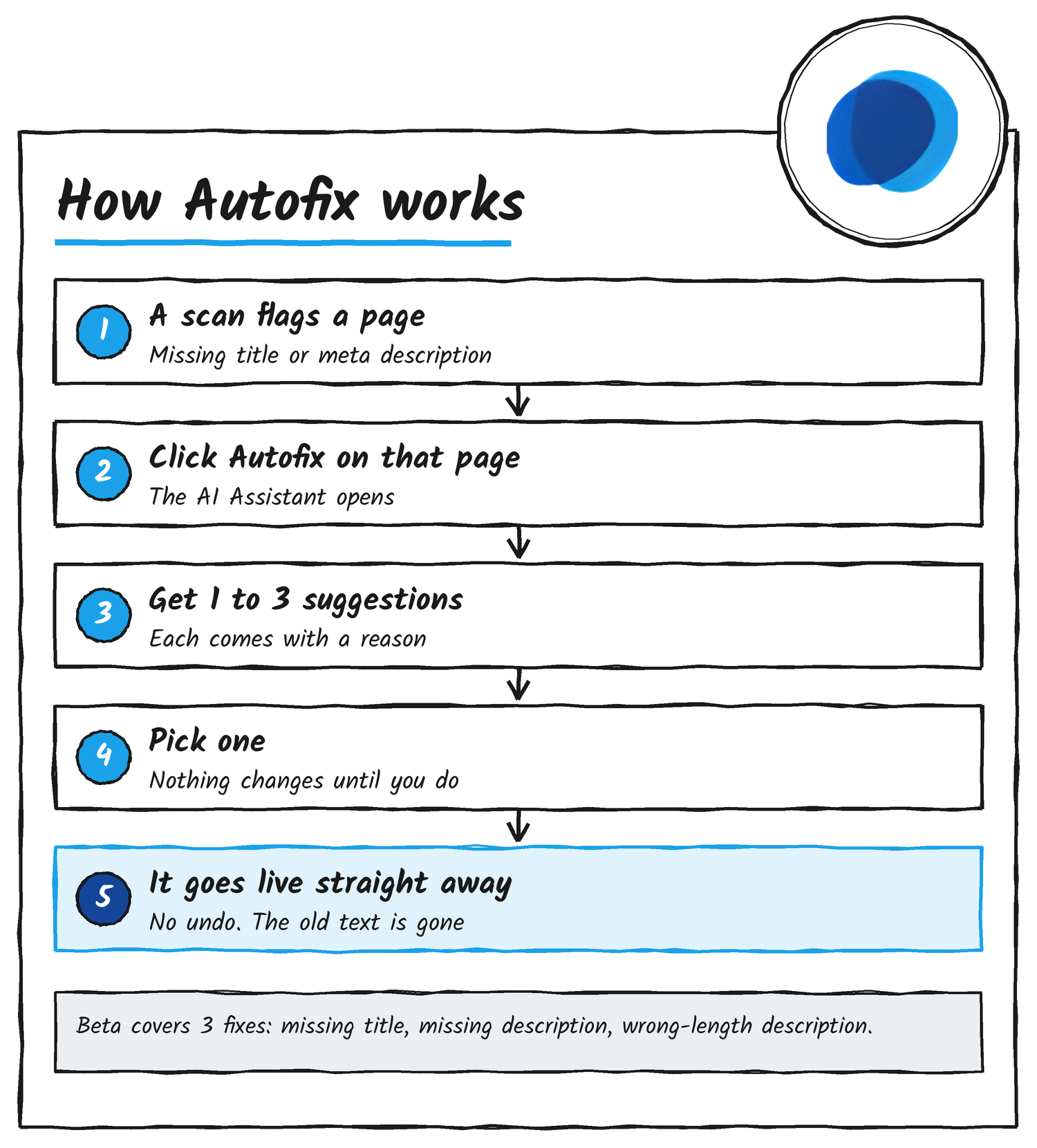
When someone picks a suggestion, Autofix writes it to the page’s SEO settings and the change is live straight away. Liferay’s docs say Autofix overwrites the old value without keeping it, so there’s no undo. The launch release describes a different safeguard: every change runs through Liferay DXP’s versioning and workflows, with a person reviewing and approving it before it goes live. In the docs, the person’s approval is the pick itself, because Autofix changes a page only when someone selects a suggestion.
What Autofix needs before it works
- Liferay DXP 2026.Q1 or later, with the Page Management API feature flag switched on before 2026.Q4.
- A publicly reachable Liferay DXP address, with https, set on AI Hub’s Configurations page.
- An OAuth 2 client using the Client Credentials type, with the
Liferay.Headless.Admin.Site.everythingscope. - A site with staging turned off, because DXP refuses Autofix’s write command on staging-enabled sites.
- Tokens in the customer’s AI Hub account, which Autofix spends to generate each suggestion.
The docs say support for more insight types is in development.
What the pitch promises that the docs don’t list
Liferay’s release says the Studio flags problems across page metadata (missing or incorrect titles, descriptions and canonical URLs), indexing and crawling (robots.txt blocks, sitemap errors and AI crawler access) and AI search readiness (missing summaries or FAQ sections, and hedging language that can hurt AI citation). It says the Studio monitors AI citation and AI crawler activity, and pulls data from Google Search Console, PageSpeed Insights and Liferay Data Platform. The release says its AI assistant can build FAQ sections and fix broken redirect chains and sitemap errors.
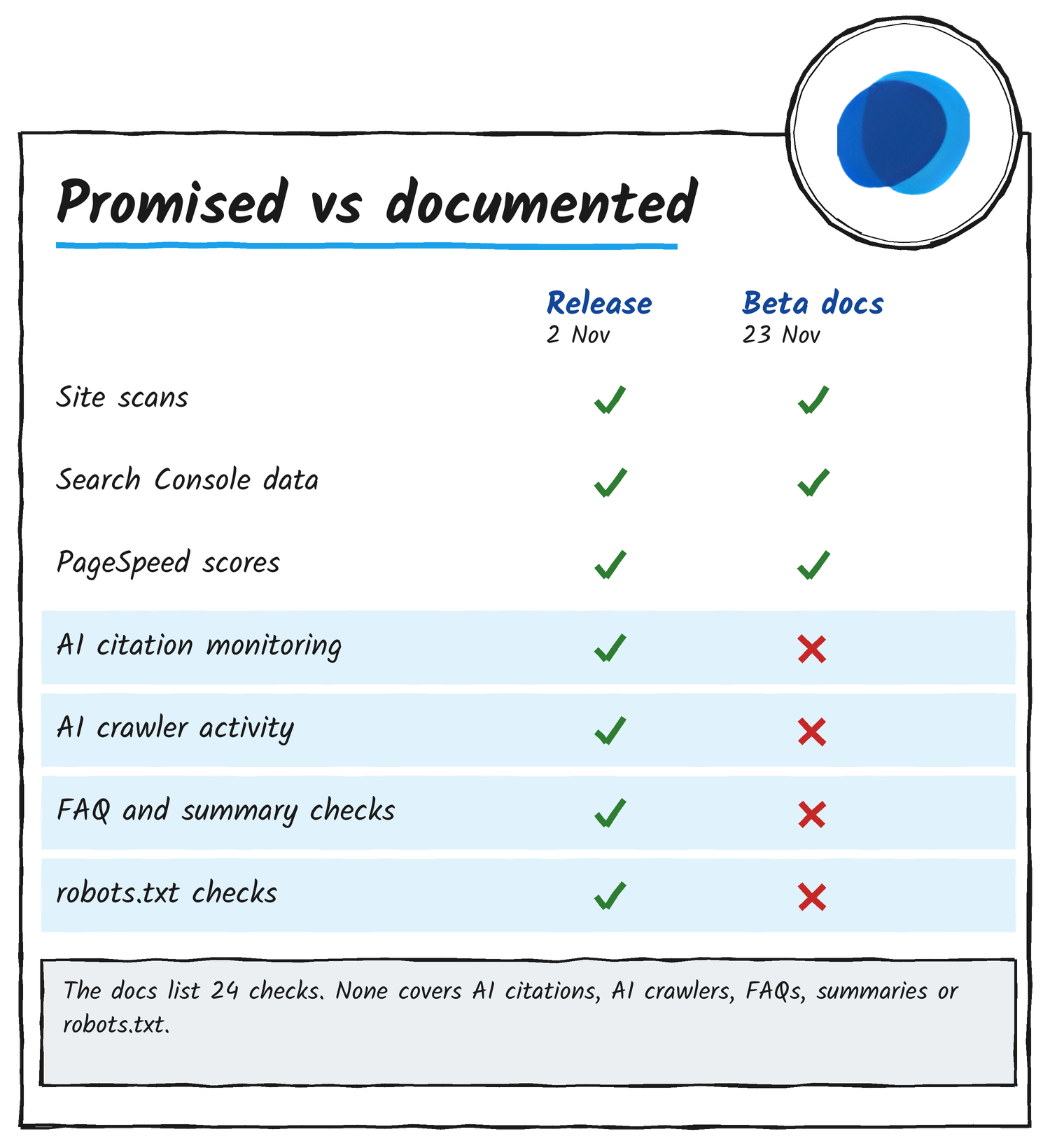
The beta documentation’s 24 checks don’t include canonical URLs, robots.txt, AI crawler access, summaries, FAQ sections or hedging language. Autofix writes titles and meta descriptions only, not FAQ sections or redirect rules. The docs name Search Console and PageSpeed Insights as the Google data sources, and the pages I read don’t mention Liferay Data Platform.
The product page goes further. It promises AI bot monitoring that shows which crawlers reach a site, naming GPTBot, ClaudeBot and PerplexityBot, along with AI citation monitoring, internal link recommendations and topic maps. It also says teams can connect every domain they run. The docs say the private beta supports one domain at a time. The copy of the page I read still carries a “Launching Soon” label and a “Join the waitlist” button.
Either your content is in it or it is not, and there is no page two to fall back on.
Sebastien Edgar, VP of Digital, Liferay, on the Studio’s product page
Liferay hasn’t said when the AI citation and crawler reports will reach the beta. Its release reports no measured gain in visibility, traffic or AI citations from the tool.
Liferay, and why it’s building this
Liferay is a private company, founded in 2004 and based in Diamond Bar, California. It says it has more than 1,100 employees, 19 offices and over 1,200 organisations running its open-source DXP, which they use for intranets, customer portals, enterprise websites and commerce. Its site names Unilever and Škoda Auto among its customers.
The Studio follows AI Hub. Liferay opened AI Hub as a public beta on 1 June 2026, and its 2026.Q3 release notes list it as generally available. Customers connect the model of their choice through the Model Context Protocol, and the Studio’s Autofix agents run on it. Diginomica reported on 4 August that Liferay is unbundling its DXP into separate products, with AI Hub at the centre. The Studio ships as one of those AI Hub add-ons.
The market it’s entering
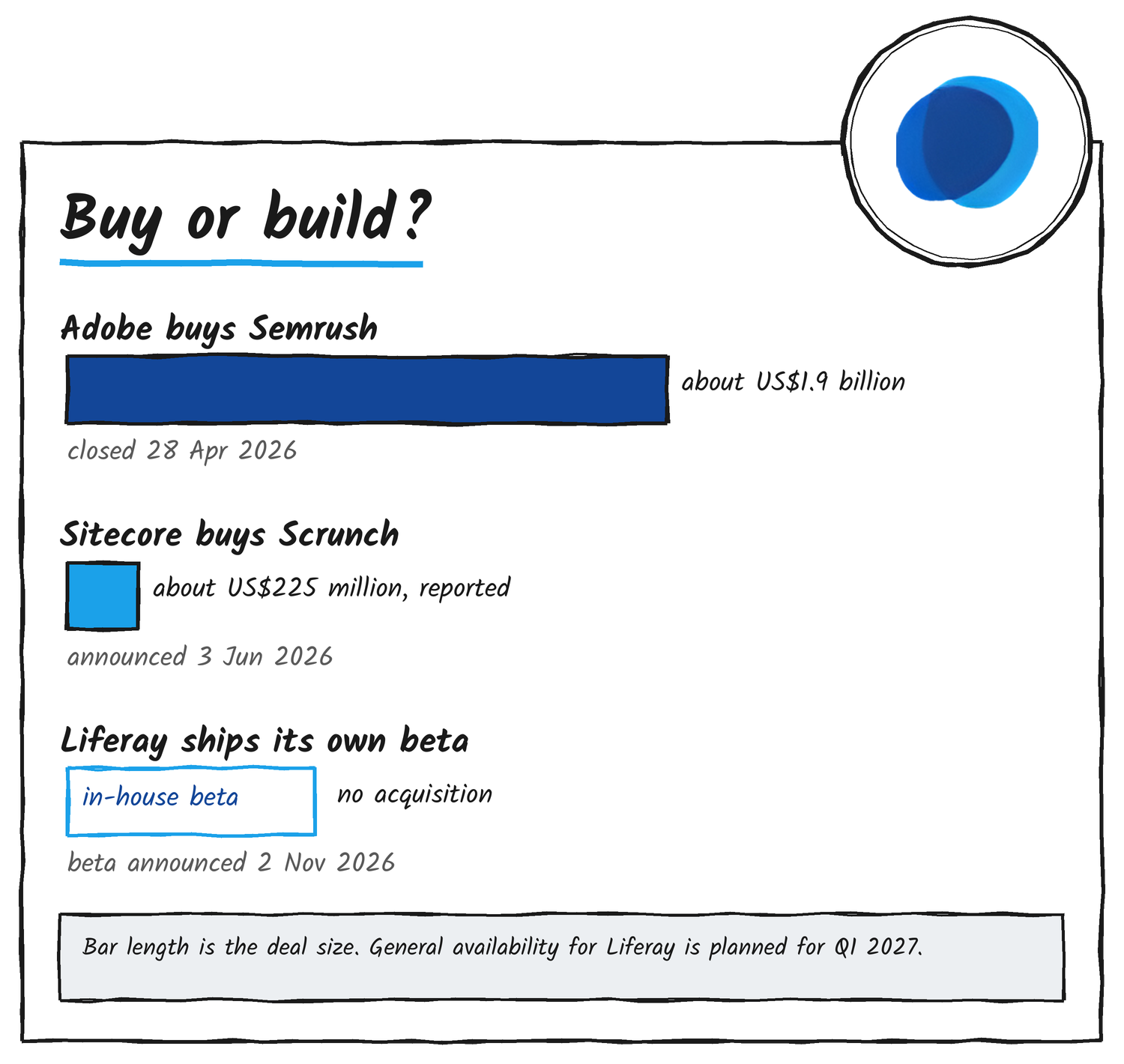
Gartner published its first Market Guide for Answer Engine Visibility Tools on 9 March 2026. Semrush, which the guide names as a representative vendor, says the guide treats these tools as a baseline part of a marketing stack.
Money has followed. Adobe completed its Semrush acquisition on 28 April at US$12 a share in cash, per Semrush’s SEC filing, about US$1.9 billion when announced. Sitecore bought Scrunch on 3 June, and TechTarget reports that Bloomberg put the price at about US$225 million. TechTarget adds that HubSpot, among others, has added its own answer engine tool. Gartner’s first take on the Sitecore deal says the shift is from passive measurement to execution. Profound, a standalone vendor, raised US$180 million at a US$1.8 billion valuation on 15 September, co-led by Sequoia Capital and Kleiner Perkins.
| Product | Where it lives | Tracks AI answers? | Price |
|---|---|---|---|
| Liferay SEO & AEO Studio | Inside Liferay DXP and AI Hub | The release promises it; the beta docs don’t list it | Not published |
| Semrush AI Visibility Toolkit | Add-on to Semrush, now an Adobe company | Yes: brand mentions and daily prompt tracking, including ChatGPT and Google’s AI Mode | US$99 a month, 25 tracked prompts, one domain |
| Ahrefs Brand Radar | Add-on to Ahrefs | Yes: AI Overviews, AI Mode, ChatGPT, Copilot, Gemini and Perplexity, with Claude on custom prompts | Custom prompts from US$50 a month; AI Visibility Index from US$199 a month |
| Scrunch | Inside SitecoreAI, still sold on its own | Yes: shows where a brand appears in ChatGPT, Gemini and Perplexity answers | Not disclosed |
| Profound | Standalone platform | Yes, across several engines | Custom Enterprise plan, with a 7-day free trial |
Liferay’s pitch is write-back. The fix lands where the content is stored, with no ticket to a developer. The tools above mostly report. The cost is lock-in: the Studio’s Add Domain button stays disabled until Liferay provisions the account and a Liferay DXP address is set in AI Hub, so it serves Liferay customers only.
Google’s own guidance also bears on how much of the AI-specific work is new. Search Central says the best practices for SEO remain relevant to AI Overviews and AI Mode, and that there are no additional requirements or special optimisations needed to appear in them. That page covers Google’s AI features only, not ChatGPT or Perplexity. Most of Liferay’s documented checks, such as titles, headings, links and alt text, sit in the SEO fundamentals Google describes. The AI-specific checks are the ones the docs don’t list.
What it changes for customers
For Liferay’s customers, the immediate change is who can edit a page’s title and description. A marketer can apply an AI-written suggestion to a live page without a developer, and the docs say there’s no undo. Sites that use staging can’t use Autofix yet.
Liferay hasn’t published a price, a count of beta customers or a result from a customer’s site. Access is by request on Liferay’s SEO & AEO Studio page, and general availability is planned for Q1 2027.
Terms used in this piece
- AEO
- Answer engine optimisation: making content easy for AI assistants and AI search features to find, understand and cite. GEO, generative engine optimisation, means much the same thing.
- DXP
- Digital experience platform: software for building and running websites, portals, intranets and commerce sites. Liferay DXP is Liferay’s.
- AI Hub
- Liferay’s separate product for building and managing AI agents. The Studio runs on it as an add-on.
- Insight
- The Studio’s word for one kind of problem found in a scan, such as missing alt text, with a count of the pages it affects.
- Autofix
- The Studio feature that has an AI agent suggest a title or meta description and writes the chosen one to the page.
- Google Search Console
- Google’s free tool that reports how a site performs in Google Search, including clicks, impressions and average position.
- PageSpeed Insights
- Google’s tool that scores how fast and usable a page is.
- Canonical URL
- The address a page declares as the main copy of its content, so search engines don’t treat duplicates as separate pages.
Sources
- Liferay, “Liferay Announces Beta Availability of Liferay SEO & AEO Studio”, 2 November 2026
- Liferay Learn: SEO & AEO Studio, getting started, scanning pages, configuration reference, Autofix and the 11 November AI Hub release notes
- Liferay SEO & AEO Studio product page, Liferay’s story and AI Hub public beta announcement
- Diginomica, Liferay unbundling its DXP, 4 August 2026
- Gartner, Market Guide for Answer Engine Visibility Tools and First Take on Sitecore and Scrunch
- Adobe and the Semrush SEC filing on the acquisition; Sitecore and TechTarget on Scrunch; Profound on its Series D
- Pricing pages: Semrush, Ahrefs and Prolinkage’s comparison for Profound
- Google Search Central, AI features and your website
Discover more from Sulat AI & Tech News
Subscribe to get the latest posts sent to your email.