Elijah Muraoka posted a short list on 16 November. Rex, he wrote, had killed his entire setup: Ghostty, tmux, Hammerspoon, Superset, a custom sessions CLI and a custom tmux skill. “It really is magic.”
Rex is the terminal multiplexer from Mitchell Hashimoto’s Superlogical. I covered what it is and the Vercel cloud launcher on 10 November. This is the deeper look: how Rex is built, what Hashimoto showed in a demo on the same night as Muraoka’s post, who can reach a Rex server, and who should switch.
He didn’t say which Rex feature did which job, and I won’t guess for Hammerspoon or Superset. What I can match to his list is the terminal itself, sessions that outlive a closed window, a CLI for driving them and a skill that lets coding agents work the terminal. I’ll take those in turn.
How Rex is built
Everything in Rex hangs off four words from its docs. A session is one project’s worth of work, and the server keeps it alive even when nobody’s watching. Inside it, a window is a tab that holds a layout of blocks, and a block is one application, which for now means a terminal. The fourth word, client, is whatever connects to the server. The Mac app is one.
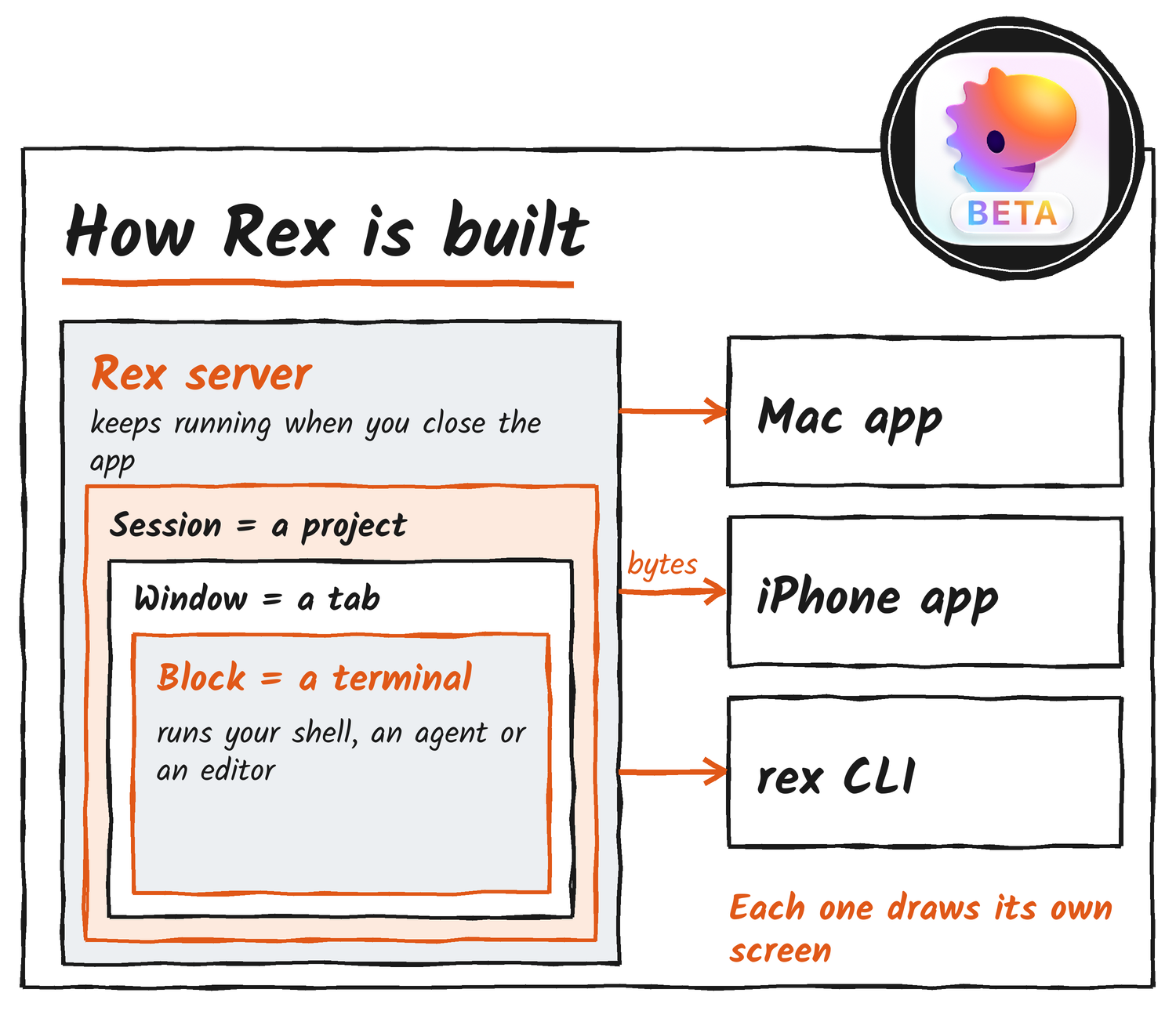
Bitdoze’s write-up of Hashimoto’s architecture walkthrough is the best account I found of how the data moves. The server doesn’t keep a shared screen and send diffs, the way tmux does. It passes raw terminal bytes to every client, and each client draws them with its own libghostty engine. Bitdoze draws two consequences from that. Every split is a separate connection in a native container, so a window has no tmux-style pane tree. And every client scrolls on its own, which means two people in one session can read different parts of the scrollback.
It’s also why closing the app doesn’t kill anything. Reona Shimada at Classmethod put a 30 October beta through a simple test. A one-second counter ran on a Mac mini, and Shimada read it from a MacBook later. It had kept ticking the whole time the MacBook was disconnected. Five runs of rex -S mini ls against the mini took 0.07 to 0.09 seconds each, though the mini was on a cable.
What the 16 November demo added
The same night, Hashimoto put out a seven-minute demo. It shows copy and paste, drag and drop and port forwarding working across machines, with a web server on a remote box opening in a local browser. He also walks through some of the plumbing underneath and how Lua scripts hook into it.
Our goal with Superlogical and Rex is for everything to feel local. I’ve said before: the moment any UI shows a selector between “local” and “cloud”, the product has failed.
Mitchell Hashimoto, on X
Alasdair Monk had already described file transfer between devices on a Rex Data protocol, with no ssh, rsync or ftp involved. Port forwarding is the part with written docs. If you know ssh, rex forward new will feel familiar, because -L and -R mean what they mean there: -L listens on your machine and connects from the server, and -R goes the other way. For the usual single forward there’s rex forward open, which sets it up and opens it. Give it a URL, a host and port, or just a port, and a bare port means that port on the server’s localhost.
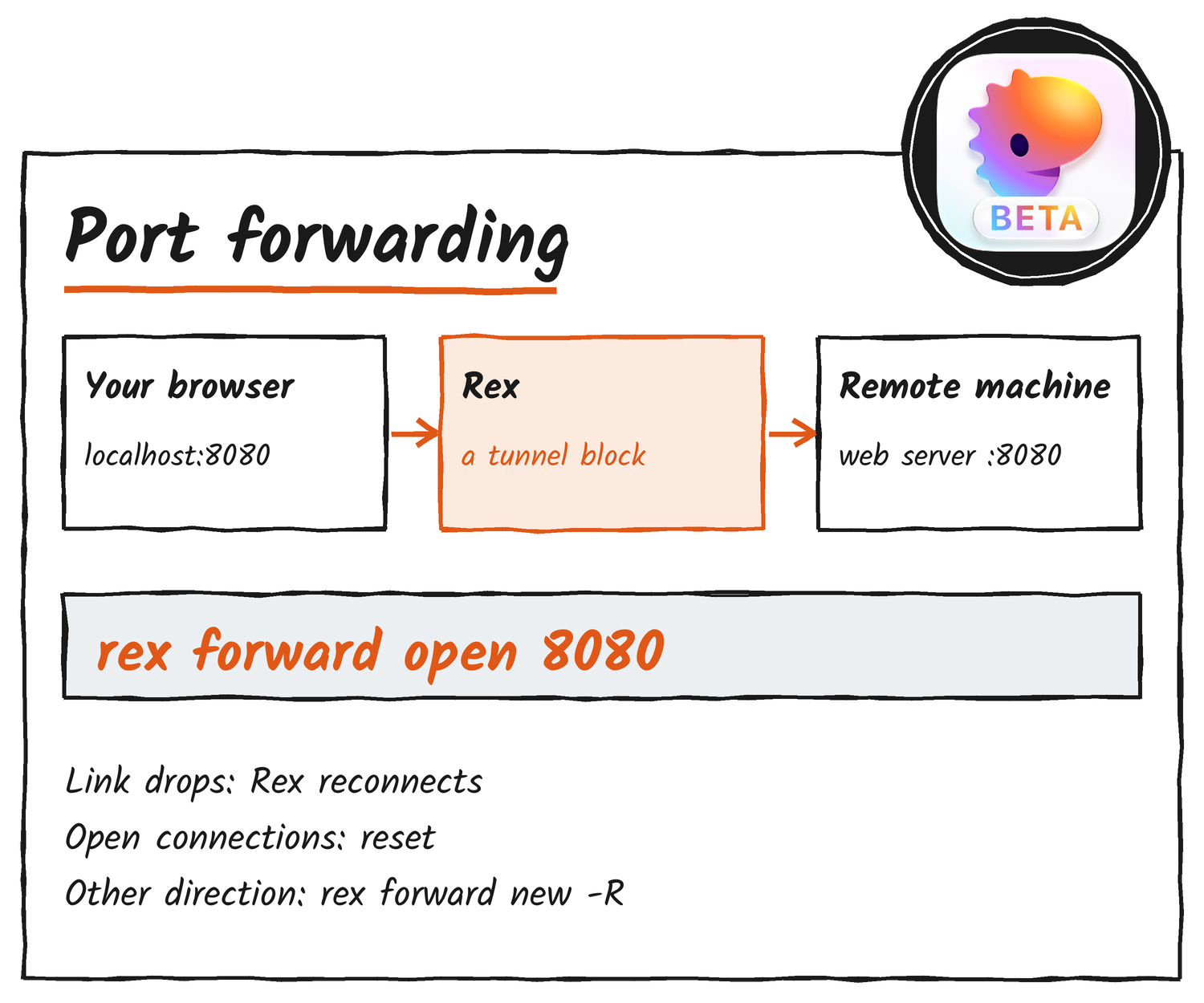
Each forward lives as a tunnel block in a session. When the link to the server drops, rex forward reconnects and keeps the same blocks, but any TCP connection that was open gets reset. The demo post doesn’t say which ports Rex forwards on its own.
Who can reach a Rex server
Out of the box, a Rex server only talks over a local Unix socket that belongs to its owner. To reach it from another machine you add a listener, and the docs give six options. Four of them know who’s calling: SSH, Rex’s own Tailscale node, Tailscale Serve and a plain tailnet address. The other two, plain HTTP and any other VPN, only work with --allow-anonymous, and the docs say that admits every connection with full access.
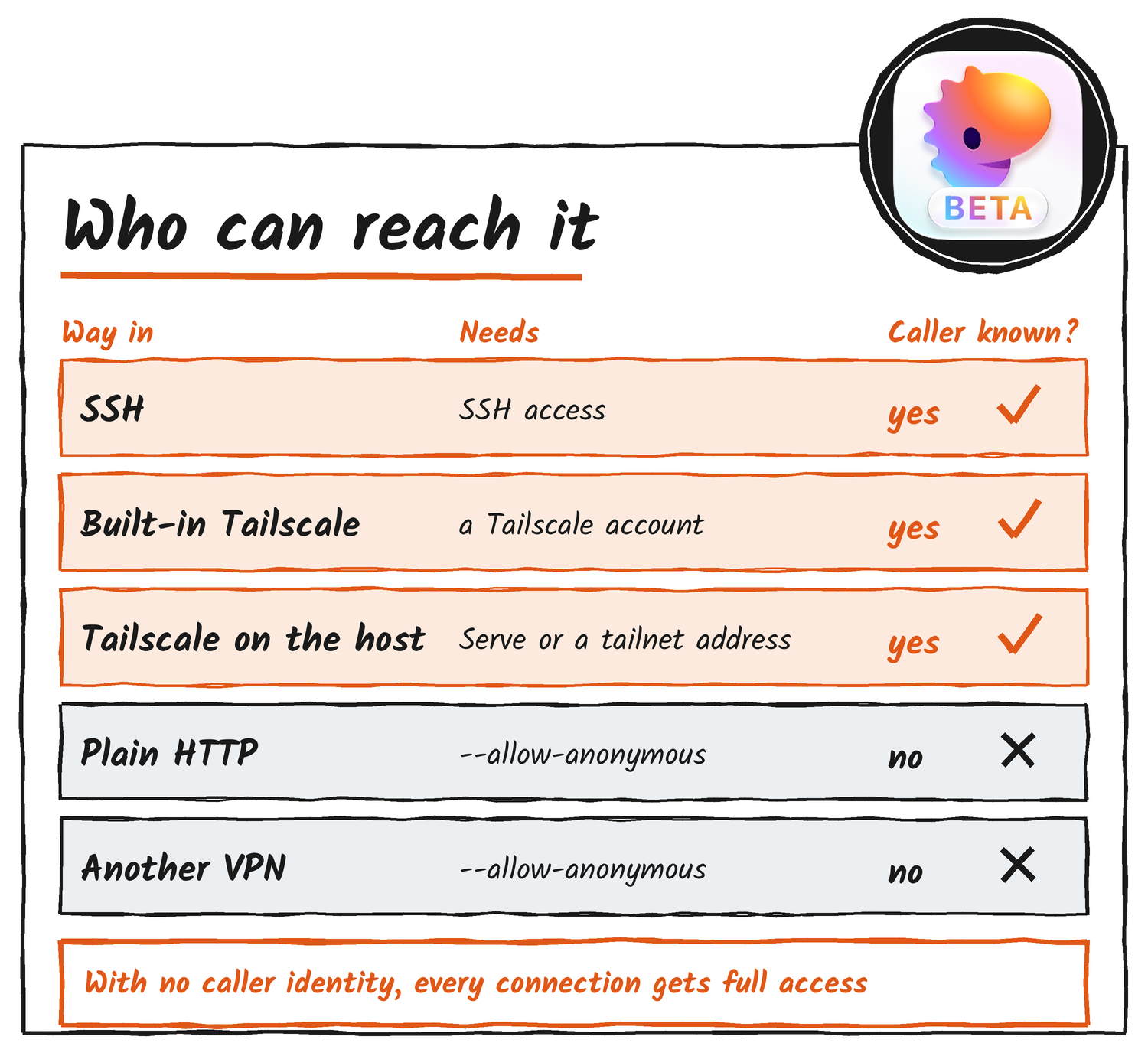
Full access to a Rex server means full access to every terminal on it, so I’d stick to the four that identify callers. On privacy, the docs are specific. With default settings the server and the rex command make no outbound connections at all, and the built-in Tailscale stays off until you switch it on. Once it’s on, the server joins your tailnet as its own device, and Tailscale gets that device’s connection logs and metrics. Superlogical gets none of it. The Mac app does check Superlogical’s update server at launch and once a day.
How agents use it
Running rex skill setup puts a Rex skill into Claude Code, Codex, OpenCode and Pi, along with session hooks for the agents that take them. After that an agent can open tabs, split panes, read what’s on a terminal’s screen and type into it. Muraoka dropped a custom tmux skill he’d written, and Rex now ships one of its own that does the same kind of work.
Rex also publishes its own Program Status Protocol, an escape sequence (OSC 7501) a program can print to say it’s working, blocked, done or failed. Rex turns that into markers on tabs you aren’t looking at, so a stuck agent shows up without you hunting for it.
Testers are already building on the CLI. Rex-teams is an unofficial skill on GitHub that leans on tabs, rex send and rex capture. A parent agent uses it to start Claude Code, Codex, Pi or OpenCode in background tabs, message them, and close each tab once the agent inside reports back. Its author says plainly that it has nothing to do with Superlogical and expects Rex to handle this natively someday. The limits are listed too. A message that lands while you’re typing mixes into your draft, a subagent that crashes before reporting wakes nobody, and alarms stop when the Rex server restarts.
Where it runs and what it costs
The Mac app is self-contained and runs its own server. For Linux, the server supports x86-64 and ARM64, needs glibc 2.26 or later (or musl on Alpine 3.21 and later), and comes as packages for Debian, Fedora, SUSE, Arch, Alpine and Nix. FreeBSD needs release 14.0 or later and nothing else. The Windows server is open to testers who hold the Windows role in the beta Discord. On 5 November Monk showed a pre-alpha Windows client and said the first alpha invitations were about two weeks away. TermRover 1.5, a third-party mobile terminal, added Rex support over SSH for iOS and Android on 13 November and was heading to the App Store and Google Play.
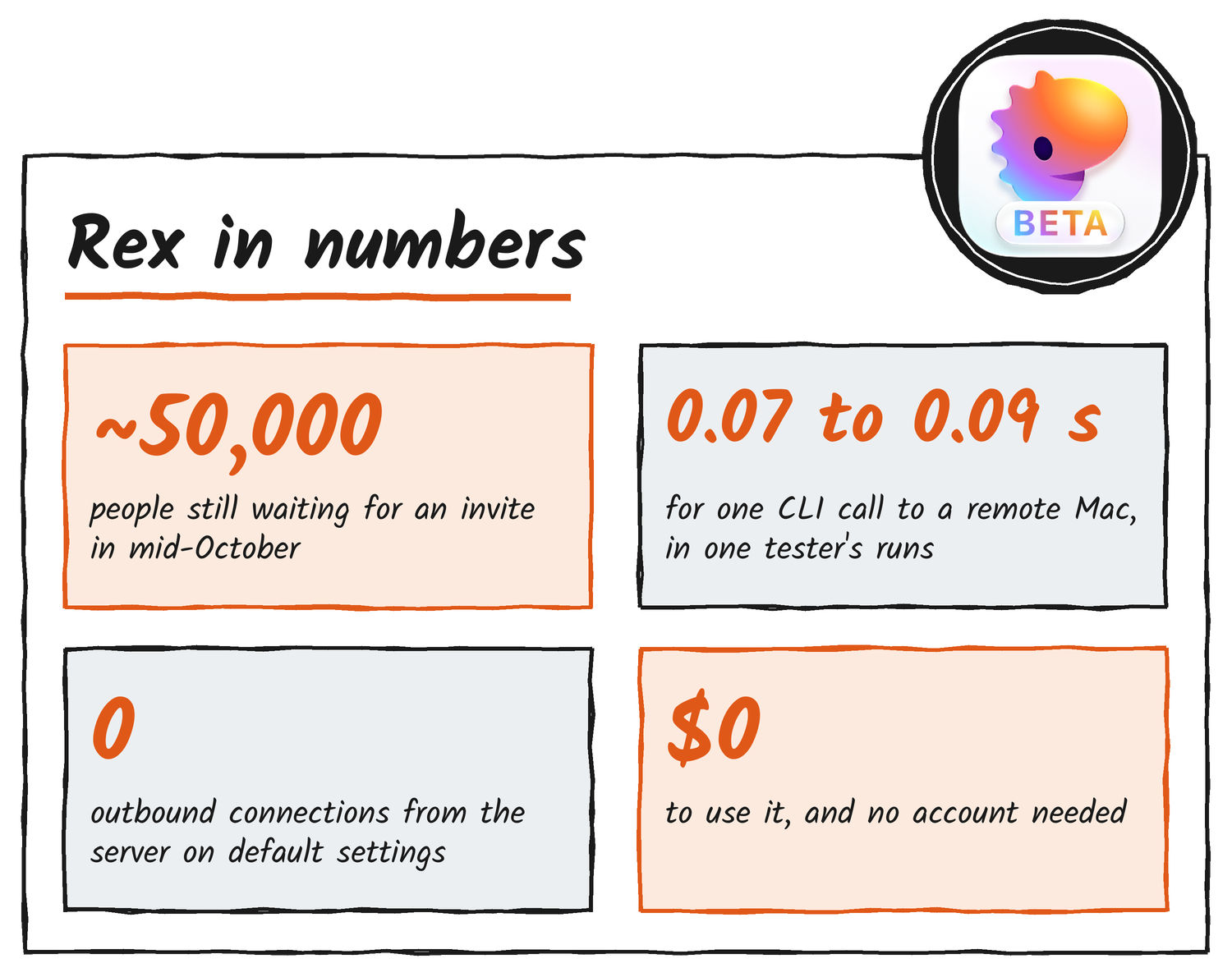
Superlogical says Rex “is and will always be free”, needs no account and can be fully self-hosted. It started inviting its mailing list on 5 October after a private test with about 50 people, and almost 50,000 were still waiting in mid-October. The company hasn’t published a commercialisation plan and promised to explain it before the stable release. The clients and servers themselves won’t be directly monetised.
Rex next to tmux and Ghostty
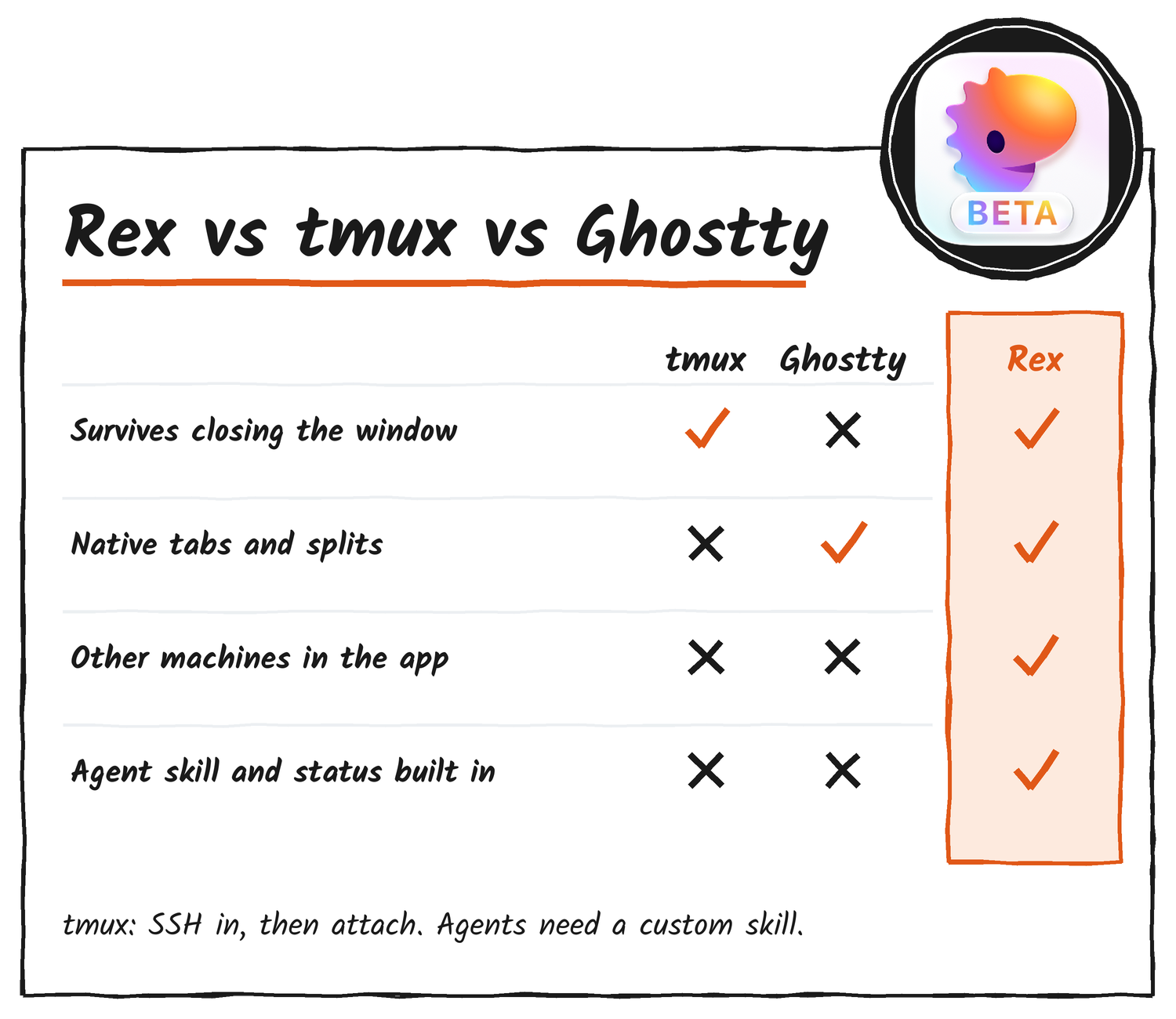
You don’t run Rex inside another terminal the way you do tmux. Rex is the terminal app. It’s built on libghostty, the library behind Ghostty’s terminal engine, while Ghostty itself carries on as a separate project. tmux is the old hand: it runs in any terminal and is installed almost everywhere. A .tmux.conf doesn’t carry over to Rex, so moving means rebuilding key bindings in Lua. Rex’s config lives in one init.lua file, and the server reads it, so rex config reload runs on the server machine and there’s no file watching.
Bitdoze’s roundup of tester setups lists the rough edges for November. Restart the Rex server and your window layouts survive, but the running processes don’t, so every pane comes back as a fresh shell. There’s no match yet for iTerm2’s option to send keystrokes to every pane at once. The iOS app works but trails the Mac app, and the Windows and Linux desktop clients haven’t reached testers.
Where it fits
If I lived on a Mac, ran coding agents on a few machines and wanted one sidebar for all of it, I’d switch. That’s where the agent skill, the status markers and sessions that outlive the window earn their keep.
I’d stay on tmux for a Linux or Windows desktop, for any server where I can’t install software, and for work where running processes have to survive an upgrade. Scripts written around tmux’s commands stay on tmux too. Rex’s CLI covers similar ground, but the commands aren’t the same.
Discover more from Sulat AI & Tech News
Subscribe to get the latest posts sent to your email.