Details.so, a Swiss library of website design references, now lets AI coding tools search it directly. Its MCP server gives Claude Code, Codex, Cursor and v0 more than 3,500 hand-picked interactions captured from live websites, so an agent can build from a real reference instead of its own defaults.
Founder Kev pushed the idea on 17 November with a 28-second demo called “Unslopping a vibecoded website”, which has drawn about 420,000 views. The pitch is simple. Agents build generic-looking sites because they have no taste of their own to draw on, and Details sells them some.
What Details is
Details has two halves. Inspo is the searchable gallery: more than 3,500 details filed by hand under the part of the page they show, such as hero sections, footers, navigation, preloaders and scroll animations. Every example comes from a live production site, and Details adds new ones weekly. The biggest categories are features sections (463), hero sections (427) and footers (366).
The Vault is the build side. It holds 70 production-ready resources such as page transitions, text reveals, buttons and navigation, each with copy-ready code and implementation notes. Fifteen of them are free with a Details account. Details’ pricing page lists Apple, Stripe, Linear, Framer, Notion, OpenAI and Shopify among the featured sites.
How an agent uses it
The server runs at api.details.so/mcp as a remote HTTP MCP server, and you sign in with your Details account through OAuth. It exposes six tools in the Details MCP guide.
| Tool | Plan | What it does |
|---|---|---|
search_inspirations |
Pro and above | Natural-language search of Inspo that returns up to ten numbered candidates |
get_inspiration |
Pro and above | Full evidence for one reference: frames, tags, description, source URL, code excerpts and a brief |
read_inspiration_source |
Pro and above | Pages through a reference’s source, up to 400 numbered lines, when source evidence exists |
read_inspiration_bundle |
Not stated | Versioned reads of instructions and source files, with hash-checked file saving |
search_vault |
Max, Team, Lifetime | Searches the Vault for packaged implementations |
get_vault_resource |
Max, Team, Lifetime | The implementation prompt, docs and extras for one Vault resource |
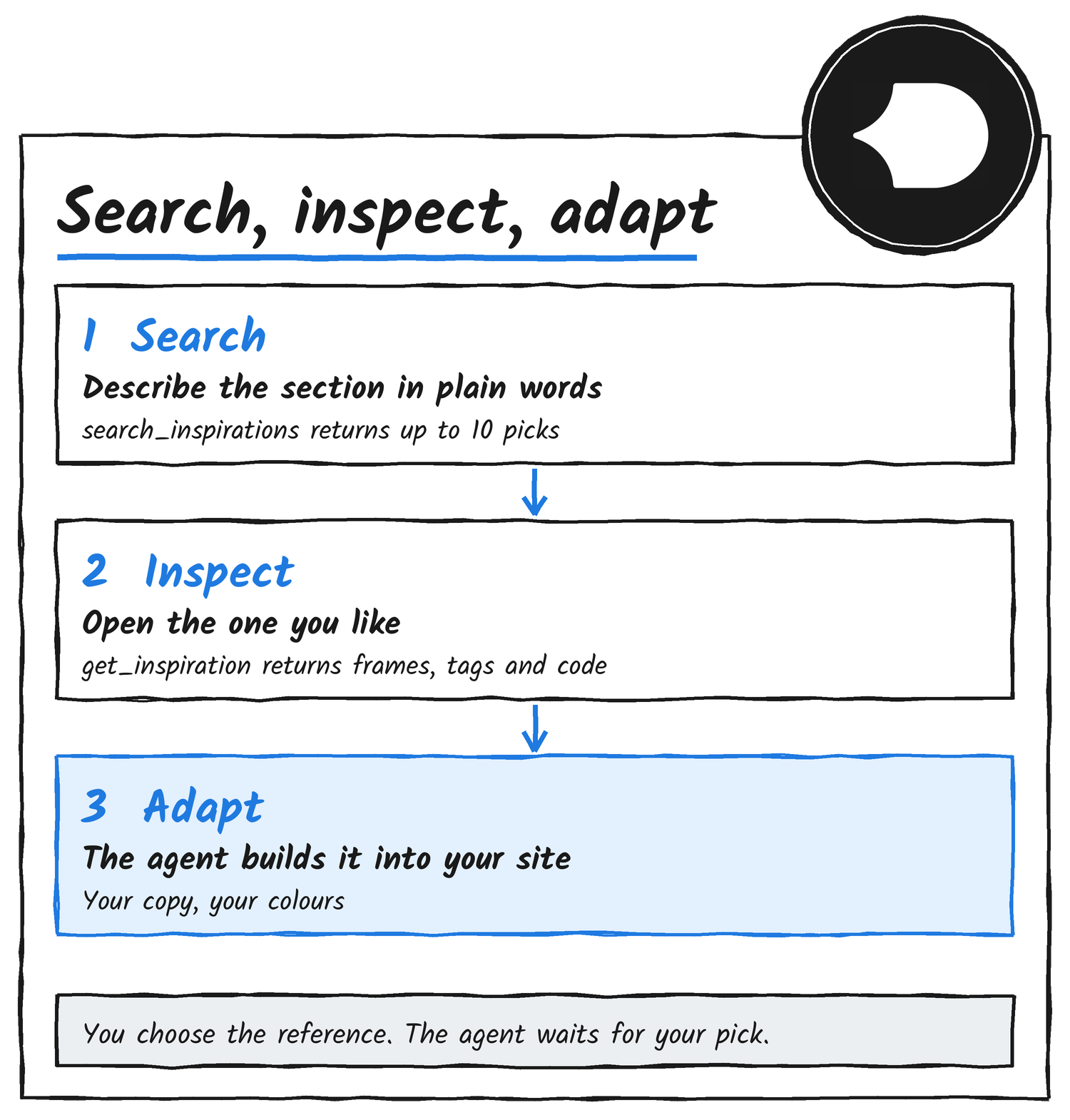
The flow has three steps. The agent searches, you pick one of the candidates, and the agent opens it and builds. Details’ instructions tell the agent to show you the ten results and wait for your choice unless you’ve told it to choose for you. If you paste a Details link, the agent skips the search and opens that reference directly.
The inspect step is where the value sits. A screenshot shows how a section looks. Opening a reference returns seven ordered frames for a video reference, or one still image, plus hand-applied tags, a plain description of what happens, the live source URL, source-checked code excerpts when available, and an implementation brief. Details’ instructions tell the agent to inspect every frame, read the excerpts and build the recorded interaction, changing only copy, assets and styling.
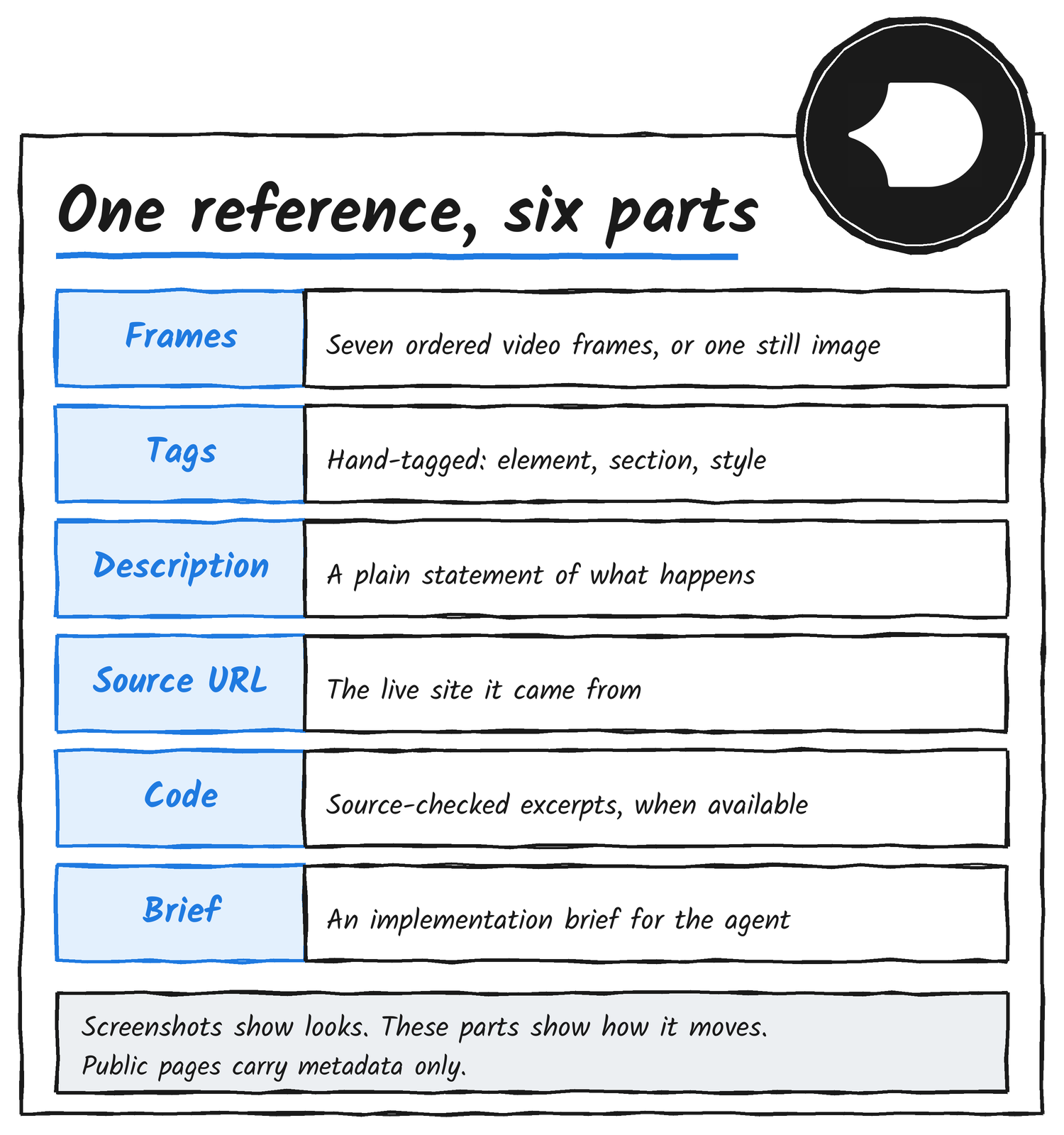
Details keeps the good parts behind the connection. Its public pages carry metadata only, and the frames, code excerpts, prompts and behaviour summaries come through the MCP tools alone.
Connect it
Claude Code takes one command, then the /mcp menu to authenticate in the browser.
claude mcp add details --scope user --transport http https://api.details.so/mcpCodex registers the server and then starts the login flow.
codex mcp add details --url https://api.details.so/mcp
codex mcp login details
Cursor reads it from mcp.json, and you choose Connect under Tools & MCP.
{
  "mcpServers": {
    "details": {
      "url": "https://api.details.so/mcp"
    }
  }
}
ChatGPT uses an official Details.so plugin, v0 takes the same server URL through its MCP menu, and any other client that supports remote MCP servers connects the same way.
What it costs
MCP access comes with every paid plan, and each plan carries a monthly credit allowance. Pro covers Inspo only. Max, Team and Lifetime add the Vault.
| Plan | Price (USD) | Tools | MCP credits a month |
|---|---|---|---|
| Pro | $9 a month billed annually, $12 billed quarterly | Inspo | 300 |
| Max | $19 a month billed annually, $25 billed quarterly | Inspo and Vault | 1,000 |
| Lifetime | $890 once | Inspo and Vault | 2,000 |
| Team | $22 a seat a month billed annually, $28 billed quarterly | Inspo and Vault | 2,000 per teammate |
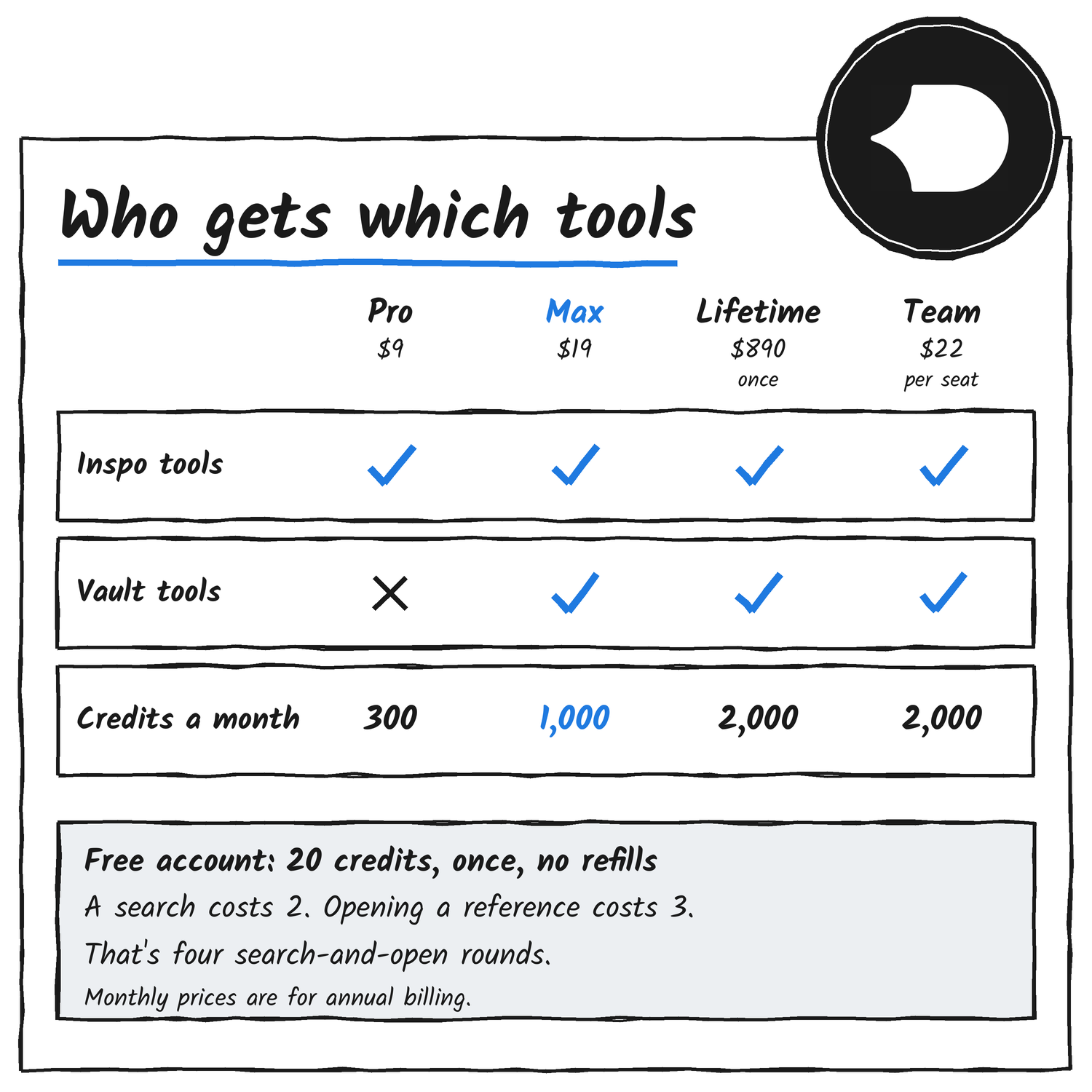
Free accounts can connect too, with a one-time allowance of 20 credits while Details keeps free access on. A search costs 2 credits and opening a reference costs 3, so the allowance covers four search-and-open rounds. Details can turn free access off, unused credits included, and the credits never refill.
Credits go on every admitted search or inspection, including repeats, searches with no results and failed retrievals, and there are no refunds. One assistant reply can call several tools. Reading source files costs nothing once you’ve paid to inspect the same reference. Details doesn’t publish per-call prices for paid plans or the size of the daily cap.
On privacy, Details logs the tool name, account and timestamp of each call for metering. It doesn’t store query text beyond handling the request.
Does it fix the slop?
The obvious objection is that an agent will just swap one generic design for another. What the tool changes is the input. Ask an agent for a services section and it builds from its defaults. Connect Details and it can start from a specific reference with ordered frames, tags and code, and it still has to adapt that reference to your content and brand.
Details says its references are for study, not copying. Its own pitch is that the best work is assembled from many good decisions, and its FAQ describes the library as references, not templates. The pricing page carries quotes from agency founders who say the MCP and the Vault speed up their client work. It doesn’t carry a benchmark or a before-and-after test.
Kev said the demo fix took five seconds: he connected the MCP and asked for improvements using Vault resources. That’s one site and one founder’s clip. My read is that the tool helps most where the agent’s defaults are the problem, and it can’t help if you pick a weak reference, which is why the pick stays with you.
Where I’d start
- Spend the free 20 credits on one real page, such as your pricing or services section.
- Pick from the ten candidates yourself, and ask the agent to describe the interaction before it writes code.
- Tell the agent to swap in your copy, assets and colours, and to keep the recorded behaviour.
- Open the result in a browser and check the motion, because the frames only describe it.
- Move to Max if you want the Vault’s packaged transitions and text reveals through the same connection.
Sources
Disclosure: I’m an OpenAI, Firecrawl and Devin ambassador.
Discover more from Sulat AI & Tech News
Subscribe to get the latest posts sent to your email.