PlanetScale has launched Insights Agent, an AI agent that reads your application code alongside your database’s performance data and opens a pull request when it finds a way to speed things up. According to PlanetScale’s launch post of 17 November US time, it’s available now on all plans, for Vitess, Neki and Postgres databases.
The agent only suggests changes. It doesn’t merge pull requests, apply deploy requests or write to your database, so a person or another agent still approves every change. This piece covers how a run works, what it can change, what it costs and where your code goes.
How a run works
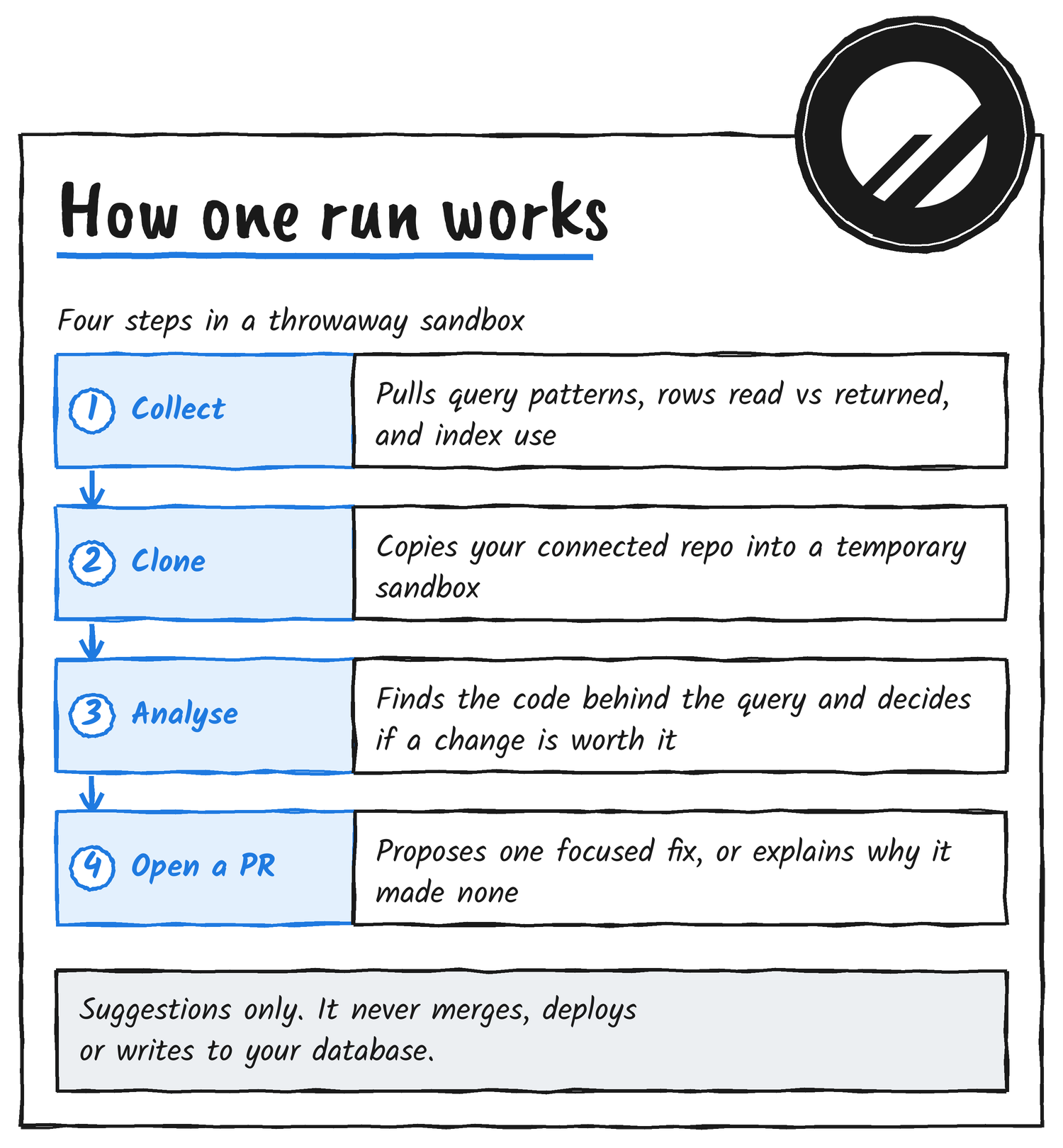
You connect a GitHub or Cursor Origin repository to a PlanetScale database, then start a run. Each run happens in a sandbox that exists only while the run lasts. The agent first gathers evidence for the queries or recommendations it’s targeting, such as query patterns, rows read compared with rows returned, index usage, how often a query runs and any query tags. It then clones the repository, finds the code behind those queries and decides whether a change is justified. If the evidence supports one, it opens a pull request that explains what changed and why. If it doesn’t, the run finishes with a short explanation instead.
Changes follow the conventions already in your repository, including your ORM, framework index APIs and migration tooling. The launch post gives Drizzle, Laravel, Go and raw SQL as examples.
Two kinds of run
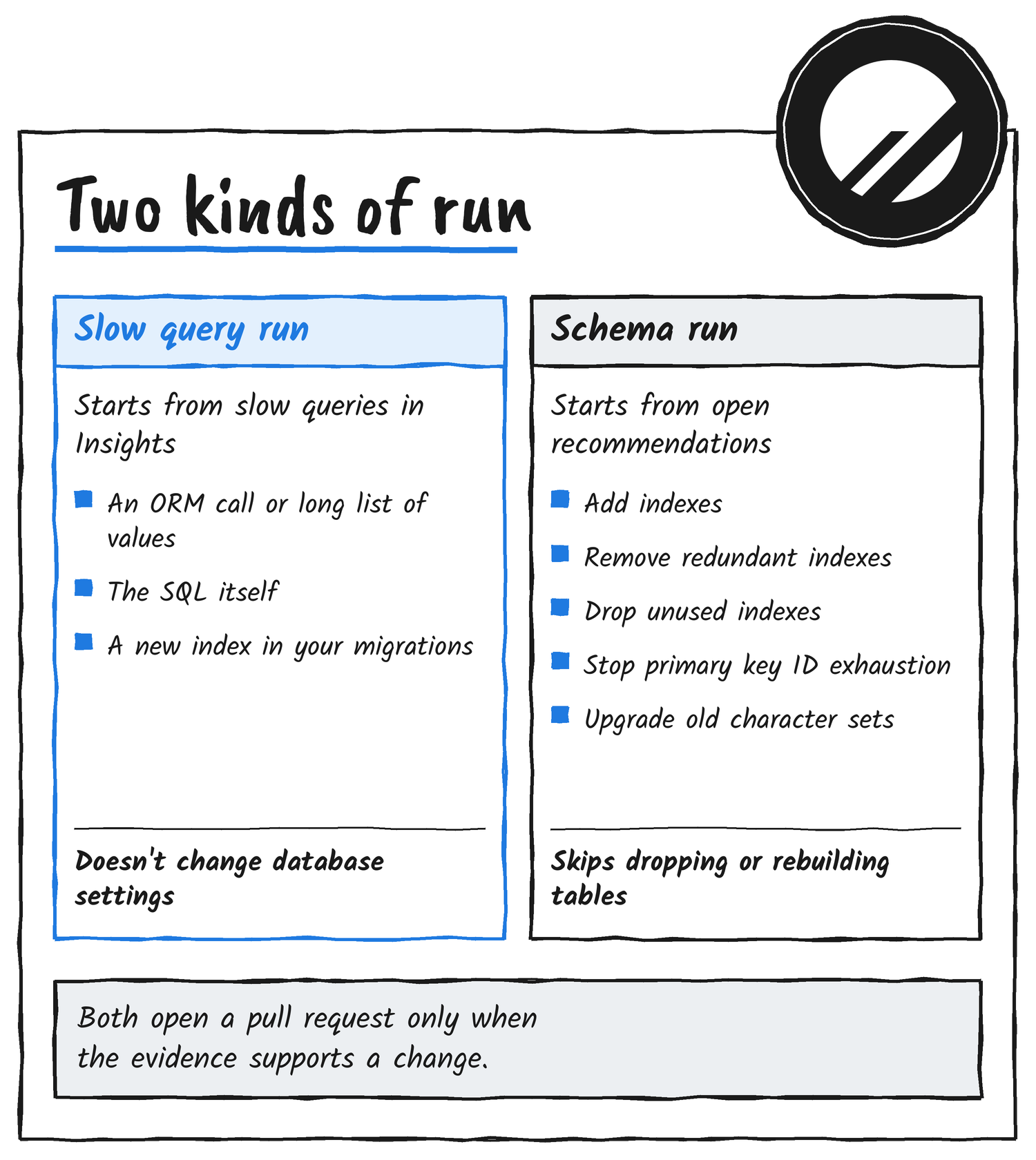
Slow query runs look through Insights for slow queries and for changes that would speed them up. That might be application code such as an ORM call or a long list of literal values, the SQL itself, or a new index added through your migrations. They don’t change database settings.
Schema recommendation runs take open recommendations from Insights and make the equivalent change in your repository, with a migration in your project’s format where one applies. They act on five types of recommendation: adding indexes for inefficient queries, removing redundant indexes, dropping unused indexes, preventing primary key ID exhaustion, and upgrading legacy character sets and collations. They don’t act on recommendations to drop unused tables or rebuild bloated tables and indexes.
Each run has a deliberately narrow focus, though a single run can still propose more than one file, query or schema change.
Starting a run
Query detail pages and schema recommendation pages in Insights now have a Fix with agent button. Click it, check the connected repository, then start the run. You can also start runs from the CLI or the MCP server, which PlanetScale’s changelog also covers for 17 November. Both can start, review, cancel and schedule runs, and a run takes up to five slow query fingerprints or up to five schema recommendation numbers. The two target types can’t be mixed in one run.
pscale insights agent runs create <database> <branch> --org <org> --fingerprint <fingerprint> --keyspace <keyspace>
pscale insights agent runs create <database> <branch> --org <org> --schema-recommendation <number>
For hands-off use, each run type has its own schedule on each branch, repeating daily, weekly or monthly at a time you pick. Scheduled runs choose their own targets and skip queries and recommendations that already have an open Insights Agent pull request. A scheduled run is skipped at no cost when there’s nothing to work on, meaning no recommendations the agent can act on, or no application queries in Insights during the last 24 hours. Schema recommendations are generated only for a database’s default branch, so that’s where recommendation runs belong.
What happens to the pull request
The pull request links to the affected queries or recommendations in Insights, describes the fix and links back to the run in PlanetScale. For slow query runs, the run page graphs the query’s p50 and p95 latency from the day before the run and marks when the pull request merged, so you can compare before and after.
On Vitess databases that have safe migrations turned on and automatic copying of migration data configured, a schema change also gets a deploy request. The agent creates a development branch named insights-agent-<run ID>, runs your repository’s migration tool against it and opens a deploy request into the run’s branch. Merging the pull request doesn’t deploy anything, so you deploy the deploy request as you normally would. If you close the pull request, the agent closes the deploy request and deletes the branch. On Postgres and Neki, the pull request carries migrations in your project’s format, and you apply them through your usual deployment process.
Limits
| Limit | What it means |
|---|---|
| Repositories | One per database, though several databases can share a repository |
| Active runs | One per branch and three per organisation, with extra runs queued |
| Targets per run | Up to five queries or recommendations |
| Custom instructions | None. It doesn’t read files such as AGENTS.md, and the prompt can’t be edited |
Starting runs or changing schedules needs the Manage Insights Agent permission, which organisation administrators and database administrators have. Only administrators can connect a repository.
What it costs
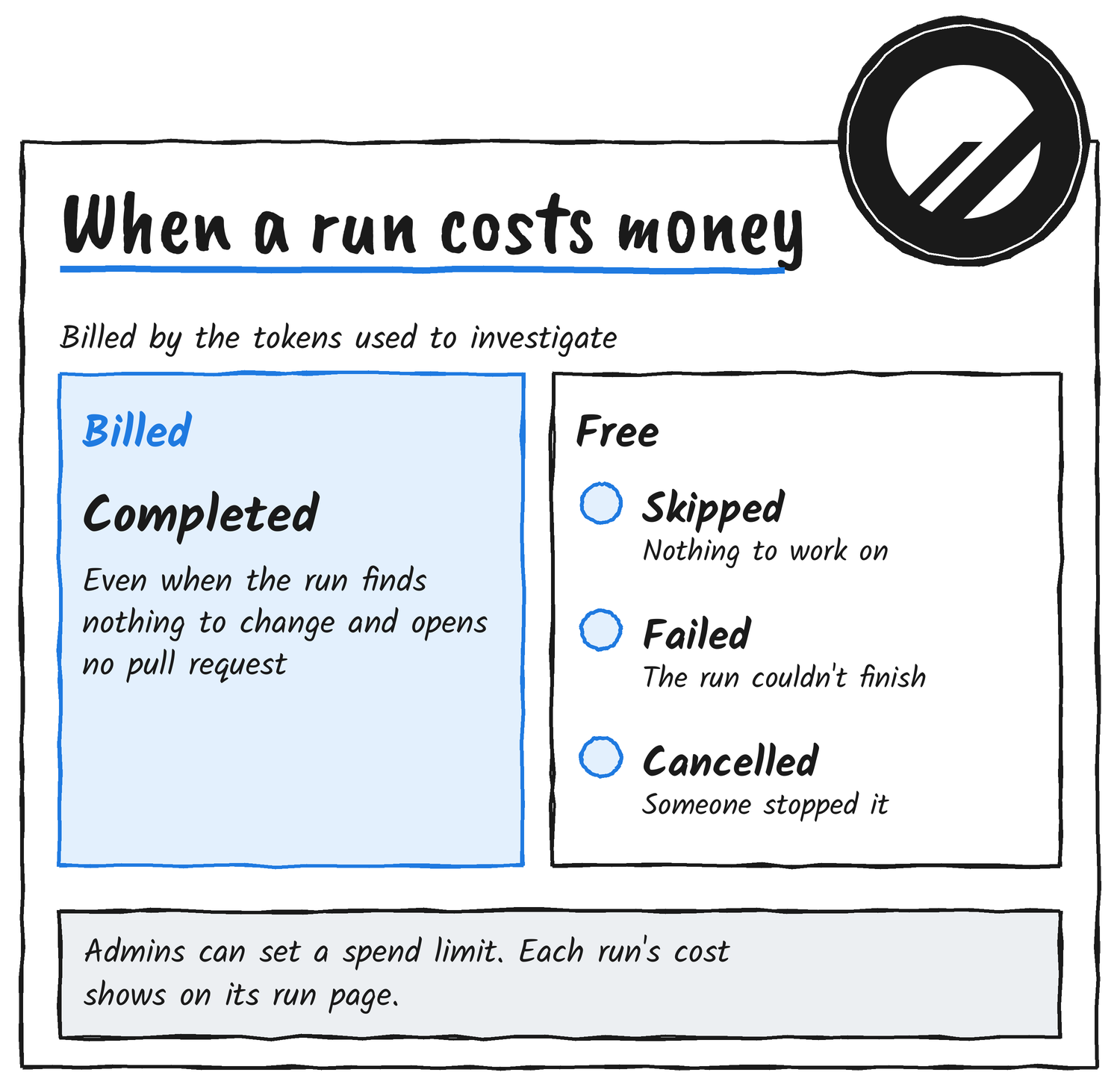
Each completed run is billed by usage, based on the tokens used to investigate the problem and prepare the change. That includes runs that finish without proposing anything. Skipped, failed and cancelled runs are free. Charges appear on the monthly invoice under Insights Agent with a count of completed runs, and each run’s page shows its cost. Organisation administrators can set a maximum spend on runs. An organisation without a payment method, or with unpaid invoices, can’t start runs, and the development branch behind a Vitess deploy request is billed like any other branch while it exists.
Your code and the models
PlanetScale’s launch post says Insights Agent uses models from OpenAI and Anthropic with zero data retention. The documentation adds that each run sends code from the connected repository, query patterns and schema information to third-party model providers, and that the data isn’t used to train models. Each run gets short-lived credentials that can only clone the connected repository and read Insights data, and they’re revoked when the run ends.
Insights Agent is on by default, but it takes no action until an administrator connects a repository to a database. Administrators can switch it off in the organisation’s settings, and turning off the LLM usage setting switches it off as well.
Or bring your own agent
PlanetScale’s CLI and MCP server give your own agents the same Insights data and schema recommendations, and its self-improving database doc covers running them on a schedule with your own prompts. PlanetScale’s own advice is to use Insights Agent when you want the loop without managing prompts, credentials, schedules or deploy requests. Use your own agent when you want to choose the model, write house rules, benchmark changes before a pull request, or work across repositories that aren’t connected to a database. The launch post adds that your own setup can draw on committed token spend or subscription usage.
Getting started
- Check that your organisation has a payment method on file and that Insights Agent is switched on.
- In the dashboard, open your database’s Settings, then Integrations, and connect a GitHub or Cursor Origin repository under Repositories. This step needs an organisation administrator.
- Open a slow query or a schema recommendation in Insights and click Fix with agent, or turn on a schedule under Insights, then Agent.
- Review the pull request like any other: run your CI, test the change, then merge or close it. On Vitess, deploy the linked deploy request separately.
Sources
- PlanetScale blog: Introducing Insights Agent
- PlanetScale documentation: Insights Agent
- PlanetScale changelog
Disclosure: I’m an OpenAI, Firecrawl and Devin ambassador.
Discover more from Sulat AI & Tech News
Subscribe to get the latest posts sent to your email.