OpenAI’s developer docs now describe how open-source and locally hosted apps can ask a user for permission to run eligible Responses API requests on that person’s ChatGPT plan. The feature sits inside Sign in with ChatGPT and is in preview. OpenAI says it doesn’t give the app access to the user’s ChatGPT conversations or other account context. This guide covers how the sign-in works, what an app sends, how long the tokens last and which limits apply.
The short version
- What it is: ChatGPT plan usage, an optional capability within Sign in with ChatGPT. Beyond the identity scopes, an app can request permission to use the user’s plan for eligible Responses API requests.
- What it doesn’t share: the user’s ChatGPT conversations or other account context.
- Who it’s for: open-source and locally hosted apps. A paid or remotely hosted app completes an interest form instead.
- Where the user stays in charge: ChatGPT Settings, under Usage, where they can review each app’s usage and manage its access to their plan and credits.
- What the app needs: no client secret and no partner API key. The direct flow is a public client using OAuth with PKCE.
What the user sees
OpenAI’s UI guidelines set the pattern for apps. A user starts from a settings card or banner with a button labelled Continue with ChatGPT. After the first sign-in with plan usage turned on, the app shows a one-time message, “You’re using your ChatGPT plan”, with a Got it button. From then on it shows Using ChatGPT plan near the composer or model picker, with a Manage usage link to ChatGPT’s usage settings.
An app that supports the feature has to say which of its own plans include it. The guidelines ask for “Use your ChatGPT plan” in the feature list of each supported plan, with a Learn more link to the OpenAI Help Center.
How the sign-in works
On first launch the app prepares a host ID, opens the system browser for sign-in and consent, exchanges the returned code for tokens, checks them, and then sends a Responses API request with the access token.
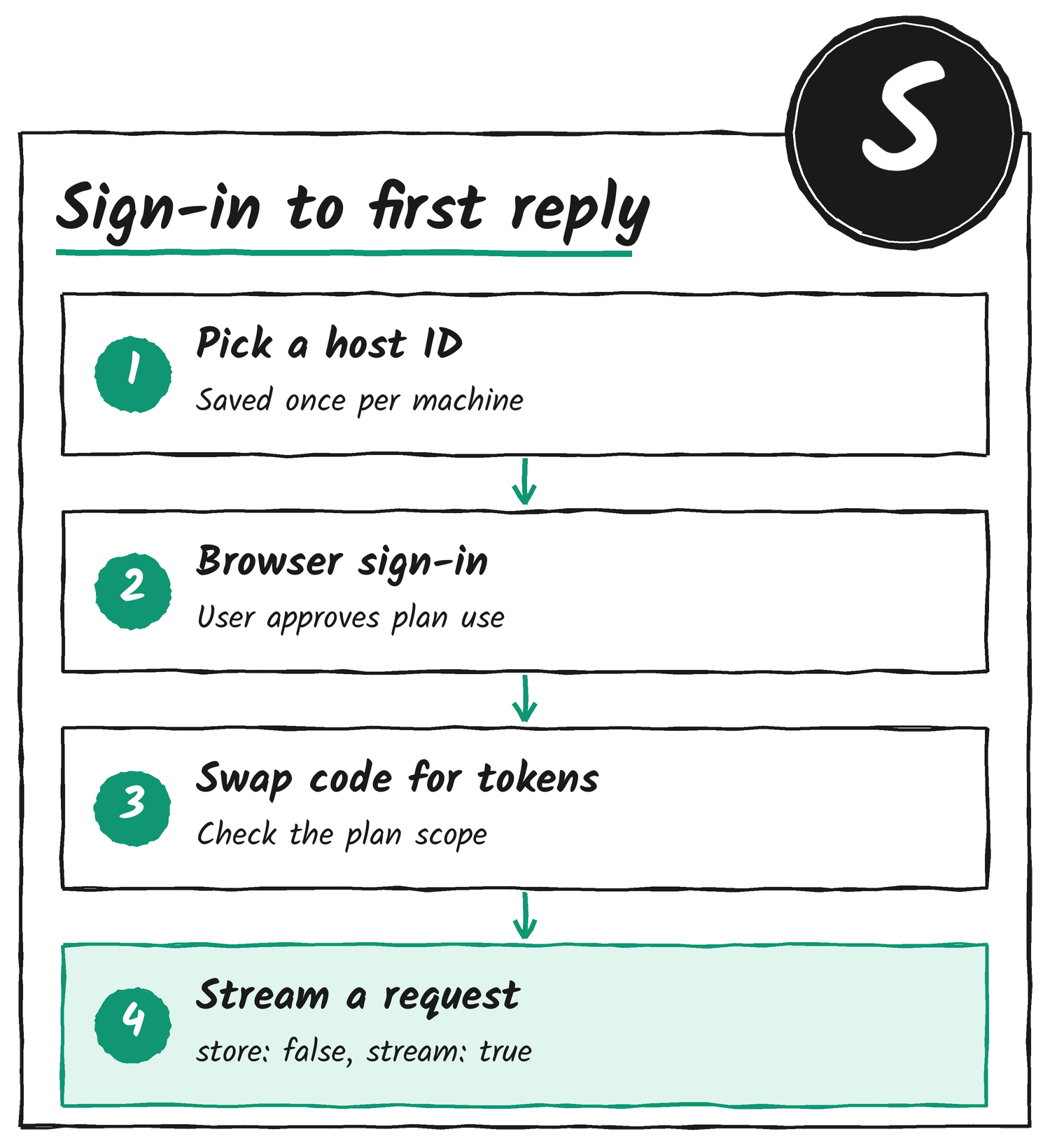
The authorisation request goes to https://auth.openai.com/api/accounts/authorize. For a first-time registration these are the parameters that matter:
| Parameter | What to send |
|---|---|
client_id | dynamic_agent_client for a new registration. After that, the issued client ID from the callback. |
agent_name_hint | The app’s real name, such as OpenClaw, used the same way on every install. Only on the first registration. |
ext_agent_host_id | A stable, opaque ID for this machine. |
redirect_uri | A loopback address on 127.0.0.1 such as http://127.0.0.1:1455/auth/callback. Only the port may change later. localhost isn’t accepted. |
scope | Identity scopes plus the plan-usage scopes, listed below. |
resource | https://api.openai.com/v1 |
state, nonce, PKCE | Fresh random values per attempt. The challenge method is S256. |
openid profile email offline_access resource.invoke chatgpt.tokens.use.directThe browser then returns to the loopback address with a code, the state and, for a new registration, the issued client ID, which usually starts with oaiapp_. The app swaps the code at https://auth.openai.com/api/accounts/oauth/token, verifies the ID token against OpenAI’s published keys, and checks that the granted scopes include chatgpt.tokens.use.direct. A valid ID token alone doesn’t authorise plan usage.
This does not grant access to their ChatGPT conversations or other account context.
OpenAI developer docs, on ChatGPT plan usage
Clients and hosts
The docs split two ideas. A client is the OAuth registration the user authorises. Each issued client ID is bound to the signed-in user and the workspace chosen during registration, and it carries the plan usage settings. A host is the place an instance of the app runs, such as a laptop or a self-hosted virtual machine.
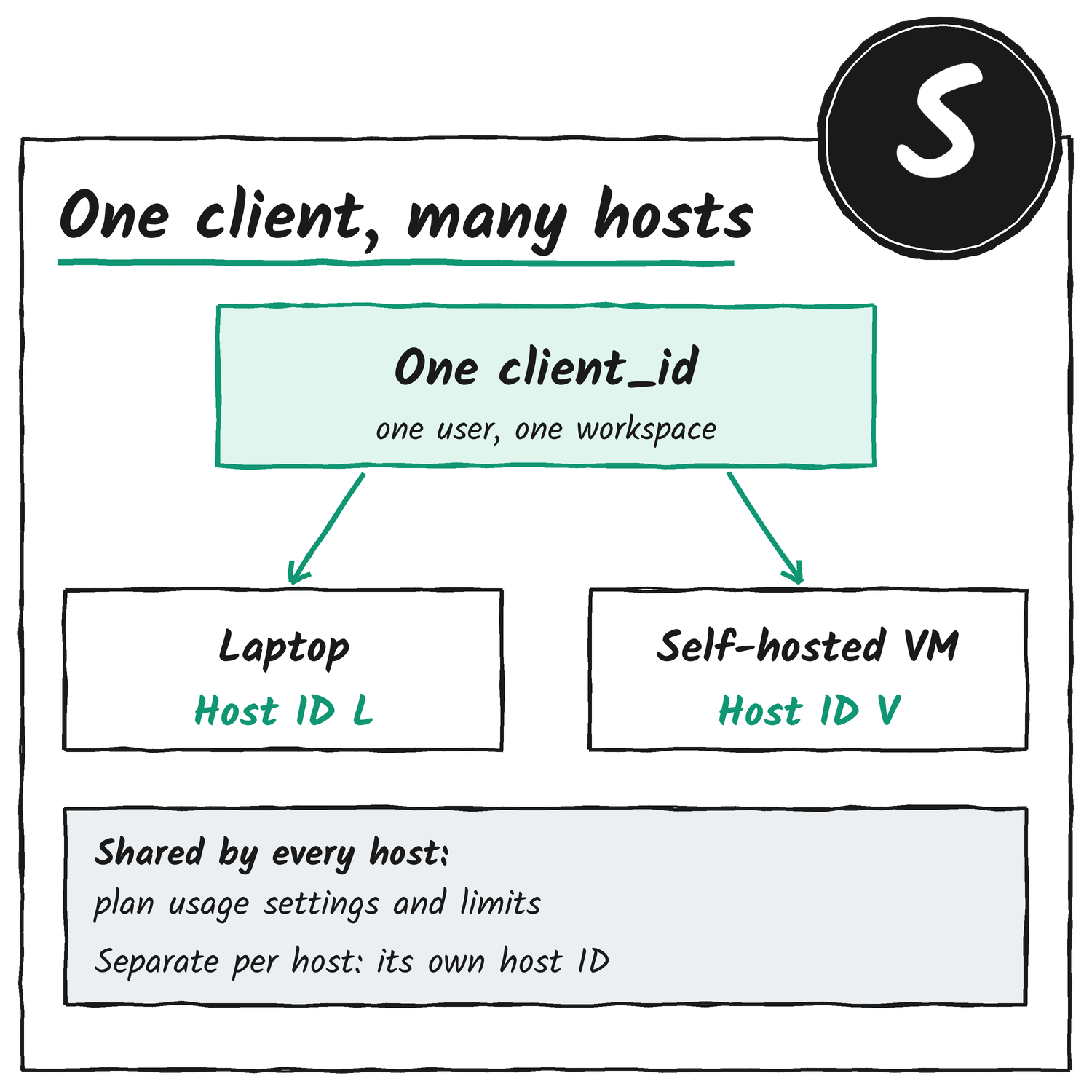
The same user’s laptop and VM can share one client ID, and so share its usage settings and limits, while each sends its own host ID. The app picks the host ID before the first sign-in and keeps it. Restarting the tool or signing in again doesn’t create a new host.
| Host ID format | Guidance |
|---|---|
urn:ietf:params:oauth:jwk-thumbprint:… | Recommended. Derived from a public key under RFC 9278. OpenAI says it currently treats this as an identifier only and doesn’t verify the private key. |
urn:uuid:… | Supported. A UUIDv4 made once per host and stored. |
did:key:… | Supported. Only the did:key method. |
Sending a request
With the access token saved as ACCESS_TOKEN, the app calls the public Responses API at POST https://api.openai.com/v1/responses. OpenAI says not to point this flow at ChatGPT’s backend-api endpoints. A GET to /v1/models with the same token returns the models the signed-in account can use, and the docs suggest keeping the entries marked visibility: list for a picker.
curl --no-buffer https://api.openai.com/v1/responses \
  -H "Authorization: Bearer ${ACCESS_TOKEN}" \
  -H "Content-Type: application/json" \
  -d '{
    "model": "gpt-6.1-sol",
    "input": [{"role": "user", "content": "Say exactly: Hello, world!"}],
    "store": false,
    "stream": true
  }'
OpenAI’s Python example does the same thing through the official SDK by passing the OAuth token as api_key and setting base_url to https://api.openai.com/v1. Both examples read the stream through to the end, because the docs count a request as successful only when a response.completed event arrives. A usage-limit failure can show up as response.failed after text has already started streaming.
| Rule | What it means |
|---|---|
| Store and stream | Set store: false and stream: true on every HTTP request. |
| Input | Send input as an array that holds all the context the request needs. |
| Instructions | Use instructions or developer messages. Explicit system-role items are rejected. |
| History | Leave out previous_response_id over HTTP and resend the history. WebSocket continuation works only inside the same authenticated connection. |
| Tools | Group function and custom tools in namespaces or pass them as additional_tools input items. |
Fields to leave out of the request
background, conversation, max_output_tokens, max_tool_calls, metadata, moderation, multi_agent, prompt, prompt_cache_retention, safety_identifier, temperature, top_logprobs, top_p, truncation and user.
Using Codex app-server
An app built on Codex app-server doesn’t have to call the API itself. It starts app-server as a child process with the OAuth access token in its environment as ACCESS_TOKEN, plus a Responses provider that points at the public API. Codex then sends the token as a bearer credential, and no separate Codex sign-in is needed.
codex app-server --listen stdio:// \
  -c 'model_provider="openai_chatgpt_plan"' \
  -c 'model_providers.openai_chatgpt_plan.name="ChatGPT plan"' \
  -c 'model_providers.openai_chatgpt_plan.base_url="https://api.openai.com/v1"' \
  -c 'model_providers.openai_chatgpt_plan.env_key="ACCESS_TOKEN"' \
  -c 'model_providers.openai_chatgpt_plan.wire_api="responses"' \
  -c 'model_providers.openai_chatgpt_plan.requires_openai_auth=false' \
  -c 'model_providers.openai_chatgpt_plan.supports_websockets=false'
The app then talks newline-delimited JSON over stdin and stdout: initialize with a clientInfo name, title and version, then initialized, thread/start with a model, and turn/start for each message. A turn succeeded only when turn/completed reports a status of completed. The name should match the agent_name_hint sent at registration. Codex can still run local shell and MCP tools and coordinate child agents, because those run on the user’s side rather than as hosted tools.
Token renewal is the app’s job. When it gets a fresh access token it restarts app-server with the new ACCESS_TOKEN and picks the conversation back up with thread/resume. Local thread history still works with store: false.
Tokens, limits and credentials
1 hour
How long an access token lasts.
30 days
How long a refresh token lasts. Each refresh returns a replacement with a fresh 30 days.
5 hours
The usage window for Plus. It’s shared by every app that uses the plan.
To refresh, the app posts form data to https://auth.openai.com/api/accounts/oauth/token with grant_type=refresh_token, the issued client ID (not dynamic_agent_client), the saved refresh token and the same resource. It leaves out scope to keep the grant. Refresh tokens rotate, so the docs say to store the newest one and serialise refreshes for a session so two processes don’t race.
On the usage side, OpenAI says a Plus user’s five-hour limit is shared across every app where they use their plan, private and open-source alike, and that the five-hour limit doesn’t apply to Pro users. Its example of the ChatGPT usage settings shows a per-app weekly limit that can be set from 10% to 100%, plus a choice on whether the app can use credits after the plan limit is reached.
Credentials stay in protected local storage. The docs say to keep access, refresh and ID tokens out of browser storage, source control, logs, analytics and support transcripts, and never to put tokens in URLs. OpenAI’s example credential file holds the email, issuer, subject, client ID, host ID, the three tokens, scopes and a saved-at time, written atomically with owner-only permissions (0600 on Unix). To sign out, an app revokes the refresh token at the revocation endpoint listed in OpenAI’s OpenID configuration, then clears the tokens locally. If credentials leak, the user disconnects the app in ChatGPT Settings.
When something goes wrong
OpenAI says plan usage errors stop inference, and that it doesn’t quietly switch the request to another billing path. Apps should keep the status, body, error code and request ID. The codes with set recovery steps:
| Code | Status | What the app does |
|---|---|---|
subscription_sharing_usage_limit_exceeded | 429 | Pause new plan requests and link to ChatGPT usage settings. The limit may be the plan’s or the app’s. |
subscription_sharing_usage_unavailable | 503 | Keep credentials and retry later with bounded backoff. |
subscription_sharing_user_not_eligible | 403 | Explain the restriction. Don’t loop through OAuth. |
subscription_sharing_unsupported_capability | 400 | Read error.param and remove the unsupported input, tool or option. |
subscription_sharing_invalid_user | 401 | Diagnose the credential. Ask for a new sign-in after a confirmed revocation. |
If the user declines consent, or the granted scopes lack chatgpt.tokens.use.direct, the app keeps the sign-in but marks plan usage as off and offers a clear choice: turn it on, or set up another billing path such as the user’s own API key. When a usage limit is hit, Manage usage is the primary button and an optional buy-credits button is secondary.
Refresh errors that mean sign in again
invalid_grant on refresh, invalid_refresh_token, token_expired, refresh_token_expired, refresh_token_invalidated and refresh_token_reused mean the tokens are unusable. The app clears them and repeats OAuth with the saved client ID. invalid_client points to a client configuration fault. OpenAI doesn’t notify an app when a user disconnects it in ChatGPT settings, so the app learns of it when a request or refresh fails.
What the preview covers
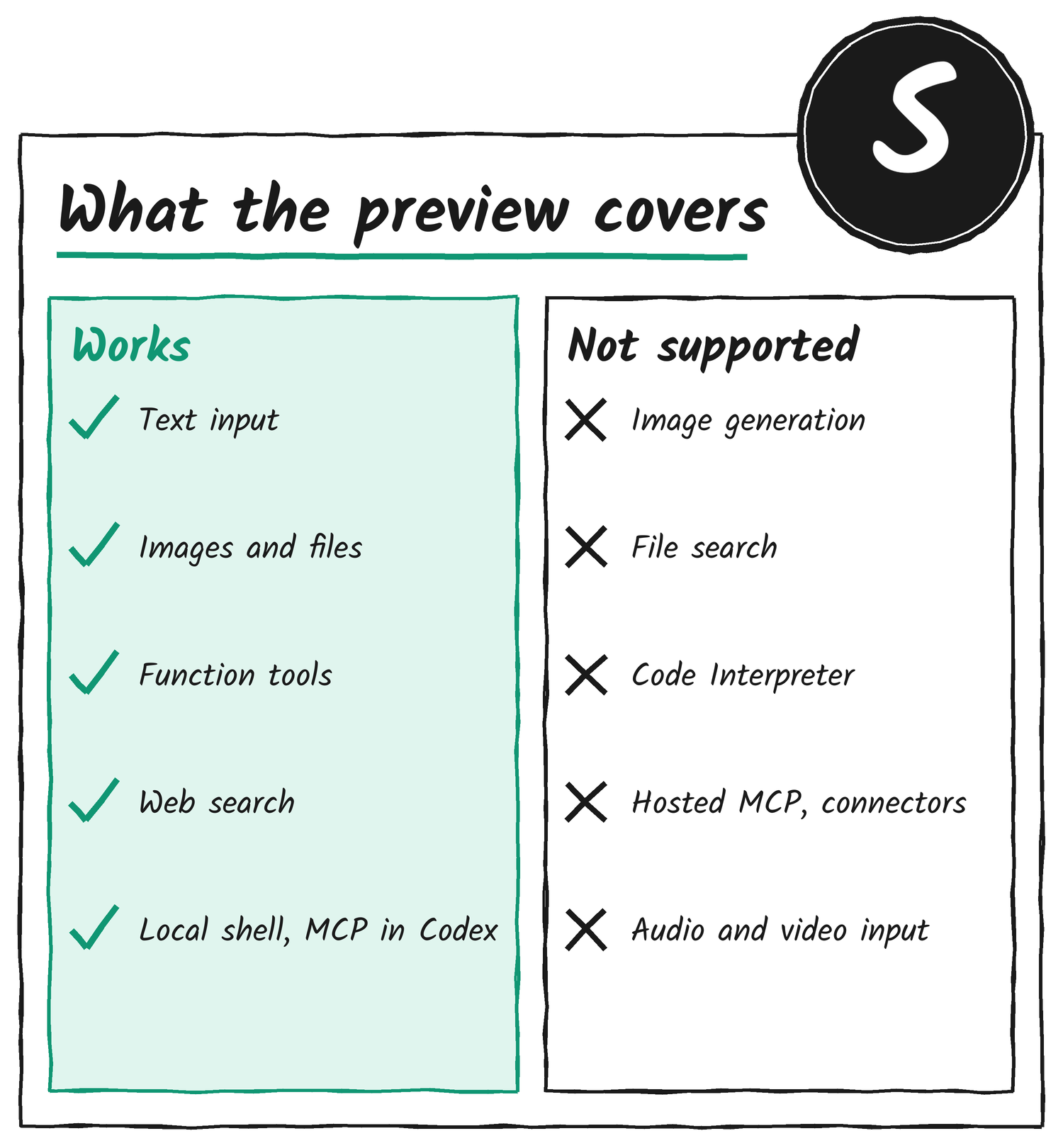
Text, image and file inputs work when the selected model accepts them, and web search stays subject to model and account or workspace policy. Image generation, file search, Code Interpreter, native computer use, hosted MCP and connectors, and Responses tool_search aren’t supported on this route. Audio and video input, the Files upload API and the transcription API aren’t either. These limits apply to direct calls and to Codex app-server alike.
Running it on a self-hosted VM
A 127.0.0.1 callback reaches the machine with the browser, not a remote server, so a VM can’t finish OAuth on its own. OpenAI’s procedure:
- Create and save a stable host ID for the VM.
- Complete OAuth on a local computer with the same tool, user and workspace.
- Copy the protected credential file to the tool’s documented VM path over a secure channel such as SSH, keeping the VM’s own host ID.
- Let the VM handle later refreshes and use its own host ID for its next authorisation.
OpenAI says host-specific usage attribution and revocation of plan access for transferred sessions aren’t available yet.
The DevKit on GitHub
OpenAI has also put the plumbing in a public repository, openai/sign-in-with-chatgpt-devkit. It’s meant for open-source apps that run on a user’s own machine, so a builder doesn’t have to hand-write the OAuth loop from the sections above.
- Local package: a Node.js SDK for OAuth, credential storage, account profiles, model discovery and streaming Responses calls.
- React package: components for the sign-in button, the connection status and the plan usage controls.
- Paste Perfect: a working macOS example that rewrites copied text and pastes the result into another app, with an Electron dashboard for accounts and settings.
OpenAI’s cookbook walks through Paste Perfect. The app creates one runtime, calls signIn(), lists the saved profiles, lists the models for the chosen profile, then calls streamResponse(), which returns only after the response.completed event arrives.
The SDK won’t keep tokens in plain text. The app has to supply an encryption provider, and Paste Perfect uses Electron’s safeStorage, which holds its key in the macOS Keychain. Only the host ID file stays unencrypted, since it contains no secret. Running the example takes macOS 14 or later, Node.js 22.12 or later and Xcode’s command line tools.
The DevKit’s code is under OpenAI’s Sign-in with ChatGPT DevKit Noncommercial License v1.0. That covers personal learning, experimentation and development, and it leaves out work done by or for a business, employer or client.
What it means for users and builders
For users, the switch is a settings option. An app that supports it offers Continue with ChatGPT, and from then on the usage settings in ChatGPT show what the app has used and what it’s allowed to use. The docs name the user’s own API key as the other billing path an app can offer.
For builders, the direct flow needs a loopback listener, PKCE, ID-token checks and a protected credential file, and nothing else to register: no client secret, no partner key. Apps that are paid or hosted remotely aren’t covered by these docs and go through OpenAI’s interest form.
The terms in one place
- ChatGPT plan usage
- Letting an app run eligible Responses API requests against the user’s ChatGPT plan.
- Client
- The OAuth registration a user authorises, tied to one user and workspace.
- Host
- The machine where an instance of the app runs, such as a laptop or VM.
- Loopback callback
- A web address on 127.0.0.1 that the browser returns to after sign-in.
- PKCE
- A check that ties the returned code to the app that asked for it.
- Access token
- The short-lived credential sent with each request. It lasts an hour.
- Refresh token
- The longer-lived credential used to get a new access token. It lasts 30 days.
- Scope
- A named permission.
chatgpt.tokens.use.directis the one for plan usage.
Disclosure: I’m an OpenAI, Firecrawl and Devin ambassador.
Discover more from Sulat AI & Tech News
Subscribe to get the latest posts sent to your email.