Nick Bolton, Synergy’s founder, emailed me to say I’m an Early Adopter and that Synergy 4 Dragon will cost me nothing once it leaves early access. I’m a Synergy customer, which is why it reached my inbox. The email reads like a thank-you note. The terms behind it matter more, and they’ve moved since October.
The offer is short. Dragon is in early access and Early Adopters get it free when that ends. Anyone who wants it sooner can buy the upgrade, but Bolton says plainly that you don’t have to.
If you wait, Dragon is free.
Nick Bolton, founder of Synergy, in an email to Early Adopters
2014 to 2022
the Early Adopter window: 1 September 2014 to 7 July 2022
$159
list price of Dragon Max, the tier Early Adopters get free
15
computers one keyboard and mouse can reach on Max
2027
when Synergy expects the stable release
- What Synergy is and what Dragon changes
- What early access means
- Who counts as an Early Adopter
- What it costs
- How Synergy got here
- The rivals, and where hardware fits
- Wait or pay?
- What isn’t known yet
What Synergy is and what Dragon changes
Synergy shares one keyboard and mouse across several computers over a network. You push the pointer off the edge of one screen and it shows up on the next machine, which keeps its own screen and its own apps. It runs on Windows, macOS and Linux. The P.S. in Bolton’s email pitches it at anyone “struggling with using two keyboards or a KVM switch”.
Dragon is a new app rather than a patch, and it installs alongside Synergy 1 and Synergy 3, so trying it doesn’t mean removing either. The alpha notes from 17 August list drag and drop of files between computers, configuration profiles for each place you work, dark mode, a layout view that draws every computer’s displays to scale, and in-app updates. The 11 November beta notes include putting every computer to sleep, or waking them all, at once. On the purchase page, portals and the sleep-and-wake control sit in the top tier.
What early access means
Early access here means a paid beta. Synergy sells Dragon now, and its help article says the licence you buy carries on into the stable release. The download page is blunt about the state of the software. It leads with “Early access beta: expect it to break”, says the beta “is unstable, has severe bugs, and can crash or lose your settings without warning”, and tells you not to rely on it for everyday work.
The checkout shows an early access warning before you pay. The alpha release notes said builds expire 90 days after they were built, so you had to keep updating. I couldn’t find the same line for the beta, so check before you depend on it. The app itself doesn’t ask for a serial key or a login, because the licence sits on your account on Synergy’s website.
Who counts as an Early Adopter
The rule depends on when your account was created, and it applies to accounts that hold a Synergy 1 licence. Open your account page and look beside “Member since”: it shows the date and an Innovator or Early Adopter badge. The email’s dates, September 2014 to July 2022, match the help article’s window of 1 September 2014 to 7 July 2022.
| Group | Who | What they get | When |
|---|---|---|---|
| Innovators | Synergy 1 accounts from before 1 September 2014, when Synergy was funded by donations | Dragon Max, free | Now, during early access |
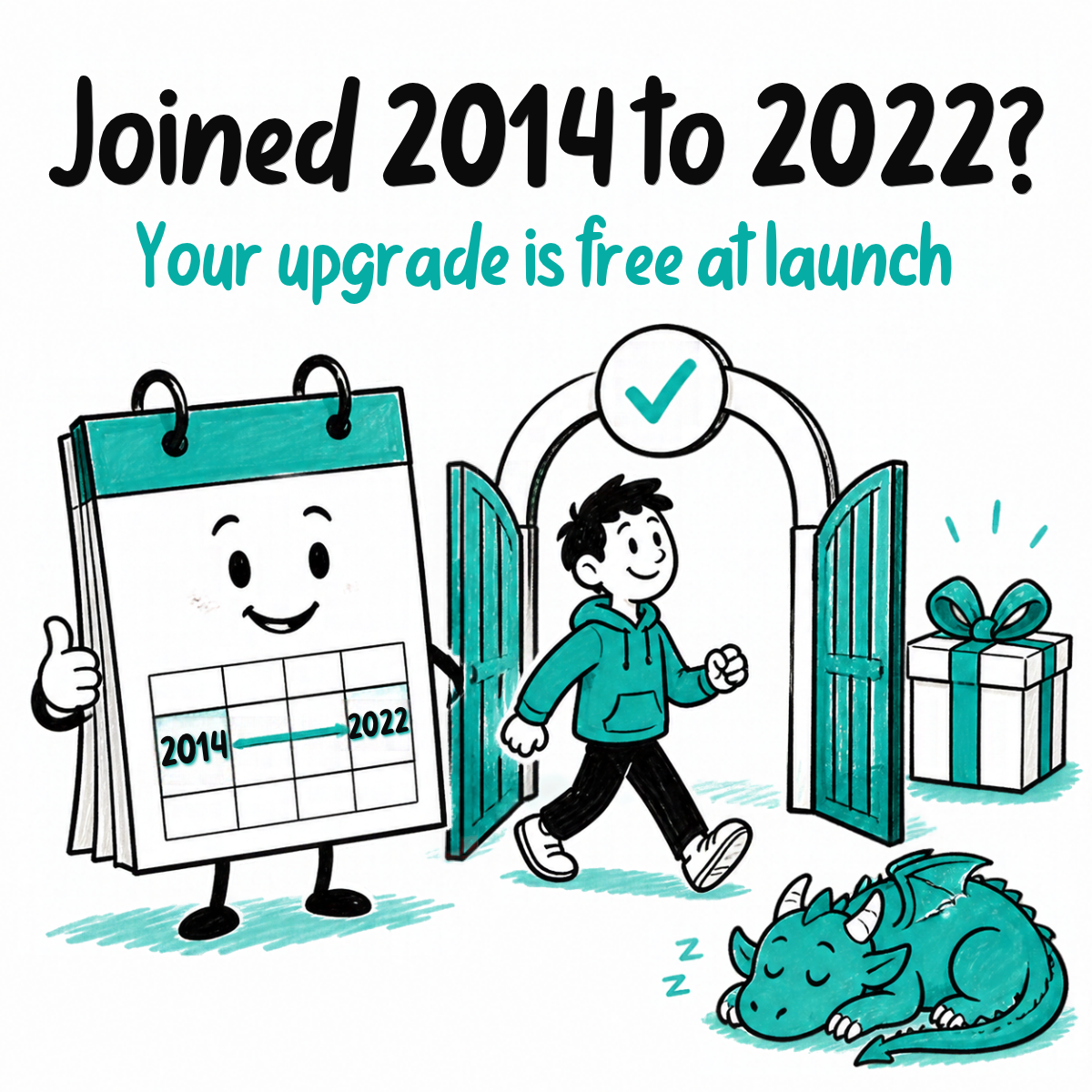
| Early Adopters | Accounts from 1 September 2014 to 7 July 2022 | Dragon Max, free | When the stable version ships, expected 2027 |
| Joined the beta before it went on sale | Beta testers | Already hold Dragon Max | Now |
| Other personal customers | Everyone else | Buy early access, or upgrade from Synergy 1 or 3 and pay the difference | Now |
| Business | Synergy Business licence holders | The beta download, for as long as the licence term runs. Synergy Enterprise doesn’t include it | Now |
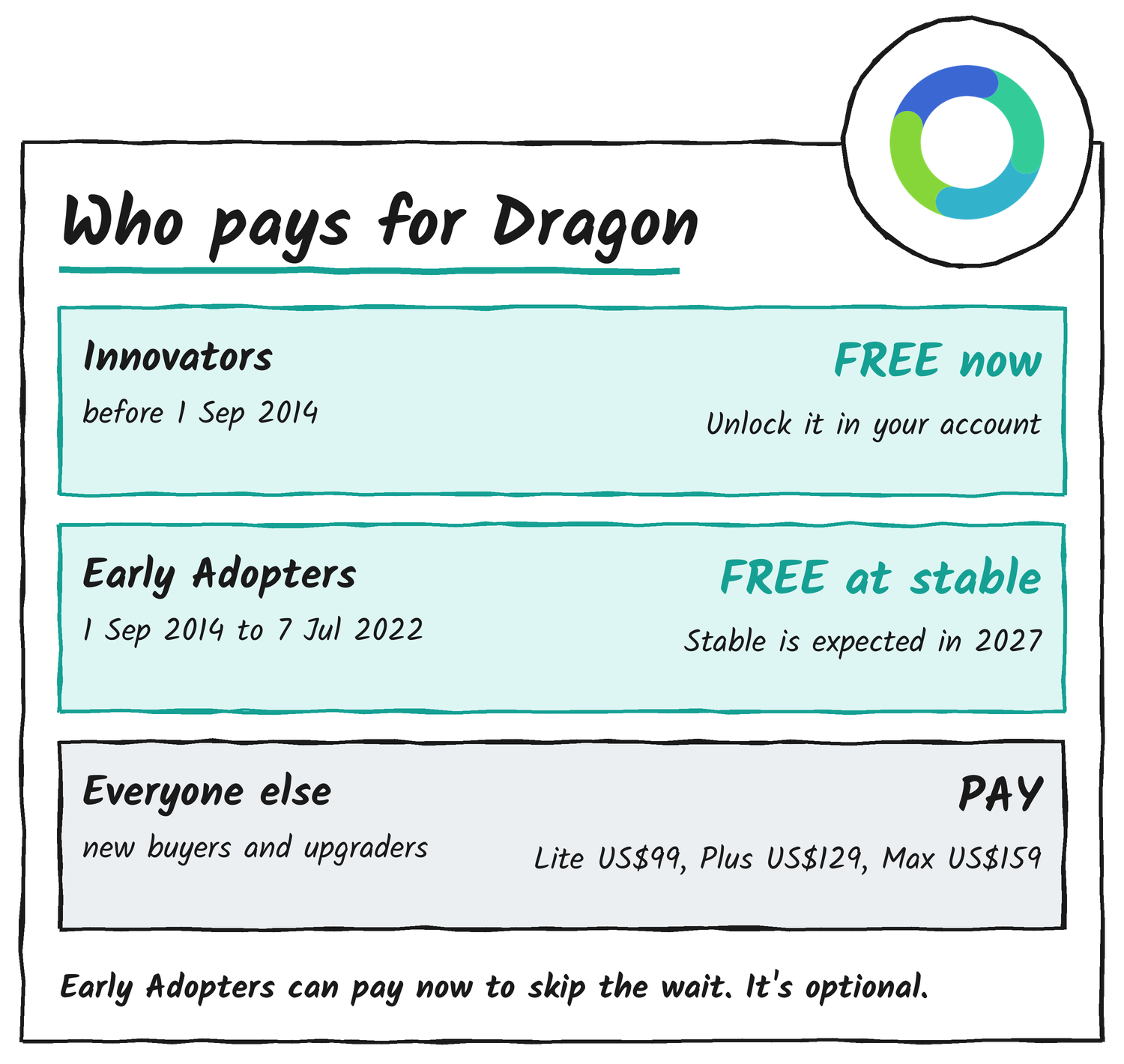
Why those dates? Synergy’s October alpha article says Innovators “donated to us before September 2014, before we became a business”, and that Early Adopters “bought Synergy 1 before July 2022”. Nothing I’ve read explains why July 2022 is the cut-off.
The same article gives the reason for the free licence. Synergy planned to keep Synergy 1 and Synergy 3 supported for five years after Dragon goes on sale, and said “That is why Innovators and Early Adopters get Synergy Dragon free: their updates and support carry on in Synergy Dragon.”
What changed since October
In October, Early Adopters were to get Dragon “after it goes on sale”, with the number of days “still to be decided”. The 14 November article replaces that with a trigger. Early Adopters unlock Dragon Max when the stable version is released, which Synergy expects in 2027. Dragon has since gone on sale as a paid beta, so “after it goes on sale” has turned into “after it’s finished”. My reading is that the wait is longer than the October wording suggested, although that wording never gave a time.
Until then, the account page row for Dragon Max shows an Upgrade button for an Early Adopter. When the stable release lands, you click Unlock instead.
What it costs
Dragon comes in three one-time tiers. Synergy says to choose your tier from the start: a higher Dragon licence is bought at its full price, with no upgrade from one tier to the next. Synergy 1 or Synergy 3 owners who aren’t Innovators or Early Adopters pay the Dragon price minus the price of the licence they hold, and keep that licence.
| Tier | Price | Computers | What it adds |
|---|---|---|---|
| Dragon Lite | $99 | 2 | Encrypted connections on by default, copy and paste, every screen at its real size and position, automatic updates |
| Dragon Plus | $129 | Up to 5 | Drag and drop files, configuration profiles, keyboard shortcuts to switch computers, a performance monitor |
| Dragon Max | $159 | Up to 15 | Portals linking any screen edge to any other, sleep and wake every computer together |
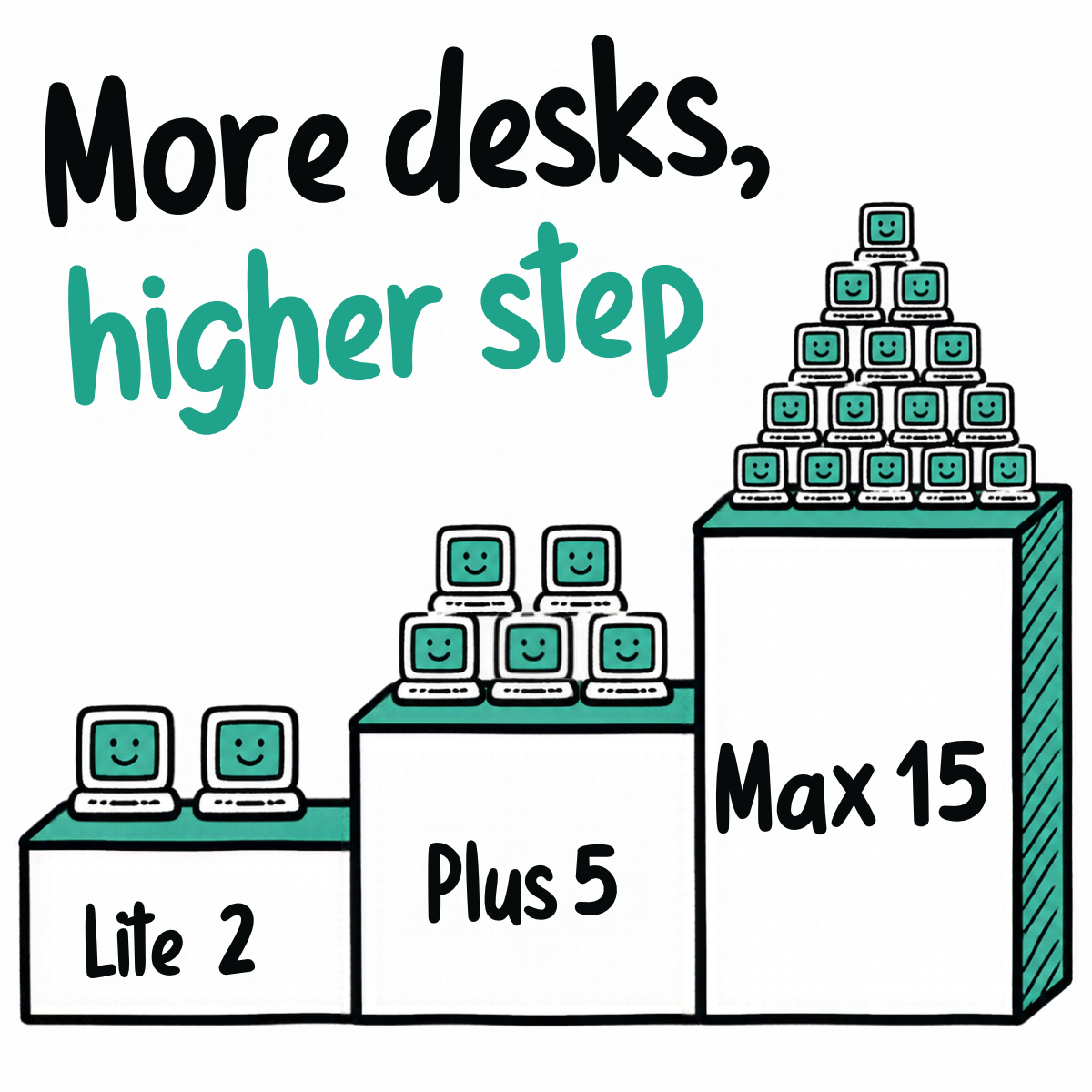
Early Adopters get Max, the top tier, which lists at $159 for up to 15 computers. The email itself states no price. It points to a page for your upgrade price, behind a login, so I can’t tell you what getting in early costs an Early Adopter. The help article says there’s no need to buy.
Dragon’s list prices sit well above Synergy 3’s. Bolton’s June post says the top Synergy 3 tier fell from $49 to $29 in January, and a $15 entry tier arrived. A third-party guide checked on 18 October lists Synergy 3 at $15, $19 and $29 for up to 3, 5 and 15 computers. Synergy also says it prices by region, so the figure you see may differ. The free licence is worth more measured against Dragon’s list price than against what the equivalent Synergy 3 costs.
How Synergy got here
| Date | What happened |
|---|---|
| 2001 | Chris Schoeneman writes Synergy as an open-source project |
| 1 September 2014 | Early Adopter window opens, after donor-funded Innovators |
| 7 July 2022 | Early Adopter window closes |
| January 2026 | Synergy 3’s top tier cut from $49 to $29, with a $15 entry tier |
| 19 May 2026 | New EULA requires a business licence for any work use |
| 15 June 2026 | EULA 2.1 reverses it for personal licences bought with your own money; announced 16 June |
| 21 July 2026 | Symless renamed Synergy |
| 17 August 2026 | First Dragon alpha (v0.1.0) |
| 11 November 2026 | Dragon Beta (v4.0.0) |
| 14 November 2026 | Help article: on sale as early access; Early Adopters free at stable release, expected 2027 |
It’s been a rough year for Synergy on licensing. Bolton wrote on 16 June, “On 19th May 2026 we changed our EULA so that a business license was required for any work use. This was a mistake.” Version 2.1 of the licence agreement, from 15 June, put personal licences back for anyone who buys with their own money, including for work, and Bolton says it covers every licence the company has sold.
The rename matters if you go looking for the company. Symless became Synergy on 21 July, and the website is due to move from symless.com to synergyapp.io later this year, with symless.com redirecting indefinitely. Bolton also says “Synergy 1 is open source, and it is the core that Synergy 3 is built on”, with Deskflow upstream of both.
The rivals, and where hardware fits
Synergy started in 2001 as an open-source project by Chris Schoeneman, according to Deskflow’s README, and the free forks all trace back to it. Deskflow is the upstream that Synergy says it maintains in the open, and its README says Synergy sponsors it with money and code. So the free option is partly paid for by the commercial one.
| Option | Cost | Status | Limits |
|---|---|---|---|
| Synergy 4 Dragon | $99 to $159, one-time | Early access beta | 2, 5 or 15 computers by tier; Windows, macOS, Linux |
| Synergy 3 | Lower; see above | Shown as “Recommended” on Synergy’s purchase page | Windows, macOS, Linux |
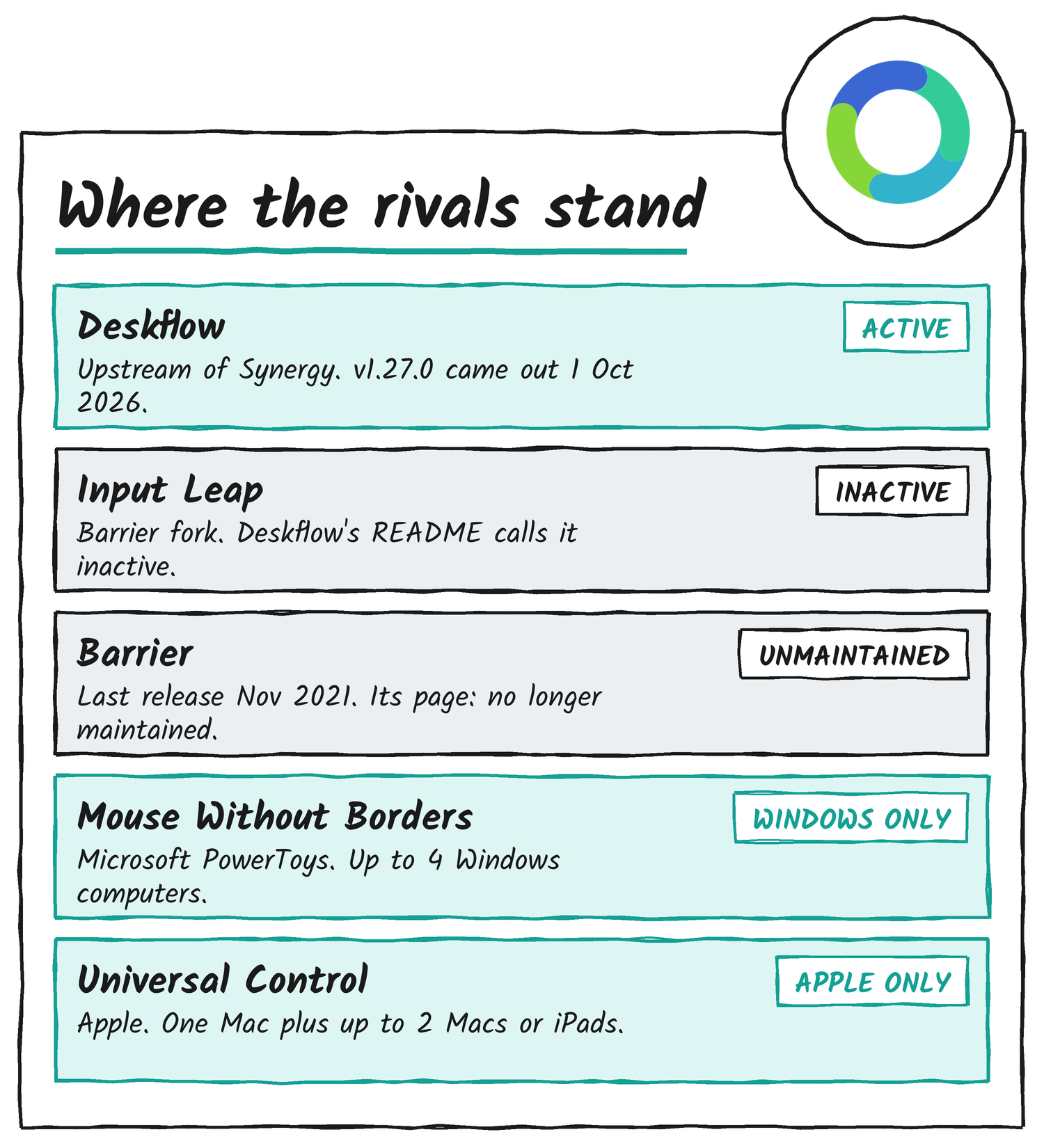
| Deskflow | Free, GPL-2.0 | Active; sponsored by Synergy | Works with Synergy 1; Synergy 3 not yet compatible, per its README |
| Input Leap | Free | Called a dead fork by Deskflow’s README; archived on GitHub per a third-party guide | Its README says it isn’t compatible with Synergy |
| Barrier | Free | Unmaintained; last release 2.4.0, November 2021, per the same guide | |
| Mouse Without Borders | Free, in Microsoft PowerToys | Maintained by Microsoft | Windows only; up to four PCs |
| Apple Universal Control | Built in | Maintained by Apple | One Mac plus up to two other Macs or iPads, same Apple Account, macOS Monterey 12.4 or later |
| Hardware KVM switch | Varies | Not software | Cables and a switch, nothing installed on the computers |
Treat the sources on Barrier and Input Leap with care. Bolton wrote in July 2025 that Barrier is abandoned and Input Leap is its fork, and Synergy sells a competing product. Deskflow’s README calls Input Leap a dead fork, and a third-party guide dated 18 October says its GitHub project is archived. That guide’s author sells a competing app, CommandDesk, and says so. I couldn’t check Input Leap’s repository directly.
Microsoft’s Mouse Without Borders is free inside PowerToys and handles up to four Windows PCs, by Microsoft’s documentation. BleepingComputer’s launch coverage put the file transfer limit under 100 MB. It’s Windows only. Apple’s Universal Control is built in, but it’s for Macs and iPads: one Mac plus up to two others on the same Apple Account.
A hardware KVM switch is the box Bolton’s email is pitching against. It hands one keyboard, mouse and monitor to whichever computer you select. It needs cables and a switch but nothing installed on the machines, and Synergy needs software on every computer and a network.
Wait or pay?
- Check your badge on the account page, beside “Member since”.
- Innovators can unlock Dragon Max now, free.
- Early Adopters lose nothing by waiting, unless they need portals or file drag and drop today. The beta can crash, and your Synergy 1 or Synergy 3 licence keeps working meanwhile.
- Keep the email and a copy of the help article’s terms. They changed once between October and November.
- Everyone else who just wants to share a keyboard and mouse should price Synergy 3 or Deskflow first.
What isn’t known yet
The upgrade price for Early Adopters hasn’t been published. The stable release date is “expected in 2027” and nothing firmer. Synergy hasn’t said whether its five-year support promise for Synergy 1 and Synergy 3 started when Dragon went on sale as a beta or starts at the stable release. And Deskflow’s README says Synergy 3 isn’t compatible with it yet.
Sources: email from Nick Bolton to customers; Synergy help articles on Dragon (14 November and October 2026), purchase page, download page, release notes (v0.1.0 and v4.0.0), blog posts of 16 June and 21 July 2026 and the EULA revision history; Deskflow README; Input Leap README; Microsoft Learn on Mouse Without Borders; BleepingComputer; Apple Support on Universal Control; CommandDesk guide to Input Leap and Barrier on Mac (18 October 2026).
Discover more from Sulat AI & Tech News
Subscribe to get the latest posts sent to your email.