Fine-tuning a Gemma 4 model can start with about 7 GB of GPU memory, according to Google’s new fine-tuning hub, and a worked example on the hub finishes training in 7 minutes 22 seconds. Pau Labarta Bajo recommended the hub on 26 November to “anyone trying to reduce token usage and costs by fine-tuning smaller specialized models”. This guide is for people who haven’t fine-tuned a model yet. It explains the words, says when to skip fine-tuning, and walks through a first run.
~7 GB
peak GPU memory to QLoRA the small E2B model
500 to 5,000
examples a LoRA run typically needs
7 min 22 s
for the hub’s example run, 57 steps
0 to 20 of 20
the example’s score after two epochs
- The idea in plain words
- Do you need to fine-tune at all?
- The four stages of training
- What you need: data, hardware, cost
- A first run, step by step
- I ran it
- Common mistakes
- Pre-flight checklist
- How other guides and tools compare
- What isn’t known
The idea in plain words
You don’t need a machine learning background to follow this. Here are the words, one at a time.
- Model
- The program that writes the answers. Gemma 4 is Google’s family of open models. “Open” means you can download the files and run them yourself.
- Weights
- The billions of numbers inside a model that hold everything it has learned. Training means nudging those numbers.
- Prompt
- What you type in. A good prompt is the cheapest way to change what a model does, and it’s where you should start.
- Fine-tuning
- Training an existing model a little more, on your own examples, so it picks up a habit: a format, a tone, a task.
- RAG
- Retrieval-augmented generation. The model stays as it is, and your documents are looked up and pasted into the prompt each time.
- LoRA
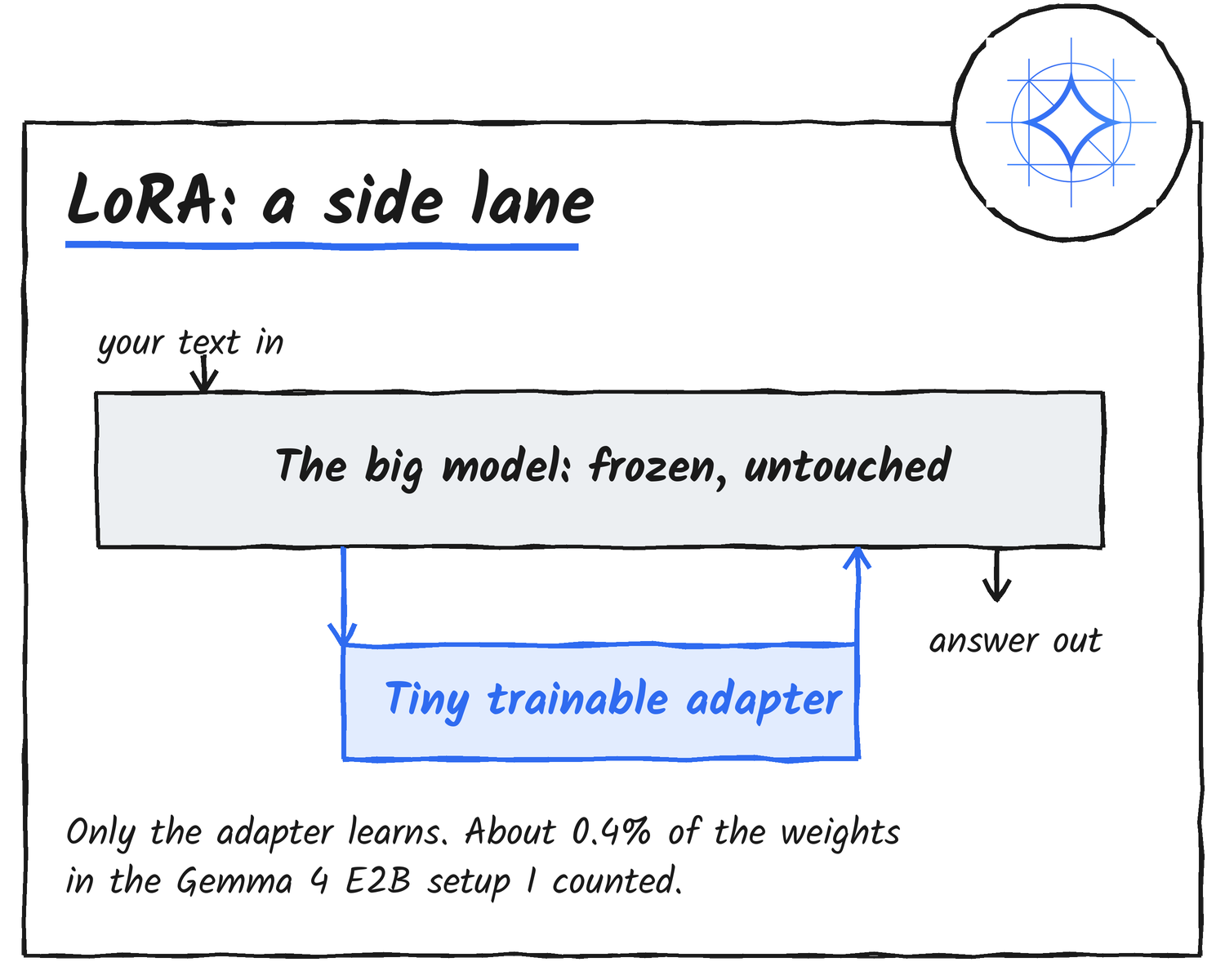
- Low-rank adaptation. Instead of changing the billions of weights, you freeze them and train a small add-on beside each layer. The add-on is called an adapter.
- QLoRA
- LoRA with the frozen model squeezed into 4-bit numbers so it takes about a quarter of the memory.
- VRAM
- The memory on your graphics card. Training needs far more of it than just using a model, so VRAM is usually the limit.
- Epoch
- One full pass through your examples. Hub runs use one to three.
- Loss
- A score for how wrong the model’s answers are on your examples. Lower is better, until the model starts memorising.
-itcheckpoint- Every Gemma 4 size comes twice: a pre-trained one that only continues text, and an instruction-tuned one, ending in
-it, that follows requests. Most people start from the-itone. - Merge
- Folding the trained adapter back into the model so you have one ordinary model file.
- GGUF
- A file format that tools like llama.cpp and Ollama use to run models on a laptop.
Here’s a picture of it. It’s my own analogy, not Google’s. Think of a new hire who has read half the internet. Prompting is handing them a sticky note: “reply in this format”. RAG is handing them a binder of your documents to look things up in. Fine-tuning is a few weeks of on-the-job training with a stack of your solved examples, until the format is second nature and the sticky note is no longer needed. LoRA is doing that training with a small notebook beside their desk, not by rewiring their brain.
Do you need to fine-tune at all?
Often not. The hub’s own advice is to ask whether you need to change the weights before you start. Its rule of thumb is that weights should learn skills and retrieval should handle facts. My advice, which is mine and not Google’s: try a better prompt first, then RAG, and fine-tune when you keep hitting the same habit problem, such as a stubborn output format, or when you want a small model to do one job cheaply.
| Your goal | Approach | Why, per the hub |
|---|---|---|
| Facts that change often, such as live stock or user records | RAG | Updating a search index takes seconds. Weights should learn skills, not changing facts. |
| A new language or a big pile of domain text | Continued pre-training | Deep domain shifts benefit from raw text before instruction tuning. |
| A new output format, persona, tool schema or task skill | Supervised fine-tuning | Small adapters learn new behaviour from a modest chat dataset on one GPU. |
| Strict correctness, such as verifiable code, maths or SQL | Reinforcement learning | Reward functions catch mistakes that example-copying misses. |
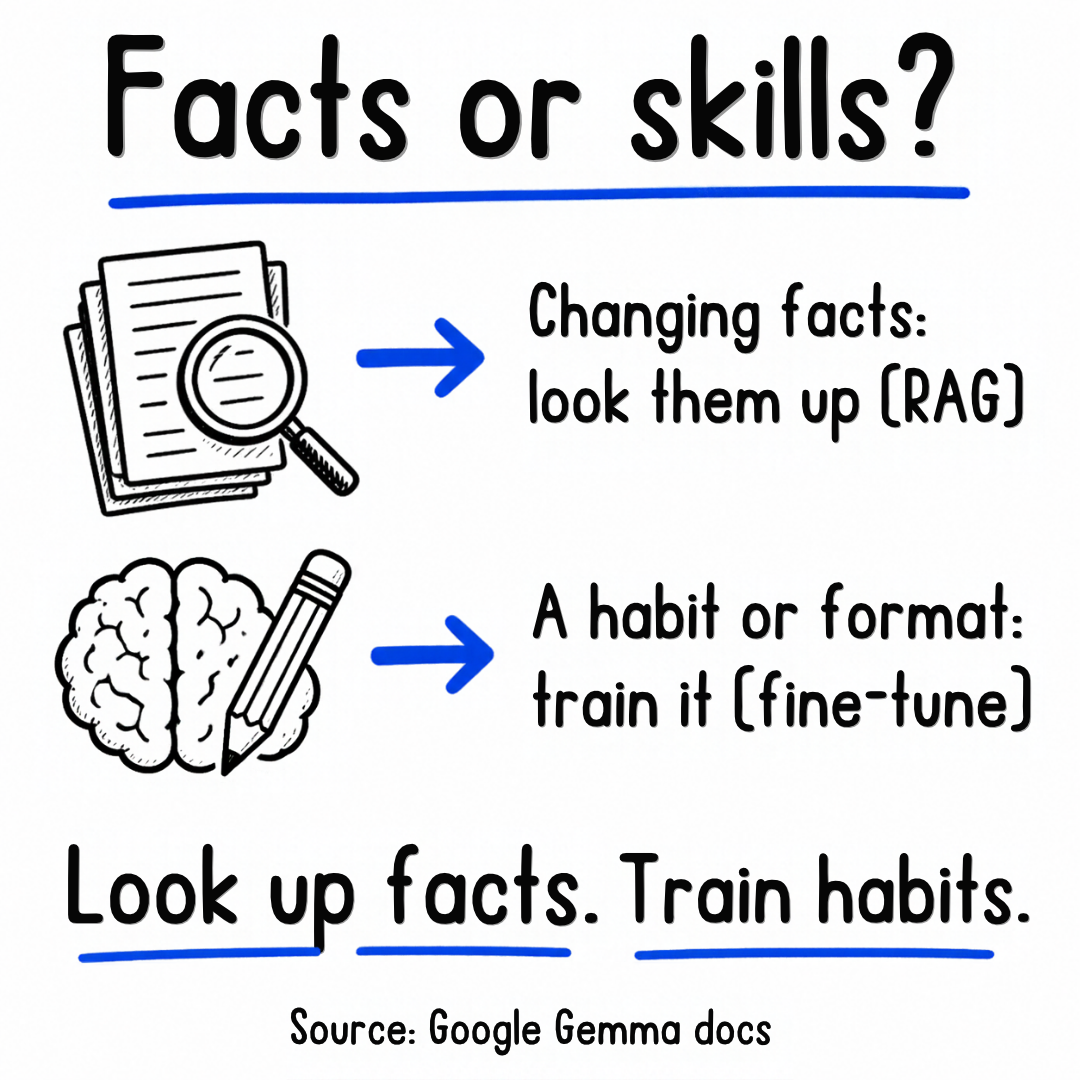
Labarta Bajo’s angle is cost: a small fine-tuned model can replace a bigger, pricier one on a narrow task. That’s plausible, but neither his post nor the hub gives a savings figure, and I haven’t measured one. Whether a tuned E4B beats a well-prompted large model on your task depends on your data, so test on examples you hold back.
The four stages of training
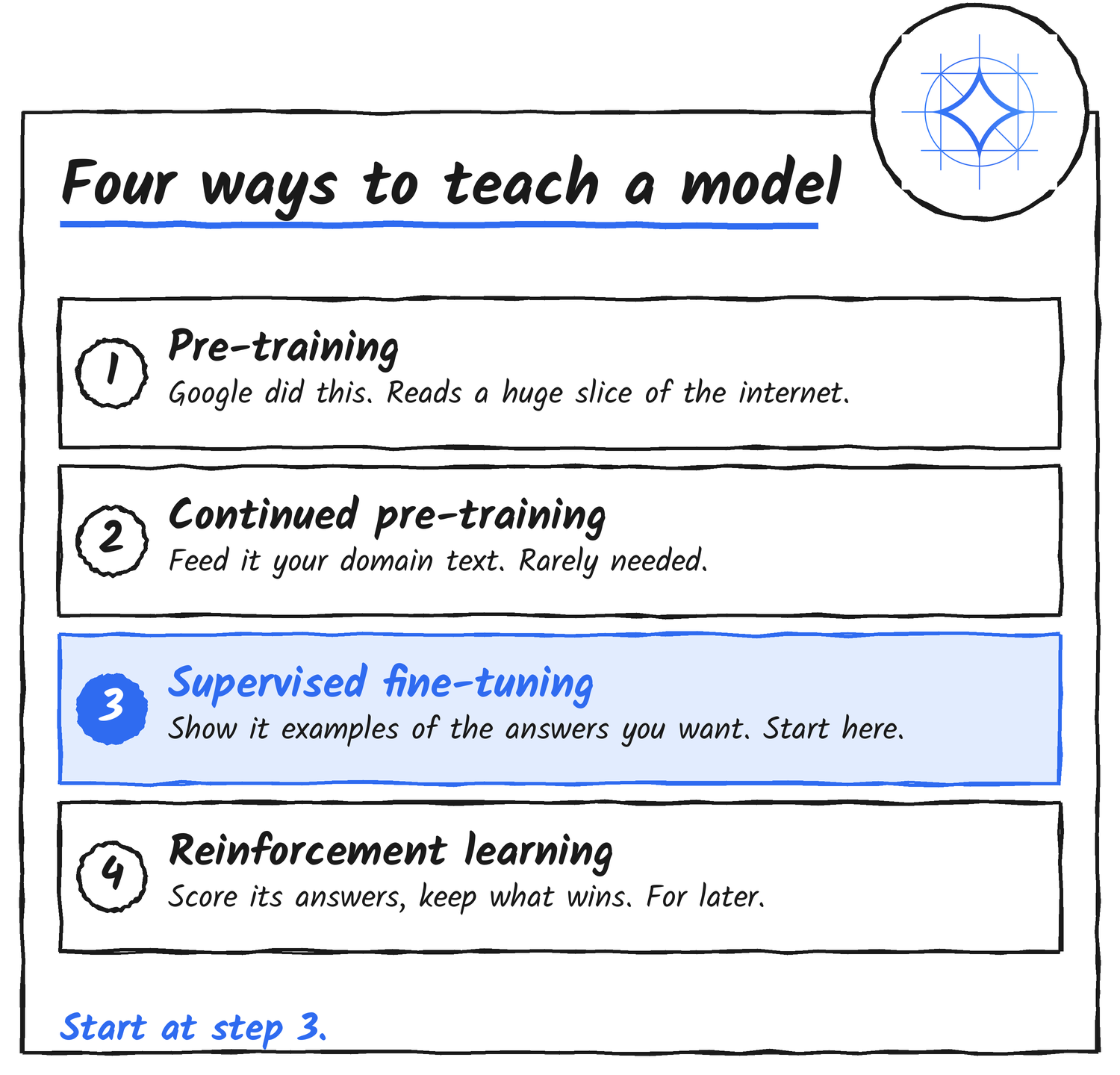
Google describes four stages. Pre-training is how the base model was made. Continued pre-training feeds it raw domain text. Supervised fine-tuning, usually shortened to SFT, shows it prompts paired with the exact answer you want. Reinforcement learning scores its answers and keeps what wins. The hub says you rarely need all four and that most teams start from the -it checkpoint and run SFT, or reinforcement learning, on top. For a first run, that means SFT.
What you need: data, hardware, cost
Data
A LoRA run typically needs 500 to 5,000 examples, each a prompt with the answer you want. Full fine-tuning benefits from around 10,000. The hub adds three habits: hold out 5% to 10% to check progress, mix in 5% to 15% ordinary conversation so the model doesn’t forget how to chat, and keep reasoning examples in the mix, at least half of them, if you want the model to keep thinking out loud.
Hardware
Memory is the gate. Training stores each trained weight, its gradient and optimiser state, so it needs much more than running the model. Google’s table gives peak memory at a 2,048-token sequence length:
| Gemma 4 model | Size | QLoRA | Train every weight |
|---|---|---|---|
| E2B | 2B effective | ~7 GB | ~32 GB |
| E4B | 4B effective | ~9 GB | ~42 GB |
| 12B | 12B | ~11 GB | ~80 GB |
| 26B A4B | 26B, 4B active | ~21 GB | ~160 GB |
| 31B | 31B | ~22 GB | ~200 GB |
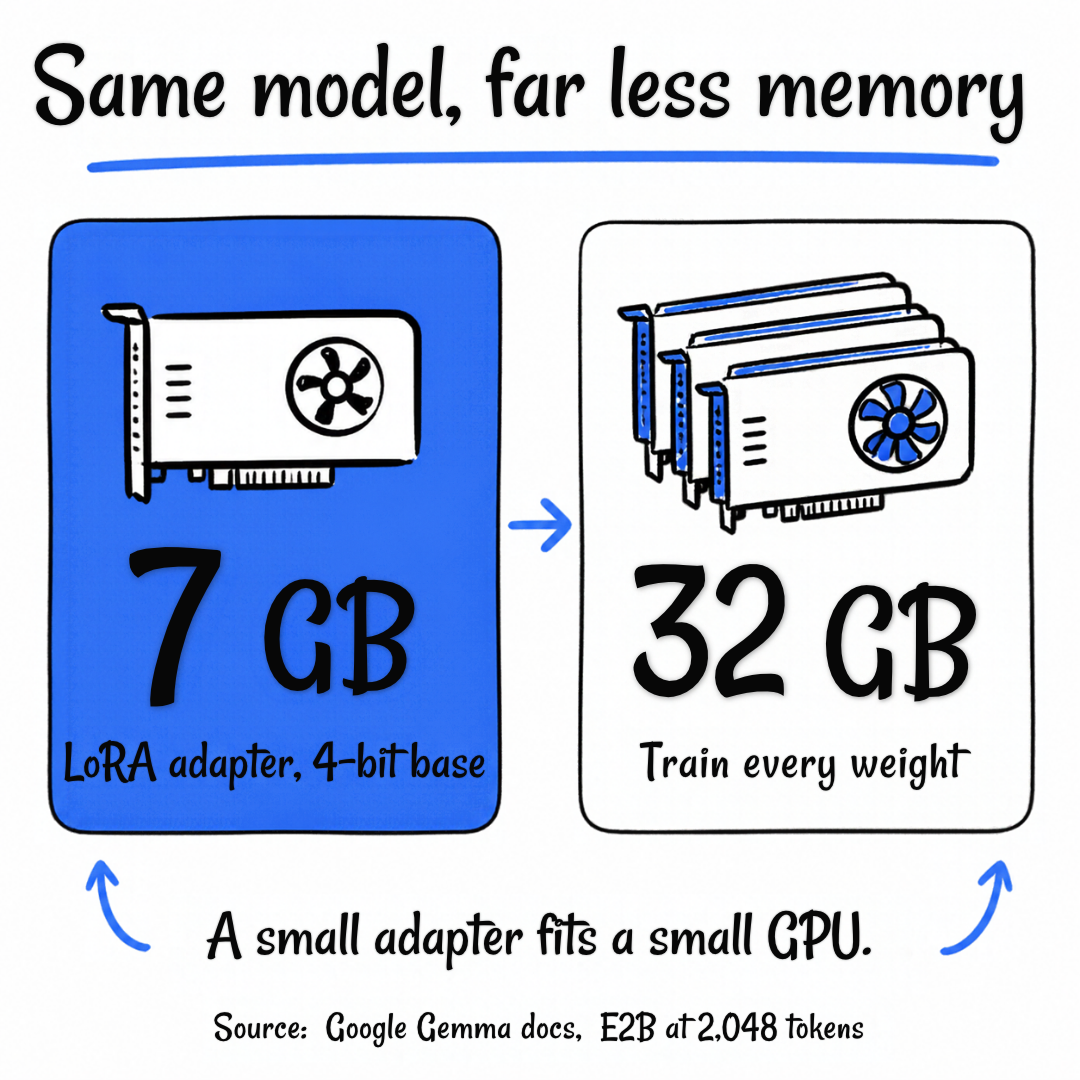
That 22 GB for the 31B model means a single 24 GB graphics card can do it. If you don’t own one, you can rent a GPU by the hour or use a free notebook: Unsloth publishes free Colab notebooks for Gemma 4, and a third-party Unsloth guide says E4B with QLoRA fits a free 16 GB T4.
Cost
Google doesn’t quote a dollar figure. The only estimate I found is from a third-party guide published on 6 April, which prices rented RTX 4090 time at about US$0.29 to US$0.59 an hour and says a full run on 1,000 examples costs under US$1. Treat it as a ballpark, not a quote, since hourly rates move.
Which model to start with
Google’s tutorial uses E2B because it is quick. Unsloth’s guide recommends QLoRA on E4B over LoRA on E2B, on the grounds that the bigger model gains more than the 4-bit squeeze costs. My read: use E2B to test your pipeline in minutes, then move to E4B for the model you keep, if you have about 10 GB free.
A first run, step by step
The hub’s (Q)LoRA tutorial teaches Gemma 4 E2B to think in a chosen language, such as French, and still answer in English. Out of the box it gets that backwards. The code below is from that tutorial, trimmed, with my notes. I haven’t run the training steps; see what I did run.
1. Pick one narrow task and install the tools
Pick a task you can score, such as “always return valid JSON” or “reason in French”. Then install the Hugging Face libraries the hub uses: transformers, TRL for training, PEFT for LoRA and bitsandbytes for 4-bit.
pip install -q -U "transformers>=5.10.1" "trl>=0.16.0" "peft>=0.19.0" accelerate datasets bitsandbytes torchao2. Format your examples as chat turns
Each example is a prompt (system and user turns) and a completion (the answer). Keeping them separate matters: TRL then ignores the prompt when scoring, setting those tokens to -100, so the model is graded only on its answer. The hub’s example uses 1,000 rows from the Multilingual-Thinking dataset.
def create_conversation(sample):
    system_message = (
        f"reasoning language: {sample['reasoning_language']}\n\n{sample['developer']}"
    ).strip()
    return {
        "prompt": [
            {"role": "system", "content": system_message},
            {"role": "user", "content": sample["user"]},
        ],
        "completion": [
            {"role": "assistant",
             "reasoning_content": sample["analysis"],
             "content": sample["final"]},
        ],
        "chat_template_kwargs": {"enable_thinking": True},
    }

dataset = load_dataset("HuggingFaceH4/Multilingual-Thinking", split="train")
dataset = dataset.map(create_conversation, remove_columns=dataset.features)
dataset = dataset.train_test_split(test_size=0.1, seed=42)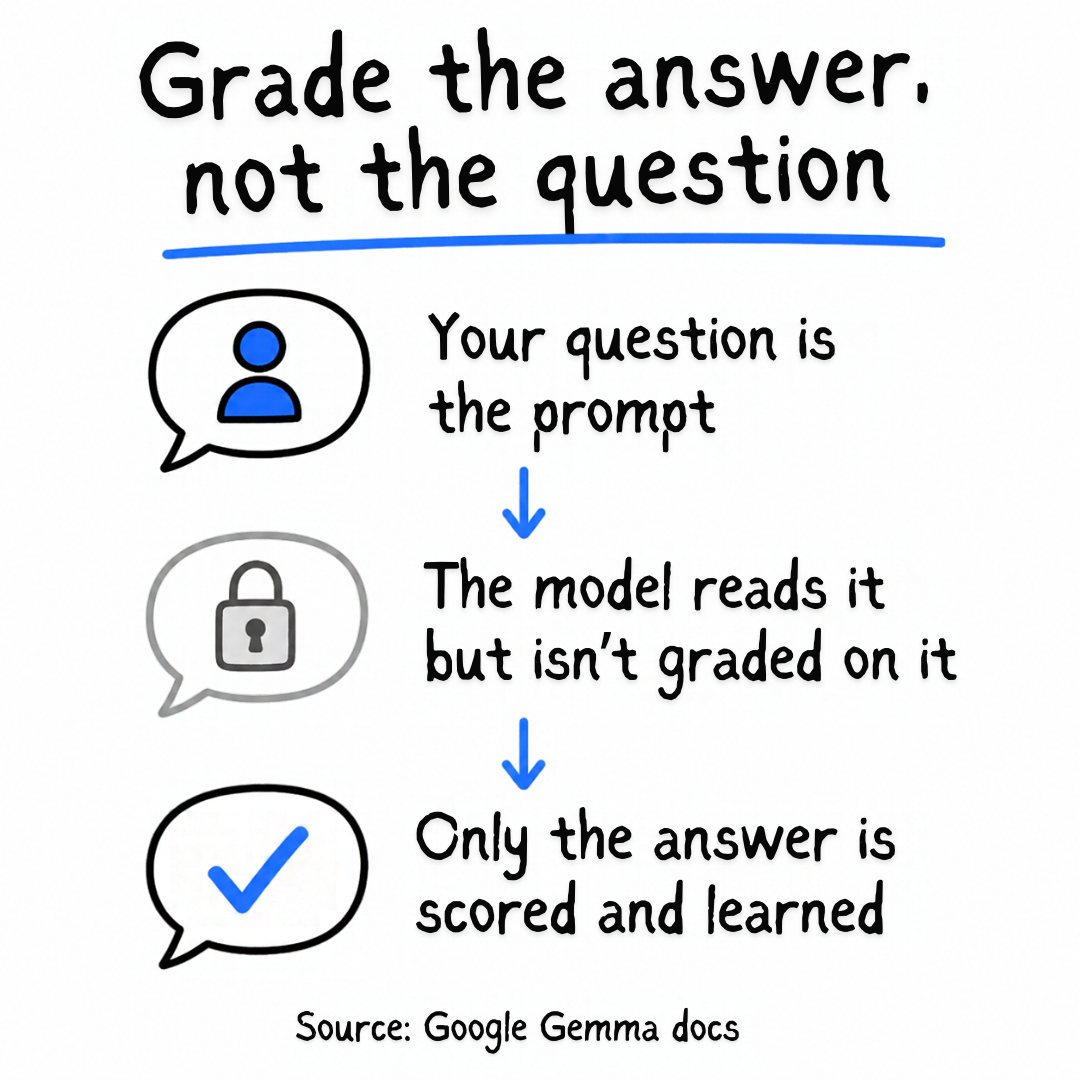
3. Load Gemma in 4-bit
This stores the frozen model in NF4, a 4-bit format, and does the maths in bfloat16, a 16-bit format that modern GPUs handle well.
model_id = "google/gemma-4-E2B-it"

quantization_config = BitsAndBytesConfig(
    load_in_4bit=True,
    bnb_4bit_use_double_quant=True,
    bnb_4bit_quant_type="nf4",
    bnb_4bit_compute_dtype=torch.bfloat16,
    bnb_4bit_quant_storage=torch.bfloat16,
)
4. Attach the LoRA adapter
Rank r is the adapter’s size. Alpha sets how strongly it counts. The hub’s table suggests rank 16 for formatting, tone and classification, 32 for domain work and tool use, and 64 to 128 for big shifts. It adapts all seven linear layers in each decoder block, because the QLoRA paper found that attention-only adapters don’t match full fine-tuning.
peft_config = LoraConfig(
    r=16,
    lora_alpha=32,
    lora_dropout=0.0,
    bias="none",
    target_modules=["q_proj", "k_proj", "v_proj", "o_proj",
                    "gate_proj", "up_proj", "down_proj"],
    exclude_modules=r"model\.(vision_tower|audio_tower)\..*",
    task_type="CAUSAL_LM",
)
5. Train
The hub’s settings are a learning rate of 2e-4 for LoRA, one epoch, an 8-bit optimiser and a 2,048-token limit. It says that run peaks under 10 GB. Its table of starting points puts LoRA at 1e-4 to 2e-4 and full fine-tuning at 1e-5 to 2e-5, so don’t carry one over to the other.
args = SFTConfig(
    output_dir="gemma-4-multilingual-thinking",
    max_length=2048,
    num_train_epochs=1,
    per_device_train_batch_size=2,
    gradient_accumulation_steps=8,
    optim="paged_adamw_8bit",
    learning_rate=2e-4,
    lr_scheduler_type="cosine",
    bf16=True,
    eval_strategy="epoch",
)

trainer = SFTTrainer(
    model=model_id, args=args,
    train_dataset=dataset["train"], eval_dataset=dataset["test"],
    processing_class=tokenizer,
    quantization_config=quantization_config,
    peft_config=peft_config,
)
trainer.train()
trainer.save_model()
6. Test on examples it never saw
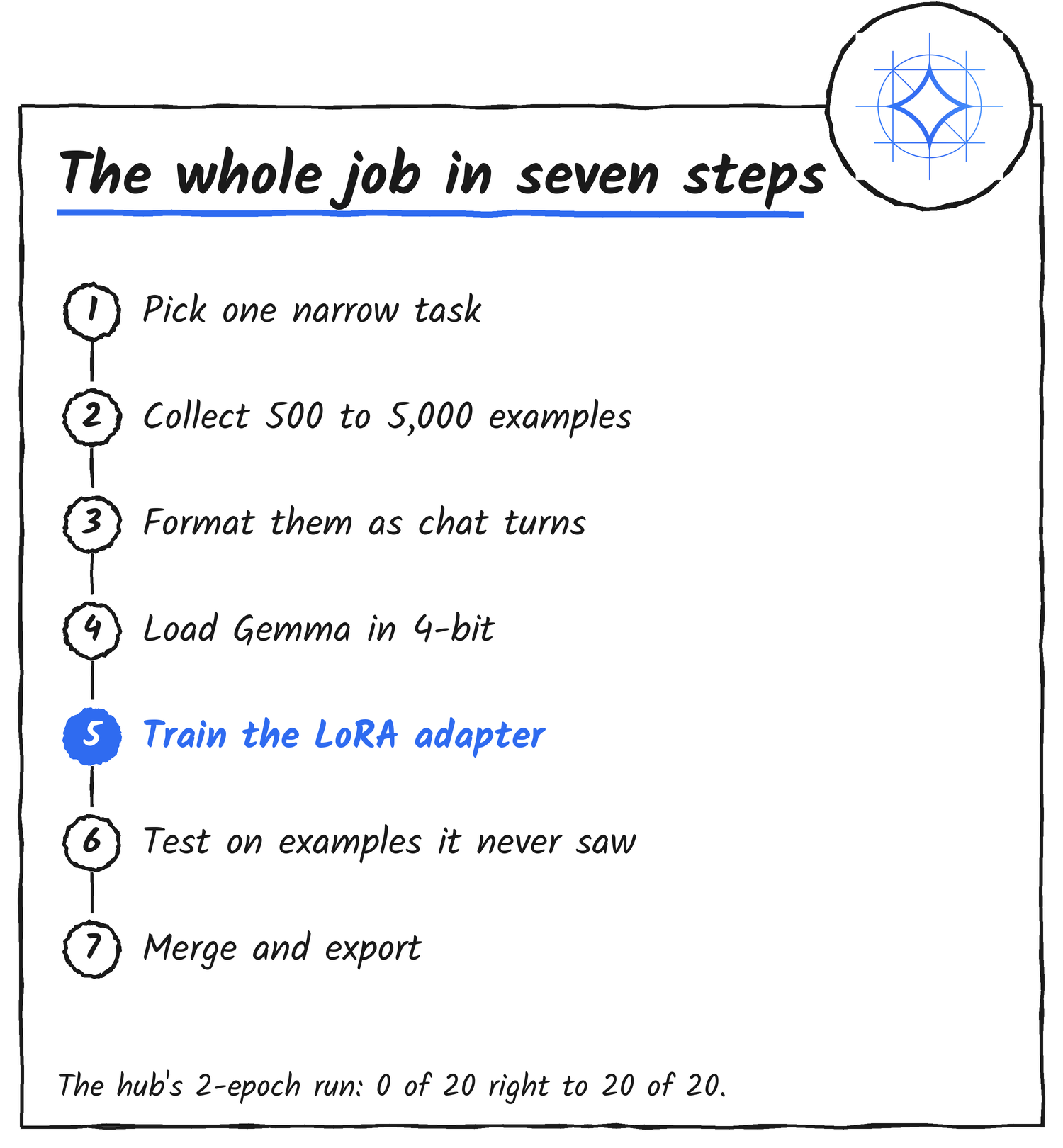
Ask the base model and the tuned model the same held-out question and compare. The hub’s base model reasoned in English and answered in French. After one epoch it reasoned in French and answered in English. Across 20 held-out prompts in four languages, adherence went from 0 of 20 to 15 of 20 after one epoch and 20 of 20 after two. That’s Google’s single run on one task, not a guarantee for yours.
7. Merge and export
Training saves only the small adapter. To get one ordinary model, reload the base in 16-bit and merge. The hub warns against merging into the 4-bit copy, which adds rounding errors.
base_model = AutoModelForMultimodalLM.from_pretrained(
    model_id, low_cpu_mem_usage=True, dtype=torch.bfloat16, device_map="auto")
peft_model = PeftModel.from_pretrained(base_model, args.output_dir)
merged_model = peft_model.merge_and_unload()
merged_model.save_pretrained("merged_model", safe_serialization=True)
From the merged folder you can serve it with vLLM, convert it to GGUF for llama.cpp or Ollama, or export it to LiteRT-LM for phones. Or keep the adapter separate: vLLM can load one base model and switch between adapters per request.
python llama.cpp/convert_hf_to_gguf.py ./merged_model --outfile model-f16.gguf --outtype f16
./llama.cpp/build/bin/llama-quantize model-f16.gguf model-q4_k_m.gguf Q4_K_M
If you have one GPU, the hub says you can swap the loading and LoRA setup for Unsloth’s FastVisionModel and leave the rest alone. If you use a coding agent, Google also publishes a gemma-trainer skill that prepares data, picks settings for your GPU and runs the job. I haven’t tried it.
npx skills add google-gemma/gemma-skills --skill gemma-trainer --globalI ran it
I have no GPU here, so I ran what a CPU can check and I didn’t train anything. That means every training result in this article is Google’s, not mine.
| Step | Ran? | What I found |
|---|---|---|
| Load the dataset and format it with the hub’s function | Yes | 1,000 rows, split 900 train and 100 test with seed 42, as the hub does |
| Load the Gemma 4 E2B tokenizer | Yes | Vocabulary of 262,144, matching the hub’s best-practices page |
| Measure example lengths with the chat template | Yes | Median 984 tokens, 90th percentile 1,813, and 45 of 1,000 over the 2,048 limit |
| Count LoRA parameters for r=16 on the seven projections | Yes | 24,158,208 trainable of 5,531,108,896 total, 0.44% |
| 4-bit loading, training, merging, export | No | Needs a GPU |
| The 0 of 20 to 20 of 20 result and the 7 GB figure | No | Google’s numbers |
Two things came out of it. First, with the hub’s 2,048-token limit, about 4.5% of its own training examples are longer than the limit, so they get cut. I haven’t tested what that does to the result. If your examples are long, raise max_length and expect more memory use. Second, the 0.44% is measured against the whole 5.5 billion-parameter file, which includes the picture and audio parts and the large per-layer lookup tables. The hub’s general line that LoRA updates “about 1% to 2%” of parameters is a different yardstick, so don’t compare the two directly.
Common mistakes
| Mistake | What goes wrong | Fix |
|---|---|---|
| Using a LoRA learning rate for full fine-tuning | The hub says 2e-4 is ten times too high for full fine-tuning and degrades the model | 1e-5 to 2e-5 for full, 1e-4 to 2e-4 for LoRA |
| Scoring the prompt as well as the answer | The model learns to imitate your questions | Use separate prompt and completion fields so the prompt is masked |
| Stopping only on the end-of-text token | Gemma 4 ends a turn with <turn|> (token 106), not just <eos> | Stop on both when testing |
| Merging into the 4-bit model | Extra rounding errors | Reload in bfloat16, then merge |
| Running many epochs with no held-out set | Training loss keeps falling while the model memorises and validation loss rises | Hold out 5% to 10% and keep the checkpoint with the lowest validation loss |
| Every example quotes a retrieved passage | The tuned model says “according to the provided document” even when there isn’t one | Follow the hub’s custom chat template guide |
| Dropping the reasoning examples | The model stops using its thinking channel | Keep at least 50% of examples with reasoning |
| Unfreezing the per-layer embeddings on E2B or E4B | Memory use jumps | Leave them frozen during LoRA |
| Panicking at a high starting loss on E2B or E4B | Normal for the small models, per the hub. Unsloth says 13 to 15 is typical, and Axolotl says 8 to 15 for vision runs | Don’t stop the run or raise the learning rate |
Pre-flight checklist
- You tried a better prompt, and RAG if your problem is facts, and the problem is still a habit.
- You can score the result on held-out examples you’ll never train on.
- You have 500 or more good examples, plus 5% to 15% ordinary chat mixed in.
- You started from the
-itcheckpoint. - Your GPU has the memory in the table, with some spare, and you’re using bfloat16.
- Prompts are masked from the loss and the turn stop token is handled.
- Your learning rate matches your method.
- You’ll merge into a 16-bit base, then test the merged model, not just the adapter.
How other guides and tools compare
The hub is Google DeepMind’s own guide, written around Hugging Face’s libraries, and it lists the other routes: Unsloth for faster single-GPU runs, Axolotl for YAML-configured runs on one or many GPUs, Vertex AI for managed jobs on Google Cloud, and GKE for multi-GPU runs on Kubernetes. Gemma 4 comes in five sizes and is under the Apache 2.0 licence, which allows commercial use.
| Source | What it says about Gemma 4 fine-tuning |
|---|---|
| Google’s hub | QLoRA peak memory about 7 GB (E2B), 9 GB (E4B), 11 GB (12B), 21 GB (26B A4B), 22 GB (31B) |
| Unsloth | E2B trains on 8 GB and E4B on 10 GB. Says it is about 1.5 times faster and uses about 60% less memory than FlashAttention-2 setups, which is its own claim. Recommends E4B QLoRA over E2B LoRA |
| Axolotl | 31B QLoRA on one 80 GB card used about 25.2 GiB. Vision LoRA on E2B about 10.4 GiB. Warns of sudden gradient spikes in LoRA runs and uses a 31B learning rate of 5e-5 with a gradient clip of 0.1 |
| Third-party guide, 6 April | QLoRA about 6 GB (E2B), 10 GB (E4B), 18 GB (26B MoE), 22 GB (31B) |
The wider evidence for LoRA comes from Thinking Machines Lab’s LoRA Without Regret study, published on 29 September 2025. It found that for supervised fine-tuning on small to medium instruction and reasoning datasets, LoRA matches full fine-tuning, and that applying it to all weight matrices matters more than raising the rank. It also found LoRA takes slightly more than two thirds of the compute per pass and tolerates large batch sizes less well. Hugging Face’s TRL library has a guide that reproduces the result. That backs the hub’s advice to start with LoRA, though it’s research on other models, not a test of Gemma 4.
What isn’t known
- Neither Google nor Labarta Bajo gives a figure for how much money a fine-tuned small model saves.
- The hub’s results are single runs on one task. I haven’t reproduced them.
- Memory figures differ between Google, Unsloth, Axolotl and a third-party guide, and I haven’t measured any of them.
- I haven’t tested the
gemma-trainerskill, the Vertex AI route or the GGUF and LiteRT-LM exports. - The hub is new and Google may change it. This guide reflects its pages on 27 November 2026.
Sources: Google DeepMind’s Gemma fine-tuning hub (gemma.ai/tuning) including the overview, best-practices, (Q)LoRA, dataset formatting, scaling and export pages, viewed 27 November 2026; Pau Labarta Bajo’s and Google Gemma’s X posts (26 and 25 November 2026); Unsloth’s Gemma 4 fine-tuning guide; Axolotl’s Gemma 4 pages; Thinking Machines Lab, LoRA Without Regret (29 September 2025) and Hugging Face’s TRL guide to it; a Botmonster Tech guide to fine-tuning Gemma 4 with Unsloth (6 April 2026); my own CPU checks of the Multilingual-Thinking dataset, the Gemma 4 E2B tokenizer and a LoRA parameter count.
Discover more from Sulat AI & Tech News
Subscribe to get the latest posts sent to your email.