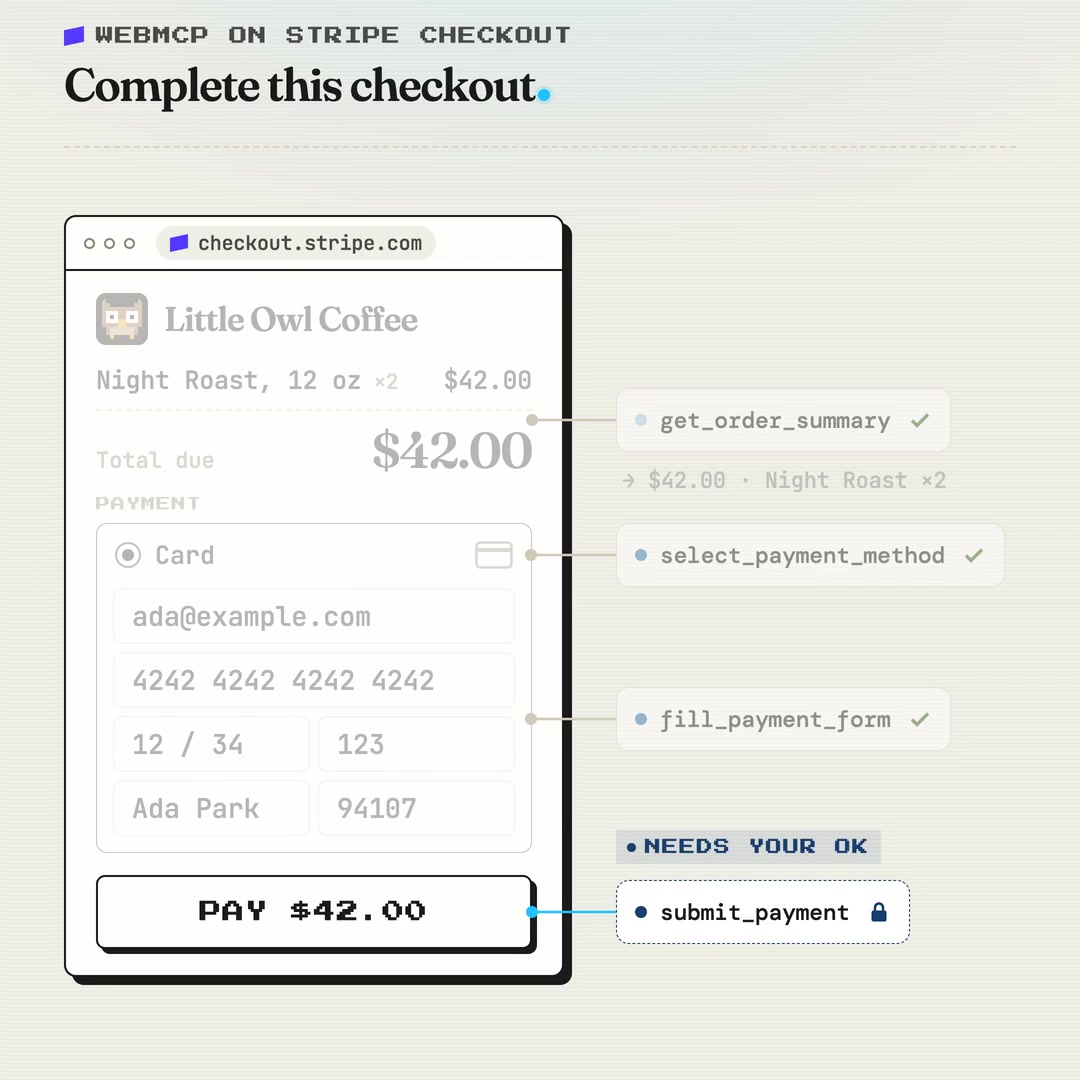
Every Stripe-hosted checkout page now hands AI agents a small set of payment tools, and a new live capture shows exactly what they are. nekuda, a New York start-up that builds agent payment infrastructure, has published the tools a Stripe Checkout page registered in Chrome through WebMCP, an experimental browser standard that lets a website offer agents named actions in place of buttons to find and click. The capture lists seven tools, from reading the order total to submitting the payment.
Stripe switched WebMCP on across Checkout in September, without merchants changing their integration. It says Checkout is used by more than 7.8 million businesses. nekuda’s co-founder Idan Levin pointed to the new directory entry on X this week.
What Stripe switched on
A browser agent normally completes a purchase the way a person would: it reads the page, works out which field is which and clicks through. WebMCP gives the page a way to describe those actions directly. A site registers tools, each with a name, a plain-language description and an input format, and an agent running in the browser can call them. The proposal comes from the W3C Web Machine Learning Community Group, with engineers from Google and Microsoft leading the work.
Stripe’s developer documentation lists four supported surfaces: the full-page checkout, the embedded checkout form, Elements (the payment components merchants place in their own pages) and the hosted invoice page. Stripe describes the tools in broad terms: reading the amount due and payment methods, choosing a payment method, filling in form fields and, where Stripe controls the submit button, starting the payment.
In an engineering write-up, Stripe said it built the tools on the same code that runs the human checkout so the two can’t drift apart. Some tools read existing page state, such as the order summary. The form-filling tool is generated by the browser from the fields currently on screen, so a field a developer adds shows up in the tool automatically.
The seven tools on a live page
nekuda captured the tools in Chrome 157 on 8 November, on a Stripe-hosted checkout reached from a real shop’s cart, with card as the only payment method and the form left empty. It says it didn’t submit a payment. The descriptions below are the ones the tools themselves gave agents.
| Tool | Description given to agents | Flag set by Stripe |
|---|---|---|
get_order_summary |
“Get the current Stripe Checkout Session’s currency, total amount due today, and line items when available. All amounts are in minor units.” | Read-only |
select_payment_method |
“Select a payment method before attempting to fill the form” | None |
fill_payment_form |
“Fills the payment form with buyer and payment details. Some fields change dynamically as values are updated, so call this tool multiple times with new values until the form is ready to submit. Form changes, including setting an address or selecting a shipping option, may change the order total.” | None |
submit_payment |
“Submit the checkout form and complete the payment” | Consequential |
get_link_pay_token_merchant |
“Get the merchant account identifier for this payment.” | Read-only |
set_link_pay_token |
“Submit a Link Pay Token for this payment.” | None |
apply_promo_code |
“Apply a promotion/coupon code. Poll UI state after applying to see if it was successful.” | None |
The form tool asks for an email address, name, postal address, phone number and the card number, expiry date and security code, so an agent paying by card passes the card details itself. Six of the tools are registered inside Stripe’s payment frame, served from js.stripe.com, which the checkout page allows to offer tools to the agent. The promo-code tool sits on the checkout page itself and, according to nekuda, only appears when the seller accepts promotion codes. Three tools didn’t publish an input format at all.
Where the capture differs from Stripe’s write-up
Stripe’s engineering post says the checkout reveals tools only as they become usable. Its example is the payment button: “we do not reveal the submit_payment tool until all the fields have been filled.” In nekuda’s capture, submit_payment was listed from the start, while the form was still empty.
The capture records one checkout, in one state, in one browser version. Stripe’s documentation says the tools vary with the payment surface, the payment methods on offer and which form is active, and tells agent builders to look the toolset up again after each change instead of hard-coding names or formats.
The two Link Pay Token tools don’t appear in Stripe’s write-up either. They belong to Link, Stripe’s saved-payment wallet. Stripe’s open-source Link CLI lets an agent request a Link Pay Token tied to one merchant, which the consumer approves before it’s issued. The token pays with the card already saved in the person’s Link account, so the agent never handles the card number. Each token lasts up to 30 minutes. The CLI is limited to US and Canadian Link accounts, with a cap of US$500 per spend request.
Stripe’s numbers
Stripe ran 60 tests across six models on a fictional outdoor-gear shop using the full-page checkout. Half used WebMCP and half drove the page the usual way. Each agent had to go to the site, add a product to the cart, check out and pay. Stripe says every run finished the purchase. The post doesn’t name the six models.
| Measure | Without WebMCP (average) | With WebMCP |
|---|---|---|
| Tokens used (input, output and cache) | 1.8 million | 42% fewer |
| Tool calls and actions | 38.83 | 38% fewer |
| Time to a completed checkout | More than 2.5 minutes | 39% faster, about 60 seconds less |
Tokens are the units AI models bill by, so fewer tokens means a cheaper purchase for whoever runs the agent. Paul Conroy, a chief technology officer who added WebMCP to one of his own sites, reported an average of about 27 times fewer tokens there, and up to 82 times fewer.
The payment button still needs a person
Stripe marks its payment tools with WebMCP’s consequentialHint flag, which Chrome’s documentation reserves for high-stakes or irreversible actions. Stripe’s guidance to agent builders is direct:
“Before calling a tool with this hint, get the user’s confirmation. Don’t interpret the hint itself as confirmation.”
The hint is advice to the agent. Whether a person is asked before money moves depends on how the agent that calls the tool is built.
Which browsers and agents can use it
WebMCP isn’t switched on for every visitor yet. Chrome runs it as an origin trial from version 149, a time-limited programme where sites opt in to test experimental features, and developers can turn it on locally with a flag. Microsoft Edge has its own trial from version 150, running until 30 March 2027. The standard’s implementation tracker lists support in ChatGPT Desktop and experimental support in Brave’s Leo assistant, with standards-position requests open at Mozilla and WebKit. The interface has already changed during the trial: Chrome deprecated the original navigator.modelContext entry point in version 150 in favour of document.modelContext.
Agent tooling picked up Stripe’s tools quickly. Browserbase’s Stagehand framework supported them on launch day, and Anna Wang, who leads product and partnerships at Kernel, a browser provider for agents, said agents on its browsers could save 42% of token spend on Stripe checkout pages. Shrey Pandya, who builds at Browserbase, described Stagehand 4.2’s automatic detection in October:
“Coolest new feature in Stagehand – we can now automatically detect & invoke WebMCP tools on the fly. This unlocks interacting with all @stripe checkout pages without repeatedly polling for new tools.”
Shrey Pandya, on X
Jeff Weinstein, who works on product at Stripe, wrote in late September that “@stripe is already seeing traction in agents using WebMCP checkout”.
A bridge or the destination
Stripe is also pushing payment routes that skip the web page entirely, including its machine payments protocol, MPP, and shared payment tokens for sellers that accept programmatic payments. Some developers questioned where page-level tools fit beside them.
The question
“Using WebMCP to expose today’s checkout flows feels like patchwork for this weird transition period before machine-native payments become standard.”
Fred Dogan, founder, on X
Stripe’s answer
“Both can/should exist! WebMCP is the “instant upgrade” that just works.”
Steve Kaliski, who works on AI, agents and commerce at Stripe, on X
Who runs the directory
nekuda was founded by Ayal Karmi, Idan Levin and Barak Ben-Rachel, and raised US$5 million in May 2025 in a round led by Madrona, with Amex Ventures and Visa Ventures taking part. It started out building wallets and spending mandates for agents. It now calls itself “The harness for websites” and offers tools that help sites add WebMCP. Its directory also catalogues the WebMCP tools on Shopify stores, which it says number more than 2.3 million.
Stripe’s documentation describes WebMCP as an experimental capability based on a proposed standard, and says browser support, tool availability and tool formats can all change. Where a tool an agent needs isn’t there, Stripe tells builders to fall back to ordinary browser automation.
Discover more from Sulat AI & Tech News
Subscribe to get the latest posts sent to your email.