Browser Use has released version 1.0 of its open-source browser agent, and most of the old library is gone. The release replaces the 0.x engine, which had a model pick one action at a time from a processed copy of the page, with a loop where the model writes Python that drives Chrome directly. The 1.0.0 release notes say the rewrite removed 136,866 lines, or 80% of the library. On the same models, Browser Use says its agent now scores up to 33 points higher on its own tests, costs 2.7 to 5.2 times less per task and finishes two to three times faster.
Gregor Zunic, Browser Use’s co-founder and chief technology officer, and the company’s own account put the cut at 90% on X. The release notes give the 80% figure alongside the exact line count. The library is MIT-licensed and has about 120,000 stars on GitHub.
What changed under the hood
The Chrome DevTools Protocol, or CDP, is the interface Chrome exposes so debugging and automation tools can inspect a page, click, type, run JavaScript and read network activity. Browser Use 0.x sat on top of it with its own layer: it turned each page into a structured description, then asked the model to choose from a fixed list of actions, one step at a time.
Version 1.0 removes that layer. According to the project’s migration guide, the model now writes Python into one persistent REPL (an interactive session that keeps its variables between steps), using helper functions from Browser Use’s separate browser-harness project and raw CDP calls. The agent runs on the Pydantic AI framework. The release notes put it in one line: “No DOM serializer, no action schema, nothing in between.”
  ● task
  │
  ● model writes a cell          new_tab(url); bu.click(41); js(...)
  │
  ● REPL runs it on Chrome (CDP) → output back to the model
  │
  ✓ finish(result)
In the launch post on X, Browser Use argued that “Predefined state and action space make it worse.” Asked in replies what made the difference, Zunic said models had become very good at understanding CDP, which gives them the full range of browser actions on complex sites.
The benchmark claims
The headline chart in the release compares 0.x and 1.0 on three models, labelled by model and reasoning setting. Its cost figures are model cost only.
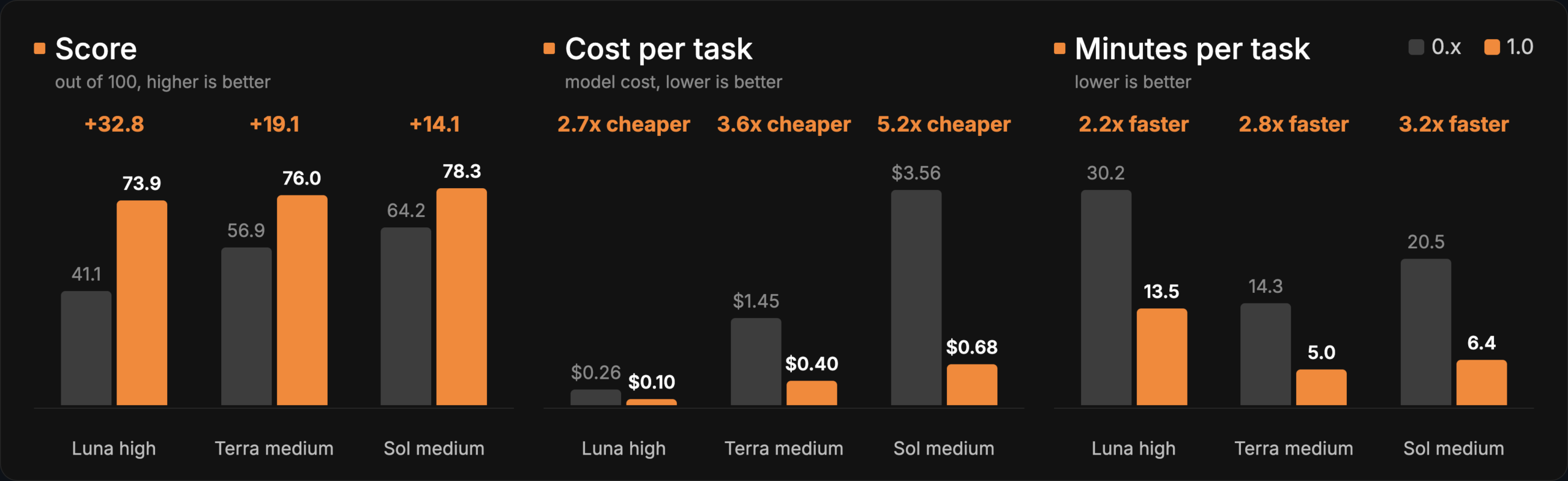
| Model setting | Score out of 100 (0.x → 1.0) | Model cost per task, US$ (0.x → 1.0) | Minutes per task (0.x → 1.0) |
|---|---|---|---|
| Luna high | 41.1 → 73.9 | 0.26 → 0.10 | 30.2 → 13.5 |
| Terra medium | 56.9 → 76.0 | 1.45 → 0.40 | 14.3 → 5.0 |
| Sol medium | 64.2 → 78.3 | 3.56 → 0.68 | 20.5 → 6.4 |
The release notes also describe a more detailed run on BU Bench v2, Browser Use’s own benchmark of hard browser tasks: 60 tasks, three repetitions each, on cloud browsers. That run compared 1.0 with Browser Use Pi, another of the company’s agent harnesses, rather than with 0.x. Both used OpenAI’s gpt-6-luna, with gpt-5.6-luna grading the results.
| Agent | Score | US$ per task | Seconds per task |
|---|---|---|---|
browser-use 1.0 (mode='ultrafast') |
62.5 [58.3, 66.5] | 0.070 | 650 |
| Browser Use Pi | 56.3 [50.2, 62.4] | 0.082 | 743 |
The raw gap overstates it: Browser Use says an OpenAI outage hit the test window. Pi lost 18 of its 180 runs to provider errors and 1.0 lost one. With those errors excluded, the company reports no significant difference in score between the two (+1.1 points, with an interval from −3.2 to +5.7), while 1.0 was US$0.013 cheaper and 114 seconds faster per task. Its summary: “Same quality, cheaper and faster.” The default bu-fast model on Browser Use’s own gateway wasn’t part of that run.
New defaults point to Browser Use’s cloud
For existing users, the bigger practical change may be the defaults. In 0.x, developers brought their own model and the library launched a local Chromium browser. In 1.0, leaving those settings empty sends work to Browser Use’s paid services.
| Setting | 0.x | 1.0 |
|---|---|---|
Model (llm=None) |
Required | bu-fast on the Browser Use gateway, which is gpt-6-luna at medium reasoning |
Browser (Browser()) |
Local Chromium | A Browser Use Cloud browser; Browser('chromium') for a local one |
| API key | One per model provider | One Browser Use key |
run() limits |
max_steps=500 |
max_steps=100, timeout=1700 seconds |
Developers can still use their own models through ChatOpenAI, ChatAnthropic, ChatGoogle or any Pydantic AI model string. The minimal example in the release is now:
uv add 'browser-use==1.0.0'
export BROWSER_USE_API_KEY=bu_...    # cloud.browser-use.com/new-api-key
from browser_use import Agent
print(Agent('Find the number of stars of the browser-use repo').run_sync().final_result())Because Browser() now starts a cloud browser, tasks aimed at localhost or private IP addresses need Browser('chromium'); the library prints a warning when that applies. Browser('chrome'), which connects to a user’s own Chrome, now attaches only to a browser whose debugging port file sits in the user’s own profile folders, rather than to whatever answers on port 9222. The result.cost_usd figure covers model and web-search charges, not the cloud browser or its proxy.
Breaking changes and what still works
The common 0.x surface (Agent, Browser, Tools, run() and final_result()) still works, according to the migration guide. Options 1.0 can’t honour raise a TypeError that names them before any browser starts or anything is billed, and every removed import raises an error naming its replacement. Some old tuning settings, such as use_vision=True and flash_mode, now log one warning and are ignored. Developers who need the old engine can pin it with pip install 'browser-use<1'.
Other removals include LangChain chat models, which now raise a TypeError, the 0.x gateway models such as bu-2-0, the bu and browser command-line shortcuts, and several optional install extras. The old browser-use --mcp server now serves three tools: browser_exec, browser_screenshot and browser_login.
The release also adds typed results through Pydantic schemas, file uploads and downloads on local and cloud browsers, domain allow and block lists in every browser mode, optional web search billed per search, and Docker images for amd64 and arm64.
What the agent can reach
Letting a model write arbitrary Python changes the security picture, and Browser Use’s documentation says so. Its trust model states that the worker running model-written code runs as the user. By default its environment drops variables with names containing KEY, TOKEN, SECRET or similar, and passwords passed through sensitive_data are typed with a type_secret() helper and redacted from output. The guide calls that redaction “Not a sandbox”, and says the agent “can read and upload any file your user can read”, advising developers to run untrusted tasks in a container or virtual machine.
Some replies to the launch focused on that point. Asmir, a developer building an AI cofounder product, wrote:
an agent writing raw python on CDP inside your real logged-in chrome is a way bigger deal than the old action list ever was, it can run any JS on every account you’re signed into. i’d only run it in a throwaway profile
Kyle Diaz, who works at Caddy, asked how high-impact actions such as purchases are gated under CDP. Browser Use replied that gating is hard even with fixed actions, and that CDP’s advantage is giving the model the complete set of actions.
Replying to Zunic, John Rood described the deleted code as “a translation layer”: models have seen huge amounts of Python but almost none of Browser Use’s action schema. He named the trade-off as the record of a run: “an action space is what made a run replayable; a program step gives you effects instead of a diff.”
Who makes Browser Use
Magnus Müller and Gregor Zunic started Browser Use at ETH Zurich and released the library in late 2024. It went through Y Combinator’s Winter 2025 batch and raised a US$17 million seed round led by Felicis in March 2025. The company sells Browser Use Cloud, hosted browsers its README prices from US$0.02 per browser-hour, alongside a hosted agent API.
The 1.0 release lists known issues. Every dependency is pinned to an exact version, so projects that need a different version of packages such as pydantic or mcp can’t install 1.0 alongside them. google-genai stays below version 3, and viewport emulation doesn’t yet work on cloud browsers. The company is telling users to pin with ==: “We ship fast from here.”
Discover more from Sulat AI & Tech News
Subscribe to get the latest posts sent to your email.