Dreamwork CEO Colin Johnson announced Dreamwork Pro on X on 18 November with a line that doubles as the pitch: he doesn’t fill out job applications anymore. You upload a resume once, and an agent does the rest. According to his post, it:
- scores more than 2.5 million live jobs against your resume
- tailors your resume for each role (“nothing made up”)
- writes the cover letter and the screening answers
- submits the application
- locates the hiring manager for follow-up
- tells you when a recruiter replies
Pro isn’t new as a plan. Dreamwork’s changelog has Pro going live on 26 June and Autopilot arriving on 18 September, and the changelog for the week to 12 November adds a ChatGPT app. What the post sells is the whole bundle. Its last two lines, “you approve what goes out” and “you show up for the interview”, hold only if you set the product up a certain way, which the sections below spell out. Product details come from Dreamwork’s own site and help centre. Employer-side figures come from the sources named.
What the agent does
Dreamwork is an AI job search agent built by Ponder Labs, founded by Johnson and CTO Ben Adamsky. It ranks live roles against your resume, puts a match score on each, and crawls company career sites daily so the matches are still open. For each role you pick, it writes a tailored resume, a cover letter and answers to the employer’s screening questions, drawn from your real resume.
Matching is free, and so is a tailored resume and cover letter for five jobs a day. Sending is paid. On Pro and Dreamer, Apply submits the application as soon as it’s written. Review first holds it for you to edit and send. Autopilot applies to matching roles on its own, and you pause it with one tap.
“You approve what goes out” is a setting
That makes approval a setting rather than a guarantee. Tap Apply and it goes. Switch on Review first and nothing leaves until you send it. Turn on Autopilot and it sends without asking you per application, with an email afterwards, either one per application or a daily summary, and every application listed on your Dashboard.
| Mode | What triggers the send | Do you see it first? |
|---|---|---|
| Apply | You tap Apply on a role | No, it sends once written |
| Apply with Review first | You tap send after editing | Yes |
| Autopilot | A match clears your minimum score | No, you get an email afterwards |
Dreamwork’s own pages disagree on one detail. The Autopilot help page says Autopilot sends even when Apply is set to Review first, and tells you to leave Autopilot off if you want to read everything before it goes. The agents page says that with Review first on, Autopilot prepares each pick and holds it for you. If you want to read every application, leave Autopilot off, as the help page says, and test with a single application before you give it volume.
Where it applies, and where it doesn’t
Dreamwork submits on the employer’s own application form, with built-in support for Greenhouse, Ashby, Lever, Workday, SmartRecruiters and iCIMS. It doesn’t log in to LinkedIn and doesn’t use LinkedIn Easy Apply or Indeed Apply. That matters on Indeed, whose terms, updated on 29 September, prohibit automating Indeed Apply outside its official vendors, according to a review by auto-apply vendor ApplyLoop.
Autopilot is narrower than Apply. It only picks roles on Greenhouse, Ashby, Workday, SmartRecruiters and iCIMS, the systems where Dreamwork has seen its applications go through. Lever roles stay in your matches for a one-tap Apply. Where the employer uses ADP, Dayforce, Paylocity, Paycom, SAP SuccessFactors or Taleo, Dreamwork tells you to submit yourself, with your materials ready. Jobs you import from a link aren’t sent for you either: you download the tailored resume, copy the cover letter and apply on the employer’s site.
Using it from Claude or ChatGPT
Dreamwork also runs inside assistants. It publishes an MCP server with 74 tools, and you add it to Claude as a custom connector. The ChatGPT app is published too. Searching live listings needs no account. A free key adds your ranked matches and tailored packs, and applying through the assistant is part of Pro and Dreamer.
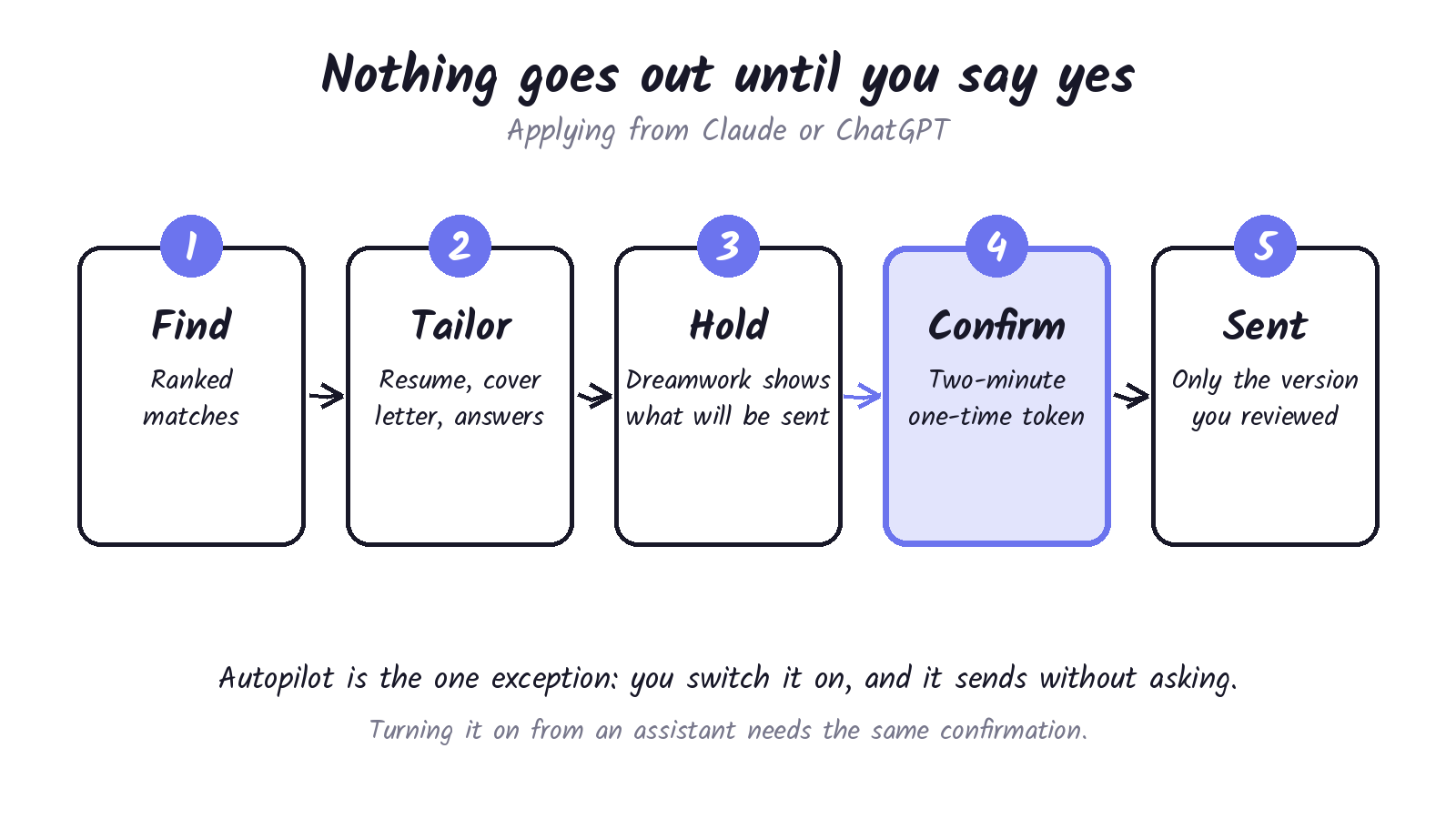
Here the confirmation step is built in. Dreamwork holds each application and hands the assistant a summary of what will be sent. It goes out only when the assistant confirms with a one-time token that expires after two minutes, and Dreamwork sends only the version of your materials you reviewed. Turning Autopilot on from an assistant needs the same confirmation. Applications sent this way draw from the same monthly allowance, and you can revoke the ChatGPT app under Connected apps in your Dreamwork profile.
What it costs
| Plan | Price | What you get |
|---|---|---|
| Free | $0 | Unlimited matches, tailored resume and cover letter for 5 jobs a day, you apply yourself |
| Pro | $99 a quarter (about $33 a month), or $39 month to month | 50 applications a month with Apply or Autopilot, smarter answers to application questions, a recruiter inbox, applying through Claude |
| Dreamer | $379 a quarter (about $126 a month), or $149 month to month | Everything in Pro, with 300 applications a month |
Pro has a seven-day free trial for new accounts, one per person. It needs a card and bills $39 a month afterwards unless you cancel. Apply and Autopilot share one allowance, which resets on the 1st of each month, UTC. An application that fails before reaching the employer is handed back to the allowance. One that Dreamwork can’t confirm either way keeps counting.
The rules Autopilot works inside
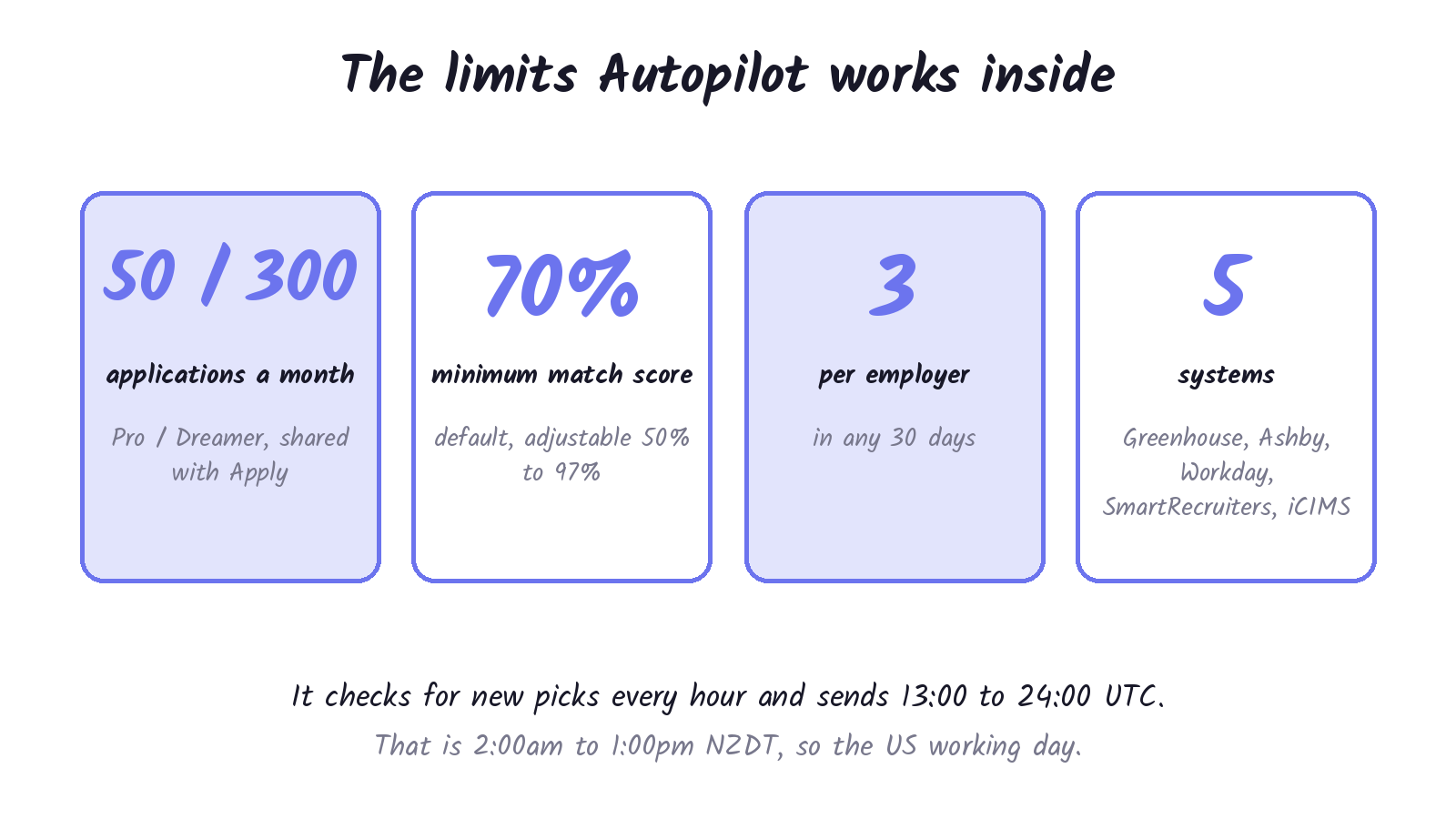
Autopilot works from your matches, best first. A role has to clear your minimum match score, 70% by default and adjustable from 50% to 97%. If nothing qualifies, it waits and never lowers the bar. It skips roles that don’t fit your preferences, companies, places or levels you excluded, anything under your minimum salary, roles you’ve already applied to, your current employer, and any employer that has already had three Autopilot applications from you in the last 30 days. It checks for new picks every hour and sends between 13:00 and 24:00 UTC, which is 2am to 1pm NZ daylight time, spreading the allowance across the month.
When a submission fails
Dreamwork retries up to three attempts in all, about five minutes apart, but only when the failure looks temporary and it can tell nothing was submitted. Your Dashboard shows one of five states: Not submitted, Needs your info, Awaiting confirmation, Couldn’t confirm and Canceled. Dreamwork doesn’t resend an application it can’t confirm, so an employer doesn’t get it twice. If you apply yourself after a Couldn’t confirm, the employer may see two.
Autopilot doesn’t email about failures. Its emails list what was sent, and the only failure that emails you is Needs your info, so the Dashboard is the place to check.
Where your resume goes
Your resume goes to an employer when an application is sent, by you or by Autopilot. Dreamwork says recruiters see only an anonymized summary of you, and that if it introduces you to a recruiter for a relevant role it may share your profile and resume with them. Since the changelog for the week to 12 November, you can turn recruiter introductions off yourself from Profile.
What employers say
Employers are the other half of this. Greenhouse CEO Daniel Chait told Fortune in July that the platform had 175,000 live jobs with about 254 applicants per job ad, and that applications per recruiter were up 412%. Because so many are AI-generated, he said, they all start to look the same. Greenhouse’s answer, launched on 15 October, is an Orchestrated Hiring Ecosystem. A seeker can mark one application a month as their Dream Job, the system verifies identity and flags fraud, and Voice AI gives each applicant a first interview.
Workday’s October Global Workforce Report puts applications per offer at 69, up 19% on the year, with technology and media up 40% and financial services up 27%. Workday argues the problem is fit, not volume.
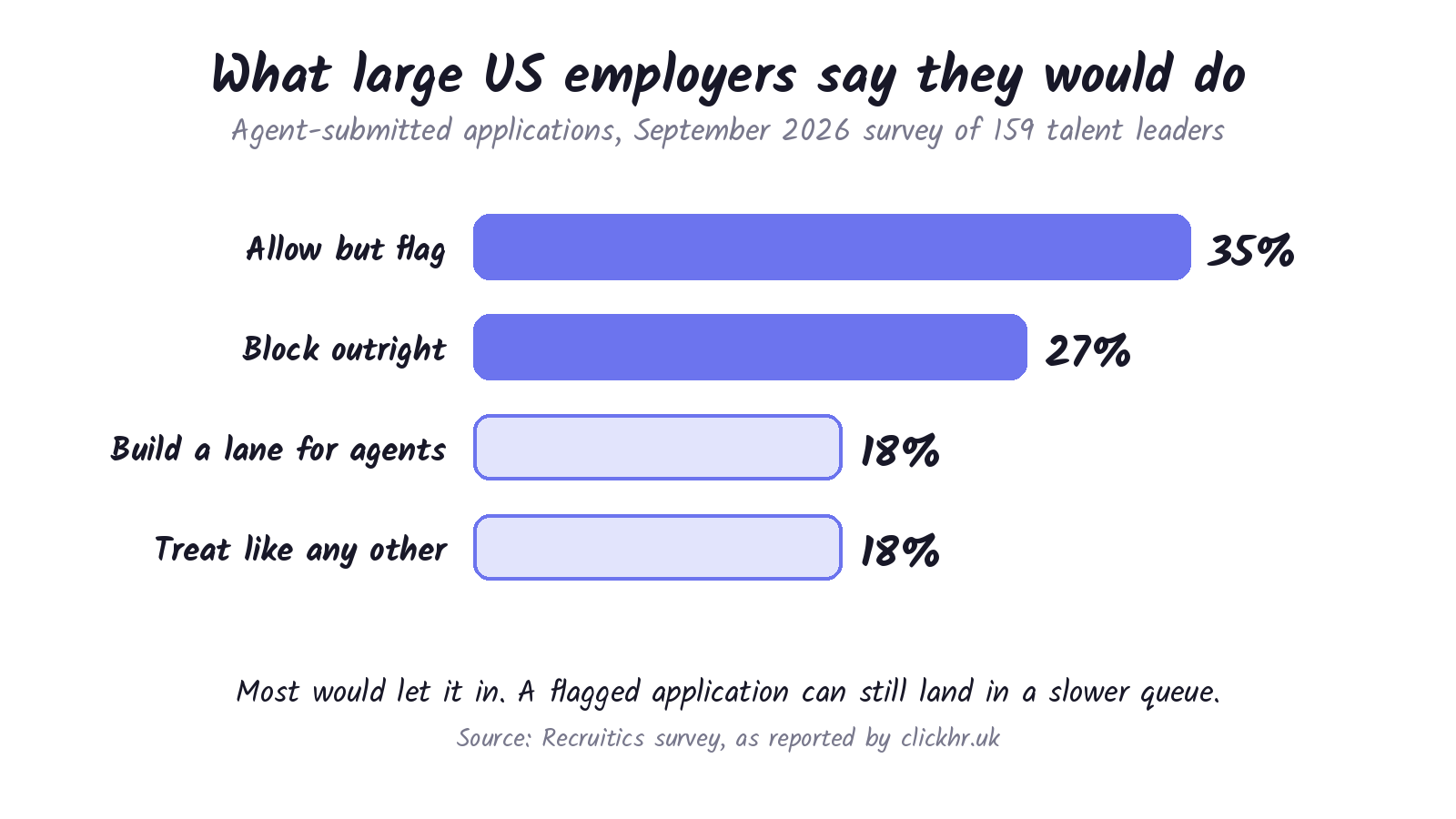
On agents specifically, a September Recruitics survey of 159 US talent acquisition leaders at organisations with 5,000 or more employees, reported by clickhr.uk, found 35% would allow but flag agent-submitted applications, 27% would block them, 18% would build a dedicated lane and 18% would treat them like any other. The same survey found 74% of leaders believe more than a quarter of the applications they receive contain AI-generated or AI-assisted content.
Applying on the employer’s own form keeps Dreamwork inside the LinkedIn and Indeed rules, but it doesn’t stop an employer’s system from flagging an application. ApplyLoop’s review says Greenhouse scores a form with an invisible reCAPTCHA and Workable tags applications as AI-assisted.
The track record so far
Dreamwork says 8,000 people have onboarded and 17,000 applications have been submitted since June 2026, which works out to about two applications per person onboarded. It cites a 4.5 out of 5 Trustpilot rating from 22 reviews as of 11 November. Its own FAQ records the one review under four stars: a 3-star review from Switzerland saying results outside the US were mostly irrelevant, that two of three roles needed a manual apply or had a broken link, and that the resume and cover letter were barely tailored. Trustpilot notes that Dreamwork hasn’t invited customers to review recently, so the reviews may not be representative.
Before you hand it your search
- Pick Review first or Autopilot on purpose, and send one test application before you give it volume.
- Set your own minimum match score instead of living with the 70% default.
- Check your target employers’ systems. Lever, ADP, Taleo and the others above need you to apply yourself or tap Apply.
- Look at the Dashboard every day, because Autopilot doesn’t email failures.
- Turn off recruiter introductions in Profile if you don’t want your profile shared.
- Do the allowance sums. Fifty applications a month on Pro is about one and a half a day.
Discover more from Sulat AI & Tech News
Subscribe to get the latest posts sent to your email.