Aria, a free Mac app that sits in the notch and shows what your coding agents are doing, shipped version 0.2.5 on 22 November with push-to-talk voice and scheduled routines. Its tagline is “Multiplayer for your AI agents”, and its own known-issues page says hosted teams haven’t been verified with two real Macs on two accounts.
Arush Pogulakonda builds it alone. His About page describes him as a high school student and a researcher at Cal Poly San Luis Obispo, and says he works with Claude Code and Codex running beside him all day. Aria is independent: its pages say none of the agent makers made, endorse or sponsor it.
Once you run more than one coding agent, most of the work turns into watching, approving and steering them. That deserves its own interface, and it should not be another window, or five.
Arush Pogulakonda, Aria’s About page
- What Aria does today
- What 0.2.5 added
- How approvals are limited
- Where the team features stand
- What it costs and where to get it
- What it reads on your Mac
0.2.5
latest release, dated 22 November
30
release posts so far
2
agents Aria can approve for
US$15
planned Pro price a month
What Aria does today
Aria reads the session logs your agents already write, opened read-only, and shows each session as working, waiting or done, with its project and how long it has run. For Claude Code and Codex it also answers permission requests through hooks you connect. Nothing is written to an agent’s settings until you press the Connect button. A request then appears in the notch with the exact command and buttons to allow, always allow or deny, and you can type an instruction instead, which goes back to the session that asked.
That’s as far as approvals go. Aria’s download page lists Gemini CLI, Cursor and Copilot as experimental and observe-only. Its agent-support page says OpenCode, Aider, Amp, Cline and Goose are guessed from the processes running on your Mac, with no replay and no approval.
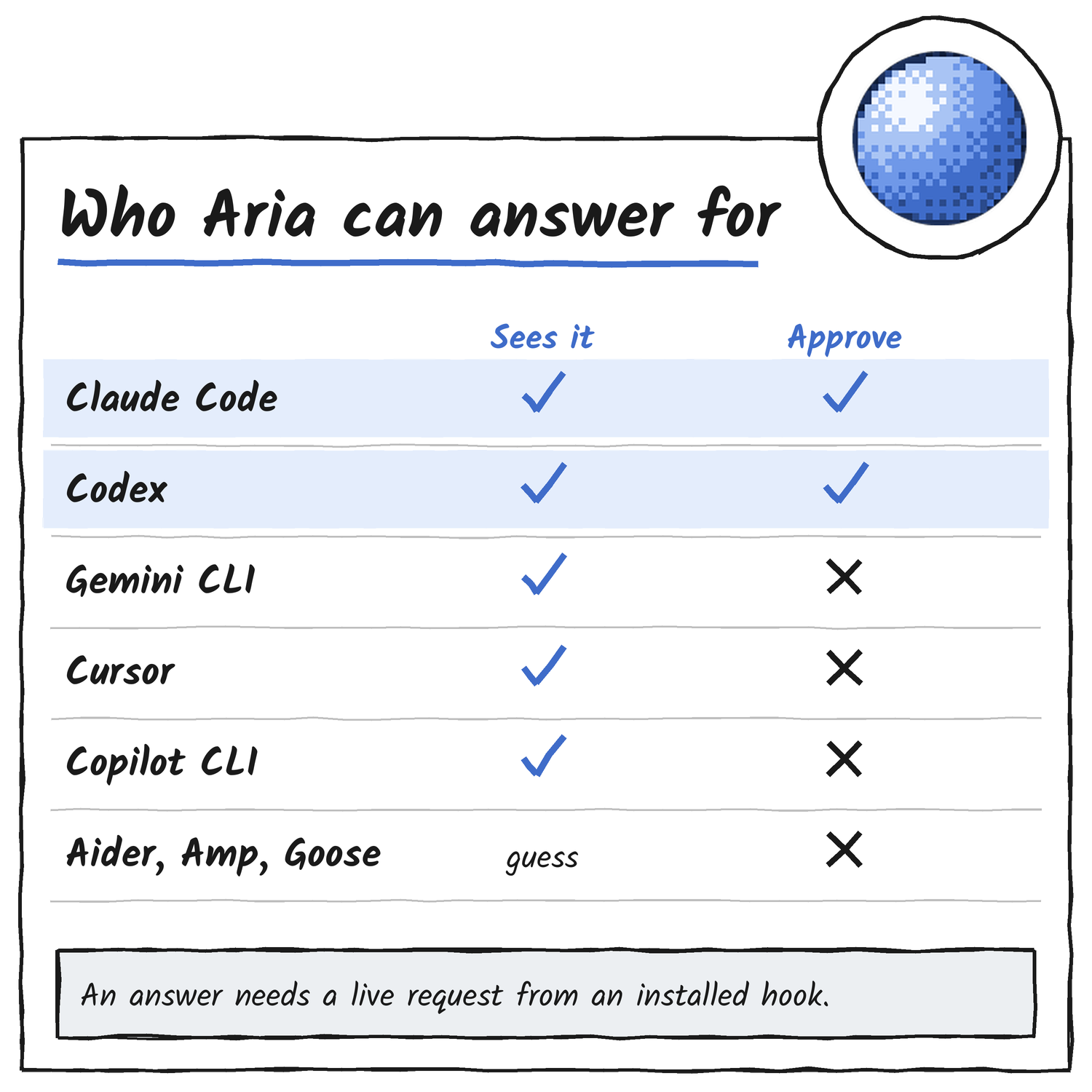
Claude Code also limits what reaches Aria. The known-issues page says Claude Code only sends a permission request when it would have shown its own dialog, so in auto, bypass or accept-edits mode, or for tools on your allow list, nothing arrives. From 0.1.8 the agent says which mode it’s in. The agent-support page, last reviewed on 12 October, adds that Aria hasn’t confirmed on a live session that an agent carries on correctly after Aria answers.
Aria needs an Apple Silicon Mac on macOS 14 or later and works on Macs without a notch. The beta is signed and notarised by Apple.
What 0.2.5 added
Voice is push to talk only. You press ⌃⌥V or the mic button in the notch, speak and let go, and there’s no wake word and no always-on microphone. A mic indicator shows while audio is captured, speech recognition runs on the Mac and replies use system voices. Cloud voices are optional and labelled as your own key. You can also say “tell me when Claude Code finishes” and Aria watches for up to 12 hours, then tells you once on one channel: speech, a notch notice or, if Text Aria is paired, a text.
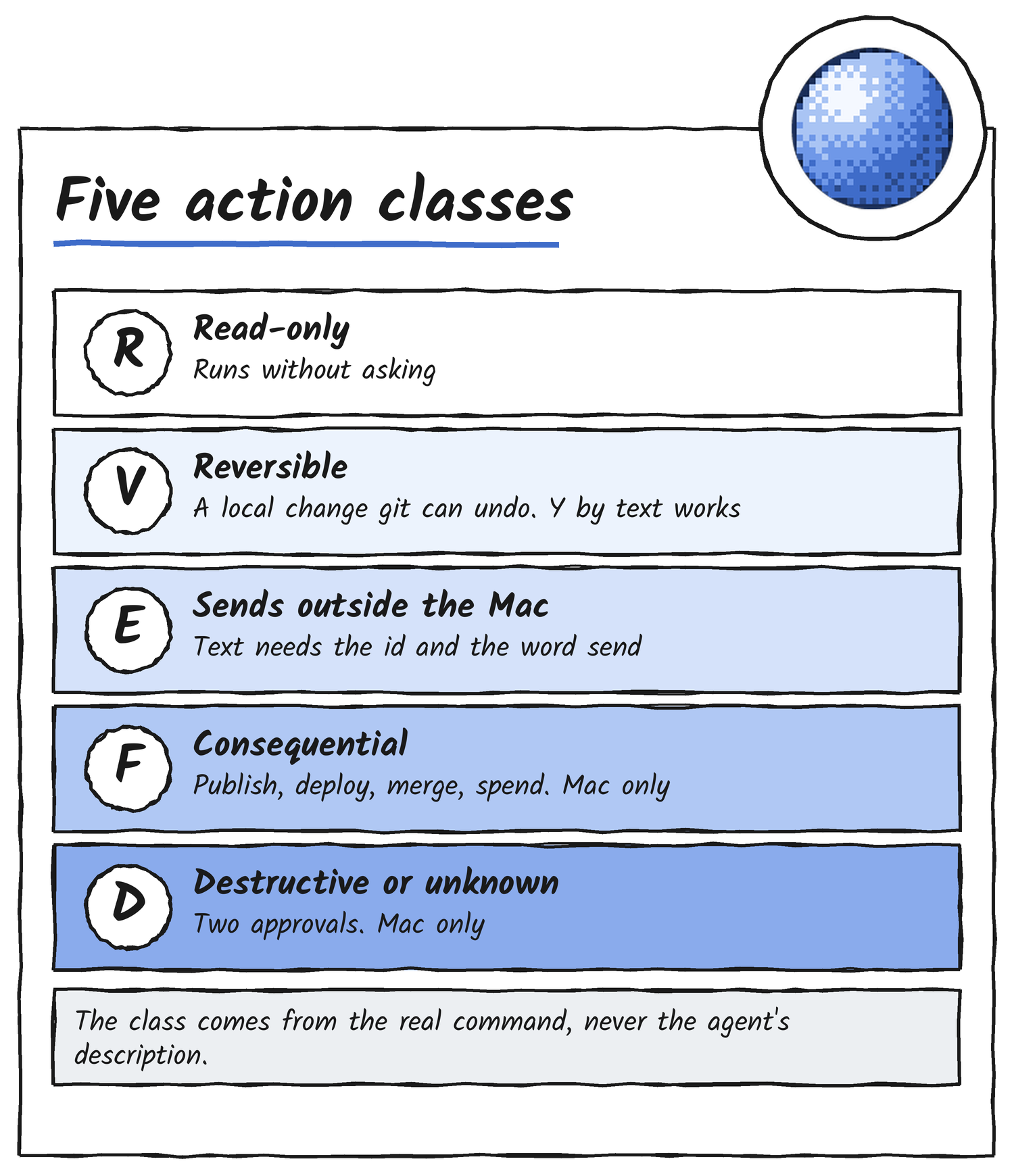
You can approve by voice, but only a class V request, the reversible kind. You say “allow” within 20 seconds of Aria reading the action aloud. Anything else gets “That one needs a click on your Mac.” A long or clipped command needs a click too.
Routines are now a typed spec: a schedule, steps (an agent task, a summary, a notify or a hand off), approval checkpoints, up to three retries and one failure notice. A fixed grammar reads common phrasings, and in Pogulakonda’s test set it read 37 of 40. The three it missed were refused, not misread. Before anything saves you get a preview listing each step with its action class, and a confirmed routine is signed with a key in your Keychain. A run missed while the Mac slept catches up once on wake if it’s under six hours late, and is skipped and logged otherwise. Three templates are ready: a morning digest, a Friday team summary and a hand off when an agent finishes. Two more are marked coming.
The release post lists what it hasn’t captured yet: a real microphone or AirPods, voice delay on real hardware, a managed AI reply time, a routine run against a real agent or paired phone, a catch-up after a Mac really slept, two Macs on one team, and CPU and energy use.
How approvals are limited
Aria’s Trust page says every request that needs approval gets one of five classes, worked out from the actual command or file path and never from the agent’s own description. Anything Aria can’t fully read counts as destructive. A text can never approve a consequential or destructive action, install hooks, change settings or pair a device, and a voice note can never approve anything.
Text Aria, off by default since it arrived in 0.1.9 on 15 November, lets you text your agents from a paired iPhone through Messages. It needs Full Disk Access to read the Messages database, sends at most 20 texts an hour and 60 a day, and “stop all” interrupts every agent it can stop. The Trust page says it has been tested against copies of the Messages database, not yet in a real round trip from an iPhone.
Where the team features stand
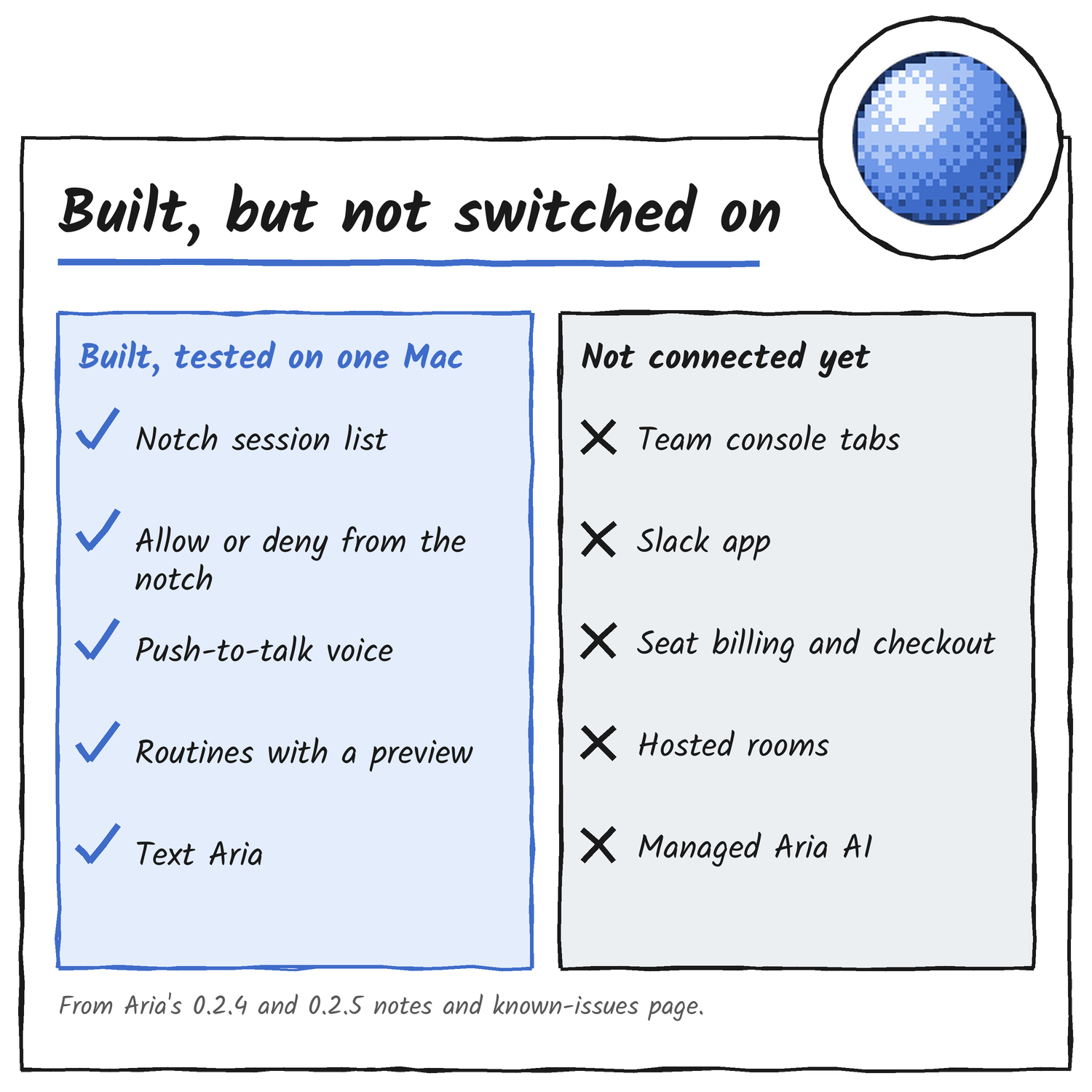
Most of the “multiplayer” in the tagline lives here. The landing page lists live tiles of teammates’ sessions, suggested prompts to a teammate’s agent, overlap warnings and hand-offs. Release 0.2.4, also dated 22 November, turned the Team page into a console with six tabs: Board, Live, Members, Seats, Policy and Briefing.
The known-issues page says the server side of Teams isn’t switched on, so the Board, Seats, Policy, trial and Briefing tabs say “Not connected”. The Slack app has been tested against a fake Slack only, and handing a session to a teammate is built but not connected. For 0.1.7, Pogulakonda ran two copies of Aria on one Mac against a local team server, and each saw the other’s agent and a clash on a shared file. Joining from a real emailed invite hasn’t been tested.
What teammates would see is narrow. By default a board card shares the agent, its state and the repo name. A task title is shared only if you turn that on, and prompts, file paths and diffs never leave your Mac, according to the 0.2.4 notes. The owner’s policy starts with two editable rules: never auto-approve file deletion, and ask before spending more than US$20. A class F or D request can only be approved on the Mac running the agent.
| Topic | Landing page says | Another Aria page says |
|---|---|---|
| Team sessions | “Watch your team’s agents work, live.” | “Hosted teams have not been verified with two real Macs on two accounts.” (known issues) |
| Downloads | “Now. The free Mac beta is signed and notarized by Apple.” | “The beta download is still invite-only.” (known issues) |
| Max plan | “Hosted rooms open with Pro and Max.” | “Max is planned for later and is not on sale.” (pricing) |
What it costs and where to get it
Release 0.2.3, dated 21 November, set the plans. Free stays free and keeps the safety and control features. Pro and Team add the parts that run more agents for you.
| Plan | Planned price | What it adds |
|---|---|---|
| Free | US$0 | The notch, seeing and approving for Claude Code and Codex, undo and review, your own key or model, private history, seven days of replay, one workspace |
| Pro | US$15 a month, or US$144 a year | Up to eight parallel workspaces and races, replay past seven days, hand-off between agents, start, tell and research by text, a daily Inbox text, talking to your fleet, hosted teams |
| Team | US$25 a seat a month, or US$20 billed yearly, from two seats | Everything in Pro, plus shared team activity and the team audit |
| Max | Later | Not on sale |
Checkout isn’t open. The 0.2.3 notes say payments will go through Stripe and the whole path, from checkout to the billing portal, refunds and tax, has been tested against a mocked Stripe only. Every feature stays open in this build until paid plans switch on. Pro has a 14-day trial with no card, the first 100 yearly Pro subscribers are due to pay US$108 a year, and waitlist design partners get Pro free until 5 January 2027 and then 40% off for 12 months. The known-issues page says design partner grants aren’t set up for anyone yet.
The download page offers Aria-0.2.5.dmg, a 33.9 MB file that answered normally when I requested it on 23 November NZ time. The known-issues page, reviewed on 22 November, says the beta download is still invite-only and that Aria now installs and runs on a second Mac. It says downloads open when the public launch does.
What it reads on your Mac
Aria’s What Aria reads page is generated from a list built into the app, and was reviewed against the code on 18 November for version 0.1.9.8. It lists 75 entries: 23 always on, 3 only after you connect something, 11 only with a macOS permission and 38 only if you turn a feature on. Twenty-one of them can send something off the Mac. The privacy page says the site has no analytics, trackers or cookies, and the app’s anonymous usage counts stay off unless you switch them on.
Examples from the list
- Claude Code session logs at ~/.claude/projects, opened read-only, always while Aria runs if the folder exists. Nothing leaves the Mac.
- API keys you enter, including an Anthropic key, kept in your login Keychain and sent only to their own service when that feature runs.
- Hosted team records in Supabase: agent type, repo label or hash, status, notes, hand-offs and approval summaries you choose to escalate.
- Planned managed AI, which isn’t available yet, would send your message and selected context through OpenRouter to the model provider.
Pogulakonda’s own pages list what’s still untested: a real iPhone round trip for Text Aria, a real microphone for voice, two Macs on one team and a live paid purchase. His updates page is where each release is logged.
Sources
- Aria 0.2.5 release notes, 22 November 2026
- Aria 0.2.4 release notes, 22 November 2026
- Aria 0.2.3 release notes, 21 November 2026
- Aria known issues, reviewed 22 November 2026
- What Aria can do with each agent, reviewed 12 October 2026
- Aria Trust page
- What Aria reads, reviewed 18 November 2026
- Aria pricing, download and about pages
Discover more from Sulat AI & Tech News
Subscribe to get the latest posts sent to your email.