Google has added file slicing to the Gemini API. Developers can now tell the model which pages of a PDF, which cells of a spreadsheet and which minutes of a video or recording to read, and Gemini counts and bills tokens only for that selection. The same release lets Word, PowerPoint, Excel and OpenDocument files go in directly instead of being converted first.
Google published the announcement on 23 November US time, written by Rohan Doshi, a senior product manager at Google DeepMind, and Ben Caine, a principal engineer there. The API change itself was already in Google’s release notes under 18 November. What Google added on 23 November is the explanation, a worked example and two partner results.
What Google shipped
A file now carries an optional processing block. Inside it, you choose a range, a set of layers and, for pages, sheets and frames, a resolution. If you leave the block out, you get the old behaviour: the whole file.
| File type | What you select | Layers you can choose | Default with no options |
|---|---|---|---|
| PDF, Word, PowerPoint, OpenDocument text and slides | start_page and end_page, counted from 1 | page_text, page_image | Page images at medium resolution |
| Excel and OpenDocument spreadsheets | sheet_index and a cell range such as A1:H50 | data, formulas, visual | Values, formulas and sheet names for every sheet |
| Video | start_offset and end_offset, plus fps up to 24 | frames, audio, transcript | Frames at 1 fps plus audio |
| Audio | start_offset and end_offset | None | The whole recording |
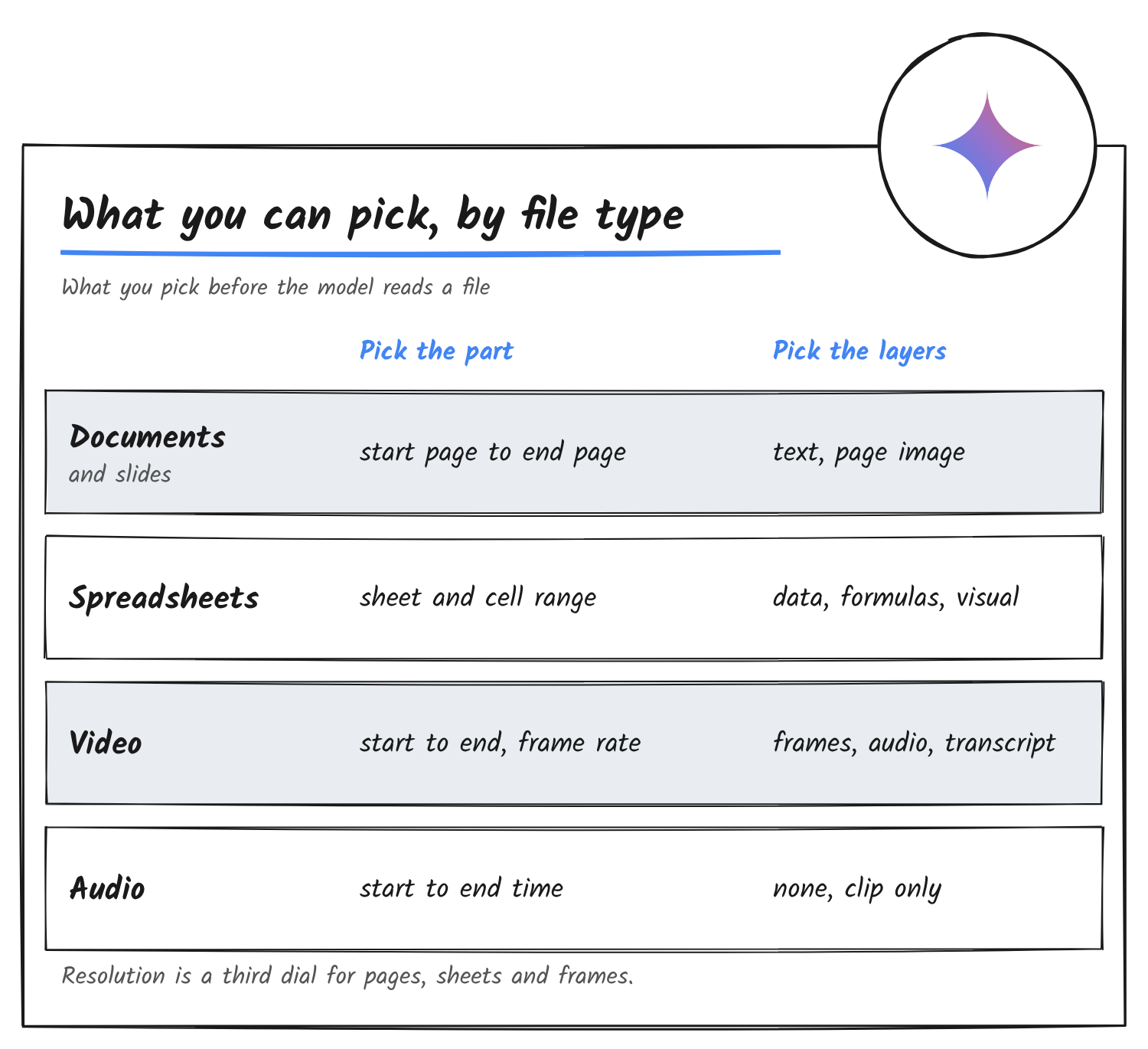
Two details matter more than the option names. First, the model is told the total page count and the worksheet names automatically, so it can ask for a different slice on the next turn without you describing the file. Second, the controls work inside a tool result. A tool can hand back a Files API link, and the model chooses what to read from it, as function_result content in the Interactions API.
What it does to the bill
Google’s docs put a page image at about 280 tokens on low resolution, 560 on medium (the default) and 1,120 on high. Those figures are for Gemini 3 and Gemini 4 models. Gemini 2.5 charges a flat 258 tokens a page. Using Google’s numbers, here’s the arithmetic for a 100-page report:
- The whole file at the default: about 56,000 input tokens, or roughly US$0.08 on Gemini 4 Hydrogen at US$1.50 per million and US$0.17 on Gemini 4 Neon at US$3.
- Pages 3 to 7 at high resolution: about 5,600 tokens, roughly US$0.008 on Hydrogen.
- Pages 3 to 7 at low resolution: about 1,400 tokens.
Dollar figures are my arithmetic from Google’s per-page token counts and its published list prices. They cover input only. Output and thinking tokens bill separately.
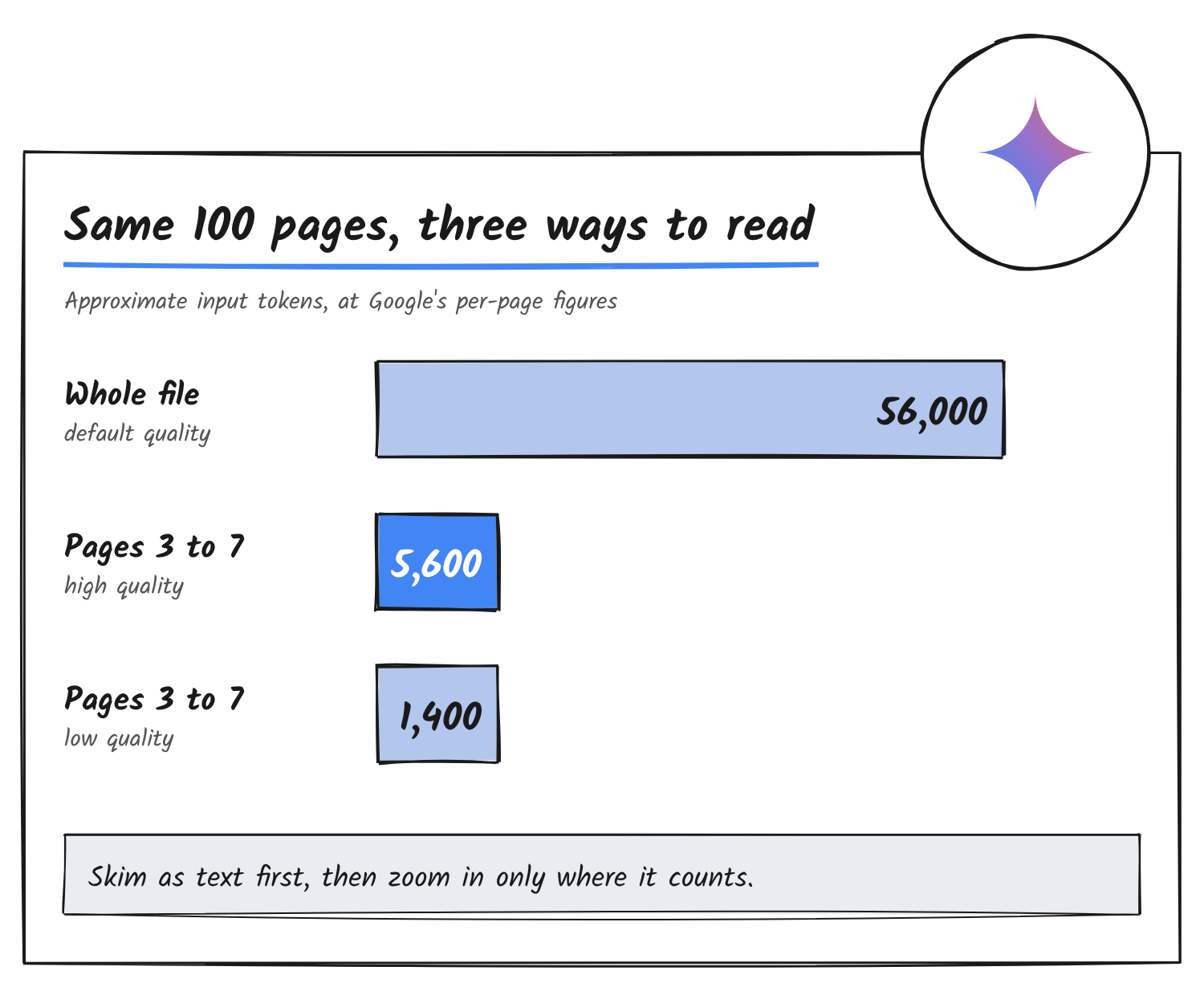
Google’s own pattern for large files is skim cheap, then zoom. Ask for page_text across the whole document to find the page with the chart, then ask for that single page as a high-resolution image. The blog’s example does exactly that with a quarterly report, using the same uploaded file twice. Here’s the spreadsheet version from the docs:
{
  "type": "document",
  "uri": workbook.uri,
  "mime_type": "application/vnd.openxmlformats-officedocument.spreadsheetml.sheet",
  "resolution": "high",
  "processing": {
    "type": "static",
    "spreadsheet_options": {
      "sheet_index": 2,
      "visible_cells": "A1:H50",
      "content_layers": ["data", "formulas", "visual"]
    }
  }
}
Source: Google’s document understanding guide. The request asks the model to audit the EBITDA formulas and chart in cells A1:H50 of the second sheet.
The partner numbers, and what they measure
14x
fewer tokens, Vercel, text extraction of a page against rendering the whole PDF
−67%
prompt tokens, LiteLLM, on a PDF
−33%
prompt tokens, LiteLLM, on a workbook
Skimming a document page for text extraction used 14x fewer tokens than rendering the whole PDF – focusing on what is relevant and reducing token spend for users.
Vercel, quoted in Google’s announcement
Most LiteLLM users sending PDFs, slide decks, and spreadsheets only need a few pages or one sheet. With this feature, they can point Gemini at exactly that slice and pay only for those tokens, and it works through LiteLLM’s Gemini routes with no extra setup. In our testing, slicing cut prompt tokens by 67% for a PDF and 33% for a workbook.
LiteLLM, quoted in Google’s announcement
Both results come from companies that route traffic to Gemini, and Google published them. Vercel’s 14x compares a text skim with rendering every page as an image, so it measures the skim step rather than slicing alone. LiteLLM’s two figures depend on how much of each file its test needed, which Google’s post doesn’t give. The 5,600 against 56,000 above is the cleaner guide to the size of the effect, and it’s a ceiling set by how few pages you need.
Video and audio get the same treatment
For video, slicing sits in what Google calls static mode: sampled frames at a fixed rate, which is 1 frame a second by default. You can clip with start_offset and end_offset written as seconds, such as "1200s", change the frame rate to anything up to 24, and choose between frames, the audio track and a timestamped transcript. A transcript bills as text, so it’s the cheap way to find the moment you want.
Google’s token figures make the saving concrete. Video runs at about 100 tokens a second at the default low media resolution, and audio at 32 tokens a second. Working from those, an hour of video is about 360,000 tokens, a five-minute clip about 30,000, and a 90-second audio clip about 2,900.
Slicing isn’t Google’s only answer to long video. It also offers an agentic mode in which the model explores the timeline itself and loads only what it needs, which Google says uses up to 88% fewer tokens on long-form content. The two modes suit different jobs. Google’s video guide recommends static processing for clips under five minutes and for questions that need most of the footage, and agentic processing for videos over 5 to 10 minutes and needle-in-a-haystack questions. Slicing is the manual version: you pick the range, so you know what you pay for before the call.
Why Google built it
Google’s argument is about the code around the model. When an API only takes whole files, it says, agents end up running LibreOffice, PDF renderers and ffmpeg inside their own harness to render and cut files down. That bloats memory, fills local disks with extracted frames, and forces enterprise platforms to keep a sandbox per user just to slice files. Sending a Files API link and letting Google render, slice and tokenise it server-side removes that work.
The release also lands in a run of changes that all push the same way. Office support widened on 5 November with PowerPoint 97-2003, OpenDocument presentations and spreadsheets, and tools gained the ability to return Office files, audio and video to the model, with Files API links instead of inline bytes. The slicing controls followed on 18 November. And on 19 November Tool Retrieval began loading tool schemas only when the model asks for them. The principle is the same each time: keep the context window for what the model needs now.

The default changed too, and it can raise your bill
Google’s Office-files table shows that the model generation changes what you get when you send a file without options. On Gemini 4 and later, a .docx, .dotx, .odt or .pptx arrives as page or slide images at medium resolution, about 560 tokens a page. On Gemini 3 and 2.5 the same files arrive as extracted text plus any embedded images. Excel files arrive as values, formulas and sheet names for every sheet on Gemini 4, but as CSV with values only on Gemini 3 and 2.5.
For a long Word document, moving from Gemini 3 to Gemini 4 with no processing block can therefore send far more tokens than before. Setting content_layers to page_text brings the cost back down, and that’s the reason to touch the option even if you never slice a page range.
What slicing doesn’t change
- The whole file still has to fit. The limits apply to the full upload, even when you ask for a few pages: 50 MB a file, 1,000 pages for a PDF, 2,000 pages or slides for an Office or OpenDocument file, and 50,000 cells a sheet.
- The whole file still goes to Google. Slicing decides what the model reads and what you pay for. It doesn’t keep the rest of the file off Google’s servers, so material that mustn’t leave your systems has to be cut before upload. Files API uploads are stored for 48 hours.
- Bad ranges fail in specific ways. A start page of zero or less returns a 400 error, a start past the last page returns an empty slice, and an end past the last page is clamped. An empty slice isn’t proof the document has nothing relevant.
- The docs’ examples are Interactions API only. Every sample in the document guide uses
client.interactions.create. - The model list differs by page. Google’s blog says slicing works across all Gemini 4 models. The document guide says the options work across Gemini 3 and Gemini 4 and later.
How the others handle big files
Gemini isn’t the only API that takes documents, but the others solve the size problem differently. Here’s what each vendor’s own docs say.
| API | Office files | Choosing a slice | Limits and cost |
|---|---|---|---|
| Gemini API | Word, PowerPoint, Excel and OpenDocument, directly | Pages, sheet and cell range, video and audio time ranges, layers, resolution | 50 MB; 1,000 PDF pages or 2,000 Office pages; about 560 tokens a page at default |
| Claude API | Not in document blocks; Anthropic says to convert .docx and .xlsx to text or PDF first | The PDF guide lists no page selector and suggests splitting large files into sections | 128 MB and 600 pages a request, 100 when the context window is under 1M tokens; 1,500 to 3,000 text tokens a page plus up to 1,568 image tokens |
| Mistral OCR | PDF, PPTX, DOCX and more | A pages list or range, counted from 0 | About 1,000 pages and 50 MB a file; US$4 per 1,000 pages for OCR 4, half that in batch (launch pricing) |
| Meta Model API | PDF only in its file-type table | None listed | Text from the first 100 pages, page images from the first 50 |
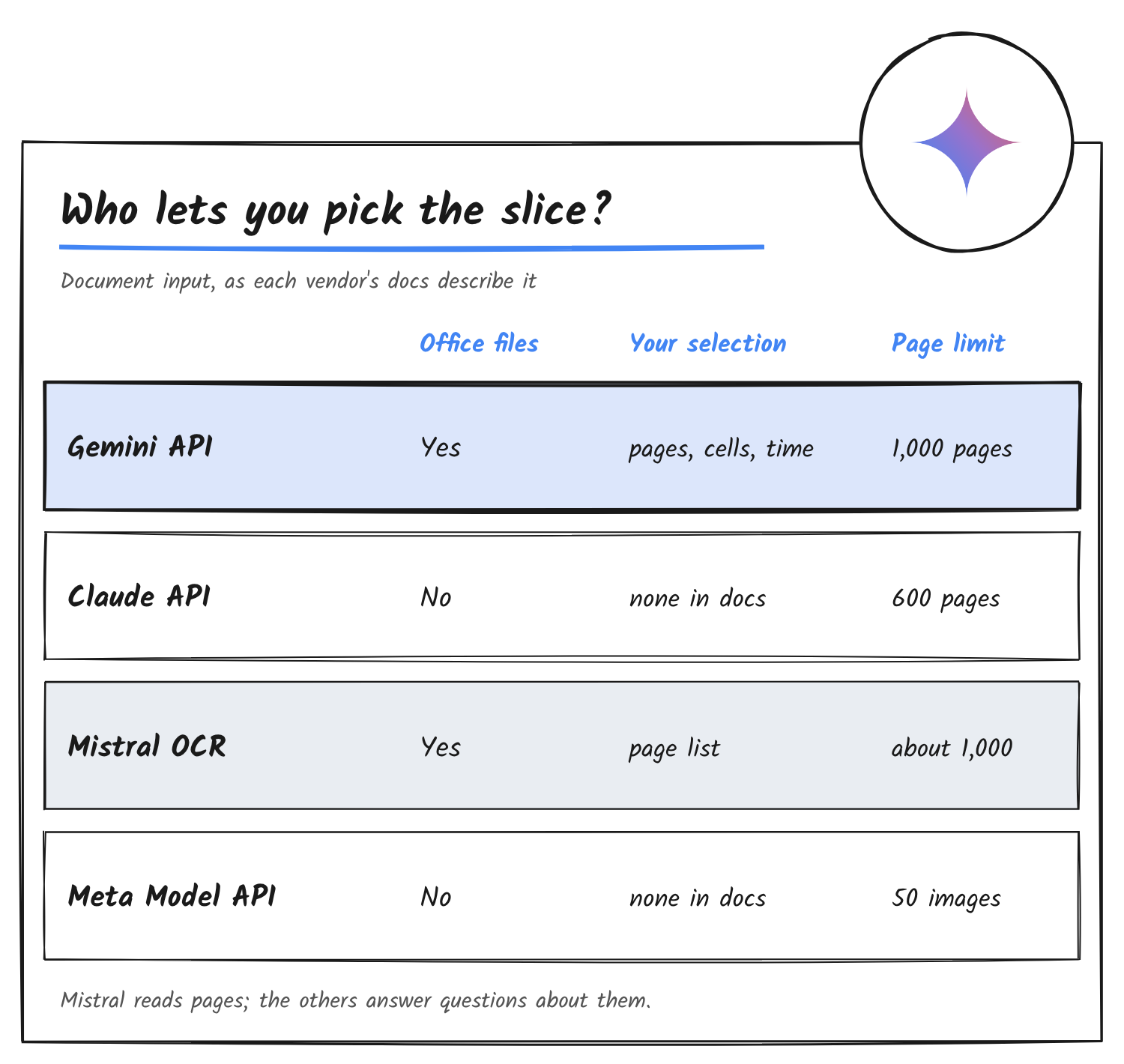
Mistral is the closest on pages, but it’s a different product. OCR 4 returns extracted text with bounding boxes, block types and confidence scores for each region. It doesn’t reason over a file, so it sits in front of a model rather than replacing the model’s file input. Anthropic’s route is to upload a large PDF once through the Files API, reuse it across requests with prompt caching, and split what doesn’t fit. Meta caps what the model sees at the first 50 page images, so a long PDF is cut for you.
The split in approach is plain. Gemini now moves the choice of what to read from the developer’s preprocessing code to a parameter in the request. Anthropic and Meta leave the cutting to the developer or to a fixed cap. Mistral exposes a page list but stops at extraction.
Who it affects
Agent builders get the most. A tool that returns a file no longer has to pre-slice it. It returns a link, and the model asks for page 14, then the formulas on sheet 3. That cuts the glue code, and it moves the cost decision into the model’s hands, which means bills now depend on how an agent behaves. An agent that asks for high-resolution pages it doesn’t need will spend more than one that skims first.
Gateways and SDKs have new work. LiteLLM says slicing already works through its Gemini routes with no setup. Any layer between an application and Gemini has to carry the processing block through unchanged, and it has to log what was selected, because the token counts it sees now reflect the slice rather than the file.
Teams on document and spreadsheet work, such as finance, legal and operations reviews, can stop converting everything to PDF or CSV before sending it. The practical test is simple. Run one representative file whole and then sliced, compare answers and usage, and keep the conversion step wherever formulas, merged cells or embedded objects don’t survive.
Everyone else sees nothing yet. These are API controls, and Google’s announcement doesn’t mention the Gemini app. Google says they’re available through the Gemini API in Google AI Studio and Gemini for business.
How it got here
- 5 November: the Gemini API accepts PowerPoint 97-2003, OpenDocument presentations and spreadsheets, and tools can return Office files, audio and video to the model, including by Files API link.
- 12 November: Gemini 4 Hydrogen reaches general availability, the model most of Google’s slicing examples use.
- 18 November: the release notes list multimodal file processing and slicing in prompts and function responses.
- 19 November: Tool Retrieval enters preview in the Interactions API.
- 23 November (US): Google publishes the file slicing announcement with the Vercel and LiteLLM results.
If you’re going to try it
- Upload each file once through the Files API and reuse the link across turns.
- Skim long documents with
page_textfirst, and requestpage_imageat high resolution only for pages with charts or dense layouts. - For workbooks, set
sheet_indexandvisible_cellsevery time. Without them you get every sheet. - For long video, request the transcript first, then clip the moment with frames.
- Check usage on a sliced and an unsliced run of the same file before you rely on the saving.
Google’s document processing guide has the full option list, and the announcement has the partner quotes. For the models these controls run on, see our earlier pieces on Gemini 4 Neon and Gemini 4 Hydrogen.
Discover more from Sulat AI & Tech News
Subscribe to get the latest posts sent to your email.