The creator who posts as 0xCodez published a six-step guide on X at 8:32am NZDT on 23 November that turns T3 Code into a team of four frontier models: Fable 5.2 leading, Opus 5.5 building, GPT-6.2 Astra playtesting and Gemini 4 Neon writing copy, with Grok Bot feeding it work around the clock. Theo’s own post from 19 November is the starting point. The pieces the guide leans on (delegation, permission modes and outside-agent access) are all in T3’s documentation.
T3 Code is Theo Browne’s open-source control plane for coding agents. It runs Claude Code, Codex, Antigravity, Grok Build and others on your own machine and your own subscriptions. Theo posted the line-up the guide builds on: Fable leading implementation, Astra as a playtester and Neon as the exclusive copywriter, all in their native harnesses.
- What T3 Code is
- The team on paper
- How delegation works
- The settings that decide safety
- Grok Bot as the dispatcher
- Cross-family review
- Where T3 Code sits among its peers
- What the guide leaves out
What T3 Code is
T3 Code is an MIT-licensed app for desktop, web and phone from Theo’s company, T3 Tools. Its README lists Claude Code, Codex, Cursor, OpenCode, Grok Build, Antigravity, Kiro, Pi, Muse Code and fx, plus any agent that speaks the Agent Client Protocol. It doesn’t resell tokens. You sign in to each vendor with your own plan, and T3’s FAQ says that sits within the terms of Claude Code, Codex and Google Antigravity.
The FAQ is blunt that T3 Code isn’t a harness. A harness is what turns a model into an agent: it supplies the tools, runs them and hands the results back. Claude Code and Codex are harnesses, and T3 Code is the interface over them. It starts them, turns their output into threads, and gives each thread its own branch and a one-button pull request.
10
agents named in the README
3
machines per free T3 Connect account
70k+
GitHub stars, by T3’s own count
US$0
to use T3 Code; you pay each vendor
T3 Connect, the tunnel that lets a phone or browser reach your machine, is free for now. Linking a paid T3 Chat account raises the cap to 10 machines on Pro or 100 on Premier. T3 says your code and prompts go from your machine to your provider, not to T3, and that T3 Connect rides a Cloudflare tunnel.
The team on paper
The guide keeps the roles in a charter file called TEAM.md that every agent reads. Theo’s post covers three of them. The Opus 5.5 builders and the Grok Bot dispatcher are the guide’s additions.
| Role | Model | Job in the guide | Where it comes from |
|---|---|---|---|
| Lead | Fable 5.2, High effort | Writes the spec, splits the work, takes the hardest slice | Theo’s post |
| Builders | Opus 5.5 | One slice and one worktree each | The guide |
| Playtester | GPT-6.2 Astra | Read-only; reports bugs, never fixes them | Theo’s post |
| Copywriter | Gemini 4 Neon | Docs, README, changelog and translations only | Theo’s post |
| Dispatcher | Grok Bot | Files tasks into T3 Code over MCP | The guide |
The guide says three frontier models shipped between 9 and 18 November. I covered each launch when it landed.

How delegation works
The mechanism is delegate_task, which arrived with T3 Code 0.1.0 on 15 October. The release notes describe it as an agent starting child agents on any provider or model and waiting for their results, and call it the recommended way to combine harnesses.
T3’s orchestrator documentation sets the rules. The child receives only the task prompt and an optional role instruction, and the parent’s conversation history isn’t copied. Each child runs as its own T3 thread with its own history. A child’s permission mode can equal the parent’s or be narrower, never broader. Setting isolation to “worktree” gives the child a separate checkout from the parent’s commit; the default, “shared”, uses the parent’s checkout. The parent can wait for results or carry on, and it wakes when its children finish.
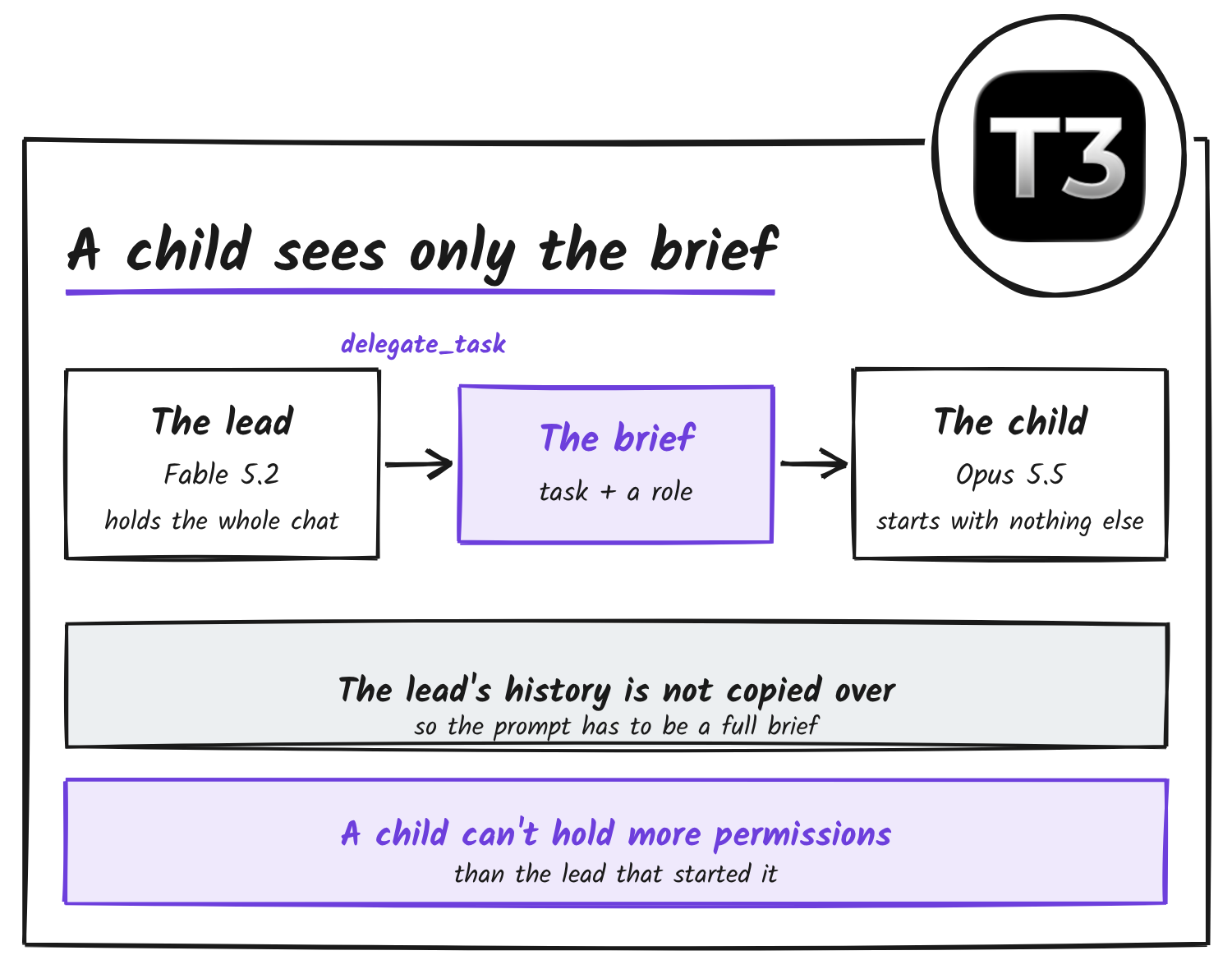
That’s why the guide gives every handoff a fixed format. Its builder example, reformatted here, reads:
BRIEF FOR:   @opus
ROLE:        builder
GOAL:        Add rate limiting to POST /api/upload: 60 requests/min per API key.
CONTEXT:     SPEC.md section 2. Use the Redis client in lib/redis.ts.
DONE WHEN:   `npm test -- upload` passes and a new test covers the 429 path.
DO NOT:      touch /ui, change package.json, run migrations.
RETURN:      files changed, test output, anything you were unsure about.
Prompt format: 0xCodez’s guide.
On shared checkouts the guide borrows two rules. Flavio Copes, who has written a deep dive on T3 Code, uses the current checkout for one controlled stream of work and worktrees for truly independent parallel tasks. Harry Smaje, who runs parallel agents on one MacBook, lets read-only reviewers share the parent’s checkout and says of that arrangement: “Nothing enforces that, so keep the line in the brief.”
The settings that decide safety
Each T3 thread has a permission mode. The permission-modes page lists four, and it says plainly that the initial default for new threads is Full access.
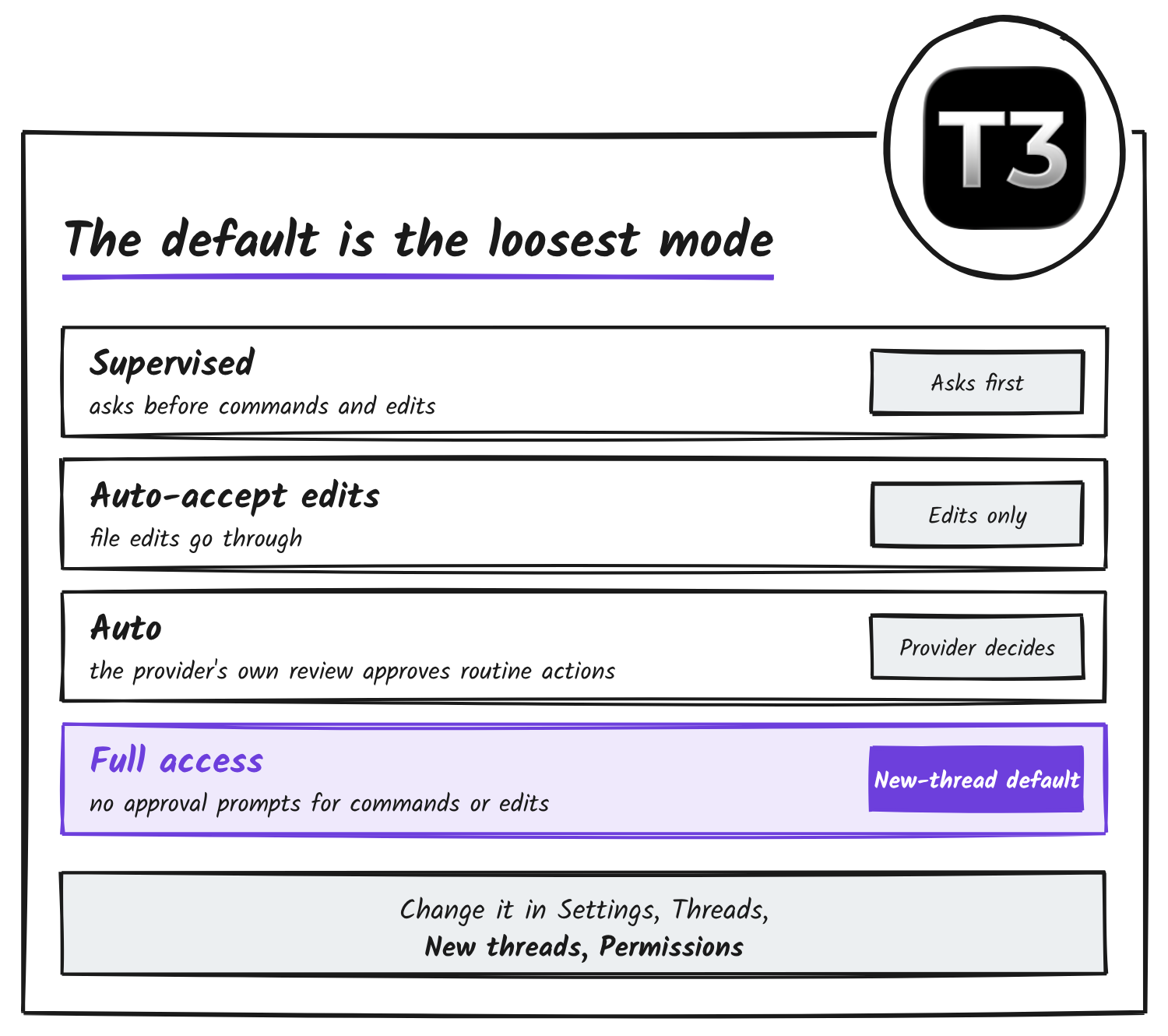
The modes don’t behave the same on every provider. Antigravity offers Auto only when your sign-in provides it, and some personal Google accounts don’t, so an Antigravity thread set to Auto runs in Supervised. Grok Build offers no Auto-accept edits. Muse Code and Kiro offer only Supervised and Full access. That matters on this team, because Neon reaches T3 through Antigravity. The guide’s advice is one mode per role: Supervised for the lead and the reviewer.
The second setting is memory. Every parallel agent starts its own copy of every MCP server. Smaje’s MacBook, an M4 Pro with 24 GB, slowed to a crawl with 19 Claude sessions open: the MCP servers came to 371 processes and 11 GB of swap. He measured each server’s resident memory just after startup, and calls the figures his configuration, not benchmarks.
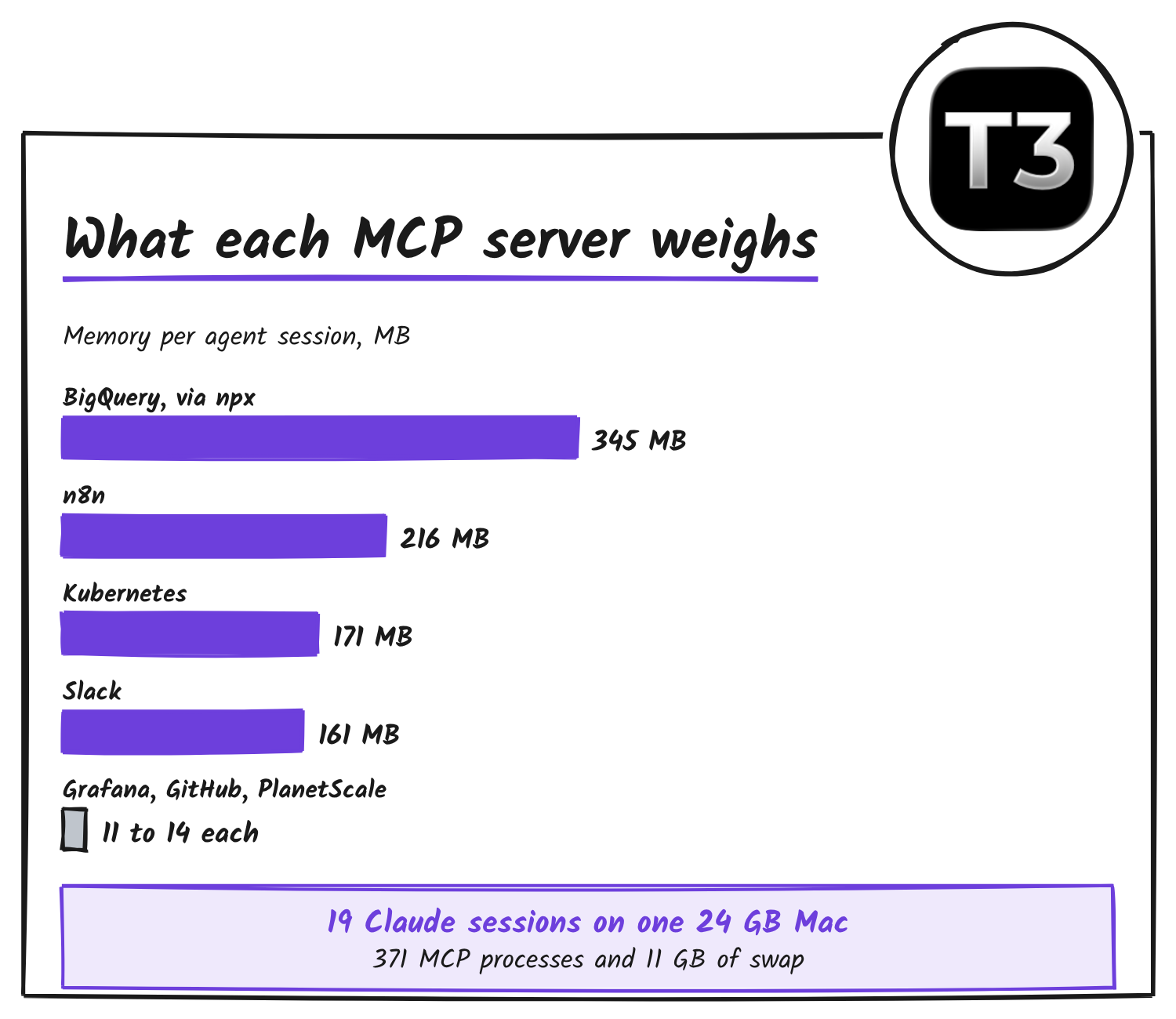
Removing eight servers took about 870 MB and 14 processes off each new session, he says. A subagent on another provider runs as its own Claude Code or Codex session, so it starts its own local MCP servers too, while Claude Code’s built-in subagents run inside the parent’s session.
Grok Bot as the dispatcher
This is the guide’s one original piece. Grok Bot is an agent with its own cloud computer that works through tasks while you’re away, and it left beta as version 1.0 on 11 November. Individual plans run US$30, US$100 and US$200 a month, and shared Team Bots need a Team or Enterprise plan. In the guide it watches the places work arrives and files clean tasks into T3 Code.
T3’s outside-agents page says any agent that supports remote MCP servers over HTTP with OAuth can start, message and read threads in a T3 environment. Hosted agents must use the T3 Connect address, because a Tailscale address only works inside your own tailnet. When the agent signs in you choose its level, from Read only through Supervised to Full access, and a thread it starts can’t run with more permissions than that level. A sign-in lasts 30 days and you can revoke it under Settings, Sharing & access. For a Claude Code session on your own computer, the setup is two commands:
claude mcp add --transport http t3 https://<environment-address>/mcp
claude mcp login t3
From T3’s outside-agents documentation.
Grok Bot’s own documentation says a Bot can add an MCP server that isn’t in its catalogue by URL, and the desktop app has a Remote HTTPS connector with an optional OAuth client ID. Neither company’s pages name the other, so the guide’s step is the two documents joined: copy the MCP URL from Settings, Environments in T3 Code, add it to the Bot, and approve the sign-in as Supervised, not Full access.

Cross-family review
The guide’s case for putting Astra on the team is that a reviewer from the builder’s own model family shares its blind spots. It credits GILD, a research firm that says it runs its agents in T3 Code with Claude Opus 5.5 and GPT-6 Astra each checking work the other produced, with a cap of three review rounds before a human decides. Smaje’s routine is similar: Opus writes the change, Astra and Sol review it in parallel, and Fable checks anything visual. He briefs each reviewer with the diff and the task, not his own conclusions, so each judges the change on its own terms.
Where T3 Code sits among its peers
T3’s FAQ names the Codex desktop app, Conductor, Claude Desktop and Cursor Glass as its inspirations. Since then the category has moved. Conductor, the Mac app from Melty Labs, said on 4 November it was joining Meta and would shut its cloud, then called that off on 12 November. The open-source field has grown around it.
| Tool | Licence | Platforms | Where agents run |
|---|---|---|---|
| T3 Code | MIT | macOS, Windows, Linux, iOS, Android | Your machine; no hosted cloud |
| Conductor | Proprietary | macOS | Local workspaces; cloud workspaces on the paid plan |
| Paradev (formerly Superset) | MIT, per its site | macOS; experimental Linux | Local worktrees; remote hosts on Pro |
| Orca | MIT | macOS, Windows, Linux | Local worktrees or SSH servers you own |
| Paseo | Apache-2.0 | Desktop, iOS, Android, web | A self-hosted daemon |
| Zed | Open-source editor | macOS, Windows, Linux | External agents over ACP, free to run |
The vendors’ own apps cover their own agents: Claude Code’s desktop app runs parallel sessions with optional worktrees, and Cursor’s Agents Window runs parallel agents locally and in the cloud. T3 Code’s claim is the cross-vendor seat: one thread list across all of them.
What the guide leaves out
- The machine has to stay on. T3 Code doesn’t host agents. They run wherever T3 runs, and the phone is a remote. T3 Connect is a tunnel to your computer, not a cloud.
- Four vendors means four plans. T3 doesn’t resell tokens, so this team needs Claude, OpenAI, Google and Grok Bot subscriptions, and each model counts against its own vendor’s limits.
- Usage events are on by default. T3 Code sends product usage data tied to a hashed identifier, with no prompts or file contents. Setting T3CODE_TELEMETRY_ENABLED to false turns it off.
Install commands from T3’s README
brew install --cask t3-code        # macOS
winget install T3Tools.T3Code      # Windows
scoop install extras/t3code        # Windows
yay -S t3code-bin # Arch LinuxSources
- 0xCodez, “T3 Code: build ai agent teams with all frontier models (Full-Course)”, X, 23 November 2026 NZDT
- Theo, post on his T3 Code line-up, X, 19 November 2026
- T3 Code README, FAQ, permission modes, outside agents and orchestrator MCP server
- T3 Code v0.1.0 release notes, 15 October 2026
- Grok Bot documentation, Use the computer and apps and Introducing Grok Bot 1.0
- Harry Smaje, Parallel coding agents on one MacBook with T3 Code
- Flavio Copes, A deep dive into T3 Code and Conductor alternatives
- GILD, Several models in one app
Discover more from Sulat AI & Tech News
Subscribe to get the latest posts sent to your email.