
Hridoy Reh posted a five-step “SEO hack” on 22 November, at 8:35pm New Zealand time: download 12 months of Performance data from Google Search Console as a CSV or Excel file, upload it to Claude, and ask it to find queries you rank for but have no content for. The copy of the post I read showed 63.8K views. Two replies hint at the catch. One says to avoid creating content that cannibalises pages you already rank with. Another says most of those queries probably don’t need a full page.
The post shows a method and no results, so I tested it. I connected a Search Console MCP server to Claude, pointed it at Zenoware, one of our own sites, and asked the questions that prompt implies plus several it doesn’t. Everything below came from that property’s real data, pulled on 27 November with figures running to 25 November. I used only read tools. Then I checked every limit I rely on against Google’s documentation.
9 of 10
clicks in 28 days had no query row to read
47%
of 90-day impressions went to one service page, at average position 59.6
4 of 8
inspected pages are indexed
1
page ranked top 10 until March, and Google now calls it unknown
The short version: the CSV trick is fine for a small site and a first look. But a year of query rows can’t tell you whether you already have the page, whether Google has indexed it, or where the traffic with no query went. An MCP connector can answer those in the same chat, which is the reason to use one. It’s also a third-party service with its own cost and trust questions, covered below.
- Where the CSV route runs out
- The connector I used
- Seven tests on a real site
- The content-gap trap, with real queries
- CSV, hosted MCP, self-hosted or BigQuery
- What can go wrong
- How to run this on your own site
Where the CSV route runs out
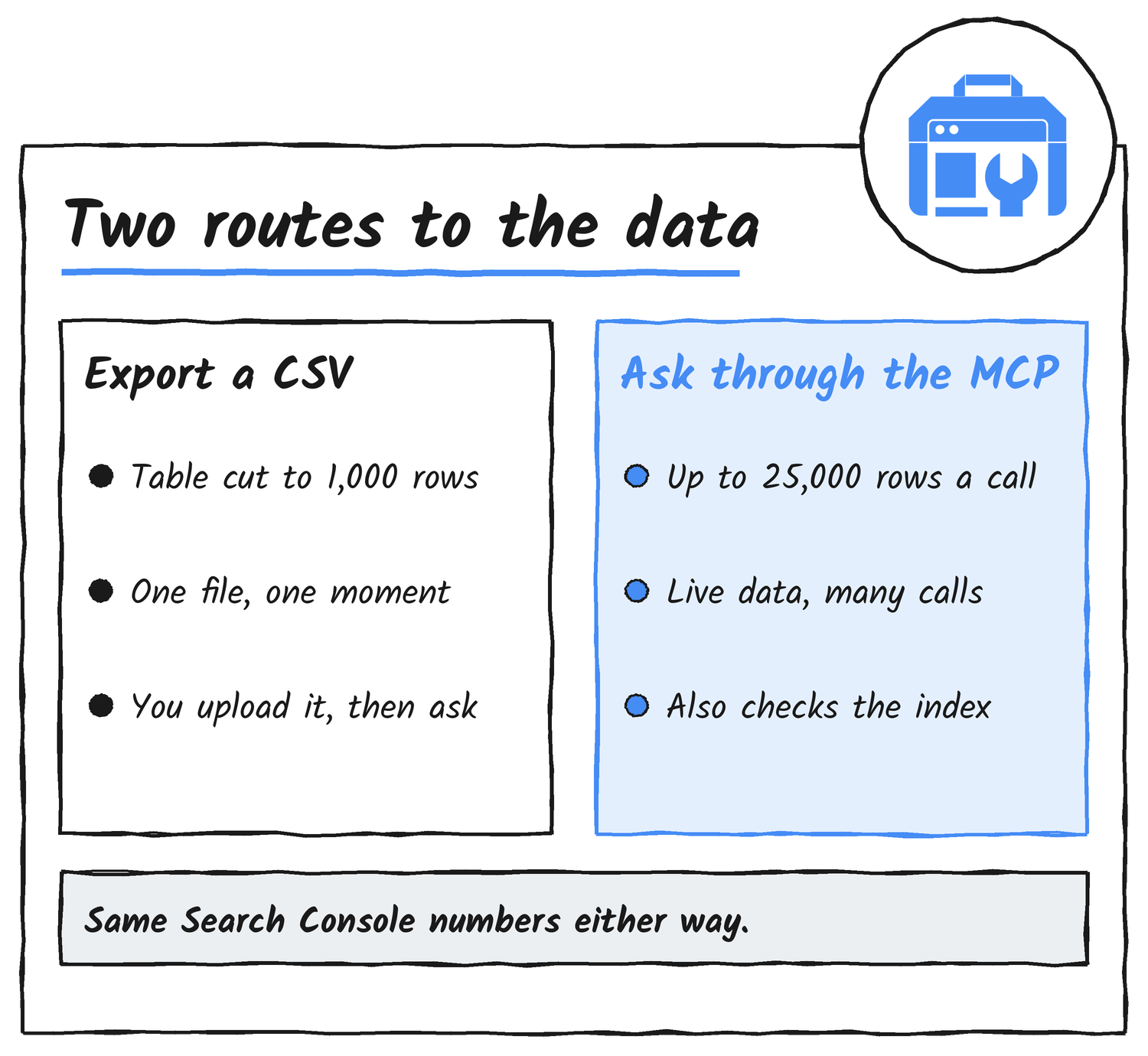
Google’s help pages set the limits. The most you can export from the Search Console interface is 1,000 rows. Google’s data limits page also says the Search Analytics API, and the Looker Studio connector, return up to 50,000 rows a day per site per search type. The API returns 1,000 rows by default, and you can raise rowLimit to 25,000 and page through with startRow. Performance reports hold 16 months of data.
The bigger catch is privacy filtering. Google omits anonymised queries, the ones not issued by more than a few dozen users over two to three months, from every table. They’re still counted in chart totals unless you apply a query filter. So the rows in your CSV never add up to the totals, and the gap can be most of your clicks on a small site. The BigQuery bulk export avoids the API’s daily row limit, but Google says it also leaves anonymised queries out.
The connector I used
I found no official Google Search Console MCP server. Google’s own list of MCP servers names Google Analytics and the MCP Toolbox for databases, which covers BigQuery, but not Search Console. I checked it on 27 November. The server I used is mcpsearchconsole.com, a hosted, third-party service. You paste one URL into your client and sign in with Google. In Claude Code the command is claude mcp add --transport http search-console https://mcpsearchconsole.com/mcp.
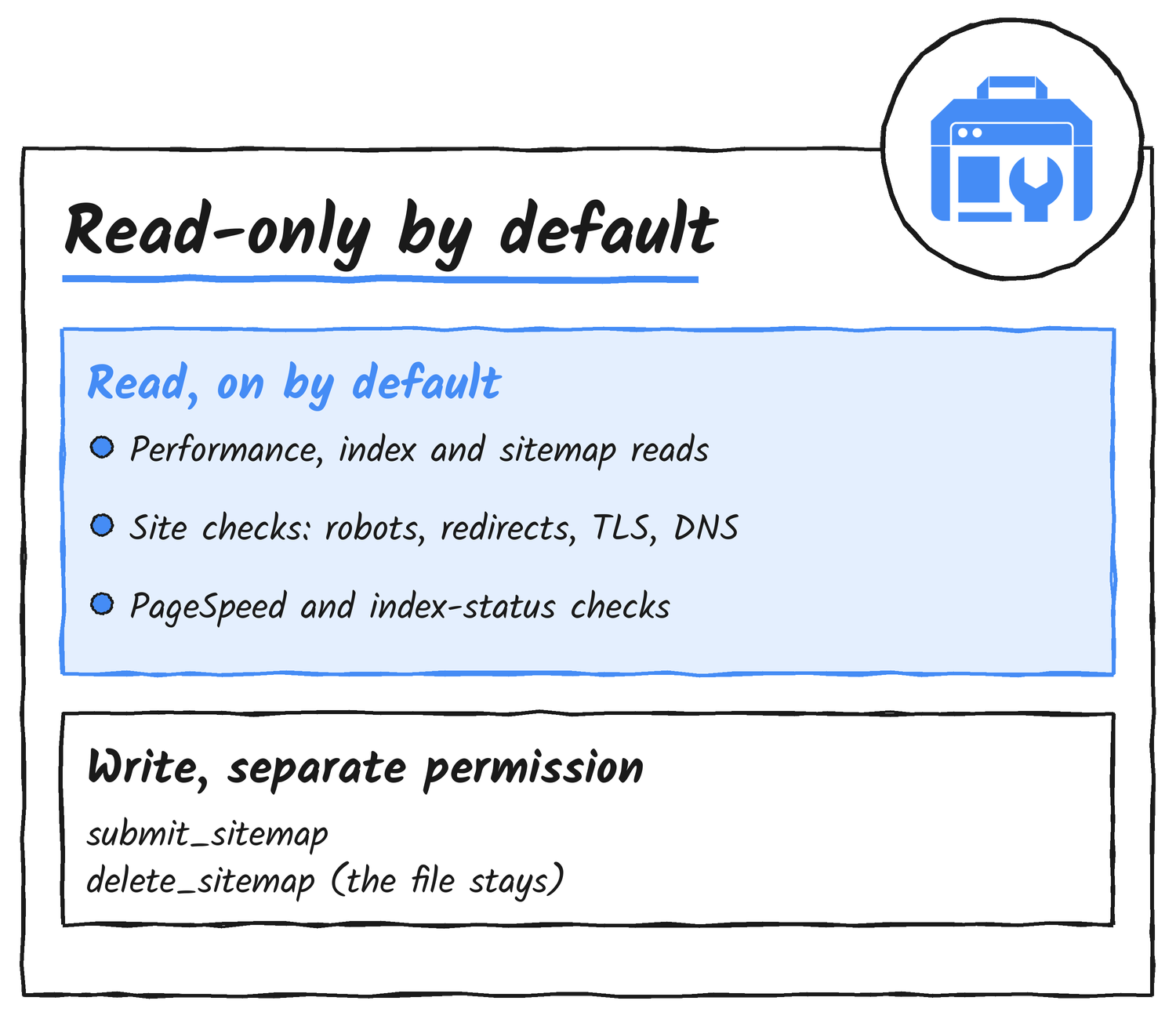
The vendor says it is read-only by design, with sitemap submission as an opt-in. Its free plan gives you one property and 15 data pulls a day, capped at 40 a month. The Solo plan, which I paid for, costs €4.99 a month excluding VAT and removes the pull limits. The vendor’s page lists 19 tools. My client showed 23, the extras being account tools such as list_plan and upgrade_plan. The ones I used were search_analytics, search_insights, search_chart, inspect_url, list_sitemaps, check_robots, check_redirects, check_tls, page_speed and list_notes. I didn’t use submit_sitemap, delete_sitemap or add_note.
Seven tests on a real site
Zenoware is a small site with 31 URLs in its sitemap and a modest 18 clicks in 90 days, which makes it a fair stand-in for most sites that would try the CSV hack. The prompts below are my reconstructions of the calls I made, written as you’d type them.
1. Did we go up or down?
Prompt: “Compare the last 90 days of zenoware.com with the 90 before.” The answer: clicks fell from 24 to 18, impressions rose from 447 to 995, click-through rate fell from 5.4% to 1.8%, and average position slid from 10.4 to 31.4. On its face that’s a ranking collapse.
It wasn’t. The account’s saved notes say that on 15 November Zenoware dropped “Auckland” and “New Zealand” from every title, description and service summary, and expected local queries to fall away. The site is now being shown for broader searches, mostly at page six or lower, which pulls the average down. A CSV can’t see that note. The connector can, because it keeps notes beside the data.
2. Is the average hiding two sites?
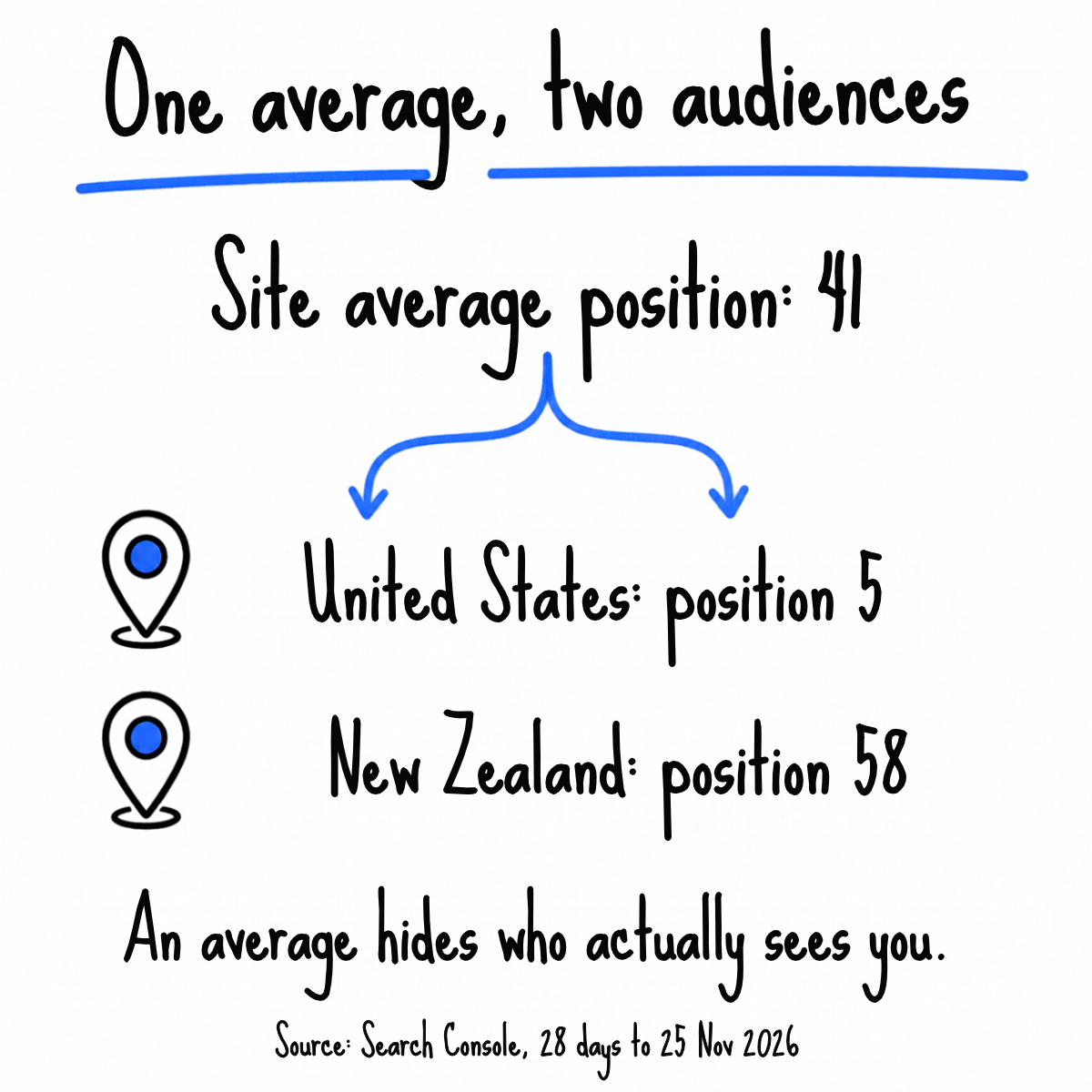
Prompt: “Split the last 28 days by country.” The 28-day total is 10 clicks, 721 impressions and an average position of 41.2. By country, the United States has 4 clicks on 68 impressions at position 5.1, while New Zealand has 2 clicks on 414 impressions at position 57.9. One number, 41, describes neither audience.
3. Where are the impressions, and is it an indexing problem?
Prompt: “Which pages get the impressions, and why aren’t they clicking?” One page, /services/security-pentest, took 467 of the 995 impressions in 90 days, with no clicks and an average position of 59.6. Filtering its queries shows cyber security testing services (7 impressions, position 23.3), network penetration testing service (5, position 60.4) and affordable penetration testing (4, position 51).
A CSV stops there, and an AI would call it a content problem. The connector went on. URL inspection says the page is submitted and indexed, last crawled on 30 October, with its declared canonical matching Google’s choice and rich results passing. The robots check says Googlebot is allowed. So it’s a ranking problem on a competitive term, not a technical fault, and that points the fix at the page’s content and links, not at the crawl.
4. Where did the other clicks come from?
Prompt: “List every query that got a click in the last 28 days.” I asked for up to 1,000 rows, with the penetration-testing queries left out because they all had zero clicks. The list shows a single click: “remynder”, one click on 7 impressions. The unfiltered total says 10. Adding a query filter (“queries not containing zenoware”) returned 1 click and 522 impressions, against 721 impressions unfiltered. That matches Google’s description: hidden queries are counted in totals until you filter by query.
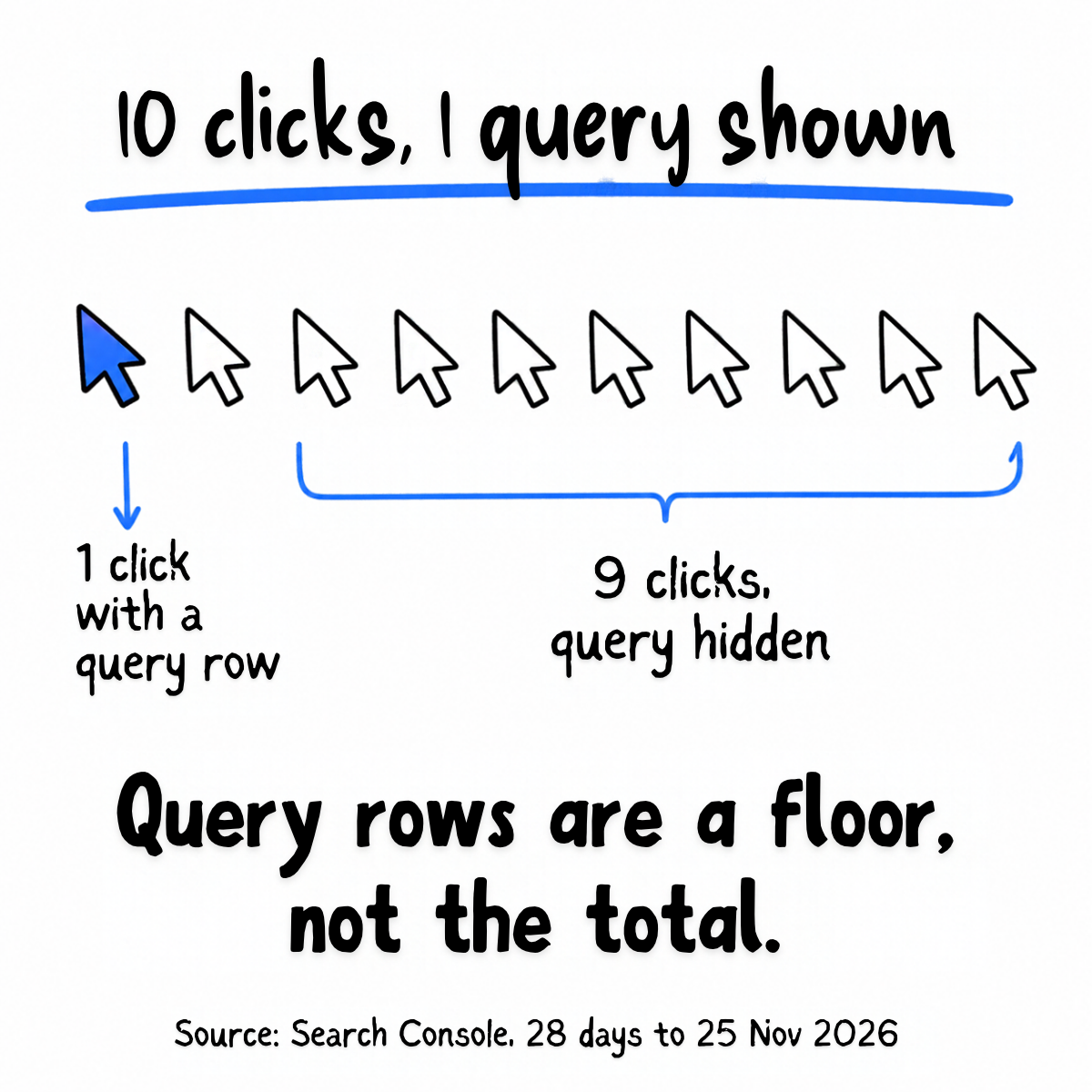
This limit belongs to Search Console, and the CSV has it too. The difference is how fast you spot it. When the total and the rows disagree, a connector lets you test the gap in two more questions. A model reading only the CSV may summarise one click as if it were the traffic.
5. What do the ready-made recipes find?
The connector bundles analyses it calls insights. I ran three. Striking distance, queries at positions 6 to 20 with at least 10 impressions, found none. Cannibalisation, two pages each taking at least 10% of a query’s impressions, found none. Low click-through rate for position, on page-one queries with at least 50 impressions, found none. Empty answers are findings: this site has no cheap on-page wins and no pages fighting each other, so Miracle Nnamdi’s cannibalisation warning doesn’t apply here.
6. Does the post’s content-gap prompt work?
Not on this site. It finds work that doesn’t need doing, and the next section shows the queries.
7. Which pages does Google index, and is the site healthy?
Prompt: “Inspect these eight URLs.” Four are submitted and indexed: the security page, the Duly case study, the legacy refactor page and the AI training page. Two are “discovered, currently not indexed” (agentic SDK integration and workflow automation), one is “crawled, currently not indexed” (API development, last crawled 15 April) and one, agent-ready web, is “URL is unknown to Google”.
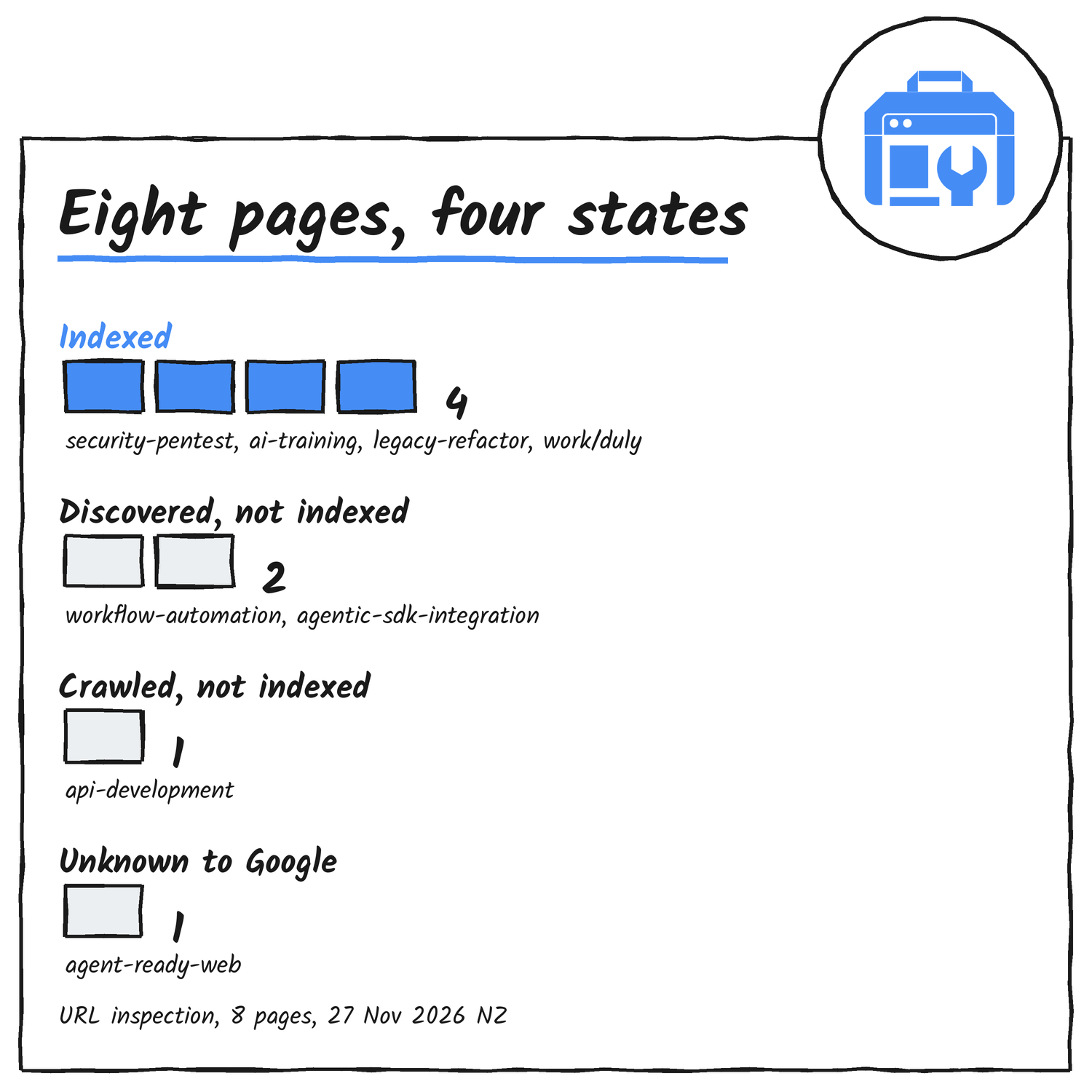
One thing didn’t line up. The sitemap report for the 31 submitted URLs says 0 indexed, while URL inspection shows four of eight indexed. I can’t explain the gap, so I trust the per-URL check. If you use an MCP for index status, spot-check the pages that matter one by one.
Site checks and movers
The site checks aren’t Search Console data, but they sit in the same tool. PageSpeed gave the home page 99 out of 100 on mobile, with a 0.9-second largest contentful paint, and no real-user data because the site doesn’t have enough traffic. The TLS check shows a Let’s Encrypt certificate valid until 30 December, 32 days left. The redirect check shows /portfolio answering 308 to /work. That last one explains something odd in the data: the query “public trust logo” earned 45 impressions at position 1 on a page that now redirects.
The movers recipe closes the loop. Clicks rose from 2 to 10 over the latest 28 days against the 28 before, the home page went from 2 clicks to 5, and four case-study pages each earned their first click. The notes say those pages came back on 15 November.
The content-gap trap, with real queries
The post’s step five asks for queries you rank for but have no content for. I pulled 480 days of page-and-query pairs and checked each odd-looking query against the pages that exist. All five of the “gaps” already have a page.
| Query | Seen as | Page that already exists | Google’s status |
|---|---|---|---|
| agentic web optimization | 2 impressions, position 71 (480 days) | /services/agent-ready-web | URL unknown to Google |
| make.com automation use cases | 1 impression, position 100 (480 days) | /services/workflow-automation | Discovered, not indexed |
| crm for property stylists | 1 impression, position 79 (480 days) | /services/cms-crm-development | Not inspected |
| laravel refactoring | 1 impression, position 132 (480 days) | /services/legacy-refactor | Submitted and indexed |
| public trust logo | 45 impressions, position 1 (90 days) | /portfolio, now a redirect to /work | Redirected, 308 |
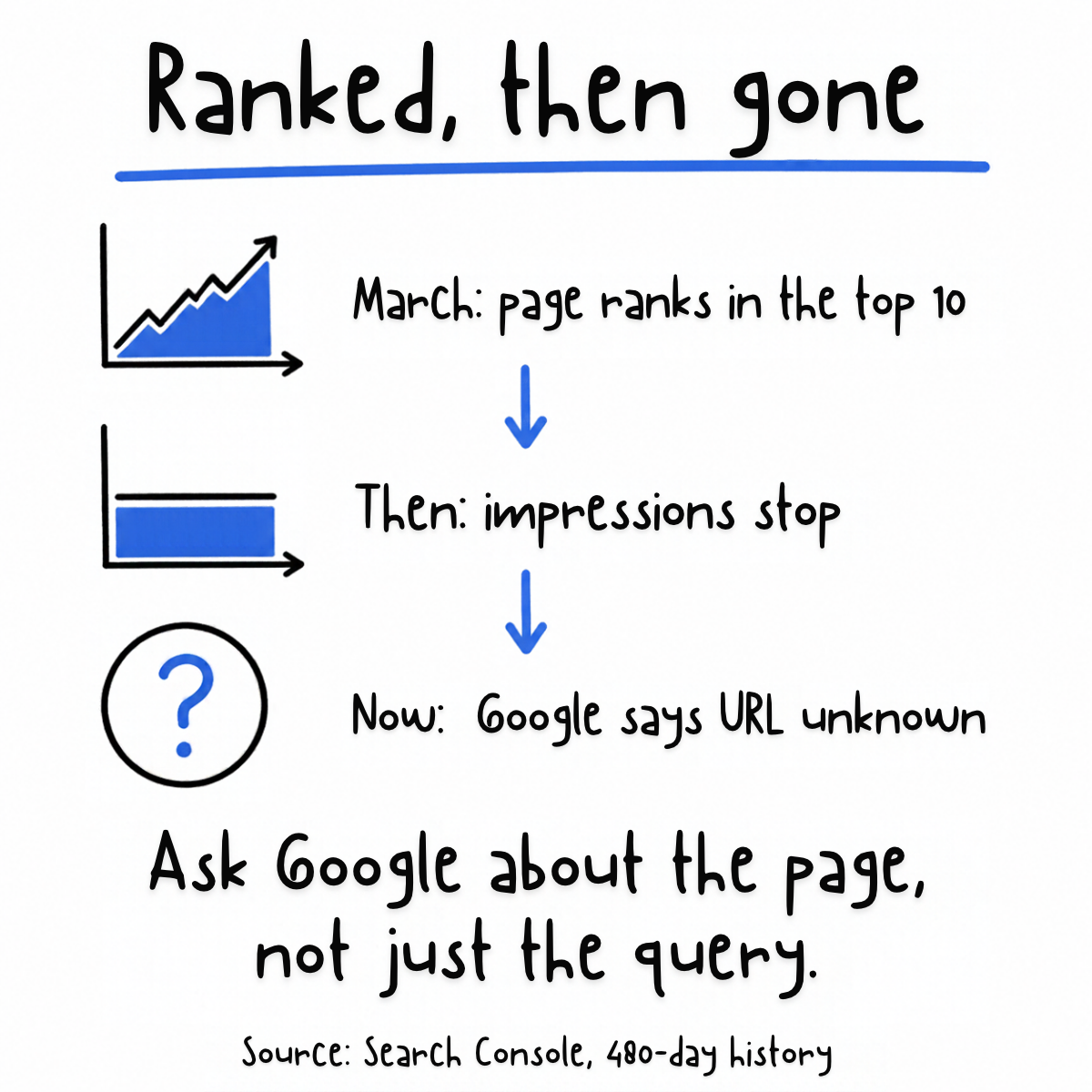
A model told to find queries without content would have invented work for each row. The agent-ready web page is the sharpest case. The daily data shows impressions for it on most weeks from 22 November 2025 to 2 March 2026, mostly at positions 1 to 10, with no clicks. After that, nothing. URL inspection says Google doesn’t know the URL. The page itself loads and carries the title “Agent-Ready Web and AEO | Zenoware”, and it’s in the sitemap. The data doesn’t say why Google dropped it. It does say that writing a new page for “agentic web optimization” would have been the wrong job.
The real gaps in this data are different. The generic penetration-testing terms, such as “penetration testing companies” at position 83.9 with 19 impressions, are queries where a page exists and loses. The fix for those is a better page, not a new one. Miltos George’s reply, that most of these queries probably don’t need a full page, fits.
CSV, hosted MCP, self-hosted or BigQuery
| Route | Rows | Rare queries | Index status | Write risk |
|---|---|---|---|---|
| CSV or Excel export (the post) | 1,000 at most | Left out of rows | No | None |
| Hosted MCP (the one I used) | Up to 25,000 a call; my client’s analytics tool returned 25 unless I asked for more | Left out of rows | Yes, one URL at a time | None by default; sitemap writes are opt-in |
| Self-hosted community server (mcp-gsc) | The same API limits | Left out of rows | Reported to cover URL inspection; I haven’t tested it | Read-only by default in version 0.4.2; writes need GSC_ALLOW_DESTRUCTIVE=true |
| BigQuery bulk export | Avoids the API’s daily row limit | Left out | No | You control access in Google Cloud |
The SERP Lens directory lists a community Search Console server too, and in my read of all 49 of its server pages, 37 say their server can make changes, so check the label before you connect. Akshaya, who works in product at Grok Bot, says Grok Bot has a Search Console connector too, as I reported last week. And Search Console’s own reports have kept growing: in July Google added platform properties for Instagram, TikTok, X and YouTube, which an MCP built on the Search Analytics API wouldn’t necessarily reach. I haven’t tested that.
What can go wrong
- A third party sees your data. A hosted server sits between Google and your AI client. I didn’t audit its data handling. If that matters for a client’s site, use the self-hosted route or the CSV.
- Scope matters. Google’s read scope is
webmasters.readonly; the full scope,webmasters, can change sitemaps. Check which one a server asks for before you sign in. - Query text is untrusted. Real search queries are strings written by strangers, and one row in Zenoware’s data is a 44-word question about legal-firm AI agents. A model reads those rows as text. My inference, which I haven’t tested, is that a hostile query could try to steer an agent that also has write tools. Keep the read-only scope.
- The 25-row default. Ask for more rows and say so, or you’ll analyse the top of the list and think it’s the lot.
- Vendor claims. The vendor publishes figures about traffic gains from connecting. I didn’t test them.
How to run this on your own site
- Connect a read-only Search Console server. Start with the free plan, which covers one property.
- Compare two periods, then split the total by country and by page. Don’t trust a site-wide average.
- Pull query rows with a high row limit, and compare their click total with the chart total. The gap is your hidden-query share.
- Before you write anything, match each “missing” query to your existing pages, then inspect those pages’ URLs.
- Run the ready-made recipes, and treat an empty result as a clean bill of health.
- Keep a change log of titles and redirects, because a drop in average position often has a cause you made.
The prompt I’d start with
For sc-domain:example.com, compare the last 28 days with the 28 before.
Split clicks and average position by country and by page.
List query rows (up to 1,000) and tell me what share of total clicks they cover.
For any query you think lacks content, find the existing page that targets it
and inspect that page's URL before suggesting new content.
The hack in the post isn’t wrong so much as unfinished. It gives a model a spreadsheet and asks it to judge a website. The connector gives it the site’s status too, and the status changed the answer in most of these tests.
Sources: Hridoy Reh on X / Search Console Help: performance data and limits / Search Console API usage limits / Search Analytics query reference / Bulk data export to BigQuery / Google MCP servers list / mcpsearchconsole.com / mcp-gsc README / my own queries of the Zenoware property, 27 November 2026
Disclosure: Zenoware is our own site, and I paid for the connector’s Solo plan. I have no relationship with Hridoy Reh or the connector’s maker. I’m an OpenAI, Firecrawl and Devin ambassador.
Discover more from Sulat AI & Tech News
Subscribe to get the latest posts sent to your email.