Brodie Clark, co-founder of SERP Lens, announced a directory of 50 MCP servers for SEO on 27 November, at 4:47pm New Zealand time. The directory, at serplens.com/mcp-servers, shows for each server what it can read or change, which account you need, and how to set it up in Claude, Cursor, Codex and VS Code. I read all 49 of its server pages, tallied what they say, and checked four of the biggest names, Ahrefs, Semrush, Sitebulb and Profound, against the vendors’ own documentation.
The short version: it’s useful, and it’s a vendor’s product. On access and plans, Semrush, Sitebulb and Ahrefs matched their own docs. Profound’s page leaves out a plan requirement that Profound’s docs state. And the label doing most of the work, “Can make changes”, sits on 37 of the 49 pages, so it tells you little on its own. The detail under each label is where the value is.
50
servers listed, across six categories
37
of 49 server pages are labelled Can make changes
6 + 6
pages say Read only, and six more say Changes not documented
9
of 49 pages list the server’s tools
- What SERP Lens launched
- What the 49 pages say about access
- What the label hides
- Two places the directory and the docs differ
- SERP Lens lists its own server first
- Where a curated 50 sits among the big directories
- How I’d use it
What SERP Lens launched
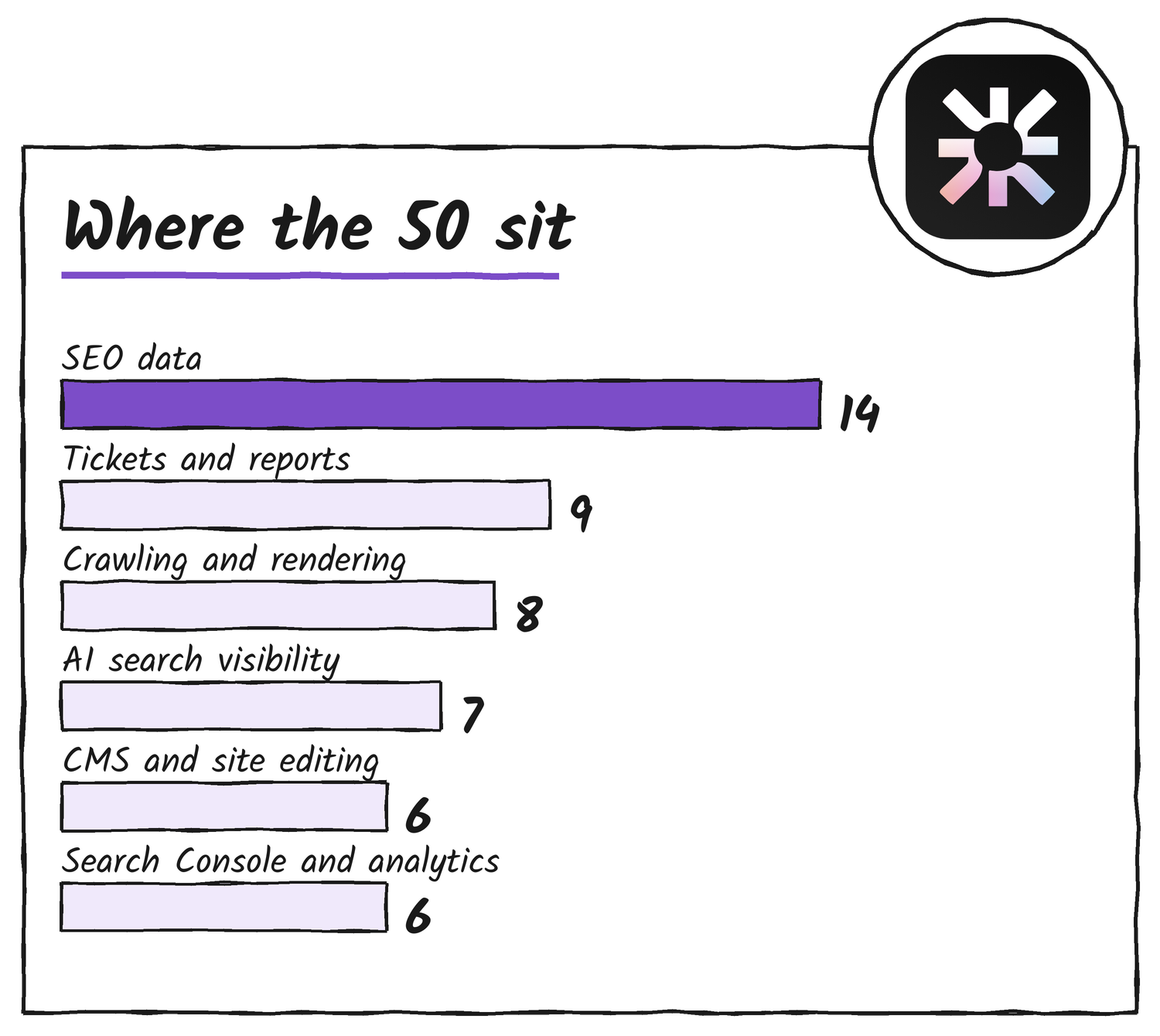
The directory sorts its servers into six categories, with these counts: SEO data 14, Tickets and reports 9, Crawling and rendering 8, AI search visibility 7, Search Console and analytics 6, and CMS and site editing 6. SEO suites and data tools are in there, such as Ahrefs, Semrush, SE Ranking, SISTRIX, DataForSEO and Similarweb. So are crawlers and audit tools (Screaming Frog, Sitebulb, Botify), AI-visibility trackers (Profound, Peec AI, Otterly, Promptwatch, Scrunch, Writesonic), content systems (WordPress.com, Webflow, Wix, Sanity, Storyblok) and general work tools like Linear, Notion, Atlassian, GitLab, Trello and Cloudflare.
Every server page follows one template: publisher, where it runs, sign-in, access, account, tools, and an endpoint or command. By my count, 43 of the 49 run remotely and 6 run on your own machine: Bright Data, Google Analytics, the Search Console server, Microsoft Clarity, Screaming Frog and Serpstat. Sign-in is OAuth on 39 pages, an API key on 6, a Google account on 2, and none on 2 (Firecrawl’s keyless setup and Screaming Frog). Forty-eight are marked Official. One, the Search Console server, is marked Community.
What the 49 pages say about access
SERP Lens’s own entry links to its docs instead of a page built on the same template, so the template pages number 49. I read each one and counted the Access label.
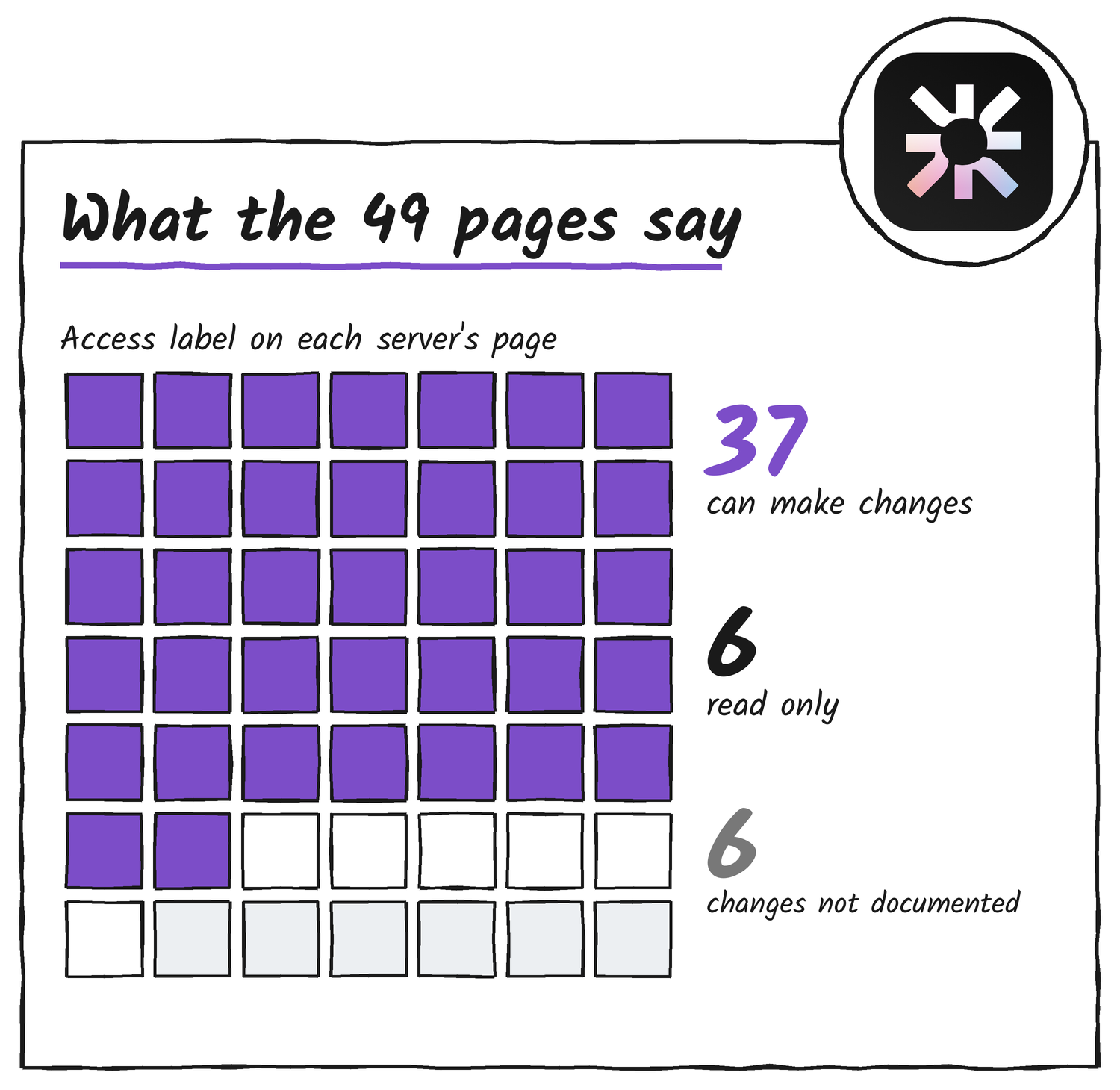
Thirty-seven say Can make changes. Six say Read only: AccuRanker, Google Analytics, Microsoft Clarity, Semrush, Similarweb and Sitebulb. Six say Changes not documented: Advanced Web Ranking, Bright Data, DataForSEO, Keywords Everywhere, SE Ranking and SISTRIX. That last label is the one to treat with care. It doesn’t say the server is safe. It says nothing is documented.

One more number, which I think matters as much. Only 9 of the 49 pages list the server’s tools. The other 40 say “Not listed” and tell you to connect the server to see them. Before you connect anything, you’re relying on a one-word label and a short “What it can change” note.
What the label hides
“Can make changes” covers a wide range. Ahrefs’ page says its server can create projects and keyword lists and add keywords. Profound’s says it can create or archive Projects, and that applying a prompt-status change after preview can permanently delete prompts and their history. Screaming Frog’s says it can write or overwrite files in its MCP folder. Same label, very different risk.
| Server | Label | Account needed | Worth knowing |
|---|---|---|---|
| Ahrefs | Can make changes | A paid plan from Lite; API units apply | Creates projects and keyword lists, adds keywords; 70 tools listed. Ahrefs’ docs say the endpoint isn’t a general API, so custom scripts and standalone HTTP clients aren’t permitted. |
| Semrush | Read only | An eligible Semrush One, SEO Classic or Trends subscription | Semrush’s docs say the Projects methods are read-only, with no creating or modifying. Listed plans include 50,000 API units. |
| Sitebulb | Read only | Any Sitebulb plan, including the free trial | Reads finished crawls and can’t start or change one. Returns up to 50 example URLs per issue. |
| Screaming Frog | Can make changes | A paid SEO Spider licence | Runs on your computer at localhost:11435 with no sign-in. Can write or overwrite files in its MCP folder. Node tools, off by default, can run scripts and install packages. |
| Google Search Console (community) | Can make changes | A Google account with access to the property | Runs locally with uvx and can submit or delete sitemaps. The directory says its setup doesn’t establish that your token can do that. |
| GSC Wizard | Can make changes | A subscription or 7-day trial | Submits sitemaps, pushes URLs to IndexNow, adds sites and shares reports with clients. |
| SEO Gets | Can make changes | A Core or Pro plan | Edits its own annotations, content groups, topic clusters and portfolios. The page says it can’t change anything in Search Console. |
| Profound | Can make changes | “A Profound account with MCP access” | Creates or updates prompts and Project tasks; prompt changes can permanently delete history. Profound’s docs say Enterprise plan. |
| Firecrawl | Can make changes | None for the keyless setup | The keyless setup has 3 tools (search, scrape, parse) and only reads. The label covers the authenticated tools. |
| Google Analytics | Read only | A Google account with access to the GA4 property | The command shown only reads. Adding --allow-write and an edit scope turns on write tools. |
Two notes on that table. First, the Ahrefs plan and unit rules match Ahrefs’ own docs, which also say MCP, Ahrefs Connect and direct API use share one monthly allowance, as I covered on 8 November. I couldn’t match the directory’s list of what Ahrefs’ server can create to a docs page, so treat that as the directory’s word. Second, I found no official Google Search Console MCP server. The directory lists a community server by AminForou for Search Console and Google’s own analytics-mcp for GA4. Google’s newer Search Console additions don’t fill the gap either: the social platform reports I covered earlier today are documented as an interface and exports, not API access.
Two places the directory and the docs differ
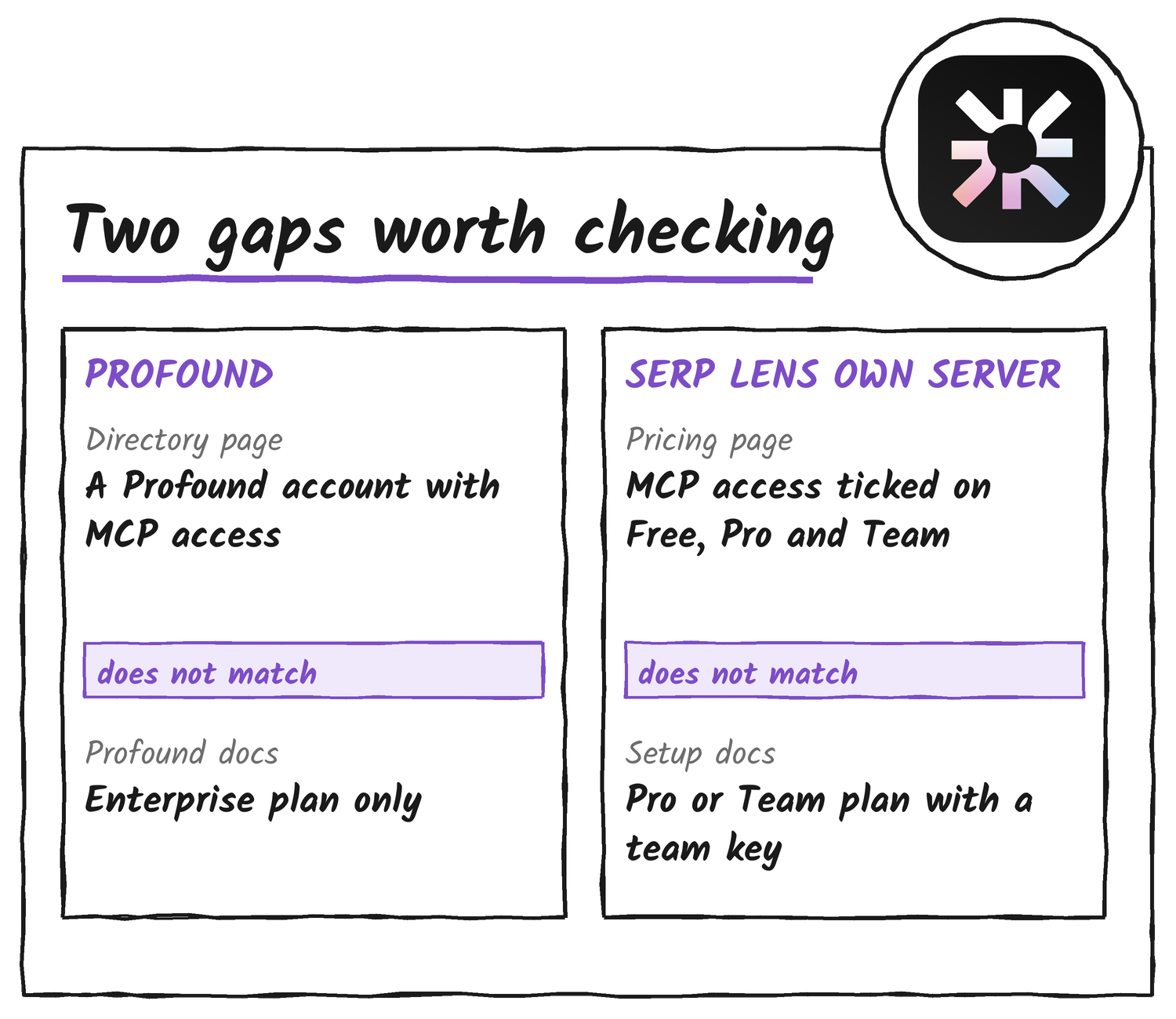
Profound. The directory’s page says you need “A Profound account with MCP access”. Profound’s own MCP overview says “Available on: the Enterprise plan”, and its MCP feature page says “The Profound MCP is available to Enterprise customers.” The directory line isn’t false, but it doesn’t tell you the plan is Enterprise, which means a sales conversation before a connection.
SERP Lens itself. The pricing table has a row called “MCP Server Access” with a tick under Free, Pro and Team. The setup docs for the SERP Lens server say you need “a team API key on the Pro or Team plan”, and a troubleshooting entry reads “MCP tools require a SERP Lens Pro or Team plan”. The pricing row may refer to the other direction, SERP Lens’s AI panel connecting to third-party servers, which the docs treat separately. The page doesn’t say which. A Free-plan user reading the table would reasonably expect the outbound server to work.
Neither is a scandal. Both are the kind of gap that the directory’s own “Account” line exists to close.
SERP Lens lists its own server first
SERP Lens makes a desktop SEO browser. Its directory sits on its own site, lists its own server first, puts SERP Lens at the head of the client tabs on each setup box, and ends each page with a prompt to start a 14-day Pro trial. The directory page doesn’t say how servers are chosen. That’s a normal arrangement for a vendor’s content, and you should know it when you read the labels.
SERP Lens’s server, @serplens/mcp, is the one entry whose docs I could read end to end. It has 35 tools, speaks stdio, and needs Node.js 24.18 or later and a team API key. Thirty of the 35 tools need the desktop app running. The other five (audit_page_score, get_page_data, check_robots_txt, get_sitemap and compare_urls) fall back to fetched HTML through SERP Lens’s Audit API, so rendered-DOM checks are missing. Pro is US$39 a month and Team is US$50 a user a month, per the pricing page. The docs carry a plain warning:
A connected client gets all 35 tools, and calls run against the app with no approval prompt inside SERP Lens.
SERP Lens docs, MCP server page
The docs say that includes driving your real browser and its signed-in sessions, evaluating JavaScript in the active tab, and reading every Search Console property connected to the app. They tell you to connect only clients you trust, to use a separate key for each, and to delete a key when you stop using it. That candour is a point in SERP Lens’s favour. It’s also the directory’s own label at work: for this server, “Can make changes” means a browser.
Where a curated 50 sits among the big directories
The 50 is a different kind of thing from the large registries, which count tens of thousands of servers.
| Directory | Size it shows | What it is |
|---|---|---|
| SERP Lens directory | 50 servers | A vendor’s curated list with access labels, account needs and setup steps. |
| mcp.so | 20,912 servers, 1,616 remote | An independent community directory. Its page says counts were updated on 26 November. |
| PulseMCP | 21,509 servers | A directory. Its page says new submissions and listing changes are paused. |
| Official MCP Registry | No total on its home page; third parties counted 72,158 (mcpindex.ai, 25 November) and 62,550 (Hedwig AI, 12 November) | The MCP project’s own metadata registry. mcpfinder.dev reported on 4 November that its docs call it a preview. |
My read is that the registries answer “does a server exist?” and this directory answers “what will it do to my account?”, for 50 servers. It also leaves things out. OpenSEO’s MCP server, which I covered on 14 November, isn’t listed, and Clark’s post says “& more” without claiming it’s complete.
A listing in a bigger directory isn’t proof of accuracy either. Profound is in Anthropic’s Connectors Directory, where eSEOspace reports the listing shows two tools, search_docs and execute, while Profound’s docs describe a wider catalogue. If you want a server in that directory yourself, I covered what Anthropic requires to list one.
How I’d use it
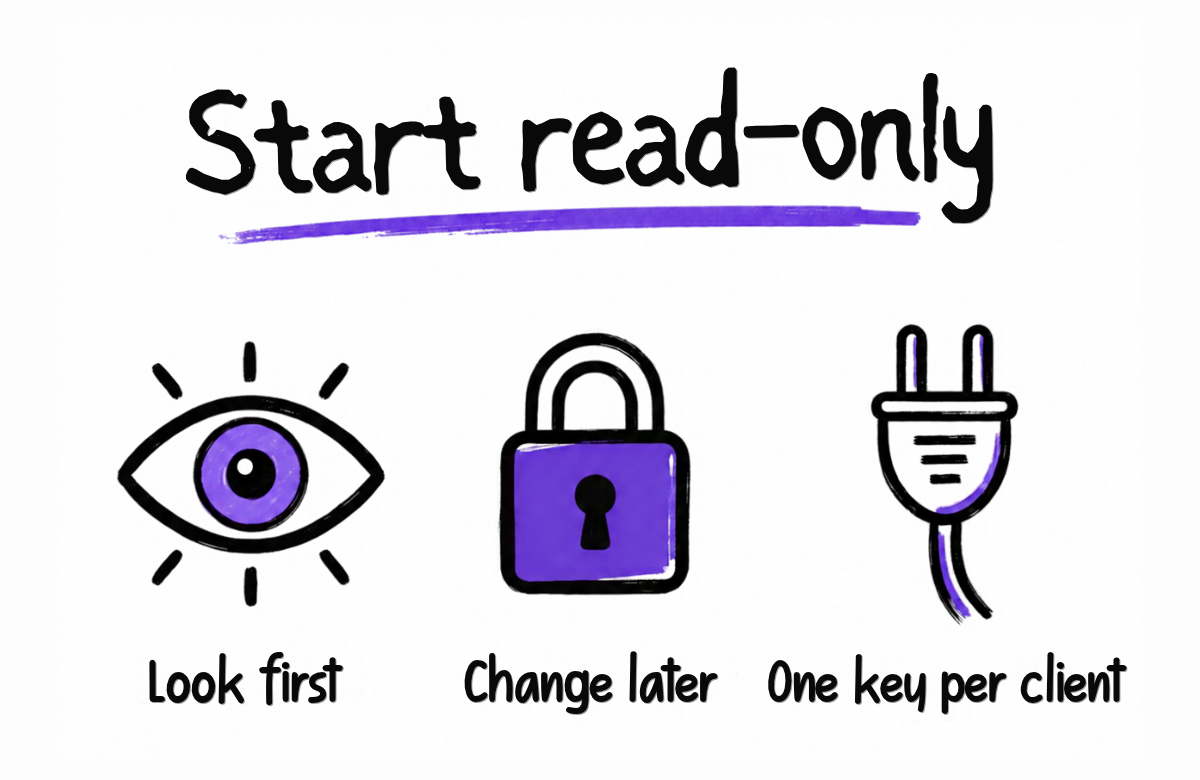
- Read the “What it can change” note on each page, not only the label. It’s where the real difference sits.
- Start with servers that can only read. On the directory’s labels that’s Semrush, Sitebulb, Similarweb, AccuRanker, Microsoft Clarity and Google Analytics as shown.
- Use a separate key for each client, and delete the key when you stop using it. SERP Lens’s docs say the same.
- Look hard at the six that run on your machine. For Screaming Frog, leave the Node tools off unless you need them.
- Check the plan and the API units before you start. Ahrefs needs Lite or higher and shares one allowance across its MCP and API use. Semrush’s listed plans include 50,000 units. Profound’s MCP is Enterprise.
- Connect first, then read your client’s tool list. The directory lists tools on only 9 of 49 pages.
The directory is worth bookmarking for what it shows per server, as long as you read the note beneath each label and not the label alone. I haven’t connected or tested any of these servers, so what’s here is what the directory and the vendors’ pages say.
Sources: SERP Lens directory / Brodie Clark on X / SERP Lens MCP server docs / SERP Lens pricing / Profound MCP overview / Profound MCP page / Semrush MCP overview / Ahrefs MCP docs / Ahrefs help / Sitebulb MCP / mcp.so / PulseMCP / Official MCP Registry / mcpindex.ai / Hedwig AI / mcpfinder.dev / eSEOspace
Disclosure: I’m an OpenAI, Firecrawl and Devin ambassador.
Discover more from Sulat AI & Tech News
Subscribe to get the latest posts sent to your email.