HeyPCB says its Circuit World gallery now holds more than 40,000 open-source PCB designs, and its own page counts 40,158. Co-founder and CEO Justin Kim announced the milestone on X. The number holds up, but not every board in it was published by a HeyPCB user. By HeyPCB’s own Terms, some are imported from public GitHub repositories, and you have to sign in before the gallery will show you any of them. I read the announcement, the product and pricing pages, the Terms and the peers’ pages, and loaded the gallery logged out. I haven’t signed up, so I haven’t opened a board.
40,158
boards counted on Circuit World’s own page
107,410
KiCad boards in PCBKit’s GitHub index
3,495
projects certified by OSHWA
- What HeyPCB announced
- How Circuit World works
- Where the boards come from
- You have to sign in to look
- How fast the count grew
- Which boards are popular
- The product around it
- How it compares
- What it affects
- What I checked and what I didn’t
What HeyPCB announced
HeyPCB’s post says Circuit World is “becoming a home for the world’s open-source hardware”, from “the smallest sensor to entire robotic systems”. It says every board can be opened, understood with AI, forked and redesigned in the browser, and that people can build on existing designs or upload their own. Kim reposted it with a link to the explore page, then added a thank-you to the “engineers, makers, and researchers who chose to share what they built with the world”. That phrase matters later.
The count checks out. Circuit World’s front page shows 40,158 boards, and the explore page shows the same figure alongside 13 notes written by HeyPCB accounts. The biggest groups are keyboards at 4,415 boards and robotics at 3,605, with ESP32 boards at 2,252 under the platform view.
How Circuit World works
HeyPCB is an AI PCB design tool that works on KiCad-native files. You describe a board and it produces the schematic, layout and fabrication files as KiCad projects you keep, and it imports from KiCad, Altium, Eagle and EasyEDA. Circuit World is the public gallery inside it. Each board has a page where you can open it in the editor, ask HeyPCB’s assistant, Inky, how it works, and fork it into your own project.
Explore is the map view. It groups boards by what they are (RF, audio, robotics, displays, power, keyboards and so on) and by the part they are built around, such as ESP32, STM32, RP2040 or Raspberry Pi. HeyPCB introduced it in October with 11,000+ boards. A sibling, CAD World, does the same for mechanical designs.
Where the boards come from
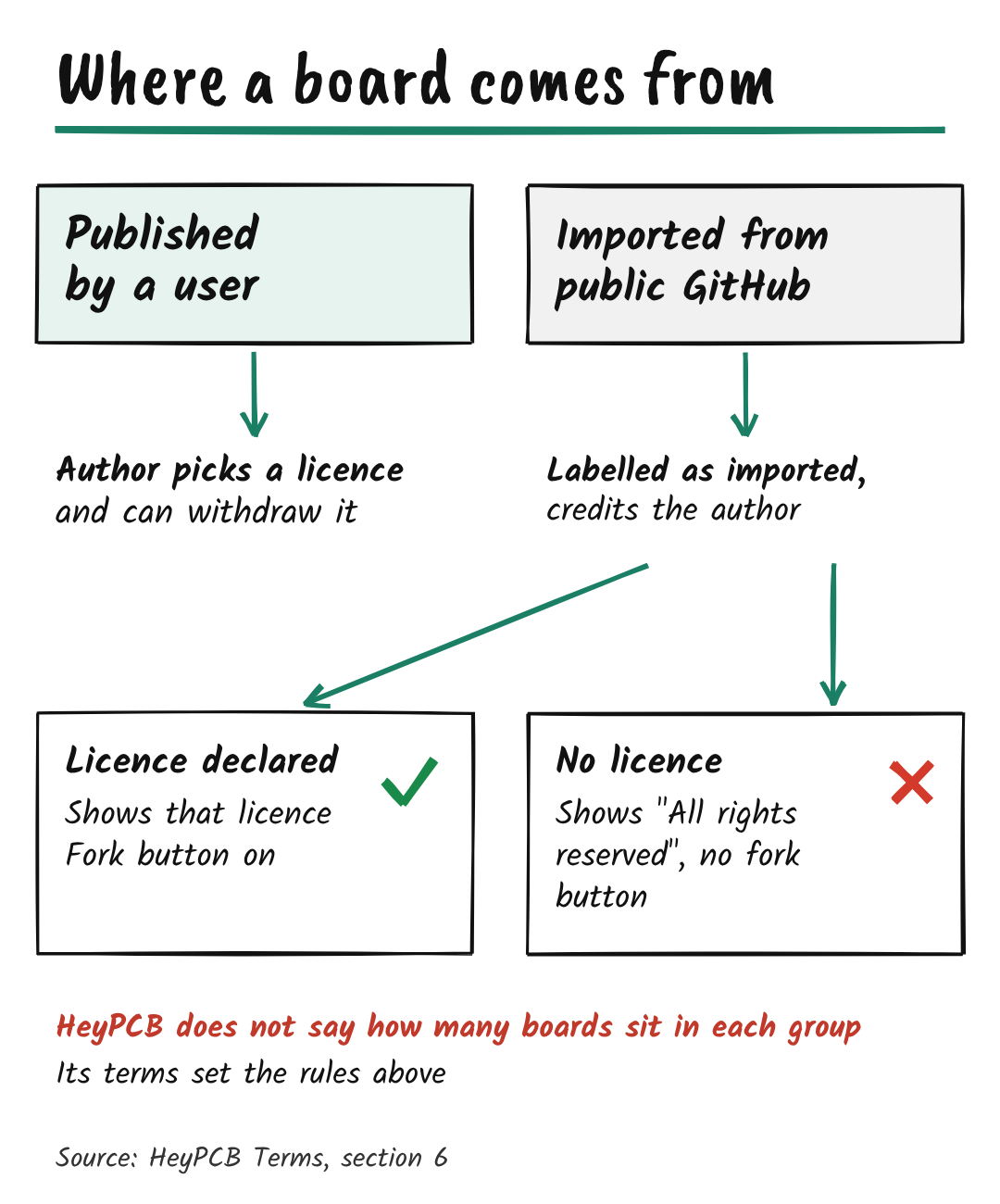
Section 6 of HeyPCB’s Terms, in the version dated 25 November that I loaded, says: “Some boards in Circuit World were not published by a heypcb user. We import them from public GitHub repositories that contain KiCad projects.” The rules for those boards are specific:
- Every imported board is labelled as imported, on its own page and on its card in the gallery.
- It names the upstream author, links to the repository it came from and states the licence that repository declares.
- If the repository declares no licence, the board says “All rights reserved” and has no fork button.
- If the licence can’t be classified, the board says so and points you to the licence file.
- A copy you take is yours to use only on the upstream author’s terms, not HeyPCB’s.
- Imported boards sit under a placeholder profile until the author claims them by signing in with the GitHub account the board came from. You can also ask for removal without an account.
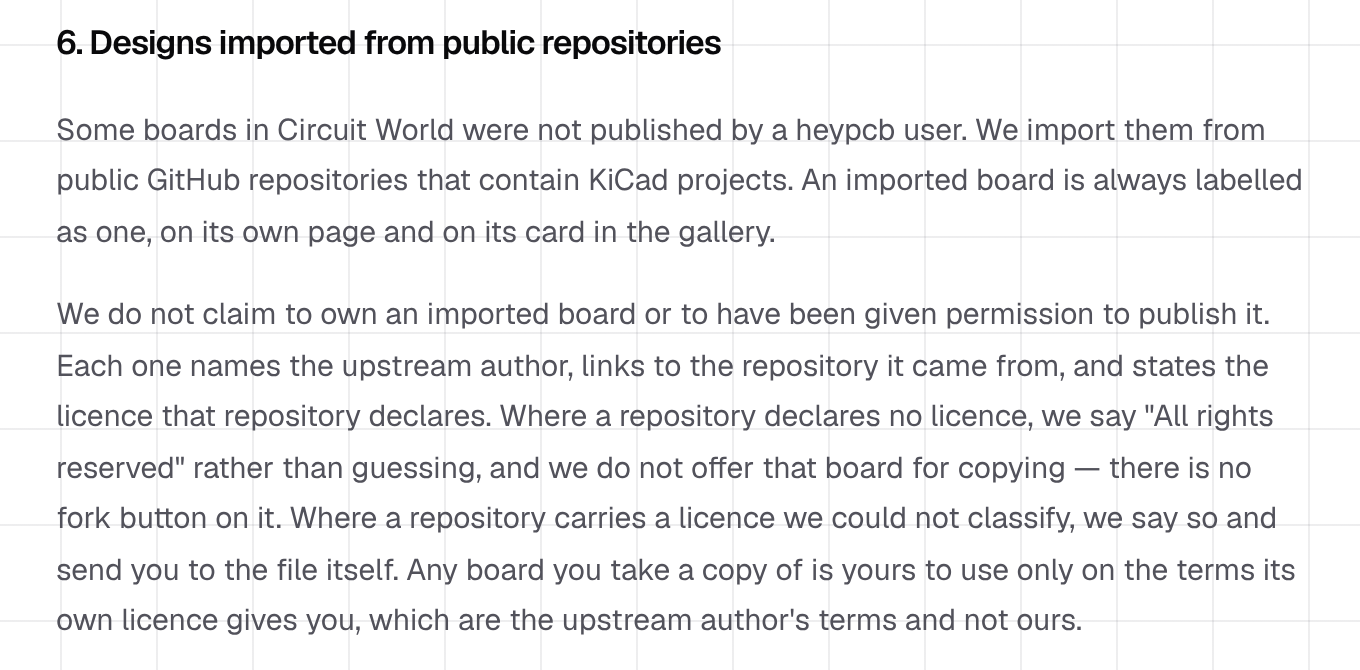
That is more careful than I expected. Code with no licence on GitHub is not free to copy, and HeyPCB doesn’t treat it as if it were. A copy of the Terms dated 3 October said the imports exist “so that the gallery is useful before it is full”. The live version drops that line, and its CAD World paragraph now adds Zenodo and Wikimedia Commons to GitHub as sources.
What the Terms don’t say is how many of the 40,158 boards are imported, how many users published themselves, and how many carry no licence. HeyPCB’s posts talk about people who “chose to share”. The Terms describe a gallery that was seeded from other people’s repositories, whose authors did not opt in. They can claim a board or have it removed, but the Terms don’t say they are told it is listed.
You have to sign in to look
Logged out, the front page lists the categories and the names on the cards, and the explore page shows its category counts behind a sign-up prompt. Opening a board gets you a wall: “Circuit World is for signed-in accounts. Sign up or sign in to browse the boards people have published.” I got the same wall on the first two boards in the Popular row. The Terms list Google, GitHub and email as sign-in options, and the sign-up says free to start with no credit card.
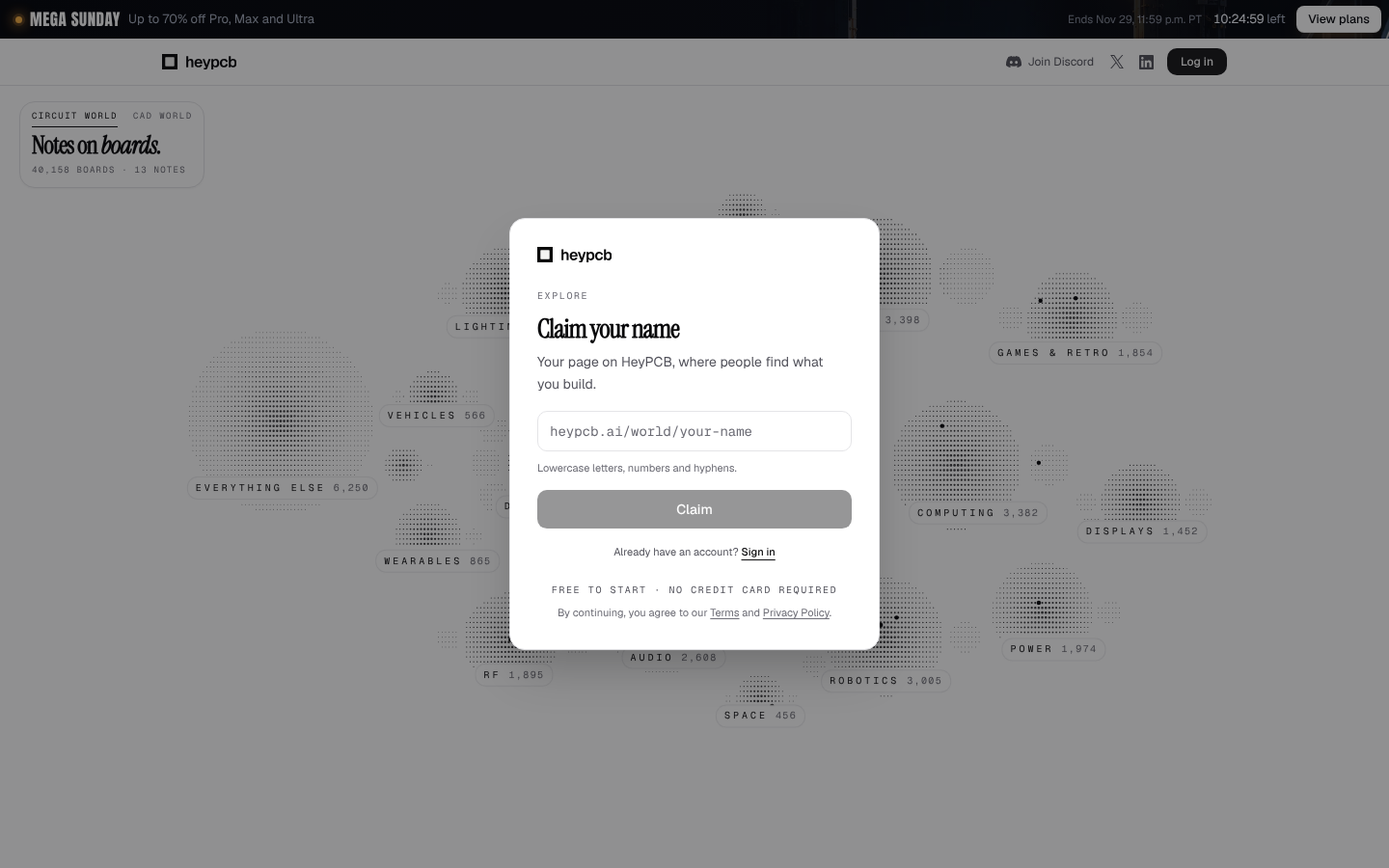
Two replies under HeyPCB’s post point at the same thing. One objected to needing a login at all. Another asked whether paying subscribers can download any number of these boards, and I saw no answer. HeyPCB’s pricing lists unlimited projects and downloads from the Starter plan up, without saying whether that covers gallery boards. I haven’t tested it.
The wall is HeyPCB’s call, and normal for a startup. It does mean the 40,000 works as a sign-up pitch as much as a public library. For imported boards, the designs themselves are still open on GitHub. What Circuit World adds is the editor, the AI and the fork button.
How fast the count grew
Kim posted 7,600+ designs in September. HeyPCB’s blog said 11,000+ on 5 October, an archived copy of the explore page from the end of October shows 15,025, and the Reachy Mini page on HeyPCB’s store cites 20,700+. The count has roughly doubled since that last figure.
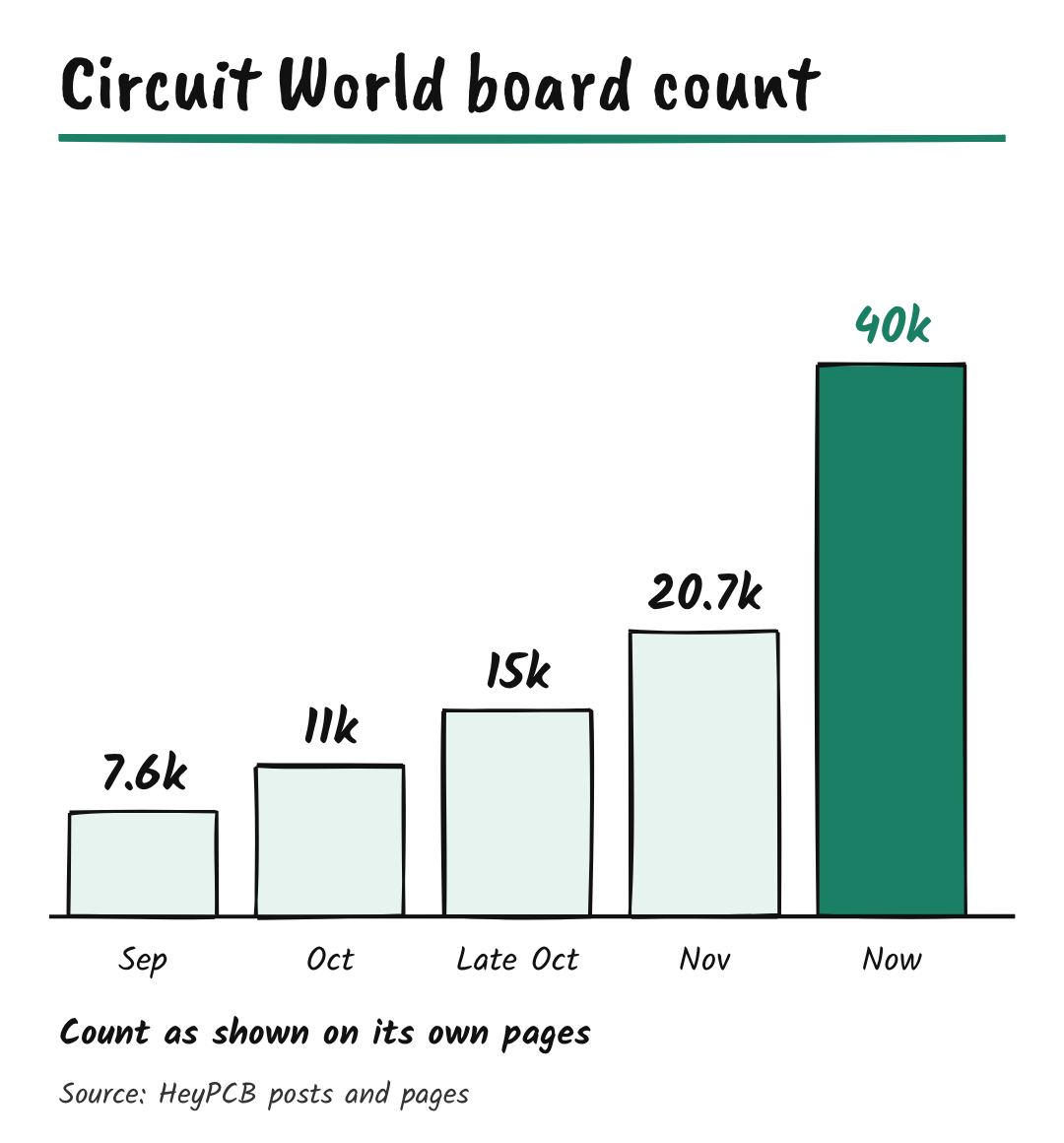
Growth at that pace looks like bulk importing, not people publishing one board at a time. That is my inference, since HeyPCB hasn’t published the split.
Which boards are popular
Circuit World’s Popular row is scored on “hearts pressed here plus the stars each board earned upstream”. The top of it is NASA-JPL’s open-source rover, Great Scott Gadgets’ HackRF and its Operacake board, Joey Castillo’s Open Book, the DeskHop keyboard and mouse switcher, the Corne keyboard, and a Google CTF board. Each is credited to a GitHub account. Logged out, I can’t see which are labelled as imported. But a score that blends in GitHub stars ranks the boards by their fame on GitHub, not by what Circuit World’s own users have built.
The product around it
Circuit World sits on top of a paid product. HeyPCB’s monthly plans are Starter at $20, Pro at $60, Max at $200 and Ultra at $500, each including AI work worth its price, refilled weekly, with 10% off for yearly billing. A Mega Sunday sale of up to 70% off Pro, Max and Ultra was due to end at 11:59 pm Pacific on 29 November, and Pro and Max come with a free dev board shipped in the US until 30 November.
There is also an MCP server that lets Claude Code, Codex, Cursor and claude.ai drive the editor. HeyPCB’s blog says Claude Code used it to build a routed 8×8 RGB display. Its store sells open designs of its own, such as Memo, a MagSafe voice recorder. Its Reachy Mini page, an unofficial replica of Pollen Robotics’ robot, shows the hardware licence (CC BY-NC-SA 4.0) and says commercial use needs Pollen’s permission, which is the licence handling the Terms promise.
The timing lines up. A $2,000 Hardware Challenge also closes on 30 November: $1,000 for the board with the most likes and $1,000 for the best board, each paid as $500 cash and $500 in HeyPCB credit, with an internship and a founding-engineer interview for both winners. Entry means publishing a board to Circuit World, which is how a gallery gets fuller. On funding, CB Insights lists a $250,000 accelerator round from August. I haven’t seen HeyPCB confirm it.
How it compares
Open-hardware indexes count different things, so the headline numbers don’t compare.
| Index | What it counts | Size |
|---|---|---|
| OSHWA certification | Hardware its makers certified against the Open Hardware Definition | 3,495 projects |
| HeyPCB Circuit World | Boards users published plus boards imported from public GitHub KiCad repositories | 40,158 boards |
| PCBKit board library | KiCad boards published on GitHub, opened in PCBKit | 107,410 boards |
| Hackaday.io | Project pages from its community, which calls itself the largest repository of open hardware projects | No count I could verify |
| OSH Park shared projects | Boards shared by people who order from the fab | No count shown |
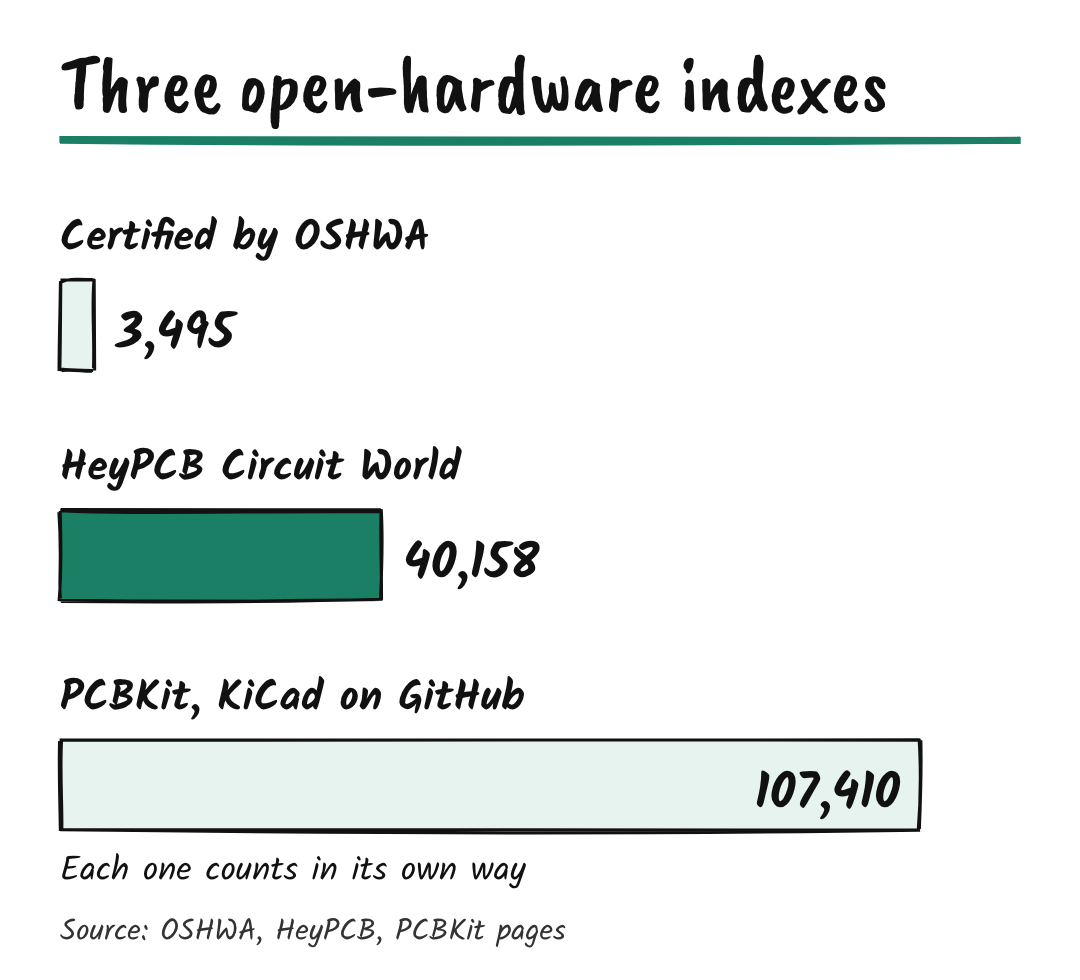
OSHWA’s list is the curated end. The Engelberg Center’s State of Open Source Hardware 2026 counted 3,431 certified pieces from 74 countries at the end of September, and found 61.5% of them documented on GitHub. PCBKit is the closest rival. It indexes GitHub KiCad boards too, lists more than twice as many as HeyPCB, and pitches the same idea: an agent plugin for Claude Code and Codex plus an MCP server.
The AI PCB tools sit around that. Flux is a browser tool that turns a description into a schematic, a routed board and fab-ready files, and imports KiCad, Altium and EasyEDA projects. Quilter automates placement and routing, and its site claims layout quoted at 428 hours took 38.5 hours of human cleanup. CELUS starts from requirements and produces a schematic and bill of materials, then hands off to another tool.
So the count isn’t HeyPCB’s edge. A GitHub index is cheap to build, and PCBKit already has the bigger one. The edge is browsing, forking and AI editing in one place, and the cost of that is the licence handling above.
What it affects
- Authors of KiCad repositories. Your board may already be listed. Check the gallery for your GitHub account, claim it or ask for removal. A repository with no licence file is shown as “All rights reserved” with no fork button, and adding a licence is what changes that.
- People who fork a board. The obligations come from the upstream licence, and the Terms put that on you. Non-commercial and share-alike licences matter if you plan to sell what you build.
- HeyPCB’s peers. The fight moves to licence handling and to whose editor opens a board fastest.
- The open hardware community. Circuit World’s count and OSHWA’s are different kinds of number. One is a crawl and the other is a decision by each maker to certify.
What I checked and what I didn’t
I read the two X posts and the replies, HeyPCB’s gallery, explore, pricing, store, blog and Terms pages, its Challenge page, its MCP package listing and the peers’ pages, all logged out. I did not sign up. I haven’t opened a board, tried the fork button, seen how the gallery labels an imported board, or tested the AI editor or the MCP server. HeyPCB hasn’t said how many of its boards are imported, and I haven’t seen it publish that.
Sources: HeyPCB (X posts, heypcb.ai gallery, explore, pricing, store, challenge, blog and Terms pages) / @heypcb/mcp on npm / PCBKit / OSHWA / NYU Engelberg Center, State of Open Source Hardware 2026 / Flux, Quilter and CELUS product pages / CB Insights.