
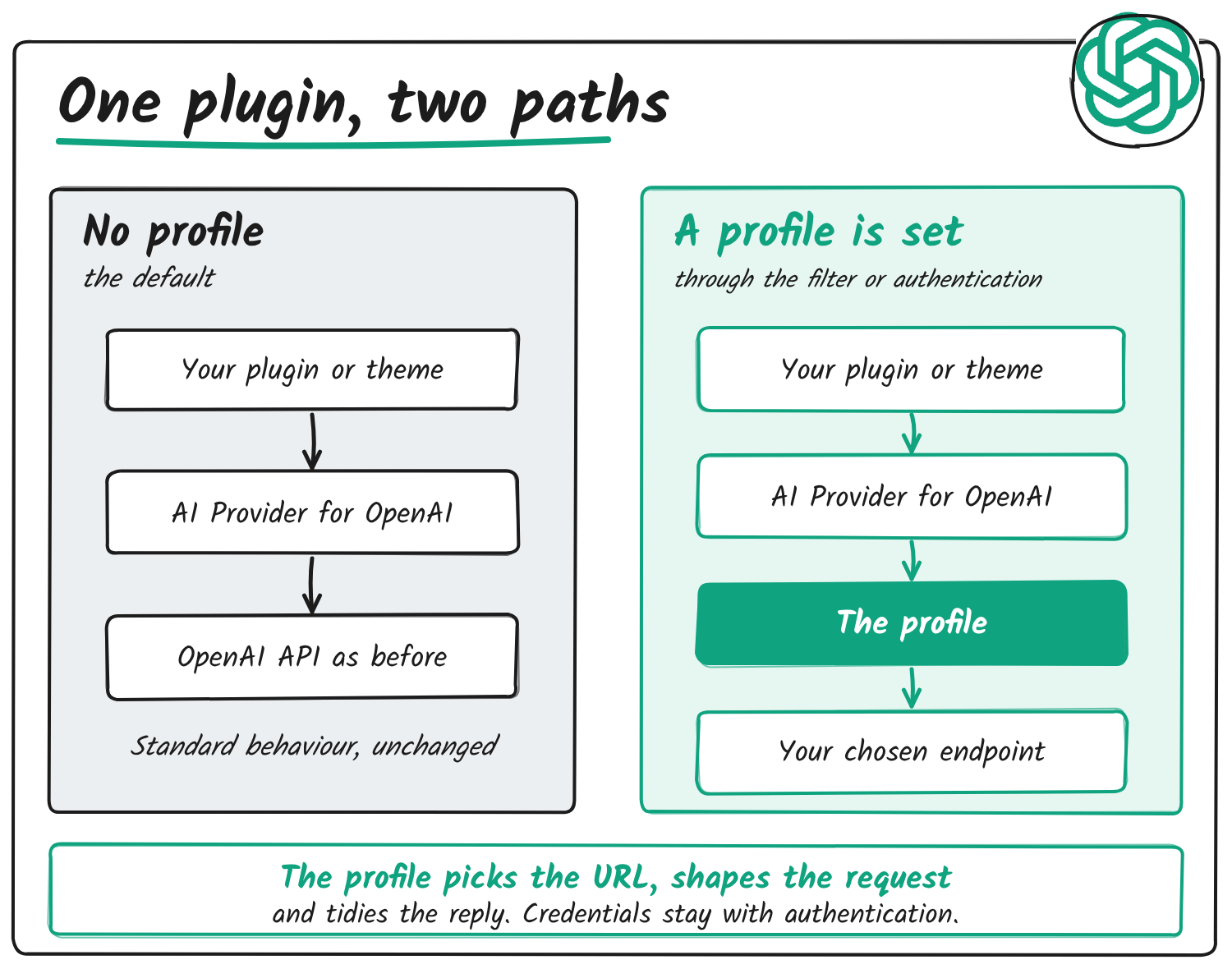
WordPress’s AI Provider for OpenAI plugin reached version 1.3.0 on 18 November, and the WordPress X account announced it on 22 November. The main addition is an API profile: you can supply one to change how requests are routed and how responses are handled. With none set, standard OpenAI behaviour stays the default.
It also recognises four GPT-6 model IDs and fixes two smaller bugs.
What the plugin does
WordPress 7.0 ships an AI Client, but core bundles no AI providers. The WordPress project built three official provider plugins instead, for Anthropic, Google and OpenAI. AI Provider for OpenAI is the OpenAI one: it connects the PHP AI Client SDK to OpenAI’s text, image and speech models.
It needs PHP 7.4 or higher and an OpenAI API key, which you set through the OPENAI_API_KEY environment variable or a constant. On WordPress 7.0 and above there’s nothing else to install. On 6.9 you add the wordpress/php-ai-client package yourself.
What an API profile is
Replacing the plugin’s authentication alone can’t express alternate endpoints, request dialects, response framing, model lists or supported operations. The pull request behind 1.3.0, number 41, adds one typed profile that covers all of that together. The README says it lets the provider handle alternate OpenAI API dialects without a fork.
A profile implements OpenAiApiProfileInterface, which has six jobs.
| Job | What it does |
|---|---|
| Cache key | Gives the model cache an identity, so one profile’s models never mix with another’s |
| Operation support | Says which operations the profile handles |
| Request URL | Sets where each request goes |
| Request preparation | Adapts the request before it’s sent |
| Response normalising | Reshapes a successful reply into the standard form |
| Model list parsing | Reads the endpoint’s model catalogue |
How to supply one
There are two routes. A custom authentication class can implement OpenAiApiProfileAwareAuthenticationInterface and return a profile, or a WordPress integration can supply or replace one with the ai_provider_for_openai_api_profile filter. Authentication still owns the credentials either way.
The PHP AI Client adds a step. It currently checks replacement OpenAI authentication against its own API-key class, so you wrap a profile-aware authenticator in OpenAiApiProfileRequestAuthenticationAdapter before passing it to setProviderRequestAuthentication(). The adapter only satisfies that check, and it hands authentication and profile selection to the object it wraps.
Any profile has to support the model-listing operation, because provider availability and model discovery both depend on the catalogue. The other operations, which are text, images, embeddings and text-to-speech, can each be turned down on their own.
What happens to a request
The order is fixed. The profile checks support first, so an operation it doesn’t handle is rejected before credentials are applied or anything goes over the network. It then prepares the request, authentication attaches credentials to the final version, and the request goes out. The profile normalises the reply only after the HTTP call succeeds.
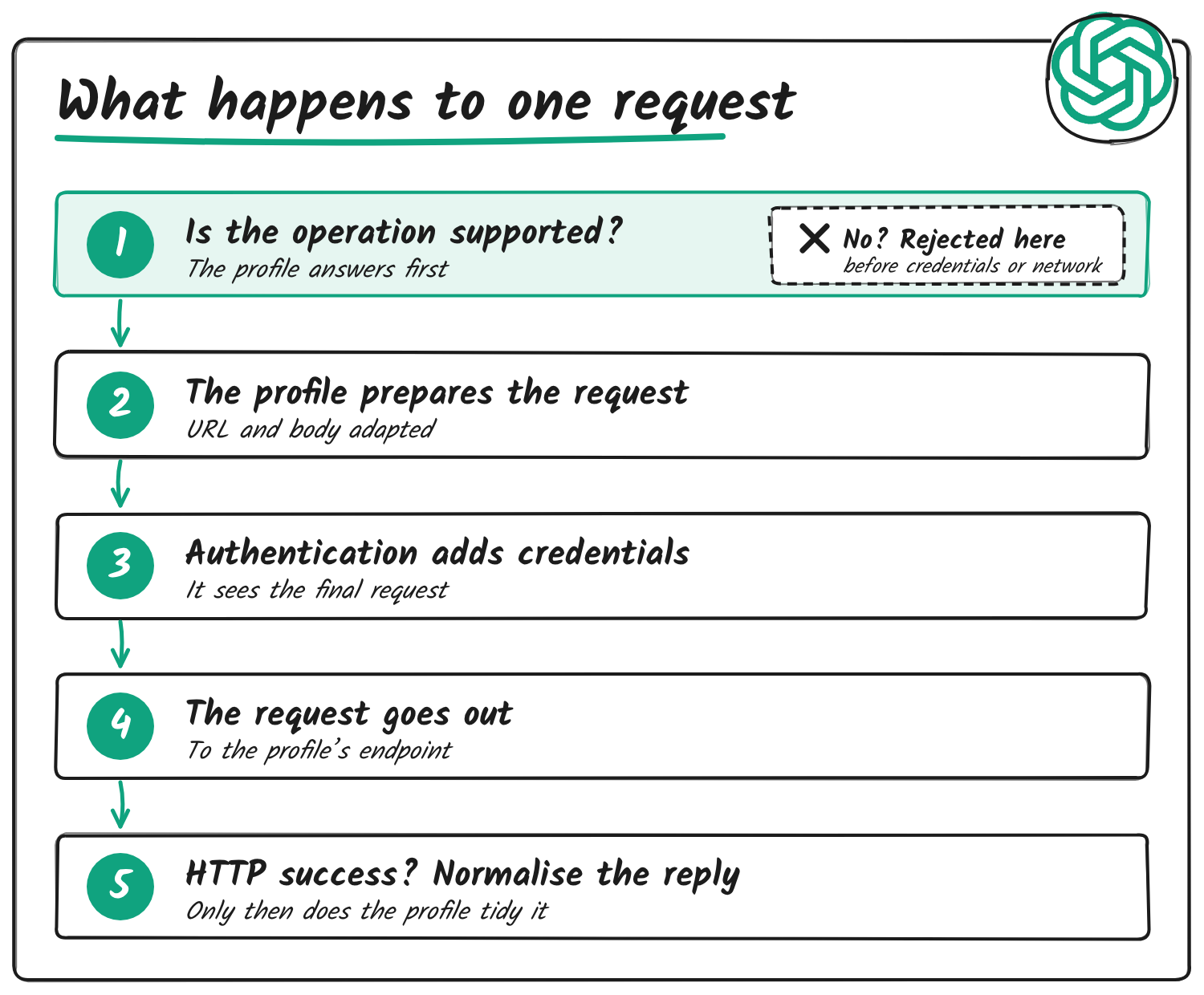
Because authentication sees the finished request, it can also hold an endpoint allowlist and refuse to attach a key to a destination it doesn’t know. The README treats profiles as trusted code, which is why that check is worth having. The filter runs for ordinary API keys too, so a profile it supplies can route that key to the profile’s endpoint.
If you only use OpenAI’s own API with a key, nothing changes. With no profile bound and none from the filter, request and cache behaviour stay as they were.
Four GPT-6 models recognised
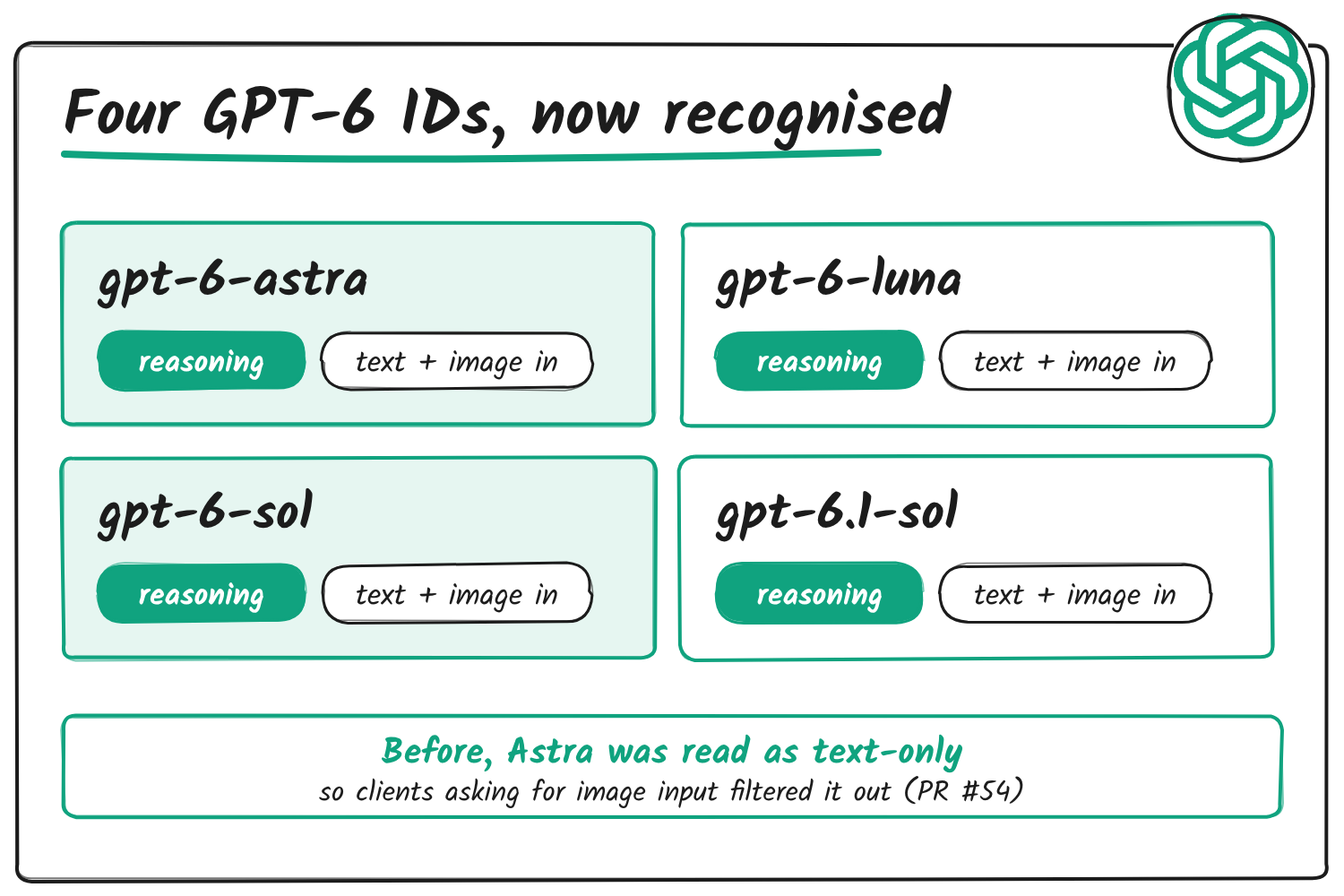
The plugin finds models by asking the OpenAI API what exists, then classifies each one from its ID. After 1.2.0 it listed gpt-6-astra but read it as text-only, so clients that require text and image input filtered it out. The fix links to a support-forum report about it, and review widened the change from Astra to every documented GPT-6 model.
Version 1.3.0 now classes gpt-6-astra, gpt-6-luna, gpt-6-sol and gpt-6.1-sol as reasoning models that accept text and image input.
The smaller fixes
- Looking up an explicit OpenAI text model ID no longer lists models first, so that lookup doesn’t depend on the models-list endpoint (#23).
- The provider logo URL now resolves for symlinked plugin installs, which avoids the WordPress 7.0 “doing it wrong” notices (#49).
Who built it
The GitHub user bradvin opened the profile pull request on 18 July. Lauri Saarni reviewed it, asked for embeddings and speech to go through the profile too, and merged it on 17 November once the 104-test suite passed across PHP 7.4 to 8.4. The release followed a day later. The plugin is open source under GPL-2.0-or-later, and it installs from the WordPress plugin directory or with composer require wordpress/ai-provider-for-openai.

Terms in this post
- API profile
- A typed object that tells the provider how to route requests, shape them, read replies and list models for one OpenAI-style API.
- PHP AI Client
- The provider-agnostic PHP SDK that WordPress 7.0 bundles and that provider plugins extend.
- Provider plugin
- A plugin that connects the AI Client to one AI company’s models.
- Operation
- One kind of request, such as text generation, image generation, embeddings, text-to-speech or listing models.
- Normalising
- Reshaping an endpoint’s reply into the standard form the client expects.
Sources
- AI Provider for OpenAI, WordPress plugin directory, changelog for 1.3.0, 18 November 2026
- WordPress/ai-provider-for-openai README, on extending OpenAI API profiles
- Pull request 41: Add an extensible OpenAI API profile contract, merged 17 November 2026
- Pull request 54: Classify documented GPT-6 models, merged 22 October 2026
- Make WordPress Core: Introducing the AI Client in WordPress 7.0, 24 March 2026
- WordPress on X, 22 November 2026
Disclosure: I’m an OpenAI, Firecrawl and Devin ambassador.
Discover more from Sulat AI & Tech News
Subscribe to get the latest posts sent to your email.