
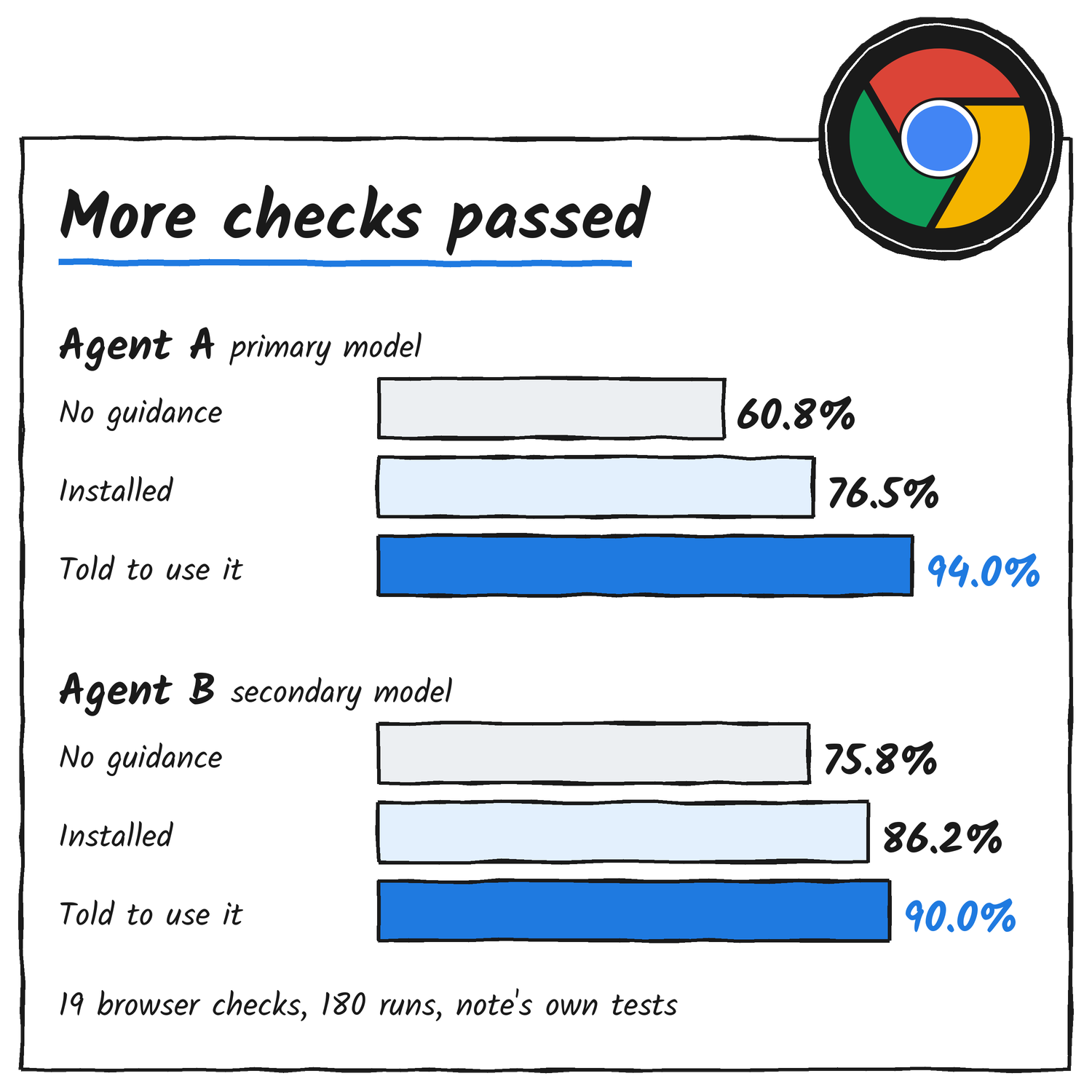
Chrome for Developers says note inc. used Modern Web Guidance to lift web-standards adherence in AI-generated code from 61% to 94% across its production Next.js codebase. Chrome describes note as one of Japan’s largest creator and media platforms. The figure is real, but it’s the best of six results: 94.0% belongs to one of two unnamed coding agents, and only when that agent was told to use the guidance.
The other agent went from 75.8% to 90.0%. With the guidance installed and no prompt, the two agents scored 76.5% and 86.2%. The headline compares the lowest starting score with the highest finishing score. Chrome published the write-up on its blog on 10 November and promoted it on X this week.

94.0%
Agent A, told to use the guidance (from 60.8% with none)
90.0%
Agent B, told to use the guidance (from 75.8% with none)
76.5%
Agent A with the guidance installed and no prompt
86.2%
Agent B with the guidance installed and no prompt
What the study measured
Modern Web Guidance is a set of skills that tells coding agents which web platform features are safe to use, drawing on Baseline data. Chrome released version 1.0 on 10 November, the same day as the note write-up. The project has 203 guides covering 250 features, and Chrome leads it with Firefox, Edge and MDN as stewards.
note’s test ran 180 times. Six UI tasks were each scored on 19 automated checks in headless Chromium and WebKit, for two coding agents under three conditions: no guidance, guidance installed, and guidance installed with an explicit instruction to use it. Chrome doesn’t name either agent.
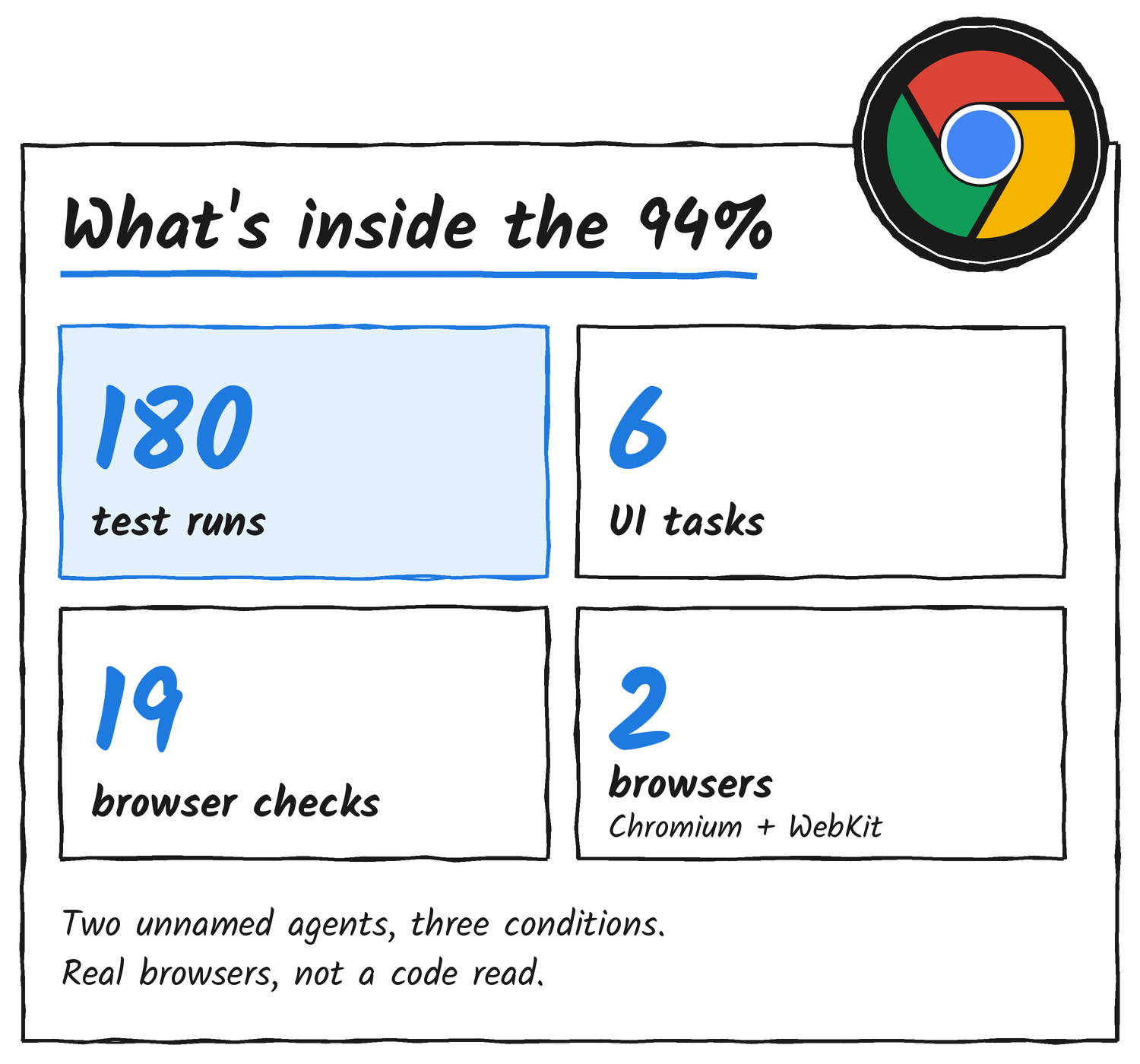
The tweet says the improvement came “across their production Next.js codebase”. The case study describes something narrower: runs on clones of note’s production repository, not on the live code. That’s a sensible way to test. It also means the result shows how the agents behaved on note’s code under note’s rules, not how much of note’s shipped product changed.
Where the 94% comes from
Installing the guidance helped both agents. Telling them to use it helped one agent a lot and the other a little.
| Condition | Agent A | Agent B |
|---|---|---|
| No guidance | 60.8% | 75.8% |
| Guidance installed, no prompt | 76.5% (+15.7 points) | 86.2% (+10.4 points) |
| Guidance installed, explicit prompt | 94.0% (+17.5 more) | 90.0% (+3.8 more) |
For Agent A, the instruction was worth more than the install: 17.5 points against 15.7. For Agent B, the install did most of the work. Chrome’s tweet uses Agent A’s full climb, 61% to 94%. Agent B’s equivalent climb is 75.8% to 90.0%, a 14.2-point gain.
The pattern echoes Vercel’s January 2026 evals of agent skills. Vercel found its skills weren’t invoked in 56% of cases, and its four conditions scored 53% for baseline, 53% for the skill alone, 79% for the skill with an explicit instruction, and 100% for an index of docs placed in AGENTS.md. The tasks and agents differ, so the numbers don’t line up. The lesson does: an agent that has a skill doesn’t reliably reach for it.
What the agents did differently
With the guidance in place, the case study says agents swapped hand-written JavaScript for features the browser already has. It lists four swaps.
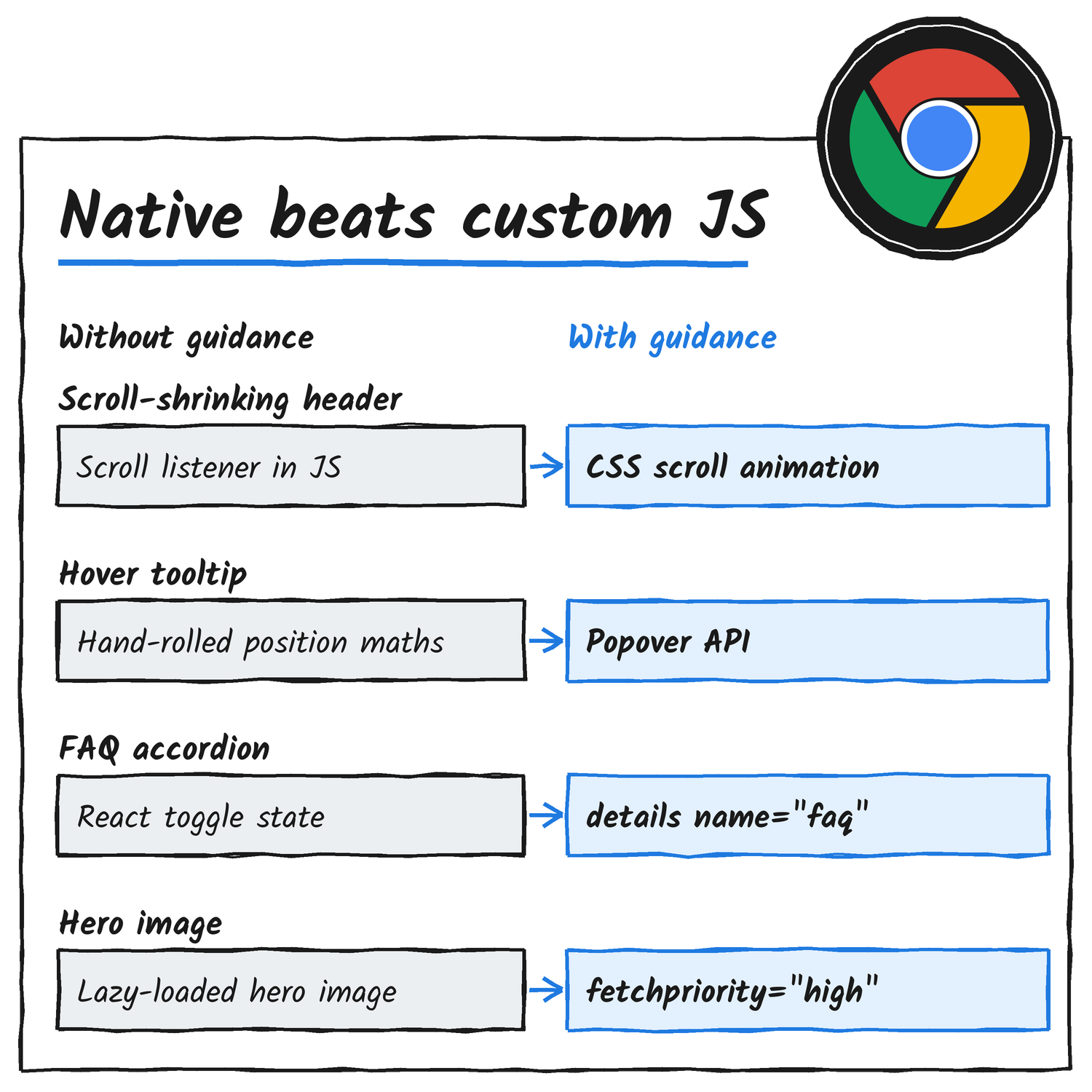
Scroll listeners gave way to CSS scroll-driven animations, tooltip positioning code to the Popover API, a React accordion to the native details element, and a lazily loaded hero image to one with fetchpriority. All four trade code the team has to maintain for behaviour the browser maintains.
When the design system and the guidance disagree
The more useful part of the write-up is what happened when the guidance clashed with note’s own component library, noteui. The skill describes itself as mandatory for all HTML, CSS and client-side JavaScript work. note’s agents were meant to use noteui’s dialogs, buttons and form fields first. Left alone, an agent following the guidance would replace a noteui dialog with a native <dialog>.
note settled it with a rule in its repository’s AGENTS.md file, which the post reproduces:
## UI Components and Modern Web Guidance

When building UI, follow this order of precedence. This applies even though the `modern-web-guidance` skill describes itself as mandatory for all HTML/CSS and client-side JavaScript tasks.

1. **Prioritize noteui**: For UI elements already provided by noteui (dialogs, toasts, buttons, form fields, popovers, etc.), use those components and follow existing conventions (such as `useDialogState` and react-hook-form). In apps, import them through `@/ui/noteui`. Do not replace an available component with a native HTML element (such as `<dialog>` or a plain `<input>`) simply because Modern Web Guidance recommends it.
2. **Use Modern Web Guidance where noteui falls short**: For capabilities that noteui does not cover or requirements it cannot meet, consult the `modern-web-guidance` skill before writing HTML, CSS, or client-side JavaScript. For example:
   - Scroll-linked effects: Use CSS scroll-driven animations instead of scroll event listeners.
   - Exclusive or page-searchable disclosure: Use `<details name="...">` and `hidden="until-found"`.
   - Core Web Vitals: Use `fetchpriority` for LCP images and `content-visibility` for off-screen content.
   - Form attributes: Pass attributes such as `autocomplete` and input `type` through the field component's props.
3. **Prioritize existing components when guidance conflicts**: Apply Modern Web Guidance only through the props and attributes supported by the component. For noteui form fields, display validation errors using the component's built-in mechanisms (`validationState` / `errorMessage`, or `HelpText` with `aria-describedby`) rather than custom alert elements.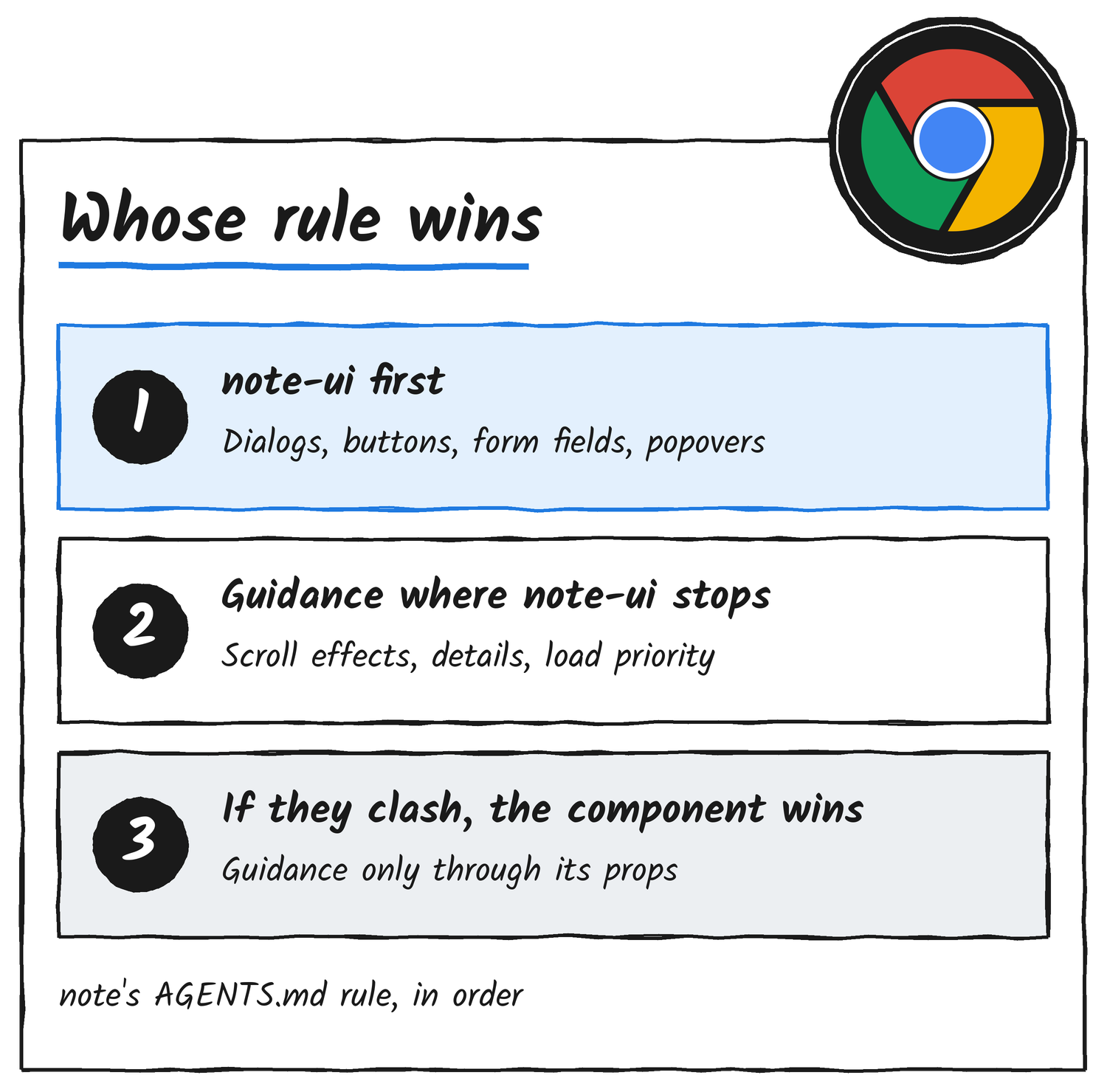
Most teams with a design system will hit the same clash. The rule is the transferable part, because the guidance is written for the open web and a company’s component library has its own accessibility and behaviour decisions baked in. The post doesn’t publish a separate score for runs under this rule, so how much it cost or gained in adherence isn’t known.
How it compares with other ways of feeding agents web knowledge
Modern Web Guidance isn’t the only attempt to stop agents writing dated web code. It sits among several approaches, and agent-browser added its own Modern Web Guidance skill on 18 November.
| Approach | How it works | What’s published |
|---|---|---|
| Modern Web Guidance | Skills with Baseline data; Chrome leads, with Firefox, Edge and MDN as stewards | 1.0 on 10 November, npm latest 1.0.2; 203 guides, 250 features; a legacy-scan tool and a public eval dashboard |
| MDN MCP | MDN’s reference served to agents through the Model Context Protocol | Launched 15 June 2026 |
| Context7 | Pulls current library documentation into the agent’s context on request | Not compared in note’s study |
| Next.js bundled docs and agent rules | The framework ships its own docs and rules for agents | Not compared in note’s study |
| Vercel’s skills evals | Tested skills against explicit prompts and an AGENTS.md docs index | January 2026: skills unused in 56% of cases; 53, 53, 79 and 100 across four conditions |
The note study doesn’t pit any of these against each other. It compares one skill set with and without itself, which can’t say whether an MCP server or a docs index would do as well. Vercel’s result, where an AGENTS.md index beat the skill, is a reason to test that on your own code.
Another figure that doesn’t match
Chrome’s launch post for Modern Web Guidance says MetaMask fixed 43 findings after running the tool. MetaMask’s own case study tallies 54 fixed and 3 partly fixed. Different counting rules could explain the gap, and I haven’t seen either side explain it.
What the study doesn’t show
It’s one company, one codebase and six tasks. The two agents are unnamed, so you can’t rerun it with the same tools or tell which vendor does better. Passing 19 checks in two browsers measures adherence to web standards, not fewer bugs or a better product. Chrome leads Modern Web Guidance and published the case study, and the tests ran on note’s side, so nobody independent has audited the numbers yet.
What to do with it
- Install the guidance in your agent’s setup using Chrome’s instructions, then tell the agent to use it in AGENTS.md or your system prompt. Installing alone won’t do it for every agent.
- If you have a design system, write note’s kind of rule before you start: components first, guidance where they stop, the component wins in a clash.
- Run the project’s legacy-scan on existing code to see what’s already dated.
- Test on a clone of your own repository with your own checks, with the guidance off, installed, and explicitly prompted, and keep the three scores separate.
Sources
- Chrome for Developers, note inc. case study, 10 November 2026
- Chrome for Developers on X
- Modern Web Guidance 1.0, earlier reporting
Discover more from Sulat AI & Tech News
Subscribe to get the latest posts sent to your email.