A 15-step guide to making game-ready 3D models for free with Claude Code, Blender and Tripo holds up against the vendors’ own documentation on almost every point I could check. The exception is its headline Tripo price. Kensei (@0xKense1) posted the guide on X on 6 November, three weeks ago, and it has passed 510,000 views, so this isn’t a launch. It’s a check on something a lot of people are now following.
The claim is that props, buildings and vehicles cost nothing per model when Opus 5.5 writes Python that Blender runs, that characters cost nothing on your own graphics card or about US$0.20 to US$0.60 on Tripo’s API, and that rigging, weights, animation clips and export all run free in Blender. I checked the numbers against Tripo, Roblox, Blender, Unity and Tencent documentation. We covered a related tool earlier, when TanStack AI added 3D model and motion generation for game assets.
- What the guide claims
- What checks out
- The Tripo price that doesn’t add up
- Two catches the guide skips
- Roblox’s six numbers
- The two bugs it fixes
- His own test numbers
- How the alternatives compare
- Since 6 November
- Sources
What the guide claims
The guide splits the work by object. Anything you could measure with a ruler, such as guns, crates, houses and vehicles, gets built as code. Claude Code writes the Python and Blender runs it with no window, using blender -b file.blend --python script.py. Characters and creatures go through a generator instead: Hunyuan3D 2.0 on your own card, or Tripo’s API, which turns a character sheet of front, side and back views into a textured mesh. After that every route joins one pipeline. You clean the mesh, split it into parts, read joint positions off a grid render, build the rig, set weights by rule, test poses, write clips on one rest pose and export FBX or GLB for Unity or Roblox.
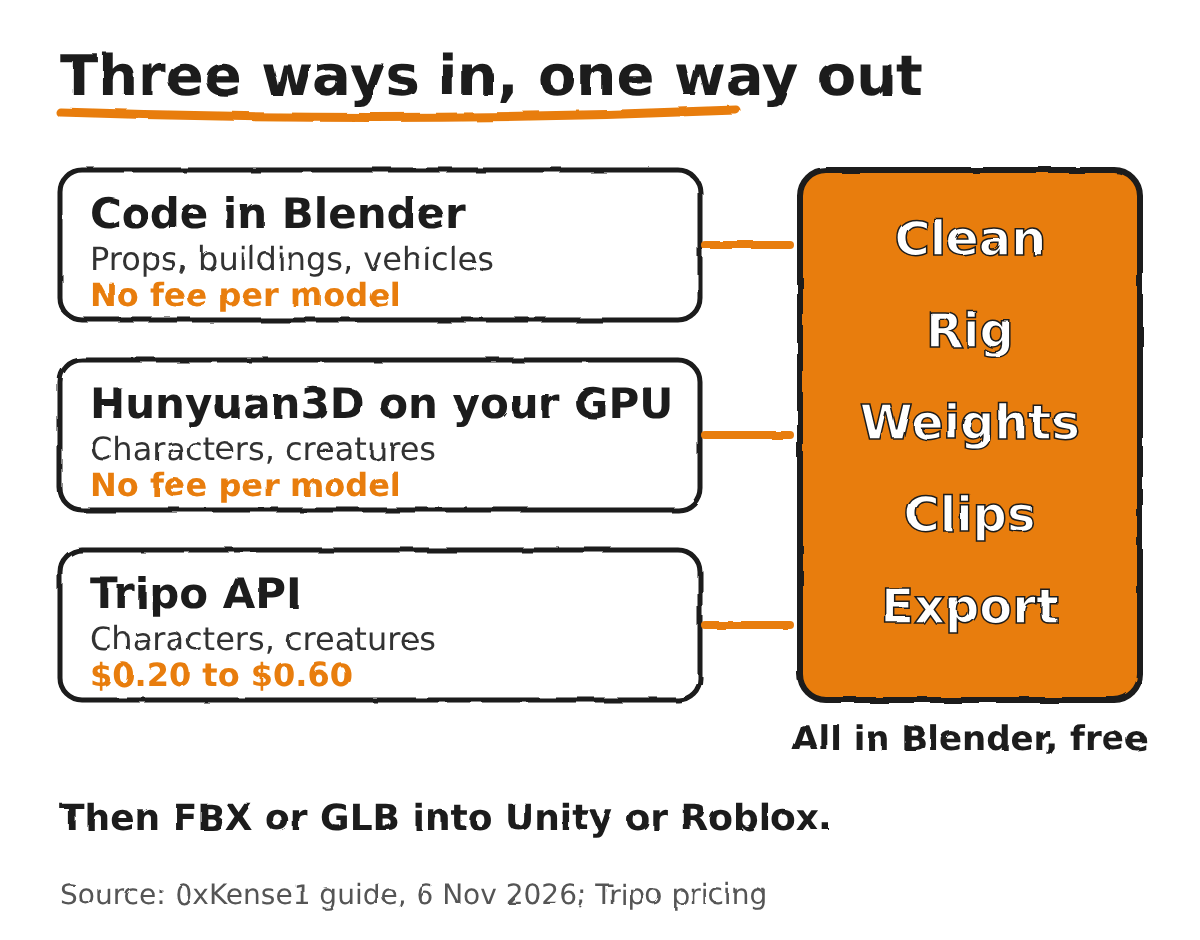
15
steps in the guide
3
routes to a mesh
US$0.20 to US$0.60
claimed Tripo cost per character
20,000
triangles per mesh on Roblox
The guide builds on earlier posts by Kensei, including a 14-step Unity game guide on 21 October and a horror-game build on 26 October, and distils the model-making part. He says the character in his main demo cost US$0.60 on Tripo, and that 15 city characters cost nothing on an 8 GB laptop GPU. Those figures come from his own runs, which I cover below.
What checks out
Most of the guide’s hard numbers are easy to test, because the vendors publish them. These are the ones I could match to a primary source.
| Claim | The guide says | The source says | Result |
|---|---|---|---|
| Tripo credit value | 1 credit is US$0.01 | Tripo’s API price list: 1 credit = US$0.01 | Matches |
| Tripo multiview inputs | Up to 4 views, front required, 2 minimum | Tripo’s multiview docs take front, left, back and right, and ComfyUI’s Tripo node needs a front view plus one more | Matches |
| Tripo rigging and retopology | Auto-rig 25 credits; retopology 10 to 40 | Auto Rig 25 credits; retopology 10 to 40 depending on version | Matches |
| Hunyuan3D video memory | 16 GB for shape and texture | Tencent’s README: 6 GB for shape, 16 GB for shape and texture | Matches |
| Hunyuan3D licence | Excludes the EU, UK and South Korea | Licence defines its Territory as worldwide minus those three | Matches |
| Roblox import limits | 20,000 triangles, 4 bones per vertex, root at 0,0,0 with no weights | Roblox’s mesh specifications list the same limits | Matches |
| Blender FBX export | Leave Apply Transform off and Add Leaf Bones off for rigged meshes | Blender’s manual calls Apply Transform experimental and known to break armatures; Add Leaf Bones is on by default | Matches |
| Unity import | Humanoid for human rigs, Generic for animals, set Loop Time | Unity’s manual separates Humanoid and Generic models and has a Loop Time setting on clips | Matches |
| Headless Blender | blender -b file.blend --python script.py | Blender’s command-line manual lists --python and runs arguments in the order given | Matches |
The Tripo price that doesn’t add up
The guide says a multiview model costs 20 to 30 credits as bare geometry plus 10 to 30 for texture, and that with the detailed texture you should expect about 60 credits, or US$0.60. Tripo’s H series table doesn’t produce that. Multiview to 3D is 20 credits with no texture and 30 with standard texture. HD texture adds 10 credits, which makes 40, or US$0.40. Getting to 60 also needs HD geometry quality, a separate add-on that costs another 20.
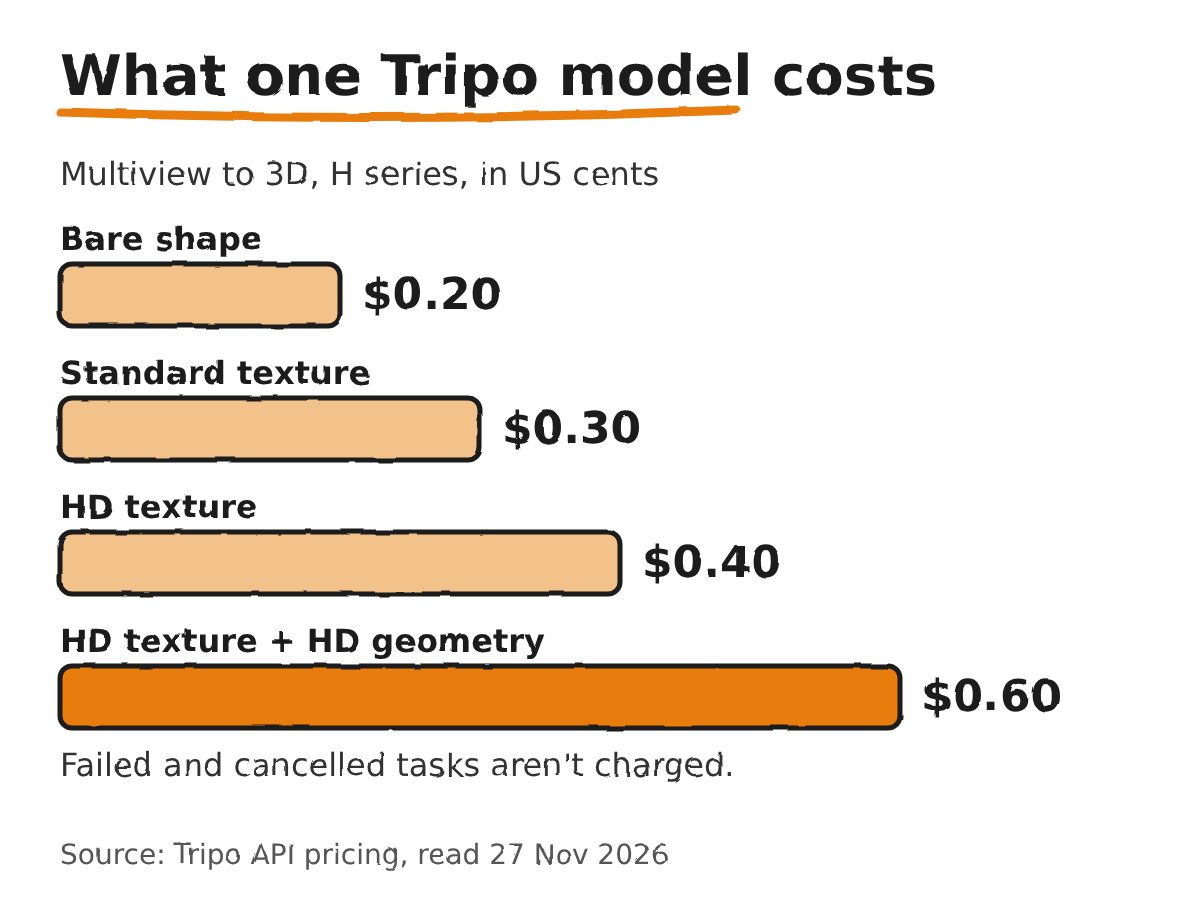
His demo spend, US$0.60 for a 40,000-face character, fits the HD texture plus HD geometry combination, so the money he spent is probably right and the shorthand “with the detailed texture” is what’s off. The guide doesn’t say which options he switched on. The “under US$1” claim survives either way. Tripo’s billing page also confirms his note that failed and cancelled tasks aren’t charged.
Check the price yourself
- Open Tripo’s API pricing page and pick the H series tab.
- Multiview to 3D: 20 credits with no texture, 30 with standard texture.
- Add-ons stack on that base: HD texture +10, 8K texture +20, HD geometry quality +20, quad mesh +5, smart low-poly +10.
- 30 + 10 + 20 = 60 credits. Swap in 8K texture and it’s 70.
Two catches the guide skips
System memory. The 8 GB laptop route runs on Hunyuan3D-2-WinPortable, a community build that squeezes the models onto small cards. Its documentation lists 24 GB of system RAM as a minimum, because the less video memory you have, the more RAM the models use as overflow. The guide gives the video memory figure and doesn’t mention the RAM. Tencent’s own 16 GB figure is for its official code, and the portable build is how people get under it.
Scripts run with your permissions. Every step has Claude Code write a Python file and run it through Blender. Blender’s command line runs whatever script it’s given. Its autoexec switch, which is off by default, only covers scripts embedded in a .blend file, such as drivers and startup scripts. The guide never tells you to read a script before it runs, so that’s down to your Claude Code permission settings.
Roblox’s six numbers
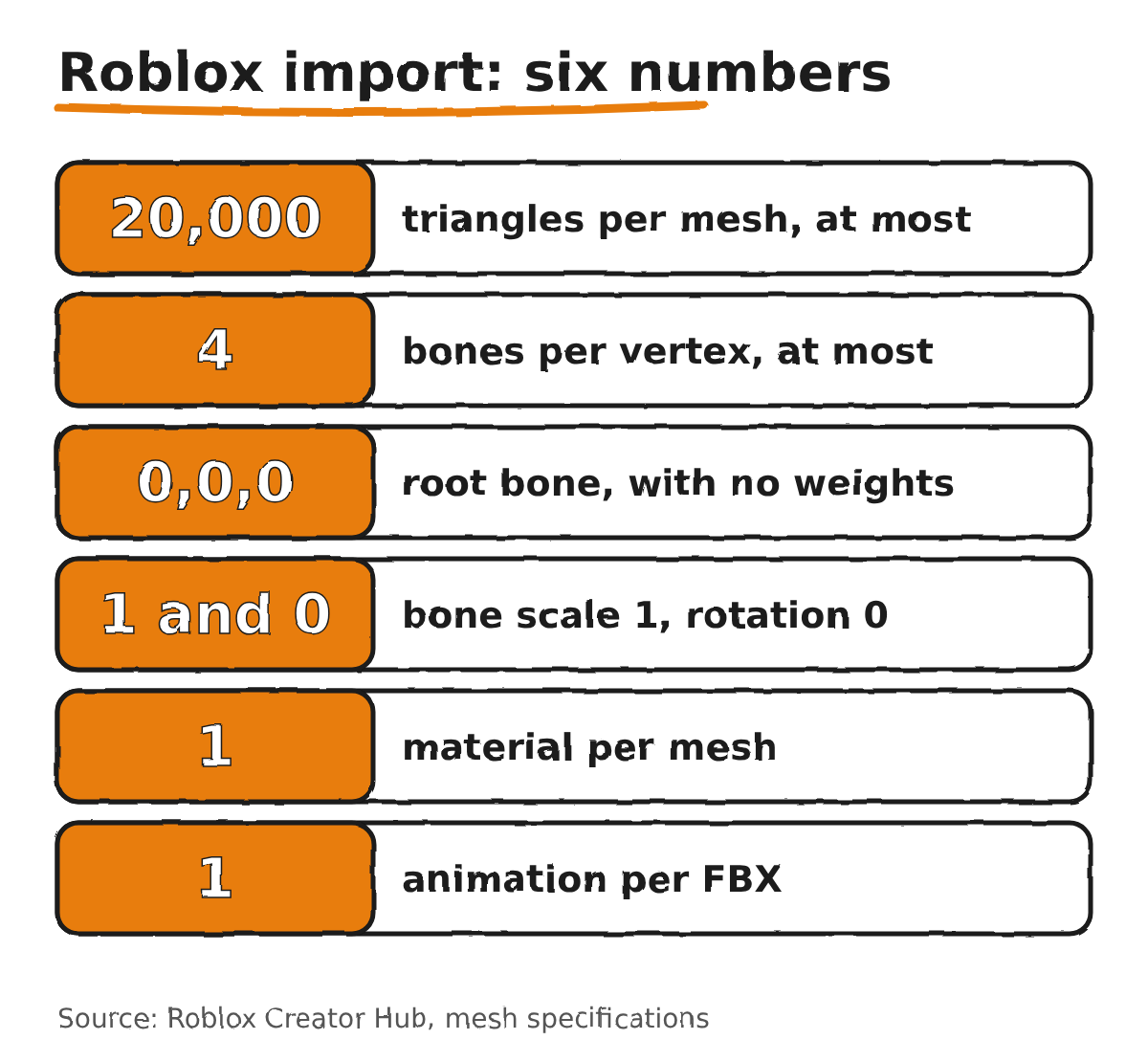
Roblox is the most rule-bound target the guide covers, and it gets the rules right. Roblox’s mesh specifications cap a mesh at 20,000 triangles, allow one material per mesh and one animation per FBX, and limit each vertex to four bones. The root joint sits at 0,0,0 with no skin weights, and bones must be frozen at scale 1 and rotation 0. The importer’s Keep Zero Influence Bones option, which the guide tells you to switch on for weapon sockets, is off by default and drops bones that move no skin. Roblox’s artist onboarding page says Studio decimates an over-limit mesh automatically, so overshooting costs you control of the result rather than the import.
The two bugs it fixes
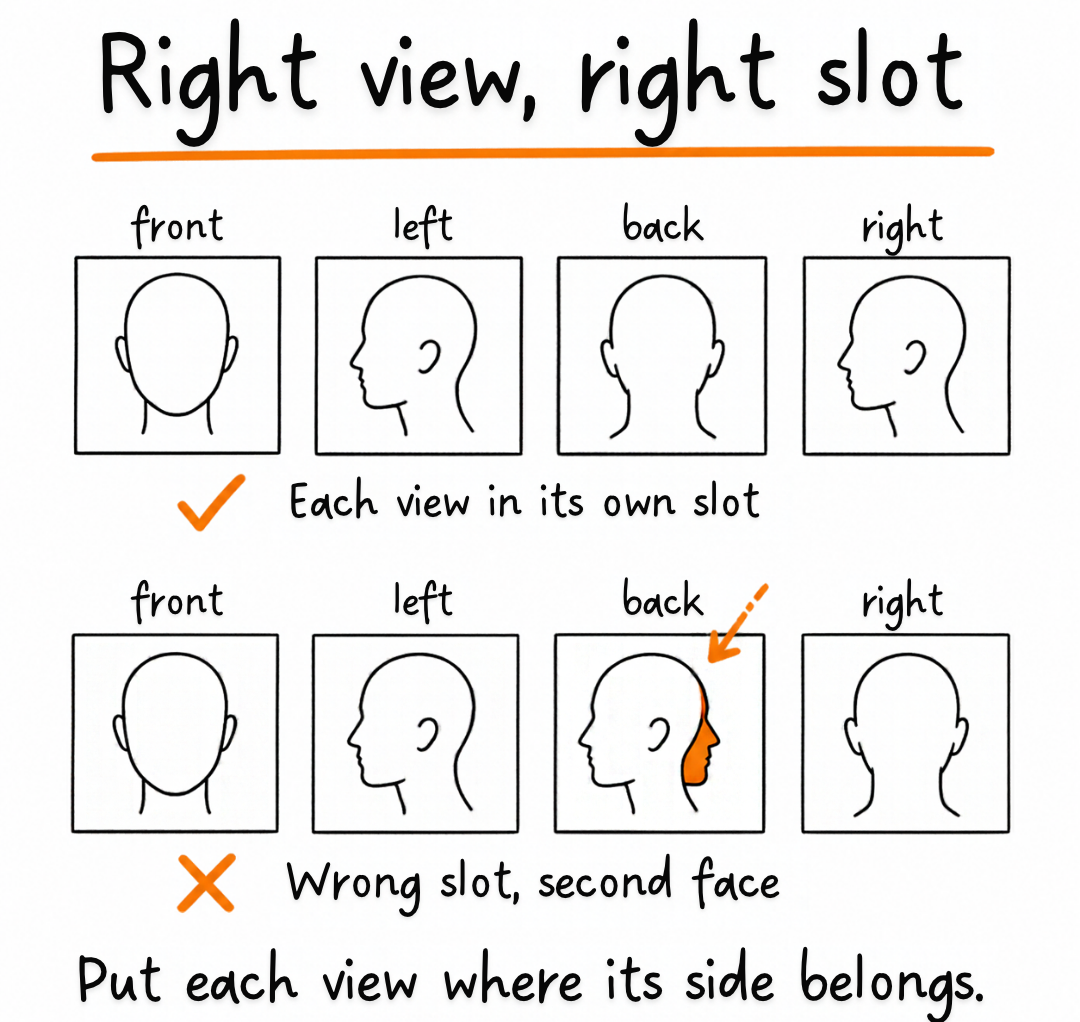
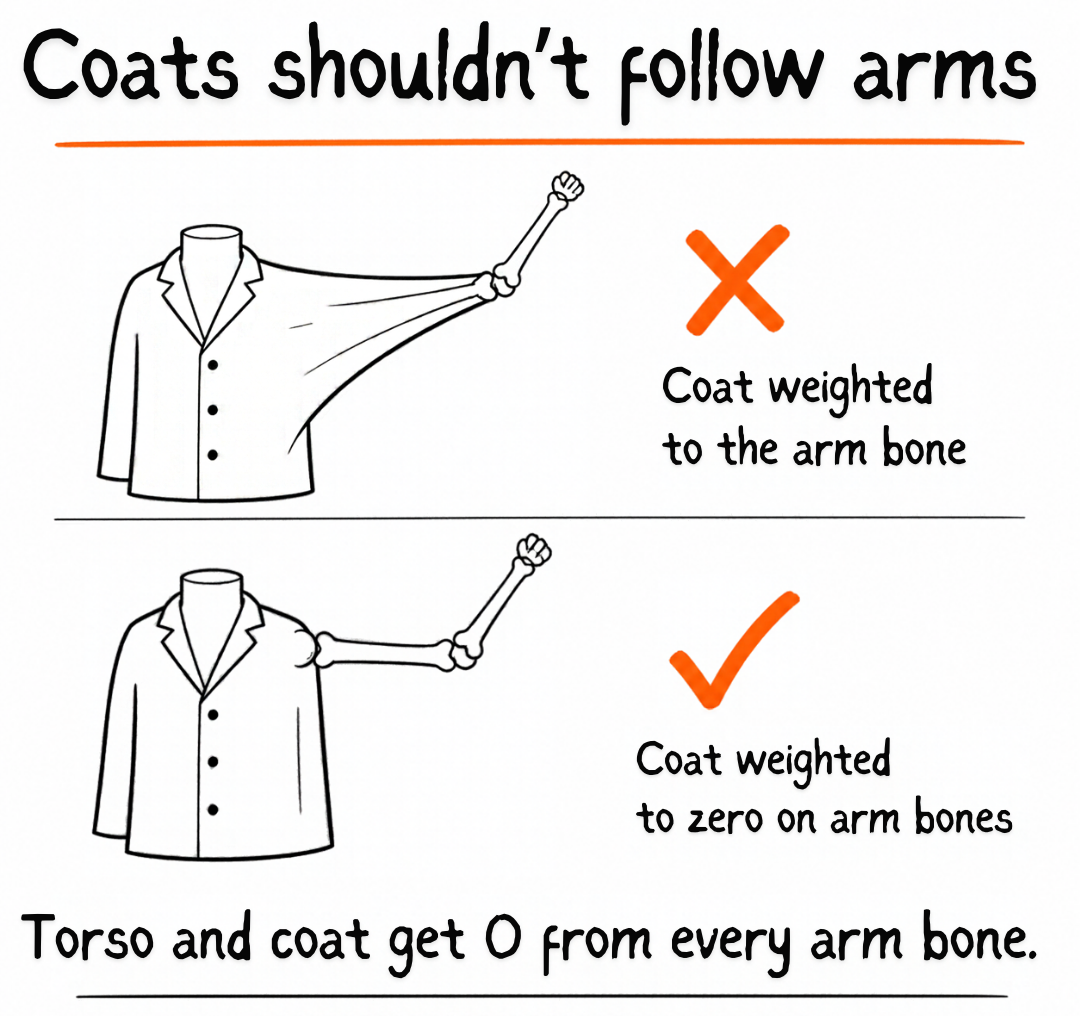
The guide says it answers the two questions its author gets most: why a generated character grows a second face, and why clothes stretch when it moves.
The second face comes from sending a view in the wrong slot. Tripo’s docs recommend naming each view with a front, left, back or right key, where the order doesn’t matter. They keep an older positional format, four strings in a fixed order with an empty string for a skipped view, and that’s where a misplaced image is easiest to make. The second-face failure itself is the guide’s own observation; Tripo’s docs don’t describe it.
The stretched clothes come from automatic weights, which can’t tell a coat from a body on a mesh that’s one fused shell. The guide’s fix is to split the mesh into tagged parts and then set the torso and coat to zero weight on every arm bone, so a raised arm can’t drag the coat with it. It also warns against smoothing weights across two parts, because that leaks the hand bone into the coat and pulls a spike out of it.
His own test numbers
No primary source exists for the guide’s own test results, and I haven’t reproduced them. They include 15 characters made on an 8 GB laptop GPU at about four minutes each, 40,000 triangles and 23 bones per character, 238 full models running at 9 frames a second against a 3,000-triangle crowd copy, a longest stretched edge dropping from 40 times to 16 times with the weight rules, and Tripo files arriving facing +X. They come from the author’s runs and videos. He labels the combat clip in step 13 as a pattern and not a clip from his builds.
He also says the same weight rules made the head turn and the step worse on that model, because the collar weighted to the chest touches the head and the hip weight runs down the thighs. The 16 times figure is therefore a best case.
How the alternatives compare
The guide’s routes aren’t the only ones. Blender’s developers built an official connector for Claude, announced on 28 April 2026 alongside an Anthropic donation to the Blender project. It needs Blender 5.1 or newer, and the guide doesn’t use it, running Blender headless instead. For generators, here’s where the guide’s two sit next to the others in the same price band.
| Route | Price | Catch | Source |
|---|---|---|---|
| Python in Blender | No fee per model | Suits hard-surface props, not organic shapes | The guide; Blender |
| Tripo API | US$0.20 to US$0.60 a multiview model; auto-rig US$0.25; retopology US$0.10 to US$0.40 | Add-ons stack on the base price | Tripo API price list |
| Hunyuan3D 2.0, local | No fee per model | 16 GB video memory officially; licence excludes the EU, UK and South Korea | Tencent repository and licence |
| Hunyuan3D 3.1 Pro on fal | US$0.375 per generation; US$0.825 with PBR, multiview and a custom face count | Hosted, billed per job | Modelglass listing citing fal, checked 11 October |
| Rodin Gen-2.5 | 0.5 credits per generation | API access needs the Business plan at US$120 a month | Sloyd roundup, 30 October |
| Meshy | Credits per request, set by a calculator on its docs page | No single per-model figure | Meshy API docs |
TanStack AI’s experimental generate3DModel() already wraps several of these through fal, which is covered in our earlier piece. The guide’s pitch against all of them is that everything after the mesh is free in Blender, and that part is true of Blender’s own tools.
Since 6 November
The price list I read on 27 November is the basis for every Tripo figure above. Tripo’s developer models page, updated in November, lists H3.1 as its flagship at about 40 seconds a model. Tripo published a Substance Painter bridge guide on 20 November, and Meshy added quadruped rigging to its API on 18 November, according to a release timeline from Cinevva, which also makes 3D tools. TanStack AI shipped its experimental 3D function on 19 November. None of these changes the guide’s route, and the post is unedited, with no follow-up from its author on the price that I could find.
The guide is a competent write-up whose checkable claims mostly match the vendors’ own pages. Its weak spots are the ones it names itself: organic shapes from code, props in hands, clothing on fused meshes. If you follow it, budget US$0.30 to US$0.70 a character on Tripo depending on texture and geometry options, plan for 24 GB of system RAM on the portable GPU route, and read generated scripts before they run.
Sources
- Kensei, “Create 3D Game Models for Free: Opus 5.5 + Blender + Tripo (15 Steps)”, X, 6 November 2026
- Tripo API pricing and multiview to model docs
- Tripo billing
- Roblox mesh specifications, importer and artist onboarding
- Tencent Hunyuan3D-2 repository and licence
- Hunyuan3D-2-WinPortable requirements
- Blender manual: FBX and command line arguments
- Unity manual, importing a model with humanoid animations
- Blender, Anthropic joins the Blender Development Fund and Blender Lab MCP server
- Tripo models; Cinevva release timeline; Modelglass Hunyuan3D listing; Sloyd API roundup; Meshy API pricing
Hero illustration features the Blender and Tripo logos, which remain the trademarks of their owners.
Discover more from Sulat AI & Tech News
Subscribe to get the latest posts sent to your email.