OpenAI has started testing 1Password in dots, its always-on agent, according to James Sun, who works on browsers and browser use for Codex and ChatGPT at OpenAI. Sun posted on X on 17 November, NZ time, that his team is “starting to test 1password in dots”, with the aim of making it easy for a dot to do tasks that need a login while keeping credentials secure.
His post says OpenAI is excited to roll the integration out more broadly soon, and it asks for feedback. 1Password had listed ChatGPT Work and dots as coming-soon integrations when it launched 1Password for Agents on 22 October.
We’re starting to test 1password in dots!
— James Sun (@JamesZmSun) November 16, 2026
Our goal is to make it easy for your dot to do tasks that require a login, while keeping your credentials secure. Excited to roll this out more broadly soon.
Let us know what you think.
What dots are
OpenAI launched dots on 29 September. Each one is an always-on agent with its own cloud computer and browser, powered by GPT-6 Astra, and plugins connect it to more than 4,000 apps, according to the launch post. Dots are available to Pro and Business Premium users in eligible markets, and OpenAI’s help centre says Enterprise, Edu and Healthcare workspaces get them by default from 18 November unless an admin opts out. A dot can also run commands on a connected computer, which the multi-exec explainer covers.
What the screenshot shows
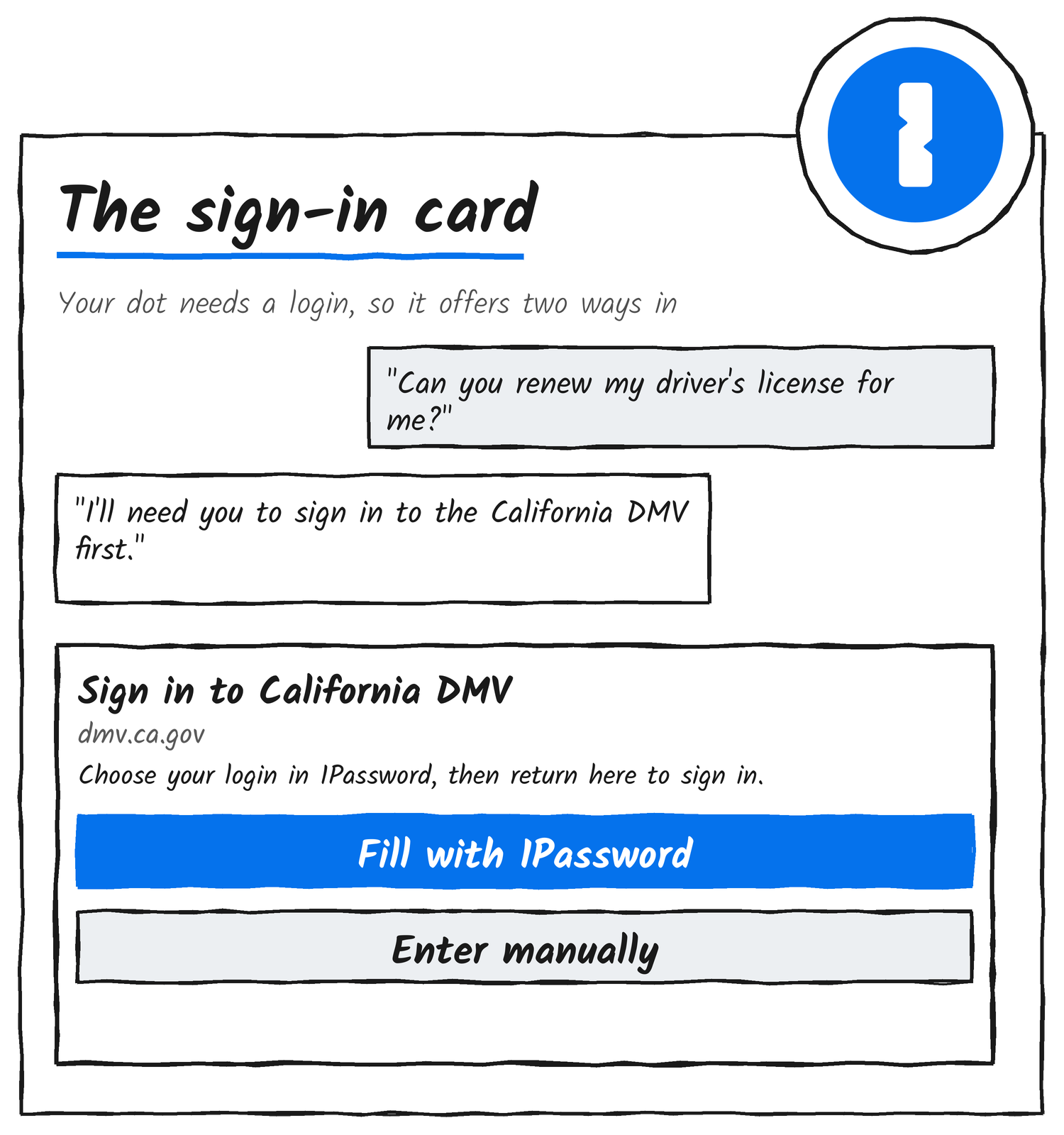
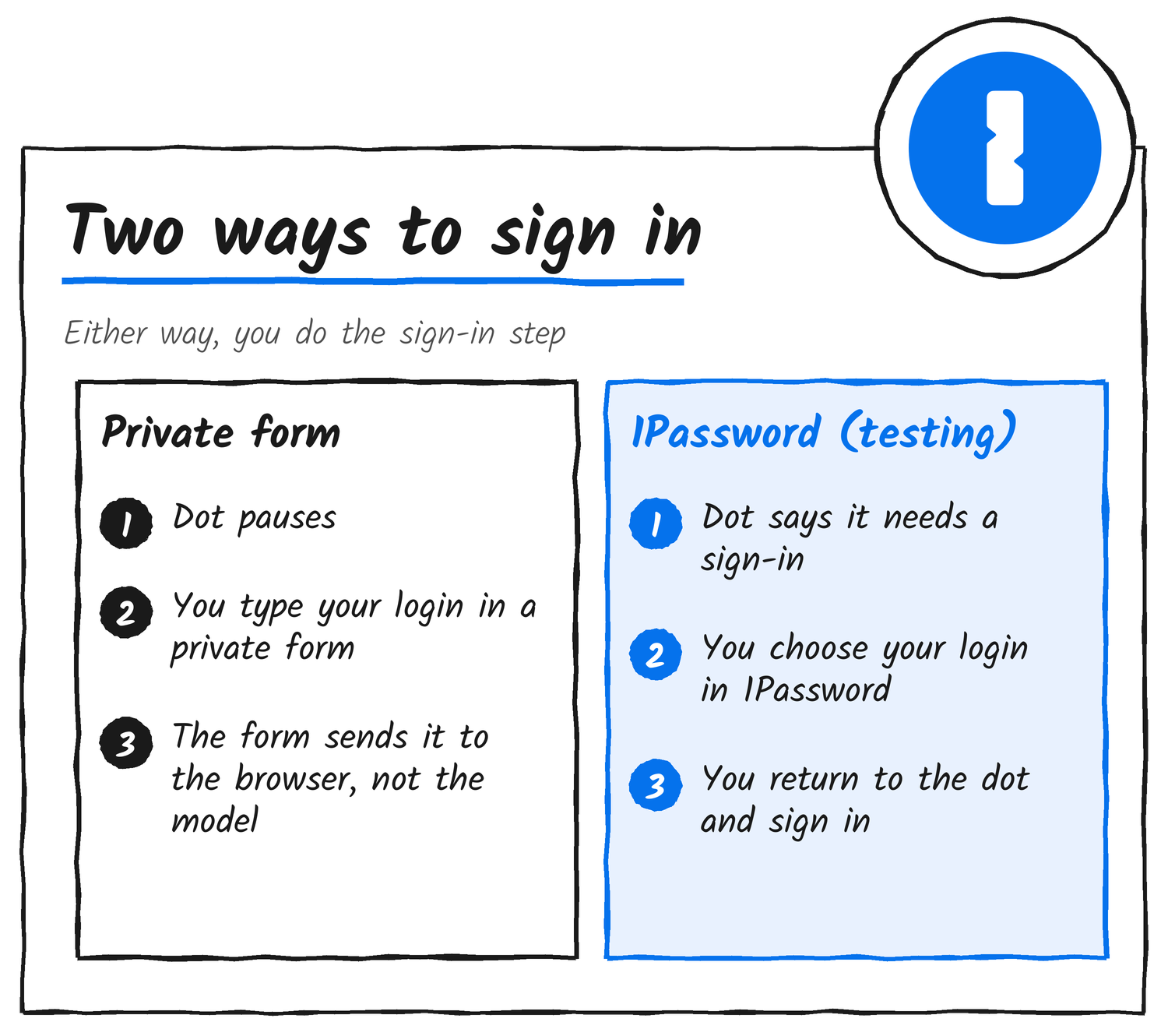
Sun’s post includes a phone screenshot. A dot named Bingo has been asked to renew a driver’s licence. It replies that it needs you to sign in to the California DMV before it can get started. A card titled “Sign in to California DMV” shows the address dmv.ca.gov and the line “Choose your login in 1Password, then return here to sign in.” Under it sit two buttons, “Fill with 1Password” and “Enter manually”.
How dots handled sign-ins before
OpenAI’s help centre says that for supported sign-ins a dot pauses while you enter your credentials in a secure login form. The form sends them straight to the browser environment without exposing them to the model, and the dot then carries on in the signed-in session. Passwords you share separately in a chat, a document or a plugin fall outside that protection.
The ChatGPT documentation for dots describes the same private browser sign-in flow that ChatGPT Work uses. When a site needs a login, the dot sends a sign-in request. You open it to enter your credentials and any verification in a private form, or you select “Take over to sign in” to complete the steps on the site yourself and then select “Done”. The dot’s cloud browser keeps its own sign-in sessions, so signing in on your own computer doesn’t sign the dot in. OpenAI’s launch post adds that dots can use saved passwords to sign in to supported websites without exposing them to the model.
Sun announced an earlier sign-in change on 7 November. A dot can now use sign-in codes sent to a connected inbox, and when prompted you can let it use a code once or always. He added that more sign-in improvements were coming.
A little upgrade: your dot can now use sign-in codes sent to your connected inbox to log in seamlessly on your behalf.
— James Sun (@JamesZmSun) November 7, 2026
When prompted, you can let your dot use the code once or always allow it to fill in.
Lots more sign-in improvements coming soon!
| Date | What happened |
|---|---|
| 29 Sep | OpenAI launches dots in ChatGPT |
| 22 Oct | 1Password lists ChatGPT Work and dots as coming soon |
| 7 Nov | Sun announces inbox sign-in codes for dots |
| 17 Nov (NZ) | Sun says dots are starting to test 1Password |
How 1Password signs agents in elsewhere
1Password’s support pages describe the flow for the agents it has already switched on. The agent asks 1Password to sign in, and 1Password opens a prompt on your device that names the requesting app and suggests logins for the site. You approve one, pick a different login or deny the request. After you approve, the 1Password browser extension in the agent’s browser fills your username, password and one-time password outside the agent’s view, then submits the form. An agent can’t approve its own requests, and an approval lasts up to 30 days.
The feature covers Login items in a Personal or Private vault on Individual and Family accounts on 1Password.com, at no extra cost. Passkeys, logins that use a sign-in provider, other item types and shared vaults aren’t supported yet. 1Password’s blog says the safeguards and controls vary by integration. The earlier article on 1Password for Agents walks through the full flow.
Who Sun is
Sun’s X profile describes his job as browsers and browser use for Codex and ChatGPT at OpenAI. His LinkedIn profile says the team behind his startup Playmatic, which helped teams write end-to-end tests, joined OpenAI in January 2026 to build browser agents for broader use cases. He co-founded the developer platform thirdweb, and before that he was VP of product at Paper, the crypto onramp company thirdweb acquired in July 2023.
Sun asked for feedback in his post. 1Password’s integrations page lists the agents it supports and has a waitlist for the rest.
Disclosure: I’m an OpenAI, Firecrawl and Devin ambassador.
Discover more from Sulat AI & Tech News
Subscribe to get the latest posts sent to your email.