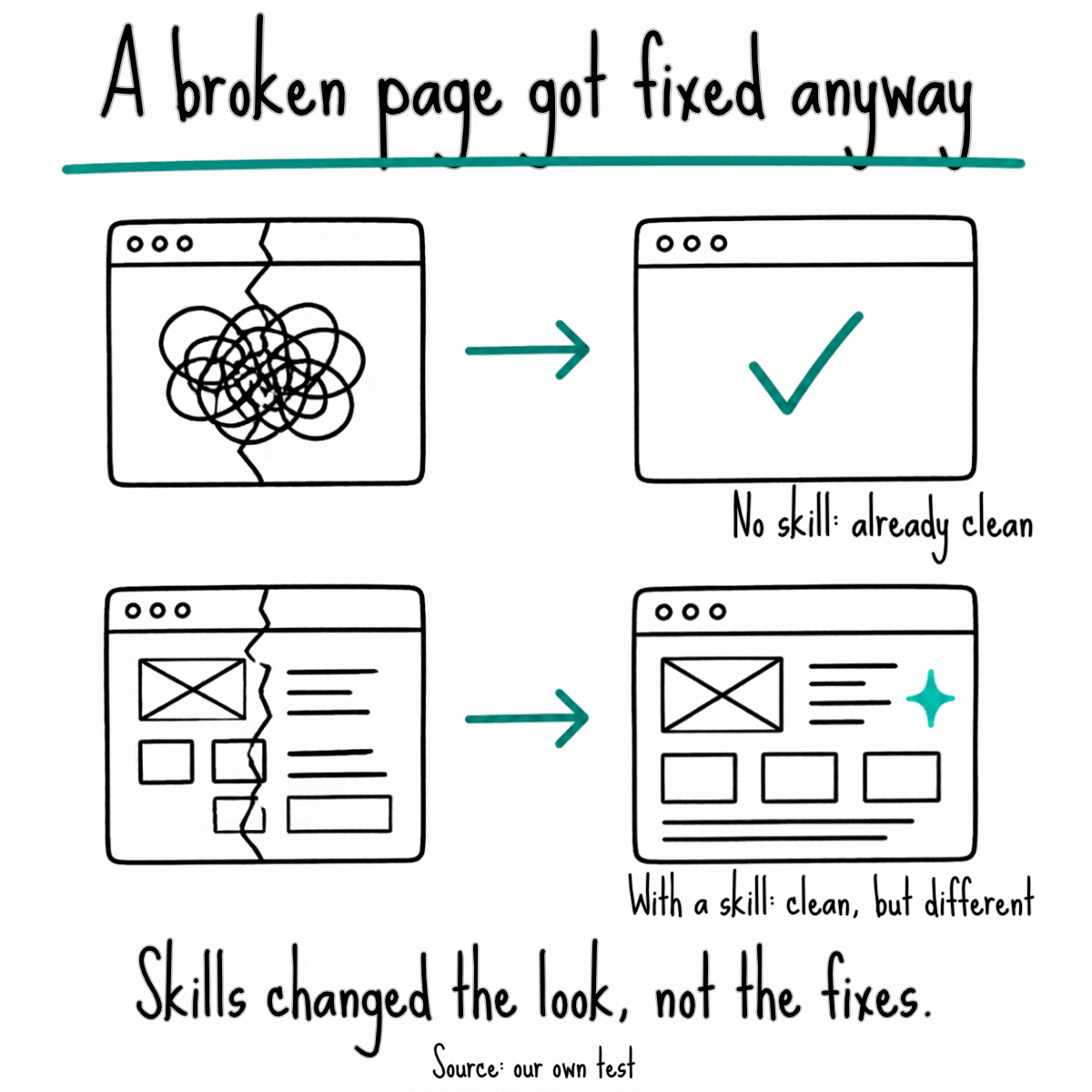
A list of five skills that supposedly make AI design like a human is doing the rounds on X. I took the three you can actually install, Taste, Emil and Vercel’s web design guidelines, and ran each one, plus a no-skill control, on a landing page I’d broken on purpose. Five coding models did the fixing in OpenCode. Every model repaired every mechanical fault with no skill at all. What the skills changed was the look of the result and, for Taste, how long the run took and what it cost. The other two items, Uizze and ThinkUI, are gated reference services rather than skills, and I didn’t run them.
The list
The list is a post going round on X, “5 skills that force AI to design like a human”. The poster’s profile says they’re building Uizze, which is item one, so read it with that in mind.
| Item | What it is | Did I run it? |
|---|---|---|
| 1. Anti UI Slop (Uizze) | A service that gives coding agents real app screens, fonts and icons to copy from. Its site says it works with Claude Code, Codex and Cursor. | No |
| 2. ThinkUI | An MCP server that returns real screens, flows, components and fonts, each traced to its source. The free trial asks for a card at checkout. | No |
| 3. Taste Skill | A large agent skill with its own scripts. It picks a layout and palette, fetches icons, lints the copy and checks the page in a real browser. | Yes |
| 4. Emil Design Engineering (emilkowalski/skills) | Emil Kowalski’s design-engineering rules for polish: press states, motion and the small details. | Yes |
| 5. Web Design Guidelines (vercel-labs/agent-skills) | A review skill that checks UI code against Vercel’s Web Interface Guidelines and reports findings. | Yes |
I skipped the first two because they aren’t skills. They’re reference libraries behind an account, so a test would measure their screenshots, not an instruction set, and Uizze needs an account while ThinkUI’s trial needs a card. If you use either, that’s a separate test I’d like to see.
Vercel’s skill is a reviewer by design. Asking it to help rewrite a page isn’t its intended use. I ran it anyway because it’s on the list, and I’ve tried to be fair about that in the results.
What I took “corrupted” to mean
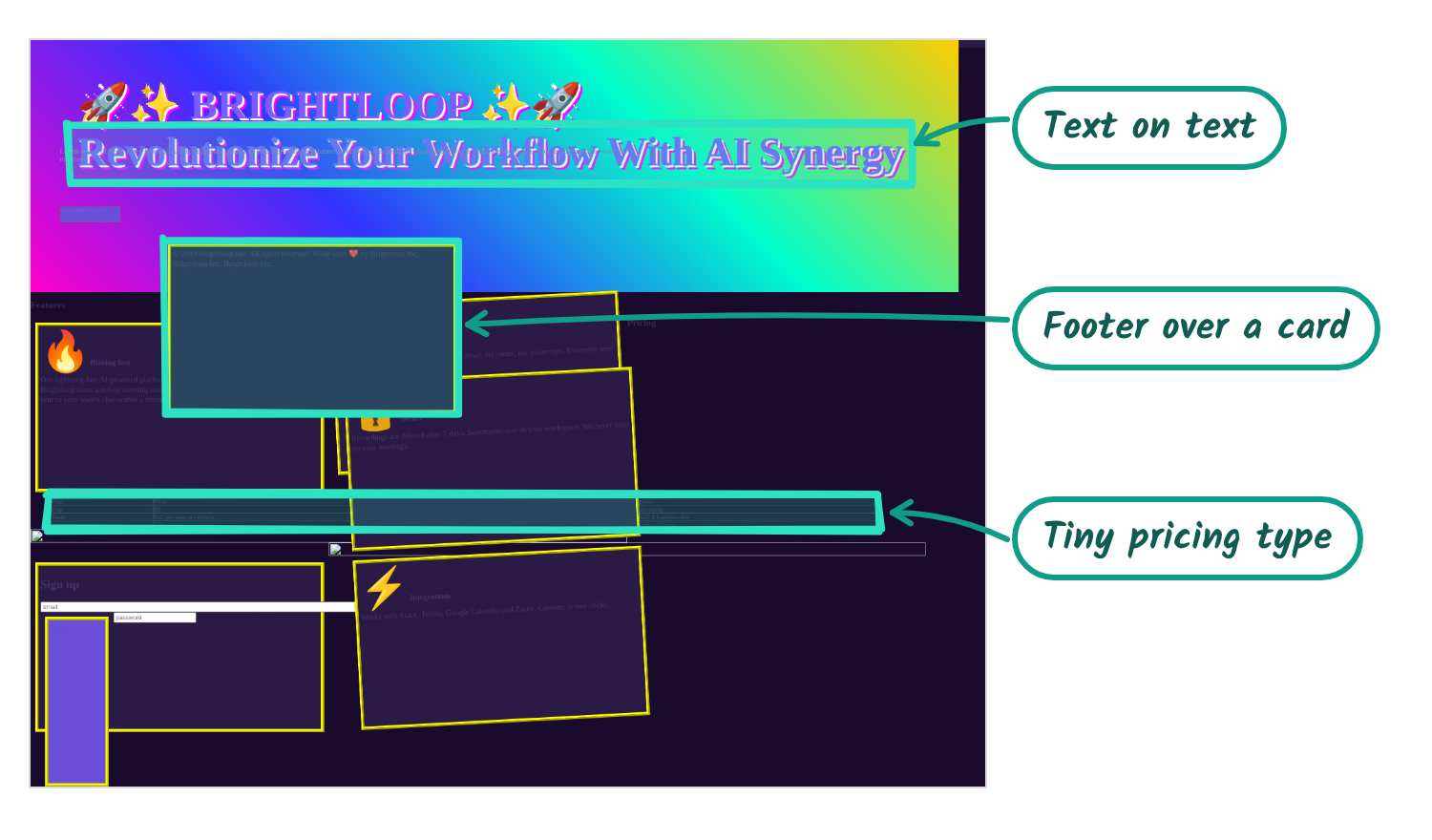
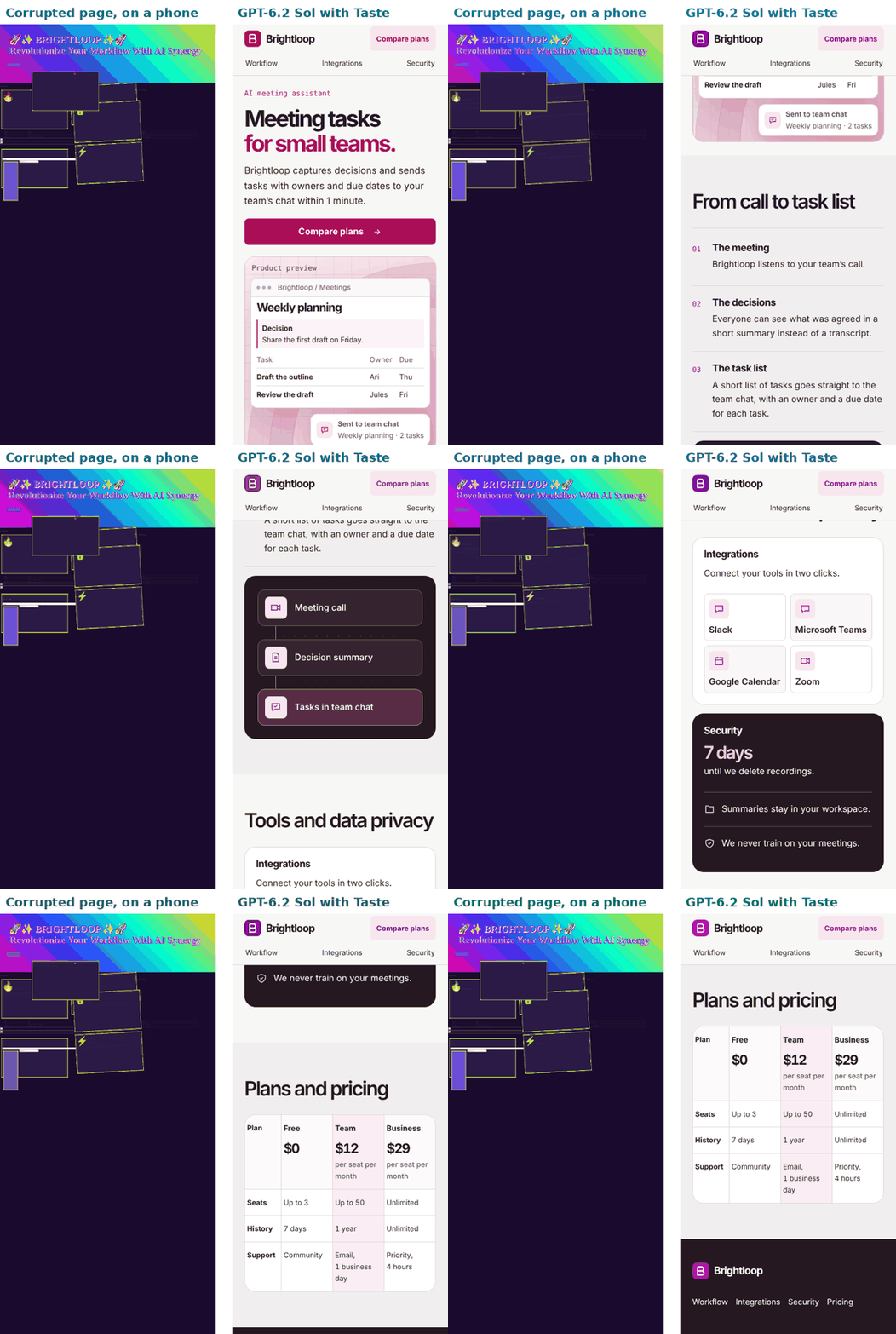
I read “intentionally corrupted website” as a page that’s broken on purpose, not one that attacks the model. I made up a product, Brightloop, a tool that turns meetings into task lists, and planted a dozen kinds of fault in one HTML file. If you meant something else, such as hidden prompt injection, that’s a different test and I haven’t run it.
- Broken markup: no doctype, language or viewport tag, unclosed tags and the body opened inside the head.
- A JavaScript syntax error, and a script that prints next year’s date.
- Fixed pixel widths, so a phone scrolls sideways.
- Low-contrast text almost everywhere, including a submit button whose label is the same colour as the button.
- Tiny type in Comic Sans and Papyrus.
- No focus outlines, clickable divs instead of buttons, inputs without labels and “click here” links.
- A navigation bar hidden behind the content.
- Overlapping absolute-positioned text and a headline that wobbles forever, with no reduced-motion handling.
- Emoji for icons, a rainbow gradient, and lorem ipsum and buzzword filler mixed in with real product copy.
- Images with no alt text, one missing file, one unreachable host, and one squashed into a strip.
- A copyright year of 2019 and a pricing table with no header cells or caption.
- Cards with negative margins, rotation and floats that never clear.
The real facts sit inside the mess: three pricing plans, a retention and training claim, four integrations and the feature copy. The prompt tells the model to keep those accurate.
The full source of the broken page, if you want to reproduce this
<html>
<head>
<title>Brightloop</title>
<style>
body{font-family:Comic Sans MS,Papyrus,cursive;background:#1a0b2e;color:#3a2a55;margin:0}
*{outline:none}
.hero{width:1400px;height:380px;background:linear-gradient(45deg,#ff00cc,#3333ff,#00ffcc,#ffcc00);position:relative}
.hero h1{position:absolute;top:60px;left:40px;font-size:62px;color:#7a5cff;text-shadow:3px 3px #fff,6px 6px #f0f;margin:0}
.hero p{position:absolute;top:150px;left:44px;font-size:11px;color:#8a7aaa;width:900px}
.btn{position:absolute;top:250px;left:44px;width:90px;height:24px;font-size:9px;background:#6b4fd8;color:#7b5fe8;border:1px dotted red}
.nav{position:fixed;top:0;right:0;width:300px;background:#2b1b4a;z-index:-1}
.nav span{display:inline;color:#443366;margin:0 3px;font-size:10px}
.cards div{float:left;width:420px;height:240px;margin:7px;padding:3px;background:#2a1a45;border:5px ridge #ff0;color:#47356b;font-size:12px;overflow:visible}
.cards div:nth-child(2){margin-top:-30px;transform:rotate(-3deg)}
.cards .i{font-size:60px;width:auto;height:auto;border:0;float:none;background:none}
.price{width:1250px;margin-left:30px;background:#fff0;border-collapse:collapse}
.price td{border:1px solid #333;padding:0;font-size:10px;color:#3d2c5c}
.footer{clear:both;position:absolute;top:300px;left:200px;color:#2b1b4a;font-size:8px}
img{width:900px;height:20px}
a{color:#2b1b4a;text-decoration:none}
@keyframes wob{0%{margin-left:0}50%{margin-left:30px}100%{margin-left:0}}
.wob{animation:wob .4s infinite}
</style>
<script>
document.write(new Date().getFullYear()+1)
var x = ;
</script>
<body>
<div class="nav"><span>Home</span><span>Features</span><span>Pricing</span><span>Docs</span><span>Contact</span><span>Login</span><span>Signup</span></div>

<div class="hero">
<h1 class="wob">🚀✨ BRIGHTLOOP ✨🚀 <br>Revolutionize Your Workflow With AI Synergy</h1>
<p>Lorem ipsum dolor sit amet, leverage cutting-edge next-generation paradigm-shifting solutions to unlock unprecedented value. Brightloop is a task and meeting tool for small teams that want fewer meetings.
<div class="btn" onclick="location='#signup'">Get Started Now!!!</div>
</div>

<h2 style="color:#3a2a55;font-size:14px">Features</h2>
<div class="cards">
<div><span class="i">🔥</span><b>Blazing fast</b><br>Our lightning-fast AI-powered platform delivers unparalleled performance at scale. Brightloop turns a messy meeting into a short list of tasks with owners and due dates, sent to your team's chat within a minute.</div>
<div><span class="i">💡</span><b>Smart summaries</b><br>Brightloop listens to the call and writes down decisions, not transcripts. Everyone sees what was agreed.
<div><span class="i">🔒</span><b>Secure</b><br>Recordings are deleted after 7 days. Summaries stay in your workspace. We never train on your meetings.</div>
<div><span class="i">⚡</span><b>Integrations</b><br>Works with Slack, Teams, Google Calendar and Zoom. Connect in two clicks.</div>
</div>

<h2 style="color:#3a2a55;font-size:14px">Pricing</h2>
<table class="price">
<tr><td>Plan<td>Price<td>Seats<td>History<td>Support
<tr><td>Free<td>$0<td>up to 3<td>7 days<td>Community
<tr><td>Team<td>$12 per seat per month<td>up to 50<td>1 year<td>Email, 1 business day
<tr><td>Business<td>$29 per seat per month<td>unlimited<td>unlimited<td>Priority, 4 hours
</table>

<img src="hero-team.jpg">
<img src="https://brightloop.invalid/screens/dashboard.png">

<div id="signup" style="margin-top:30px">
<h2>Sign up</h2>
<input placeholder="email" style="width:700px;font-size:9px"> <input placeholder="password" style="font-size:9px">
<div onclick="alert('thanks')" style="background:#6b4fd8;color:#6b4fd8;width:80px">Submit</div>
<a href="javascript:void(0)">Terms</a> <a href="#">Privacy</a> <a href="#">click here</a>
</div>

<div class="footer">© 2019 Brightloop Inc. All rights reserved. Made with ❤️ by Brightloop Inc, Brightloop Inc, Brightloop Inc.</div>
</body>
How I ran it
Everything ran in OpenCode 1.19.6 in headless mode, one run per setup, each in a fresh folder holding only the broken index.html. I copied each skill into the folder’s .opencode/skills directory, where OpenCode finds skills, and the prompt named the skill. The five models were Kimi K3.1 Pro through Synthetic, DeepSeek V4.1 Flash through Morph, Claude Opus 5.5, GPT-6.2 Sol and Gemini 4 Neon. I set Neon’s thinking level to low and its output limit to 65,536 tokens in the project config. I used Taste 2.5.1 and version 1.1.0 of Vercel’s skill, and capped each run at 25 minutes, then re-ran the runs that hit it with a 50 minute cap.
The prompts
This is the no-skill control, word for word:
Open index.html in this folder. It is the landing page for Brightloop, a meeting-to-tasks tool, and it is a mess. Rewrite it as a single self-contained index.html (no external dependencies) that is a clean, well-designed, accessible landing page. Keep the real product facts (features, pricing table, security claims, integrations) accurate and drop the filler. It has to work on a phone and on a desktop. Use simple placeholder blocks, not external images, wherever you would need pictures. When you are done, say in two sentences what you changed.The skill runs added one sentence on the end:
Use the design-taste-frontend skill.
Use the emil-design-eng skill.
Use the web-design-guidelines skill.
Did the skills load?
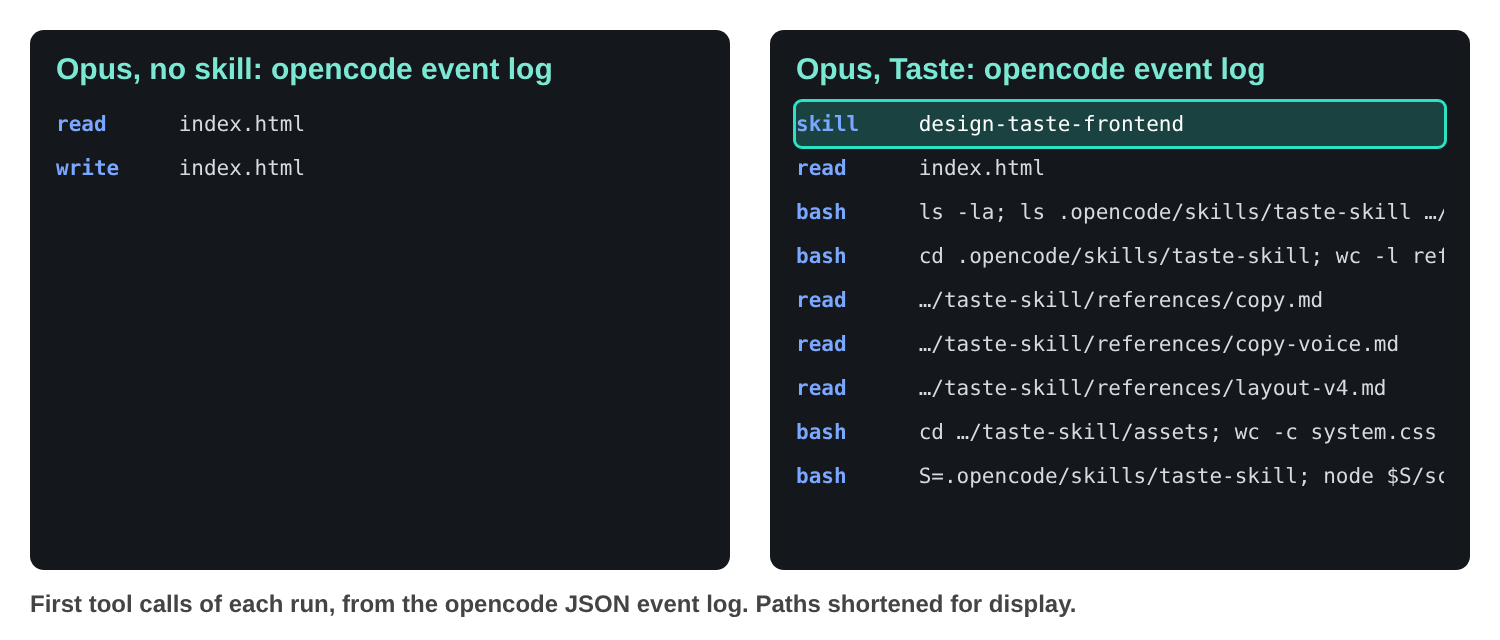
A skill that never loads quietly turns the run into a no-skill run, so I checked OpenCode’s event logs. Every skill run shows a skill call with the right name, and none of the controls has one. Taste goes further. Opus, Kimi and Sol ran its scripts, including a gate that sets up the build, a palette picker and a copy linter, and Opus and Sol also ran its layout check in a browser. Neon opened Taste and then ran only the copy linter. My guess is that’s why Neon’s Taste run was so short.
How I scored it
I opened every result at phone and desktop widths in headless Chromium and used a script to check for sideways scrolling, a viewport tag, a language, missing alt text, console errors and whether the plans, retention and training claims and integrations survived. I ran the axe-core accessibility checker on each one, and I looked at every page myself. Judgements about looks are mine alone.
Results
Every model fixed the mechanics, skill or not
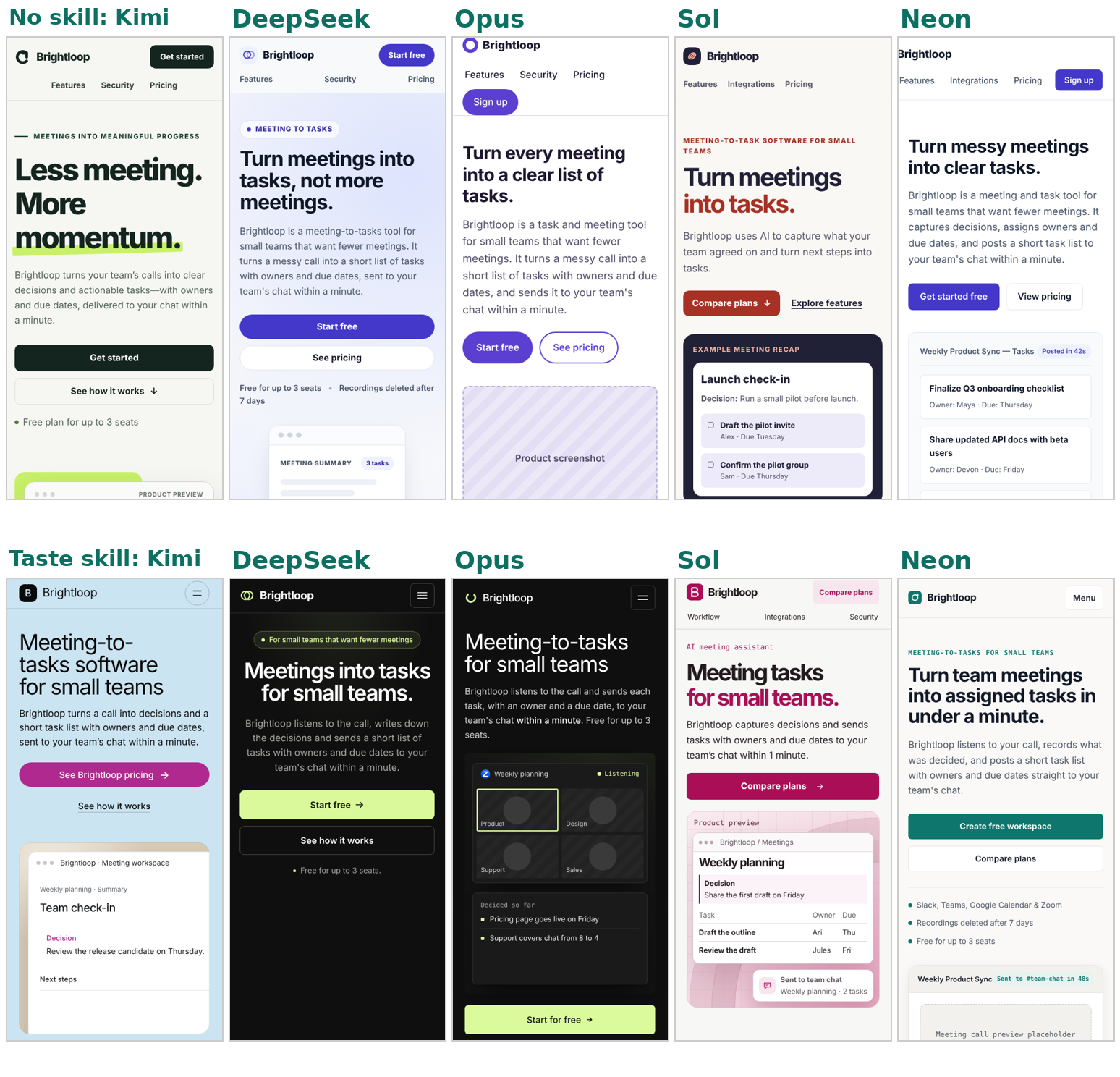
All 20 final pages fit a phone without scrolling sideways, had a viewport tag and a language, had no images missing alt text, threw no console errors and dropped the lorem ipsum. They kept the pricing, retention, training and integration claims too, though a few reworded “two clicks” as “2 clicks”, which I counted as kept. The broken original trips five axe rule types across 34 elements. Fourteen of the 20 outputs trip none and the rest trip one. That’s one of five no-skill pages with a flag against five of the 15 skill pages, so on accessibility the skills didn’t beat the controls.
What the skills did change
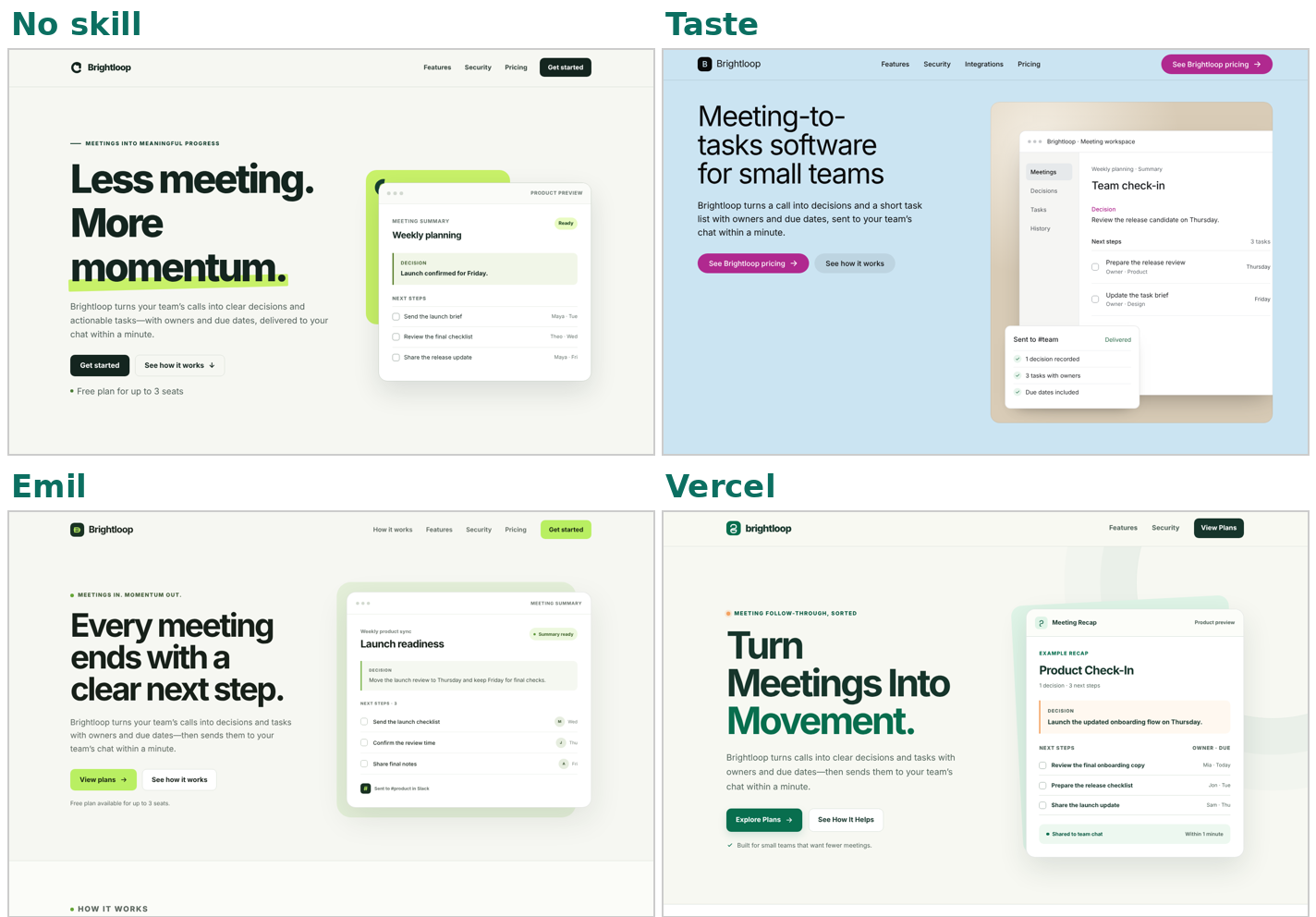
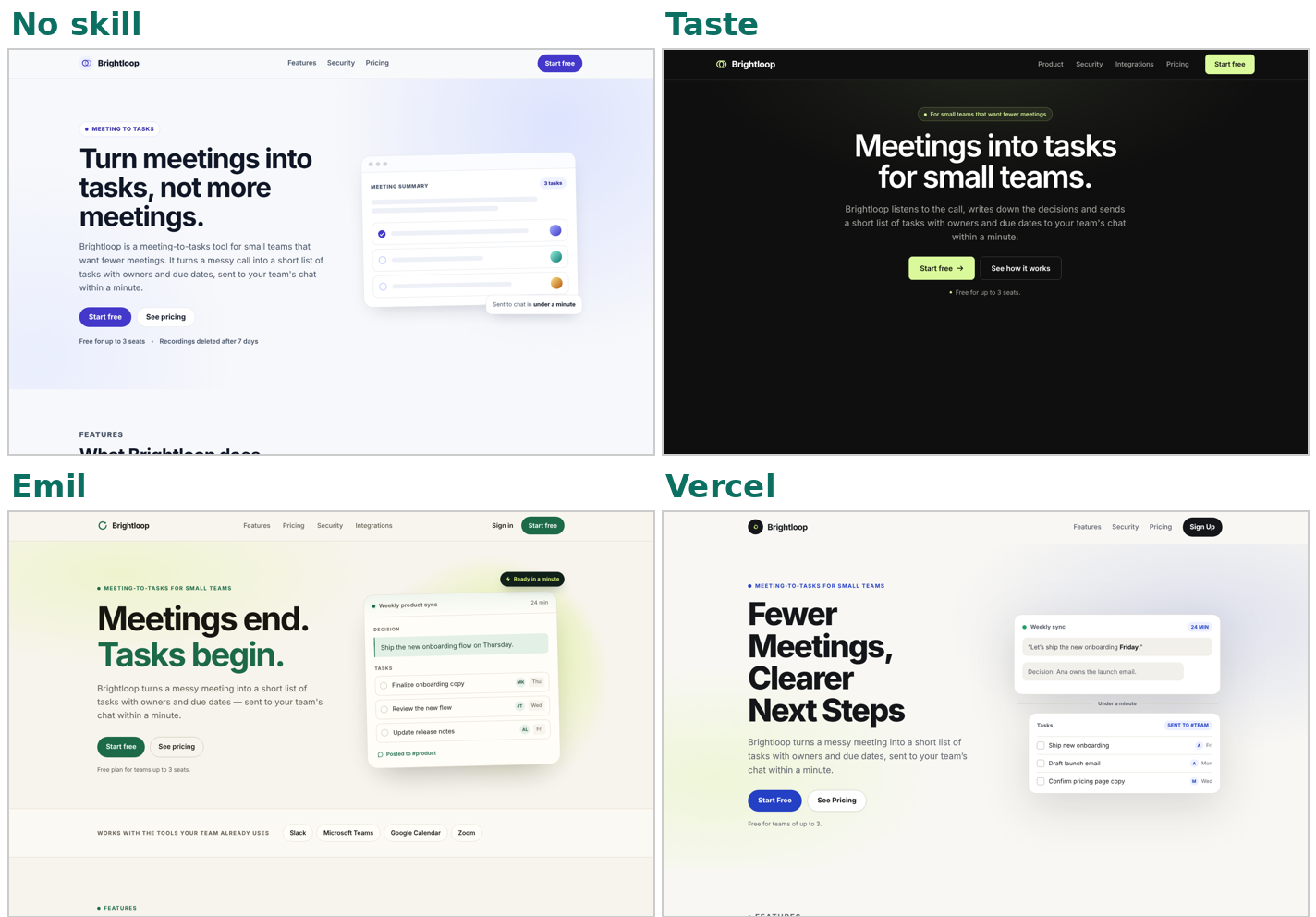
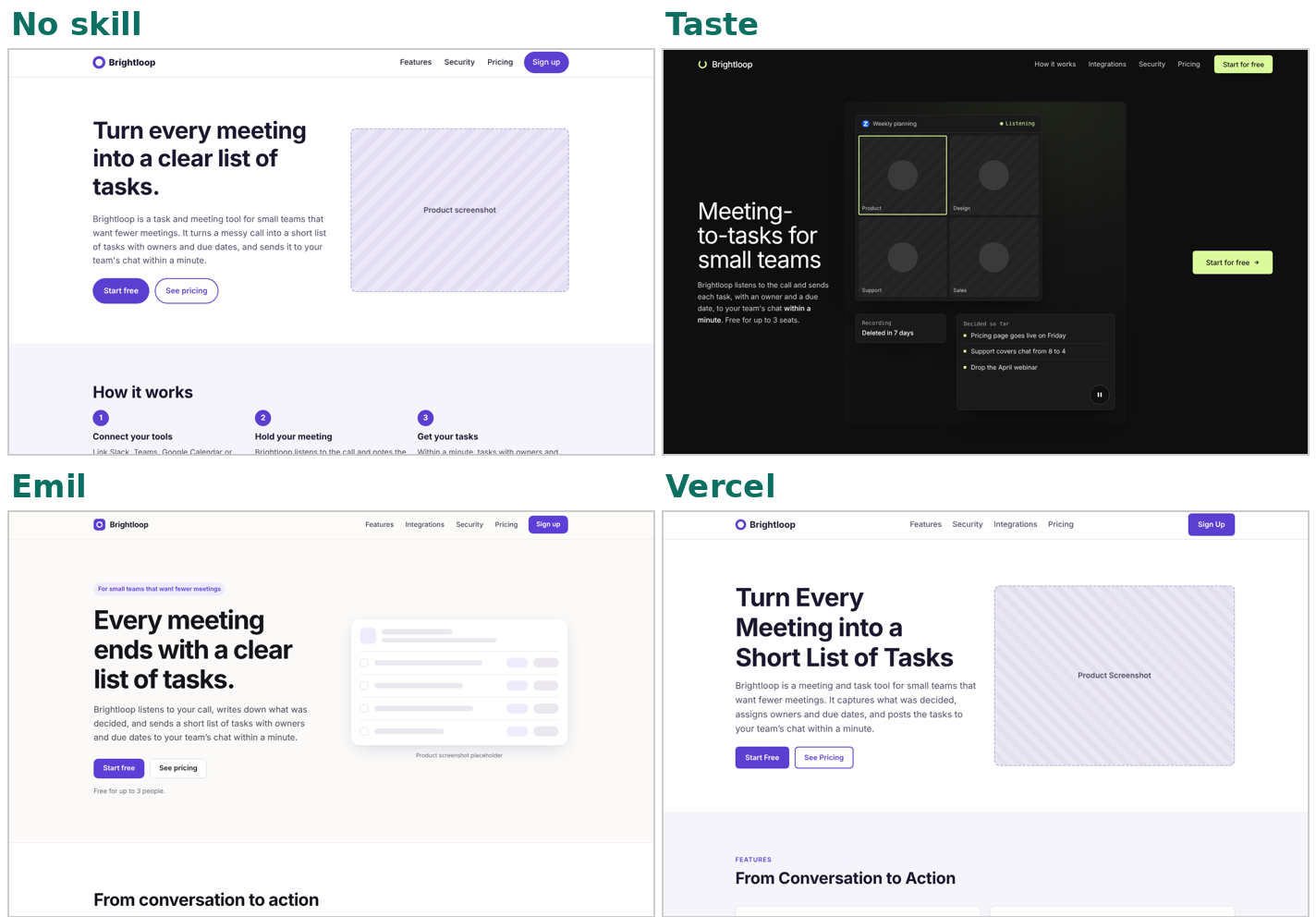
Taste is the only skill that clearly moved the design. Under Taste the pages stopped looking like the same page. Opus and DeepSeek both went near-black with a lime accent, and Opus’s log shows it picking a palette called soot-pale-lime from the skill’s own list. Kimi went pale blue with magenta buttons and Sol went pink.
Emil and Vercel barely moved the look. Emil’s subject is motion and press states, which a still screenshot can’t show, and I didn’t test those. Vercel’s most visible effect is in the code: tabular numerals in the pricing table in all five Vercel outputs and in none of the five controls.
The five models, four setups each
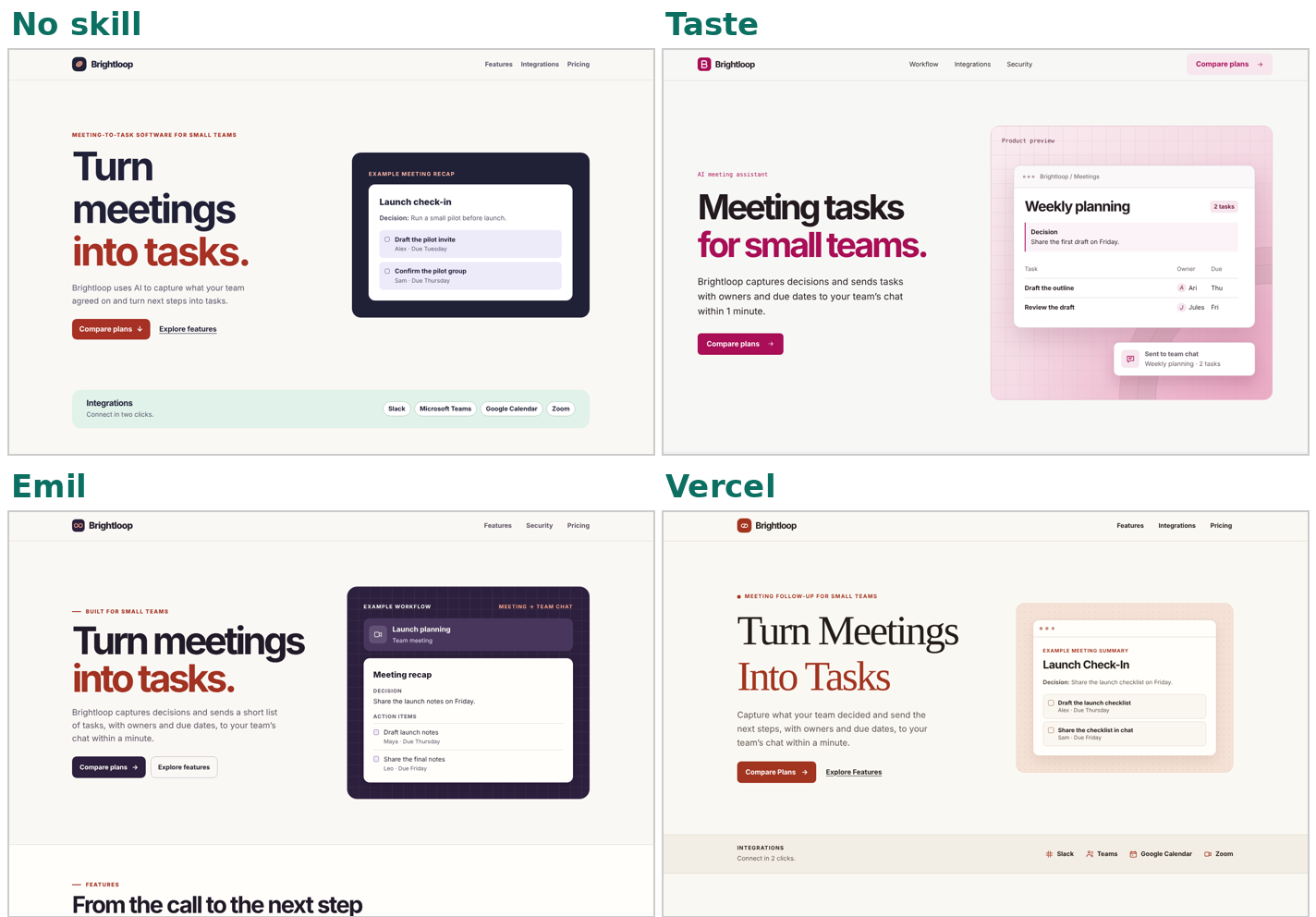
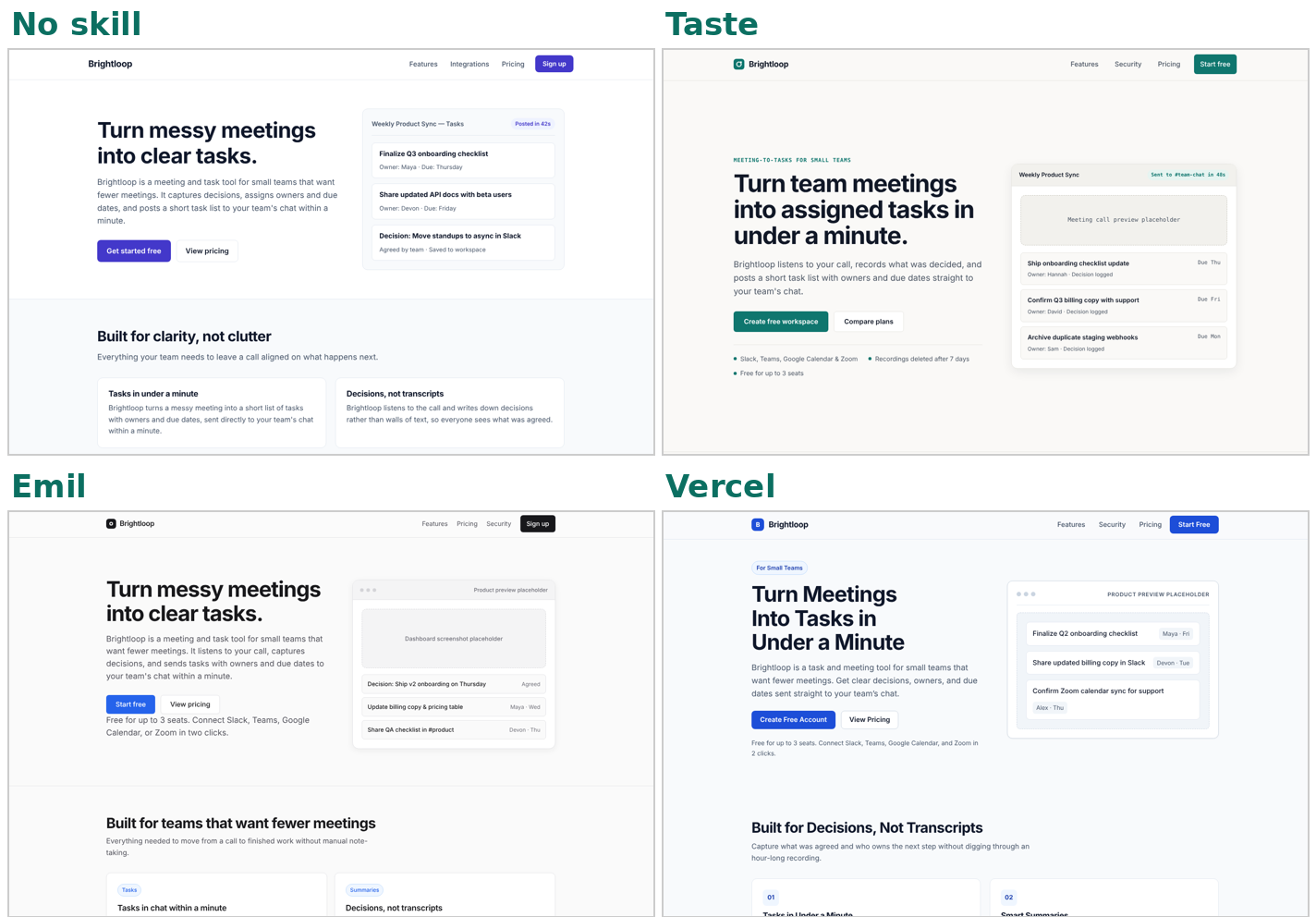
Time and cost
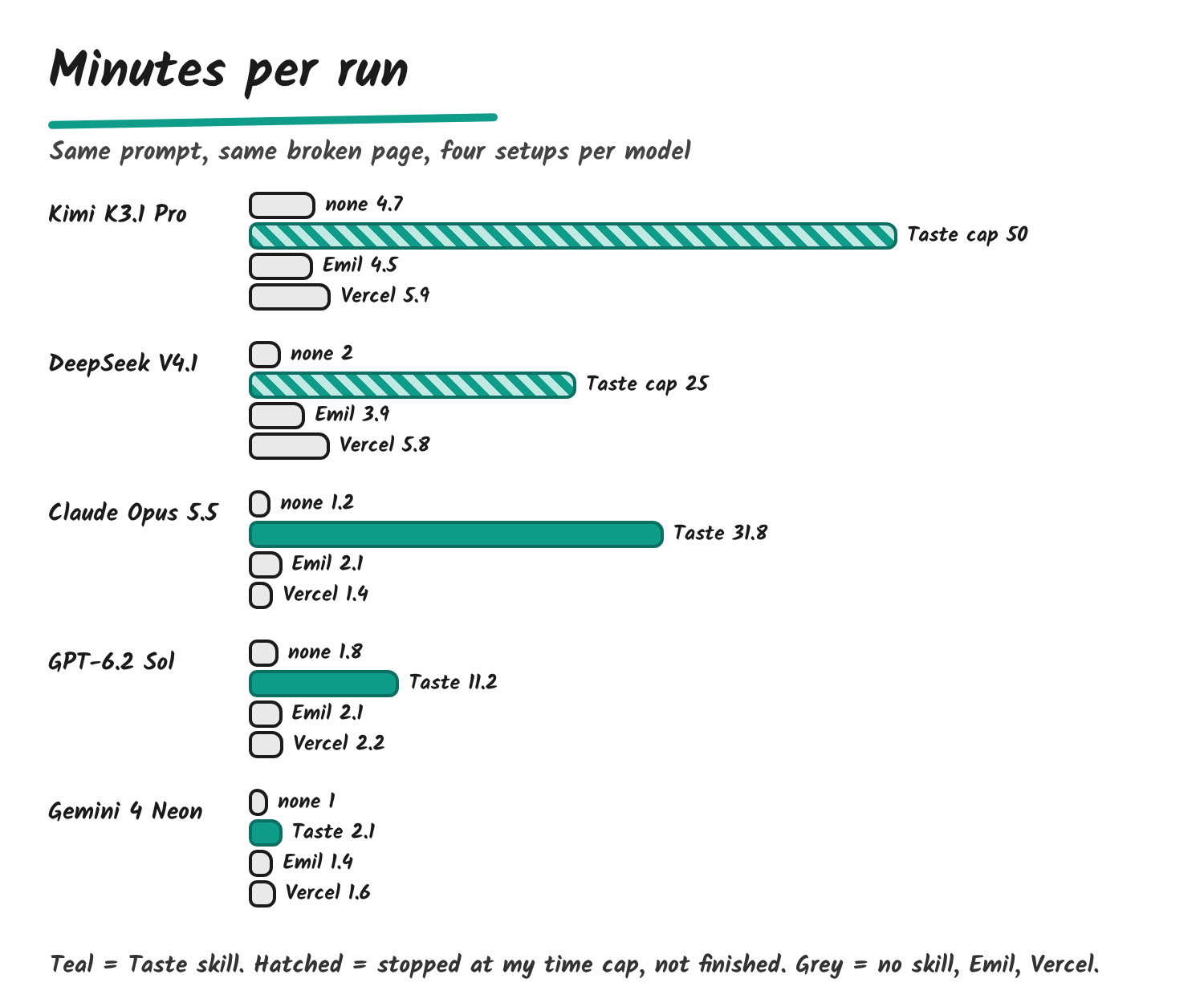
This is where the skills differed most. The times and costs below are for the run I scored. The cost is OpenCode’s list-price estimate from token counts, not a bill.
| Model | No skill | Taste | Emil | Vercel |
|---|---|---|---|---|
| Kimi K3.1 Pro | 4.7 min, US$0.32 | 50 min (cap), US$7.90 | 4.5 min, US$0.37 | 5.9 min, US$0.44 |
| DeepSeek V4.1 Flash | 2.0 min, US$0.03 | 25 min (cap), US$0.22 | 3.9 min, US$0.07 | 5.8 min, US$0.05 |
| Claude Opus 5.5 | 1.2 min, US$0.28 | 31.8 min, US$4.27 | 2.1 min, US$0.55 | 1.4 min, US$0.35 |
| GPT-6.2 Sol | 1.8 min, US$0.13 | 11.2 min, US$0.67 | 2.1 min, US$0.18 | 2.2 min, US$0.17 |
| Gemini 4 Neon | 1.0 min, US$0.15 | 2.1 min, US$0.33 | 1.4 min, US$0.22 | 1.6 min, US$0.23 |
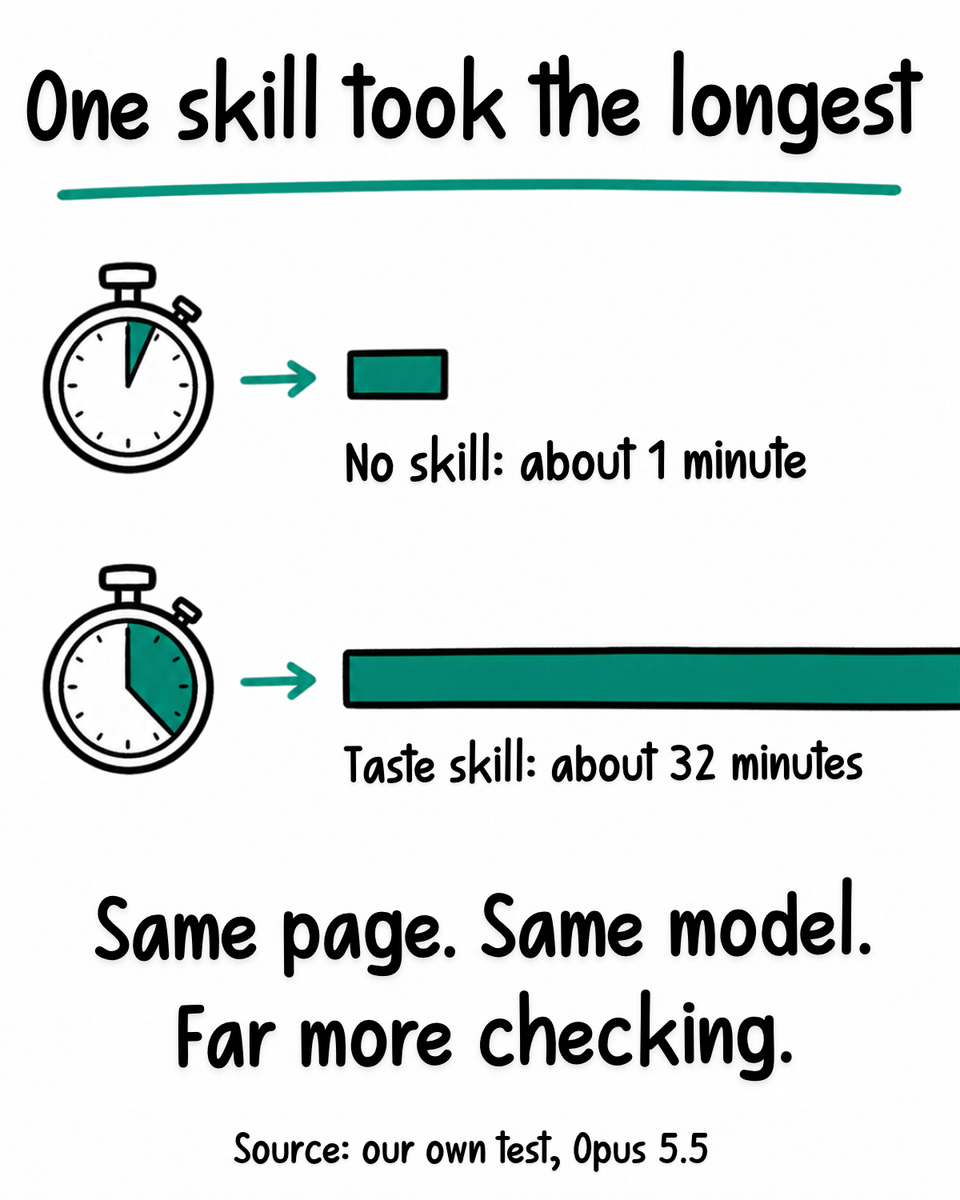
Taste on Opus took about half an hour and four dollars of list-price tokens, against about a minute and under a dollar with no skill. Emil and Vercel cost between the same and about three times the control. The table also leaves out the capped first attempts, which cost Kimi and Opus a few dollars more each.
Runs that ended quietly
Three Taste runs (Kimi, DeepSeek and Opus) hit my first 25 minute cap. Opus finished on a second try with a longer cap. Kimi hit the 50 minute cap as well, but the page it had written by then passed my checks, so I scored that. DeepSeek’s re-run ended after about three minutes with a clean exit and left the broken file untouched. I scored DeepSeek’s first run instead, from the file it had written when I stopped it. DeepSeek also finished its first Emil run without changing the file, and a second try worked. That’s the same habit I saw in my Seaglass test: check that the file changed, not just the exit code.
Claims nobody gave the model
Opus and Neon, both on the Vercel skill, added a line saying no credit card is needed. The original page only says the free plan covers three seats. That’s a promise about the product that nobody gave the model. I found it by searching for card wording, so there may be others I didn’t think to search for. Several mockups also carry sample timings, such as a task list “posted in 42s”. They’re decoration, but they’re numbers the product page never gave.
On a phone
At phone width every page fits. The top row is no skill and the bottom row is Taste.
What I couldn’t test
- Uizze and ThinkUI, for the reasons above.
- Emil’s real subject, motion and press states, which stills don’t show.
- Vercel’s skill doing the job it was built for, reviewing a finished file.
- Anything beyond one run per setup. A second run could land differently, and the gap between five minutes and thirty is the gap I’d least trust a single run on.
- Prompt injection in a hostile page, if that’s what “corrupted” meant.
I judged looks by eye from screenshots. Design is subjective, so you may rate these pages differently.
Where that leaves the list
The models fixed the page, not the skills. Every model repaired every fault without help, and the skills’ effect lay elsewhere. If you want your agent’s pages to stop looking like stock output, Taste is the one that did that here, and you pay in time and tokens: from about ten minutes to over half an hour extra on the bigger models, and two runs that didn’t finish inside my caps. Emil and Vercel were cheap and also changed little that I could see, which may say more about my test than about the skills. In my view the sensible way to use Vercel’s is as a check after a build, which I didn’t test. Treat the list as three skills worth trying and two products to judge separately, and put a time cap on any Taste run.
Disclosure: I’m an OpenAI, Firecrawl and Devin ambassador.